MAN00000772_SI-G200BB_SVCPDFA.pdf - 第589页
在线预览 MAN00000772_SI-G200BB_SVCPDFA.pdf PDF 文档。
CLGB-10112-01
SI-G200BB Service Manual
"Alarm List Contents"
SHEET
1/1
Contents
8 Alarm List
Alarm List for the Servo Pack "Sigma-III" Series (SGDS type)BBGB-10101-01
How to check RAS alarm.......................................................BBGB-10102-01
Alarm List for the Servo Pack "Sigma-III" Series (SGDS type)
BBGB-10101-01
Alarm List for the Servo Pack
"Sigma-III" Series (SGDS type)
SHEET
1/18
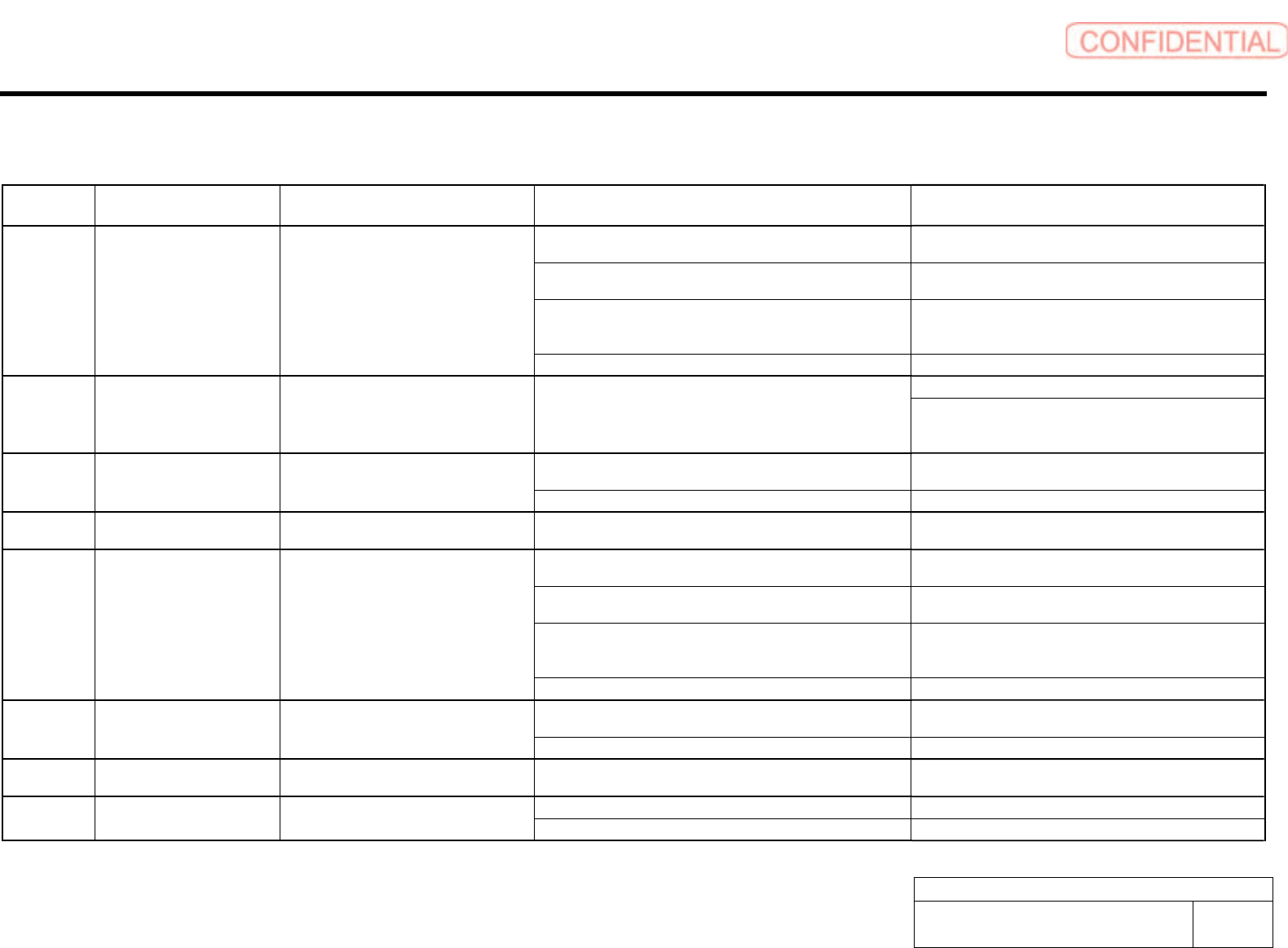
Alarm List for the Servo Pack "Sigma-III" Series (SGDS type)
Alarm
Display
Alarm Name Situation at Alarm Occurrence Cause Corrective Actions
The control power supply lowered and sometimes ranged from
30 VAC to 60 VAC.
Correct the power supply, and set Fn005 to initialize the
parameter.
The power supply was turned OFF while changing the
parameter setting.
Set Fn005 to initialize the parameter and input the
parameter again.
The number of times that parameters were written exceeded
the upper limit. For example, the parameter was changed every
scan through the host controller.
Replace the SERVOPACK.
A.020 Parameter Checksum Error 1 Occurred when the control power supply
was turned ON.
The SERVOPACK EEPROM and the related circuit are faulty. Replace the SERVOPACK.
Replace the SERVOPACK. A.021 Parameter Format Error Occurred when the power was turned ON
again after writing the parameter with the
parameter copy function of the digital
operator (JUSP-OP05A).
The model number of the SERVOPACK in the software being
used for the SERVOPACK is old and not compatible with the
current parameters.
Change the parameter settings to be compatible with the
model number in the software being used for the
SERVOPACK.
The control power supply lowered and sometimes ranged from
30 VAC to 60 VAC.
Correct the power supply, and set Fn005 to initialize the
parameter.
A.022 System Parameter Checksum
Error 1
Occurred when the control power supply
was turned ON.
The SERVOPACK EEPROM and the related circuit are faulty. Replace the SERVOPACK.
A.023 Parameter Password Error Occurred when the control power supply
was turned ON.
A SERVOPACK board fault occurred. Replace the SERVOPACK.
The control power supply lowered and sometimes ranged from
30 VAC to 60 VAC.
Correct the power supply, and set Fn005 to initialize the
parameter.
The power supply was turned OFF while changing the
parameter setting.
Set Fn005 to initialize the parameter and input the
parameter again.
The number of times that parameters were written exceeded
the upper limit. For example, the parameter was changed every
scan through the host controller.
Replace the SERVOPACK.
A.02A Parameter Checksum Error 2 Occurred when the control power supply
was turned ON.
The SERVOPACK EEPROM and the related circuit are faulty. Replace the SERVOPACK.
The control power supply lowered and sometimes ranged from
30 VAC to 60 VAC.
Correct the power supply, and set Fn005 to initialize the
parameter.
A.02b System Parameter Checksum
Error 2
Occurred when the control power supply
was turned ON.
The SERVOPACK EEPROM and the related circuit are faulty. Replace the SERVOPACK.
A.030 Main Circuit Detector Error Occurred when the control power supply
was turned ON or during operation.
A SERVOPACK fault occurred. Replace the SERVOPACK.
Parameter is set out of range. Set the parameter within the specified range. A.040 Parameter Setting Error 1 Occurred when the control power supply
was turned ON.
The SERVOPACK EEPROM and the related circuit are faulty. Replace the SERVOPACK.