4OM-1345-009_w.pdf - 第142页
2-17 AKHEMT -ID Machine Information Codes Display Field A (Scope of Machine Information) Display Field B (Details of Machine Information) 802001 Alarm for Splicing Few components to feed. Please prepare Splicing. 802101 …
2-16
AKHEMT-ID
Machine Information
Codes
Display Field A (Scope of Machine Information)
Display Field B (Details of Machine Information)
801a01 Warning Operation
Product started by RUN MODE "PASS" Operation.
801a02 Warning Operation
The PCB before component placing was conveyed from X/Y table.
801a03 Warning Operation
The PCB in the middle of component placing was conveyed from X/Y table.
801a04 Warning Operation
The feeder ready button was turned on in start protection mode.
801a05 Warning Operation
Cannot alternate by external start protection.
801b01 Lightning Surge Warning
Lightning Surge Protector works; Q204.
801b02 Lightning Surge Warning
Lightning Surge Protector works; Q204. Running continue.
801c01 Information
This placement step was detected outside of the possible range. This step is
auto skip running.
801c03 Information
Data was changed during machine worked. The changed data is not refl ected
in operation until it stops or interrupts operation.
801c04 Information
PCB Origin Position data is not right. Please correct a PCB Origin Position on a
"Prod Chng (Origin Pos)" screen.
801c05 Information
Warm start mode was canceled.
801c06 Information
The machine stopped by the automatic stop function.
801c07 Information
Warm start mode was canceled. Please remove the unaccomplished PCB.
801c08 Information
It started with the data out of the setting range contained in the feeder offset B
data of system data. On edit screen, X/Y of the components (tape width 8 mm
/ sending pitch 2 mm) should be set as more than -1.0 mm and less than +1.0
mm.
801c09 Information
It started with the data out of the setting range contained in the placement level
data of component supply changed data. On edit screen, the place level of
square shape below 3216 should be set up less than +0.5 mm. When the place
level exceeding 0.5 mm is required, please input H data of placement data (PP
data).
801e01 Placement Level Data
Calculated data out of range. Please check library data and pattern program
data.
0609-003
3.2 List of Machine Information
2-17
AKHEMT-ID
Machine Information
Codes
Display Field A (Scope of Machine Information)
Display Field B (Details of Machine Information)
802001 Alarm for Splicing
Few components to feed. Please prepare Splicing.
802101 Feeder Maintenance Warning
The total number of feeder's shots reached a previous notice setting number.
802102 Feeder Maintenance Warning
The feeder adsorption rate decreased and exceeded the previous notice setting
number.
809001 Internal Exception Notice
CPU2 Vector 0 exception has been disregarded.
809002 Internal Exception Notice
CPU2 spurious exception has been disregarded.
809003 Internal Exception Notice
CPU2 undefi ned exception has been disregarded.
809004 Internal Exception Notice
CPU3 undefi ned exception has been disregarded.
809005 Internal Exception Notice
EB005 SYSFAIL exception has been disregarded.
809101 Cutting tape Preliminary announcement
Please cut a tape in a predetermined position.
809201 Library tape width check
The tape width in library and the feeder are not in agreement. Please check the
library and feeder.
809401 PCB existence
The PCB which carried out manual bypass to the input conveyor was detected.
809402 PCB existence
The PCB on a output conveyor was removed.
0605-002
3.2 List of Machine Information
2-18
AKHEMT-ID
4. "ERROR" Windows
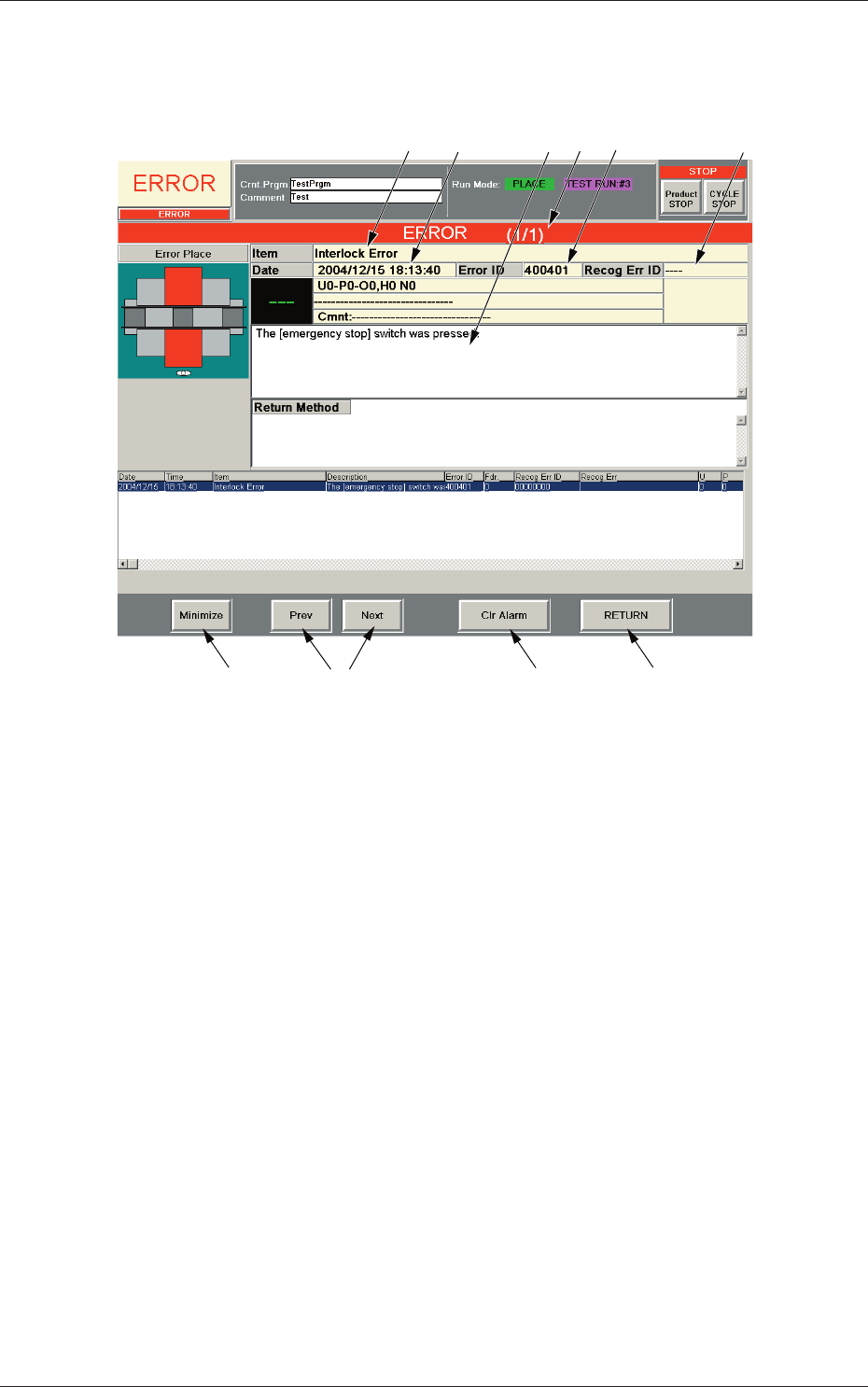
When the machine detects an error, the following "ERROR" window opens.
[6]
[1]
[9]
[8]
[10]
[3] [5]
[4]
[2]
[7]
Fig. 4B4 Example of "ERROR" Window
[1] Error ID
Displayed is a string of alphanumeric characters (6 characters) that
identifi es an error.
When an error has occurred, use the error ID as an index and refer to
"Chapter 3 Troubleshooting from Error IDs" (Vol. 4) for details.
[2] Recog Err ID
Displayed is a string of alphanumeric characters (8 characters) that
identifi es an error.
When an error has occurred, use the error ID as an index and refer to
"Chapter 4 Troubleshooting from Recognition Error IDs" (Vol. 4) for
details.
[3] Item
Displayed is a name of the classifi ed element that caused an error.
[4] Description
Displayed are the contents of the error and Return Method (Remedial
Procedure).
0602-001
4. "ERROR" Windows