4OM-1345-009_w.pdf - 第144页
2-19 AKHEMT -ID [5] Date and Time Displayed are the date and time of error occurrence. [6] Number of Pages Displayed are the total number of pages and the number of the current page. Example: (3/5) T otal Number of Pages…
2-18
AKHEMT-ID
4. "ERROR" Windows
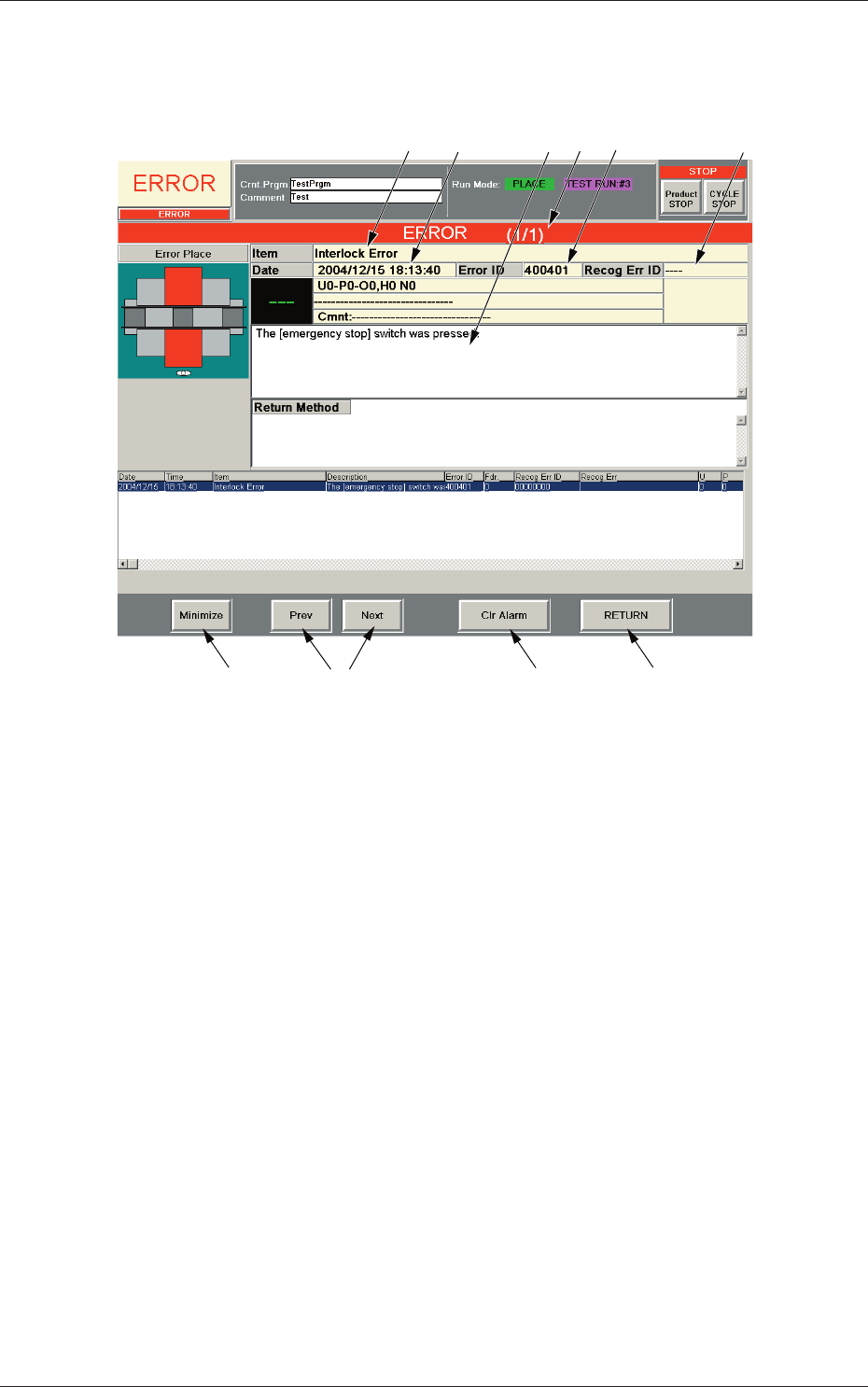
When the machine detects an error, the following "ERROR" window opens.
[6]
[1]
[9]
[8]
[10]
[3] [5]
[4]
[2]
[7]
Fig. 4B4 Example of "ERROR" Window
[1] Error ID
Displayed is a string of alphanumeric characters (6 characters) that
identifi es an error.
When an error has occurred, use the error ID as an index and refer to
"Chapter 3 Troubleshooting from Error IDs" (Vol. 4) for details.
[2] Recog Err ID
Displayed is a string of alphanumeric characters (8 characters) that
identifi es an error.
When an error has occurred, use the error ID as an index and refer to
"Chapter 4 Troubleshooting from Recognition Error IDs" (Vol. 4) for
details.
[3] Item
Displayed is a name of the classifi ed element that caused an error.
[4] Description
Displayed are the contents of the error and Return Method (Remedial
Procedure).
0602-001
4. "ERROR" Windows

2-19
AKHEMT-ID
[5] Date and Time
Displayed are the date and time of error occurrence.
[6] Number of Pages
Displayed are the total number of pages and the number of the current
page.
Example:
(3/5)
Total Number of Pages : 5
Number of Current Page : 3
[7] [Prev] and [Next] Buttons
[Prev] Button : When pressed, this button opens the previous page.
[Next] Button : When pressed, this button opens the next page.
[8] [Clr Alarm] Button
When pressed, this button cancels an alarm sound only.
[9] [RETURN] Button
When pressed, this button cancels an alarm sound and closes the
"ERROR" window. The original window resumes.
[10] [Minimize] Button
When pressed, this button minimizes the "ERROR" window and moves
to the bottom left of the window.
Double-click the minimized window to return it to the size before it was
minimized.
•
Reset Procedure from "ERROR" Window
(1) Take a note of "Error ID", "Item", and "Description" in the "ERROR"
window.
Notice
When you have forgotten an error message, refer to the list of
errors in the "Machine Error Recall" window. (Operation Sequence:
[RECALL MSG.] Button (Submenu)
→
"Machine Error Recall"
Window)
(2) Press the [RETURN] button to resume the original window.
(3) Use the error ID as an index and refer to "Chapter 3 Troubleshooting
from Error IDs" (Vol. 4) or "Chapter 4 Troubleshooting from
Recognition Error IDs" (Vol. 4) for details.
0605-002
4. "ERROR" Windows

2-20
AKHEMT-ID
0602-001