4H4CEOM2.pdf - 第55页
Page 8-27 TEACHING 8 4H4C-E-OMA08-A02-02 Chip Recognition T eaching 16. Set the area to be recognized by BL 1. • Set the size with . Set so that the recognition point (set at step 12) is in the area. 17. Press Complete .…
Page 8-26
4H4C-E-OMA08-A02-02
Chip Recognition Teaching
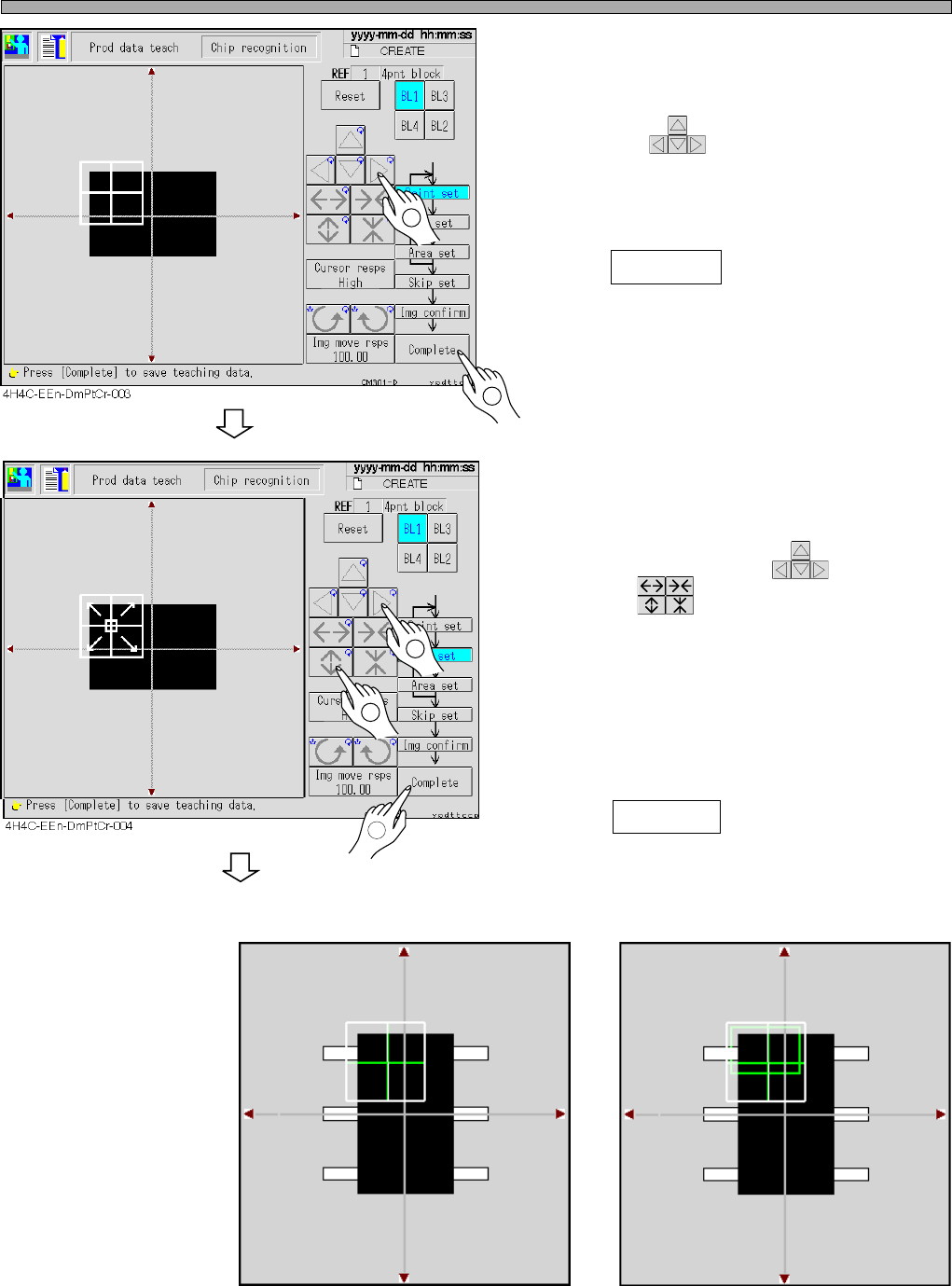
12. Set the point to be recognized by BL
1.
• Move with .
Set so that the chip (looks black) in the point
obtains about 70 % of the whole.
13. Press Complete .
∗ For the chip with the pins, also set so that the
chip which looks black obtains about 70% of
the whole. (e.g.: Recognition screen 1)
14. Set the range of the image to be rec-
ognized by BL 1.
• Move the inner frame appeared at the center of
the recognition point with , and set the
size with .
∗ Usually, set the recognition point at full size.
∗ For the chips with the pins or ones having
variations, set the range of the image to
recognize particular or stable points. (e.g.:
Recognition screen 2)
15. Press Complete .
Recognition screen 1 Recognition screen 2
3Y3C-015P
To the next page
1
2
1
2
3
Point
Chip
3Y3C-016P
Page 8-27
TEACHING
8
4H4C-E-OMA08-A02-02
Chip Recognition Teaching
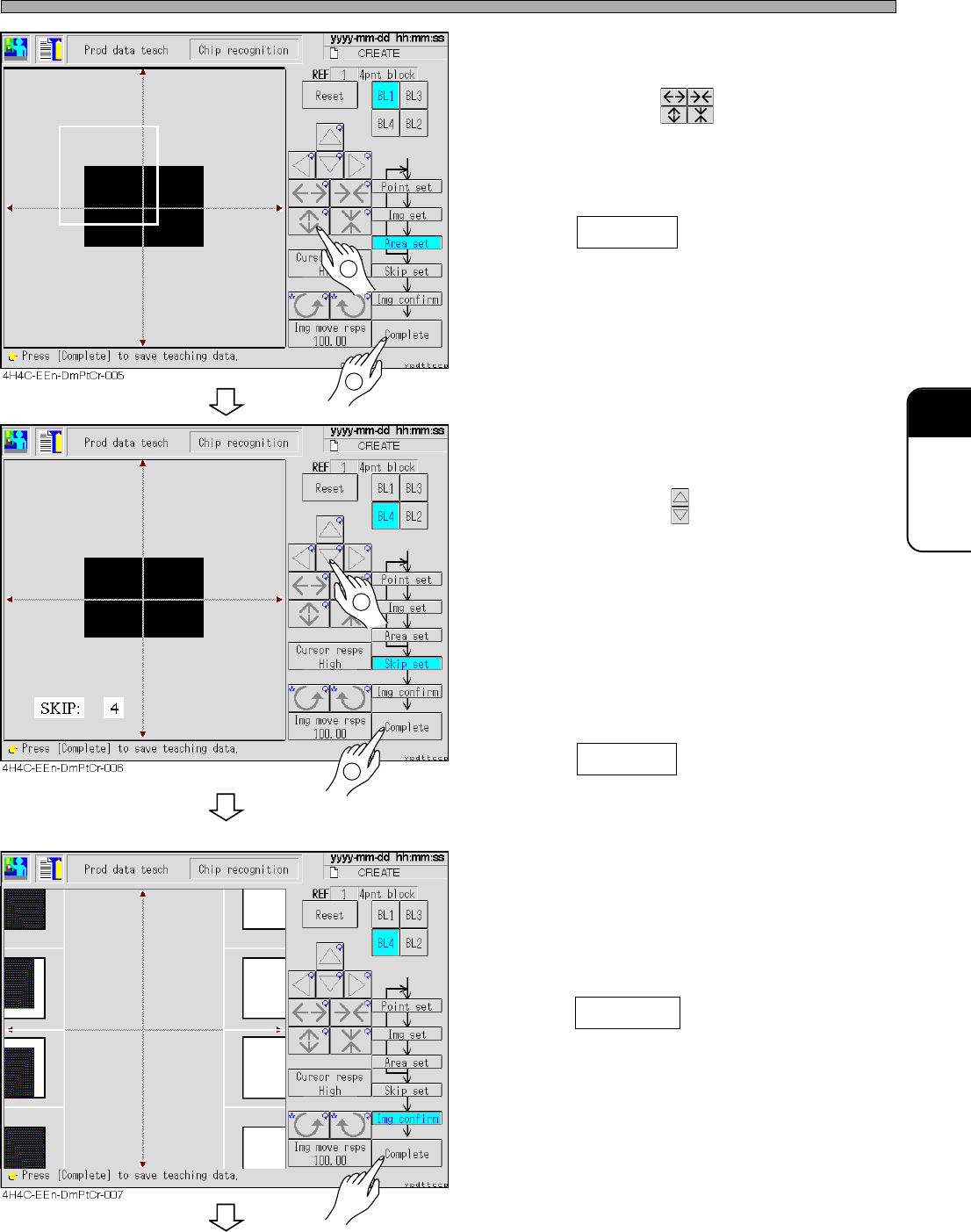
16. Set the area to be recognized by BL 1.
• Set the size with .
Set so that the recognition point (set at step
12) is in the area.
17. Press Complete .
• Data are automatically saved.
18. Repeat steps 12 to 17, and set to BL4.
19. Set the skip value.
• Set the value with .
Search the image to be recognized in detail at
1 and roughly at 10 (usually : 4)
The recognition image detection is finally
recognized at SKIP 1.
In recognition, the image is searched at the set
skip value at first, and the position is detected
at SKIP value 1 finally.
20. Press Complete .
• The teaching image for each block appears.
21. Check the taught image.
• Left : Position to be recognized (point setting)
Right : Image area to be recognized (image
setting)
22. Press Complete .
• Teaching for each block is over.
To the next page
1
2
1
2
Page 8-28
4H4C-E-OMA08-A02-02
Chip Recognition Teaching
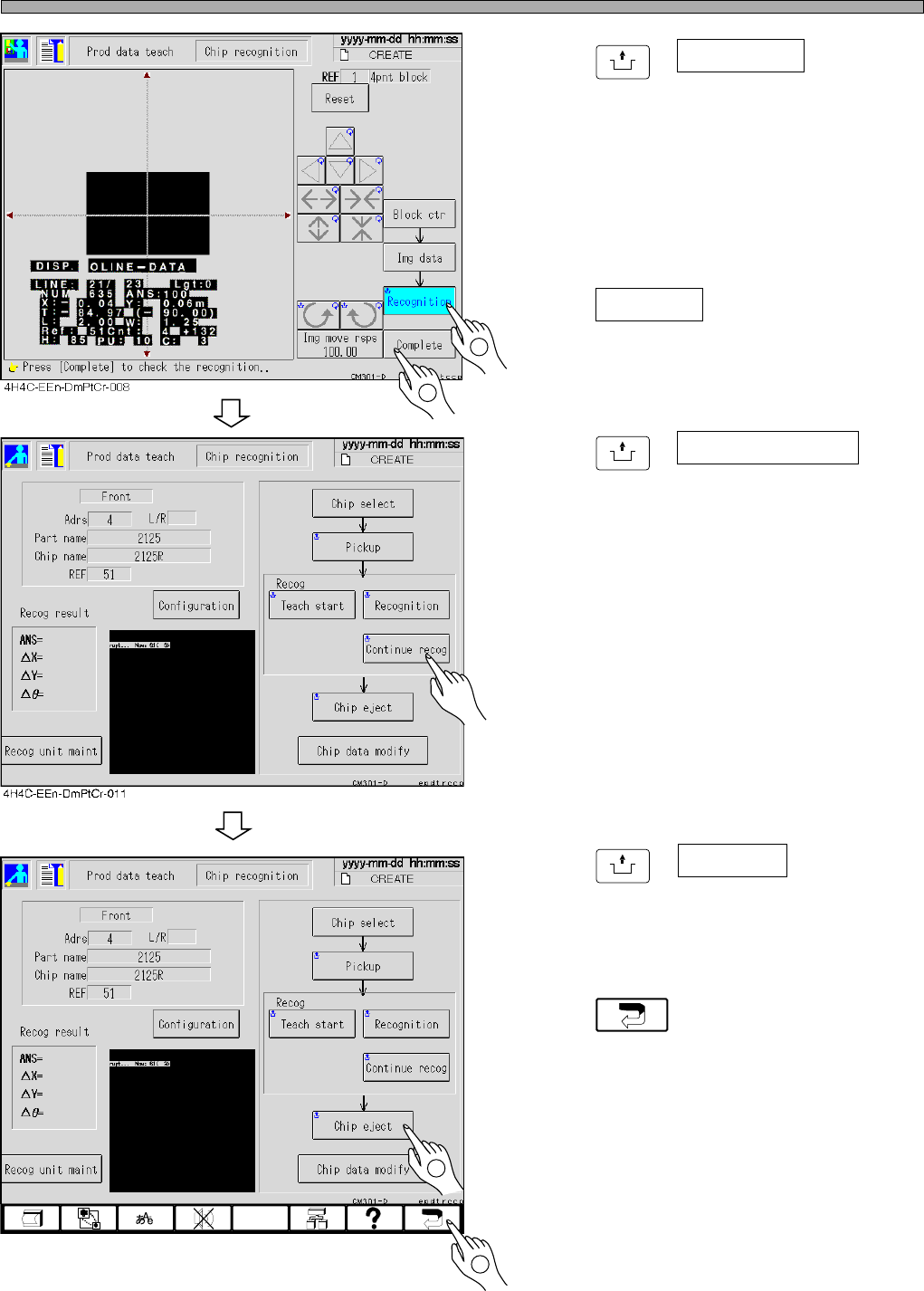
23. Press
UNLOCK
+ Recognition .
• The recognition result appears on the recogni-
tion screen.
∗ When the recognition result (ANS=) is under
the recognition rate (the judgment value ratio of
the machine parameter), carry out steps 7 to
24 and retry the recognition by changing
recognition points and so on.
24. Press Complete .
• Teaching is over.
25. Press
UNLOCK
+ Continuous recog for
checking.
• The recognition is continued 10 times, and the
result appears. After checking the result, press
“ESC” and close the displayed result.
(It is just for checking and unnecessary to
operate.)
∗ When the recognition result (ANS=) is under
the recognition ratio (the judgment value ratio
of the machine parameter), operate steps 7 to
24 and retry the recognition by changing the
recognition points and so on.
26. Press
UNLOCK
+ Chip eject .
• The chip used for recognition is ejected.
27. Press .
• 4-point block match recognition teaching is
over.
• At this time, the taught data are uploaded to
the PT.
4H4C-EEn-DmPtCr-011
2
2
1
1