AltaPail II Bulk Melters Product Manual.pdf - 第149页
Troubleshooting 9-2 Part 1121836_03 E 11/2014 Nordson Corporation Touch Screen Alerts and Faults The Nordson AltaBl ue Touch Adhesive melt er diagnoses ma ny alert and fault conditions t hat may occur during operation. A…
Troubleshooting
9-1
Part 1121836_03
E 11/2014 Nordson Corporation
Section 9
Troubleshooting
WARNING! Allow only qualified personnel to perform the following tasks.
Follow the safety instructions in this document and all other related
documentation.
WARNING! Troubleshooting activities may sometimes have to be carried out
when the melter is energized. Observe all safety instructions and regulations
concerning energized unit components (active parts). Failure to observe may
result in an electric shock.
Safety
S
Never disconnect cables from, or reconnect cables to, the main board
while the melter is energized.
S
Before breaking any hydraulic connection, always relieve system
pressure. Refer to Relieving System Pressure in Section 7, Service.
S
Refer to the safety information provided with optional equipment.
S
If the melter is removed from its sub-base for diagnostic checks or
service, ensure that the ground lead between the chassis and the
sub-base is re-attached when the melter is reconnected to the sub-base.
NOTE: Refer to Administrative Options and Settings located in Chapter 6 of
this manual.
Troubleshooting
9-2
Part 1121836_03
E 11/2014 Nordson Corporation
Touch Screen Alerts and Faults
The Nordson AltaBlue Touch Adhesive melter diagnoses many alert and
fault conditions that may occur during operation. An “alert” condition is a
situation in which a potential problem may be occurring with the melter,
pump, applicator or hose. The melter will operate under an “alert” condition
unless the problem goes unresolved, at which point the melter will go into a
“fault” condition, during which the melter will shut down until the problem is
resolved.
Refer to the appropriate table for more information.
About Touch Screen Messages
Pump and Zone Alerts/Faults
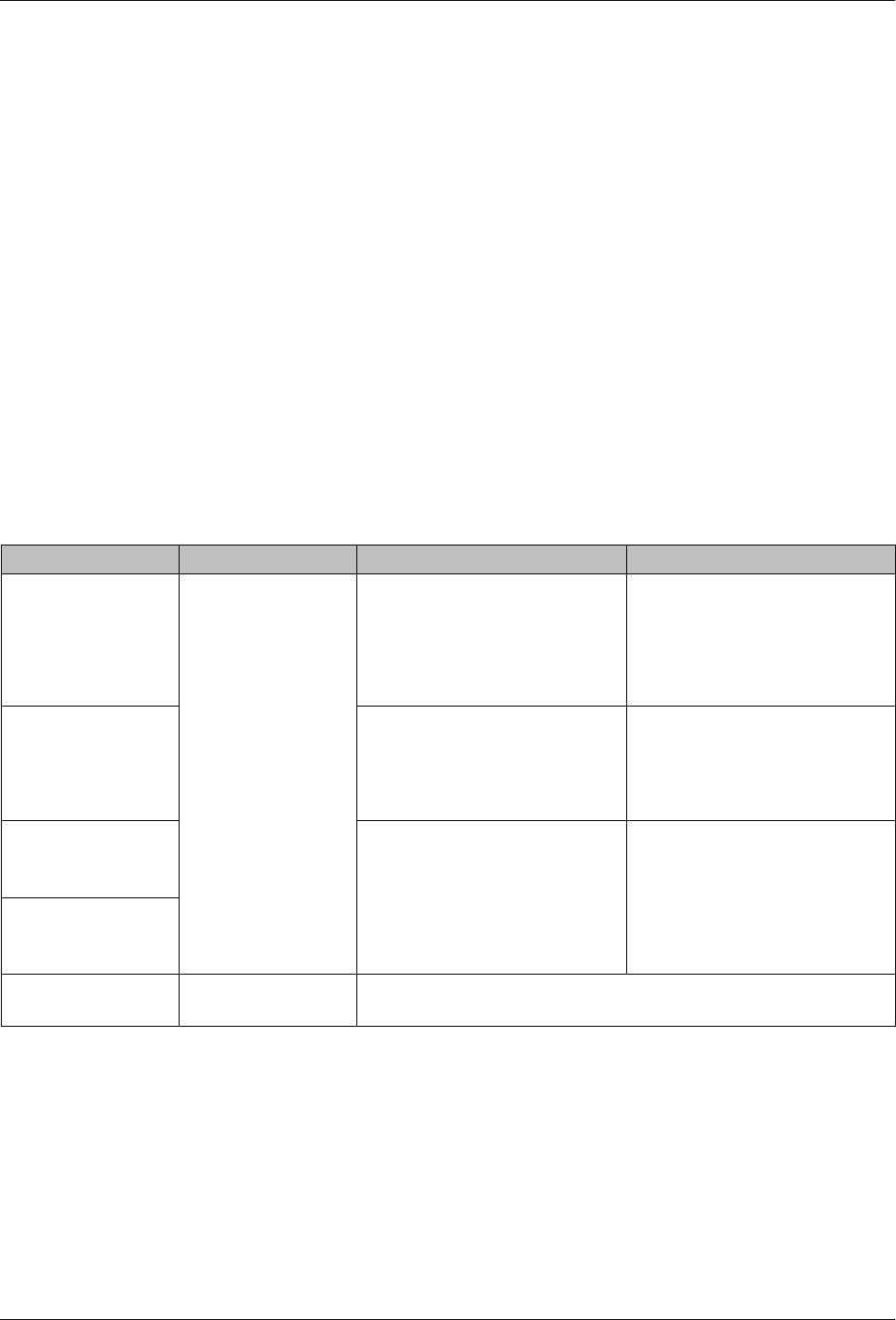
Table 9-1 Pump and Zone Alerts/Faults
Screen Message Affect on Melter Cause Corrective Action(s)
Internal or External
Temperature for
[ZoneName] has
dropped below
defined setpoint
threshold
Alert
condition
-
an
issue has been
detected. The
melter continues to
operate normally.
Fault condition - if
the issue is not
resolved within 2
minutes of the alert
message, the
master pump and
heaters are switched
off. Melter stops
functioning
The actual temperature of the
component has dropped below
the set temperature limit
Check for conditions that may
cause a drop in ambient
temperature or replace the
component.
Internal or External
Temperature for
[ZoneName] has
risen above defined
setpoint threshold
The actual temperature of the
component has risen above the
set temperature limit
Check for conditions that may
cause an increase in ambient
temperature or replace the
component.
Internal or External
Short RTD on
[ZoneName]
The
RTD
for
the
component
indicated has failed or the
component was disconnected
from the melter.
Check
the
connections,
or
replace the RTD
Internal or External
Open RTD on
[ZoneName]
Issue with a pump
The melter may not
continue to work.
Refer to Troubleshooting Pumps later in this section for more
information
Troubleshooting
9-3
Part 1121836_03
E 11/2014 Nordson Corporation
System Alerts
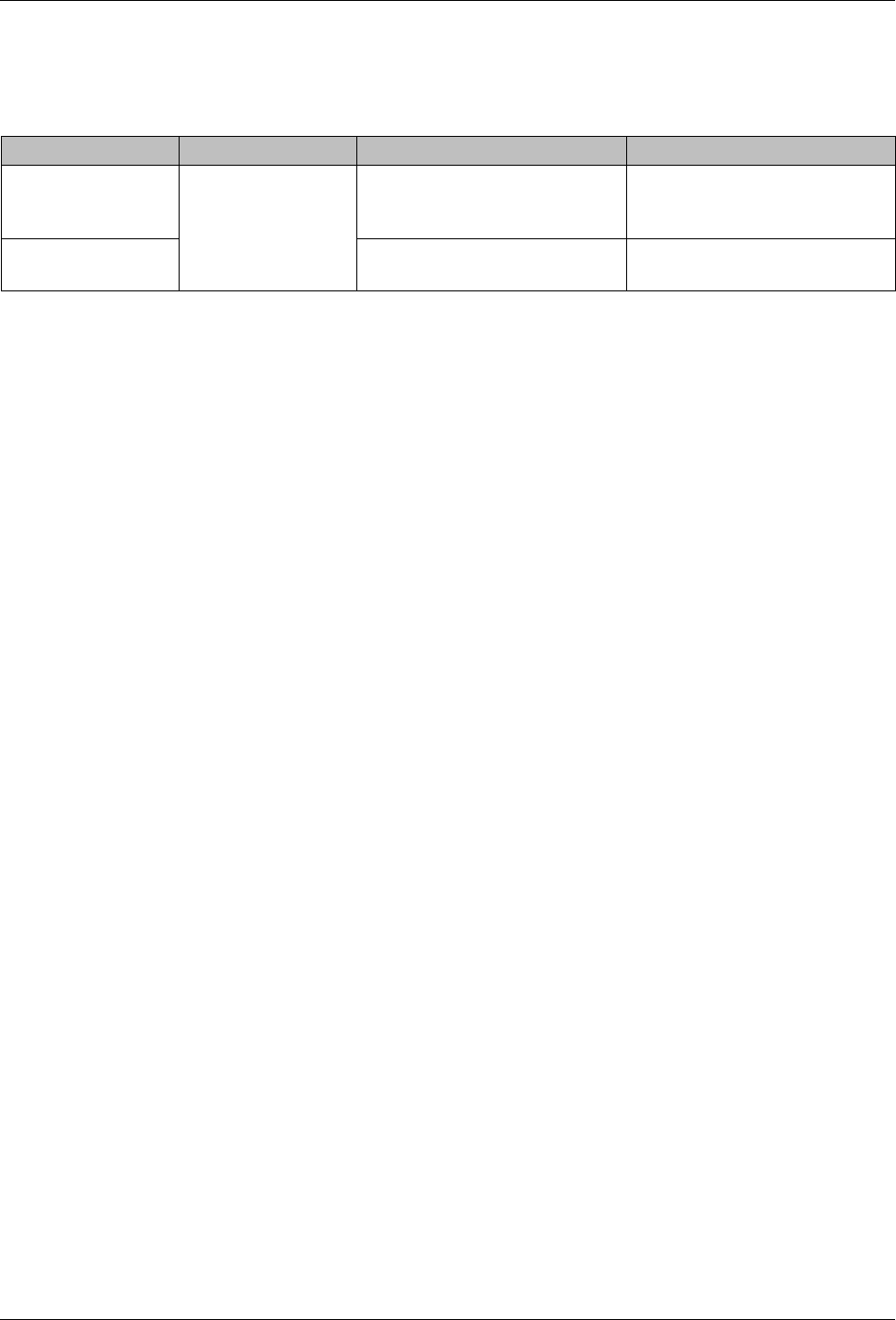
Table 9-2 System Alerts
Screen Message Affect on Melter Cause Corrective Action(s)
Failed motor board
The
melter
continues to work,
but some functions
may not be
available. Melter
requires servicing.
Communication failure between
CPU and the motor board
Replace motor board
NVRAM test failure
Internal RAM failure Replace CPU