AltaPail II Bulk Melters Product Manual.pdf - 第60页
About the Touch Screen Display and U ser Interface 5 -9 Part 1121836_03 E 1 1/2014 Nordson Corporation NOTES: S You can modify zones a t any time. S Changes to set point temperatures and PID Type take eff ect when the zo…
About the Touch Screen Display and User Interface
5-8
Part 1121836_03
E 11/2014 Nordson Corporation
About Zone States and Statuses
S
Refer to Table 5-1 for a detailed explanation about of each possible
zone state.
S
Refer to Table 5-2 for a detailed list and explanation of each possible
zone status.
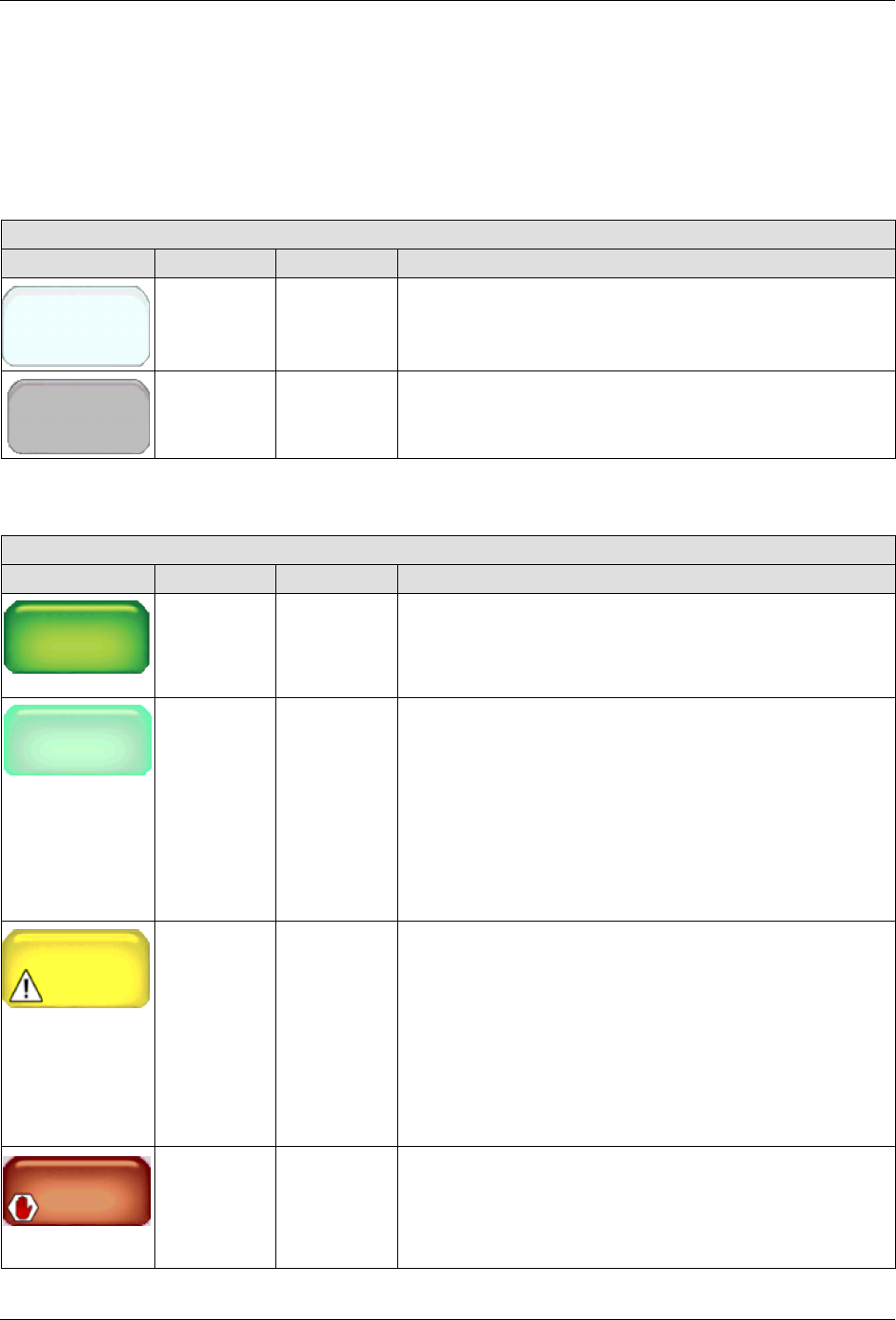
Table 5-1 Zone State Reference
Zone States
Button Color State Notes
Disabled
Zone 1A
White Disabled The zone is available, but disabled.
Zone 1A
Gray Unavailable The system cannot detect the zone.
Table 5-2 Zone Status Reference
Zone Status
Button Color Status Notes
Zon
e 1A
Set
Point
176_C
145_
__
_
C
Zone 1A
145_ C
Dark green Ready/OK The zone is enabled and has reached its set point
temperature.
Zone 1A
145_
__
_C
Zone 1A
145_ C
Light green Waiting for
Ready
The zone is enabled and is in the process of heating to its
set point temperature.
S
The zone is enabled and is in the process of heating to
its set point temperature.
S
The system is in either Standby or Ready Delay mode.
S
A zone or pump is in an alert or fault condition.
S
The system itself is in an alert or fault condition.
Zone 1A
Alert
Yellow Alert The zone is enabled, but the system has detected an alert
condition. Touch the zone with the alert to view system
message.
NOTE: In an alert condition, both the master Heater
and Pump controls remain On.
You have two minutes from the time the system
detects an RTD or an over/under temperature
condition before the alert condition is upgraded to a
fault condition.
Zone 1A
Fault
Red Fault The zone is enabled, but the system has detected a fault
condition. Touch the zone with the alert to view system
message.
NOTE: In a fault condition, both the master Heater
and Pump controls are switched Off.

About the Touch Screen Display and User Interface
5-9
Part 1121836_03
E 11/2014 Nordson Corporation
NOTES:
S
You can modify zones at any time.
S
Changes to set point temperatures and PID Type take effect when the
zone is enabled and when the melter itself is in a Ready/OK state.
S
Changes to the zone name and enabling/disabling take effect when you
touch Done.
S
The default name is displayed unless you modify it.
S
The state of a zone is independent of the overall status of the melter.
About the Touch Screen Display and User Interface
5-10
Part 1121836_03
E 11/2014 Nordson Corporation
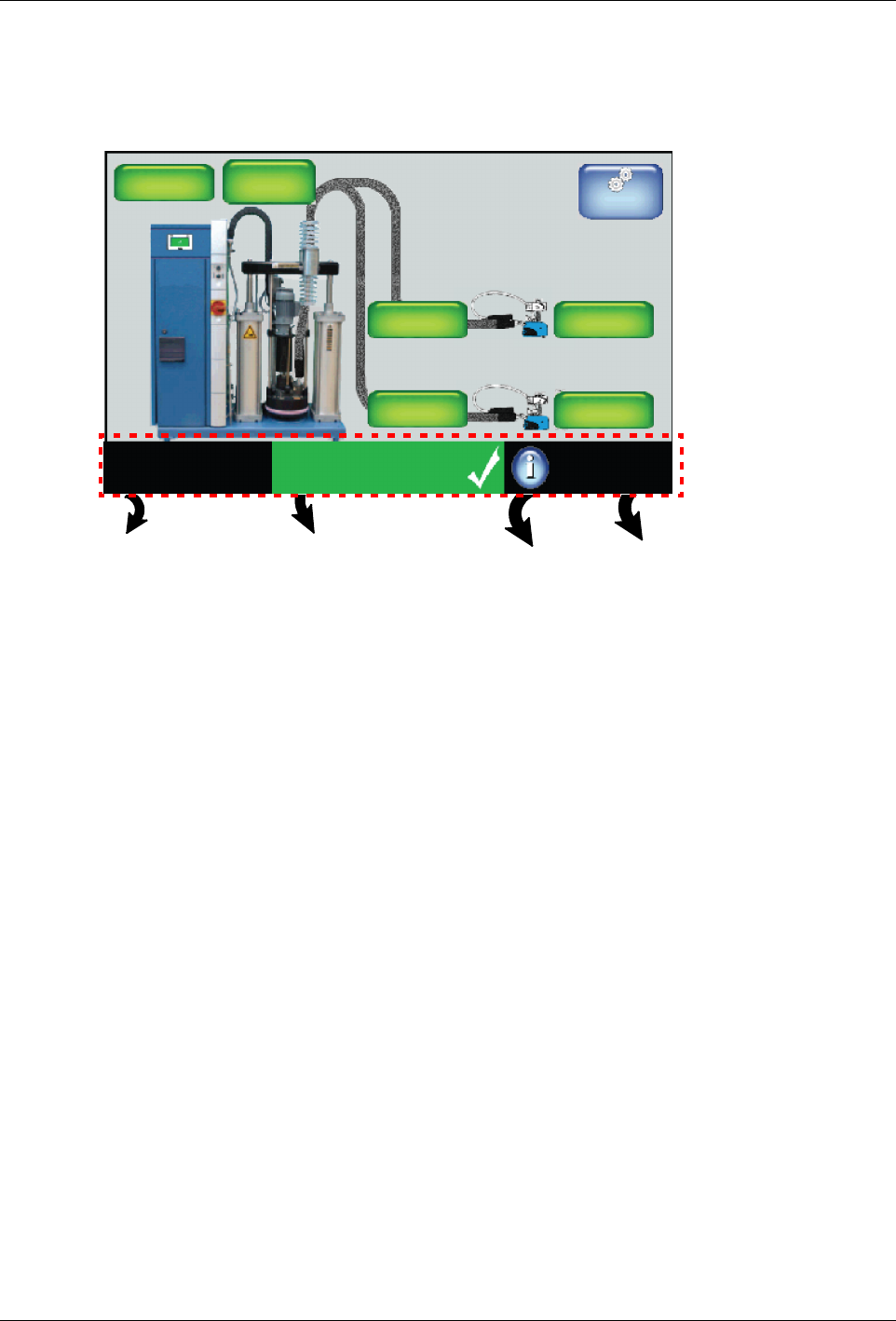
Monitoring the Status of the Melter
You can view the status of the melter from the following:
View which, if any, recipe is
currently loaded.
Touch to create, delete, load
or unload a recipe.
View overall
melter status.
Touch to view
the event log
View (only) the state of the
Master Heater and Pump
controls, as well as whether
or not password protection
is enabled.
Touch to view
Melter statistics.
System Status:
Ready/OK
Platen
176_C
176_C
Pump
GTL
32 RPM
Zone 1A
Pump: On
Heaters: On
Password: Disabled
Recipes:
Nothing Loaded
176_C
Zone 1B
176_C
Zone 2A
176_C
Zone 2B
Master
Controls
NOTE: Refer to the Quick Reference Card for additional information.