AltaPail II Bulk Melters Product Manual.pdf - 第70页
Basic Software Me lter Configuration 6 -1 Part 1121836_03 E 1 1/2014 Nordson Corporation Section 6 Basic Softw are M elter Con figuratio n WARNING! Allow only qual ified personnel to p erform the following ta sks. Follow…

About the Touch Screen Display and User Interface
5-18
Part 1121836_03
E 11/2014 Nordson Corporation
This page intentionally left blank.
Basic Software Melter Configuration
6-1
Part 1121836_03
E 11/2014 Nordson Corporation
Section 6
Basic Software Melter Configuration
WARNING! Allow only qualified personnel to perform the following tasks.
Follow the safety instructions in this document and all other related
documentation.
Overview - Getting the Melter into Production
The melter is shipped from the factory with most temperature, pump and
melter (system) settings pre-configured and ready to use. However, there are
some settings that you must configure and fine-tune to best fit your
manufacturing environment.
Two conditions must be met before you can start using the melter in a
production environment.
Condition Description
#1
Getting to the
System Status:
Ready/OK
S
The Master Heater Control is On
#2
Getting the Pump
to run
S
The Platen is Enabled
S
At least one hose and applicator zone pair is
Enabled
S
The Master Pump Control is On
NOTE: The following assumes you have installed melter and the adhesive
container is lowered the platen into position. Refer to Installation for more
information.
Basic Software Melter Configuration
6-2
Part 1121836_03
E 11/2014 Nordson Corporation
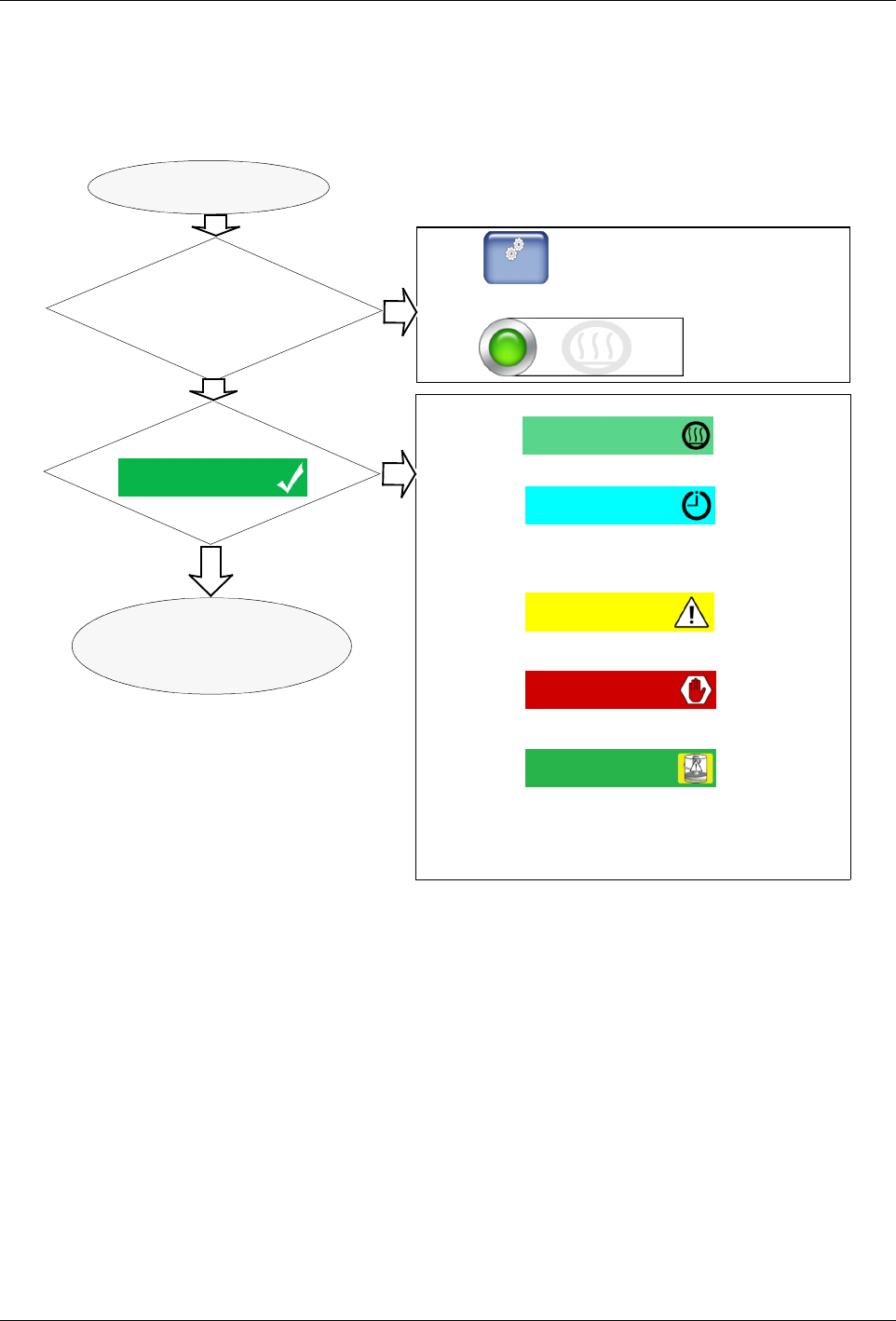
Getting to the System Status: Ready/OK
The following flowchart assumes you have already installed and configured
the melter for your manufacturing environment. You have also installed the
adhesive container and lowered the platen into position.
Switch the melter On
Touch
From the Home screen, look in the lower-left
hand corner. Are the Heaters On?
Master
Controls
Do you see this?
System Status:
Ready/OK
What do you see?
The Platen and all available and enabled external zones have not
reached their set point temperatures. Continue to wait.
Although the zones have reached their set point temperatures, the
Ready Delay option has been configured to wait a predefined number of
minutes, allowing for enough adhesive to melt for normal operation.
Continue to wait.
A System, Zone or Pump Alert condition exists. Although the melter
continues to work, the melter requires servicing.
A System, Zone or Pump Fault condition exist. The melter has stopped
working and requires immediate attention.
Running low on adhesive. The melter continues to operate, but after a
predefined number of seconds (the default is 0) the pump stops and all
heated zones cool down to their Standby set-point temperatures. Re-
place the empty container.
Heater Control
Heaters: On
Then touch to switch On the Heater Control
Yes
Refer to Getting the Pump to
Run
System Status:
Ready Delay
System Status:
Ready Low Level
System Status:
Heating
Then touch to switch On the Heater Control
Yes
No
No
Figure 6-1 Getting to Ready/OK