AltaPail II Bulk Melters Product Manual.pdf - 第28页
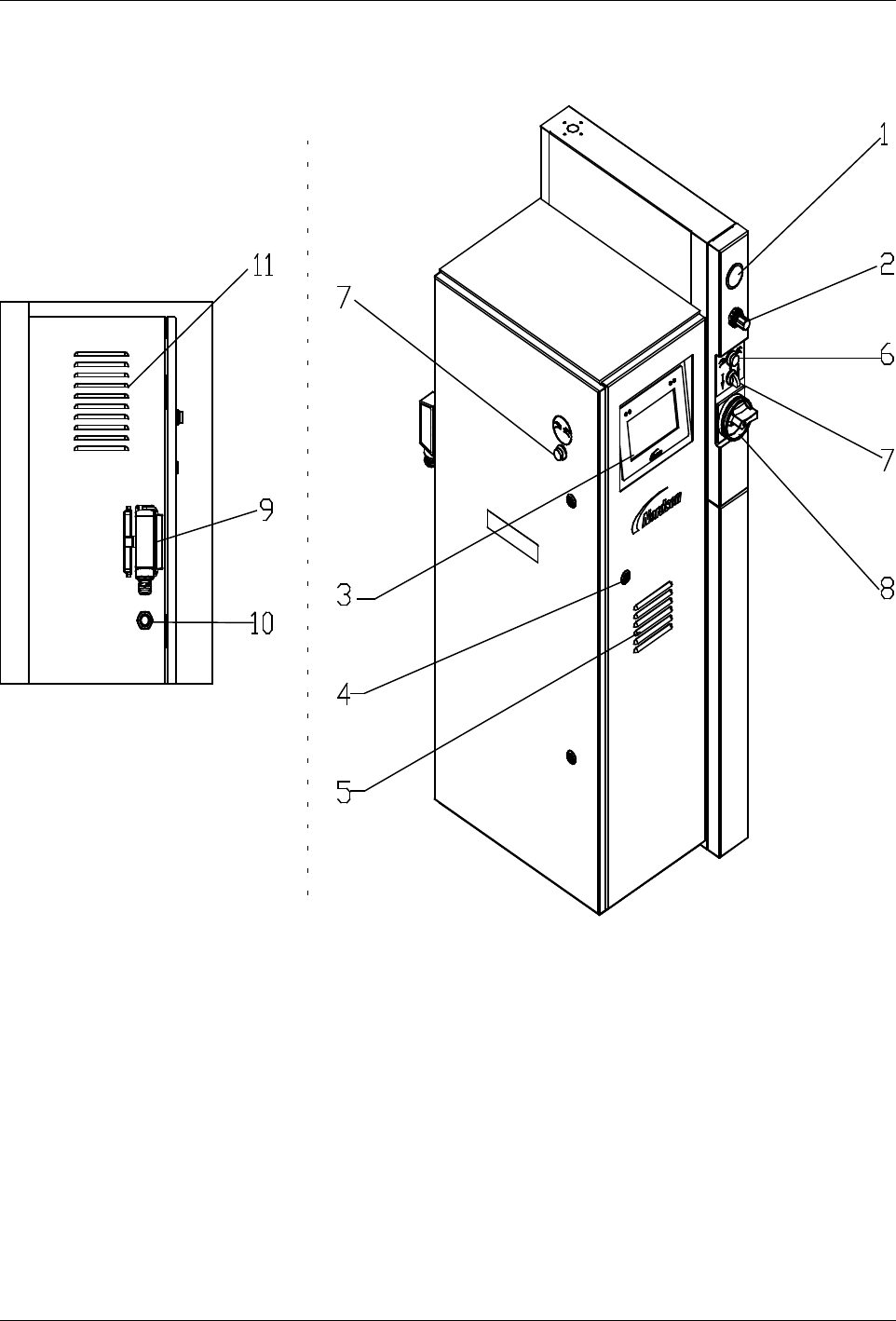
Introduction 2-5 Part 1121836_03 E 11/2014 Nordson Corporation Button Two-hand Control and Sel ector Raise/Lower Platen Used to raise a nd lower the pl aten. WARNING! The two-hand control may only be o perated by one per…
Introduction
2-4
Part 1121836_03
E 11/2014 Nordson Corporation
Electrical Cabinet
Back view of melter
Front/side
view of melter
Figure 2-2
1 Display Platen pressure
2 Pressure control valve Platen
pressure
3 Touch Screen Display
4 Door lock
5 Air filter / fan with filter
6 Button Two-hand control
7 Selector Raise/lower platen
8 Main switch
9 I/O Connector
10 Cable gland Inputs/outputs
11 Air Filter

Introduction
2-5
Part 1121836_03
E 11/2014 Nordson Corporation
Button Two-hand Control and Selector Raise/Lower
Platen
Used to raise and lower the platen.
WARNING! The two-hand control may only be operated by one person using
both hands!
Main Switch
The main switch is used to switch the bulk melter on and off.
Position
0
/OFF = Bulk melter is switched off.
Position
I
/ON = Bulk melter is switched on.
Padlocks can be used to protect the main switch from being turned on by
unauthorized personnel.
Fan with Filter
The fan reduces the temperature inside of the electrical cabinet. The filter
must be serviced regularly. Refer to page 8-7, Fan and Air Filter.
Door Lock
The electrical cabinet can be opened for installation, maintenance and repair.
Store the included key such that it is accessible only to qualified and
authorized personnel. The bulk melter may not be operated when the
electrical cabinet is open.
WARNING! Risk of electrical shock. Failure to observe may result in
personal injury, death, or equipment damage.
WARNING: Disconnect the bulk melter from the line voltage.
Air
Deaerate
Aerating
Compressed Air
2
1
Introduction
2-6
Part 1121836_03
E 11/2014 Nordson Corporation
Function / Concepts
Raising and Lowering Platen
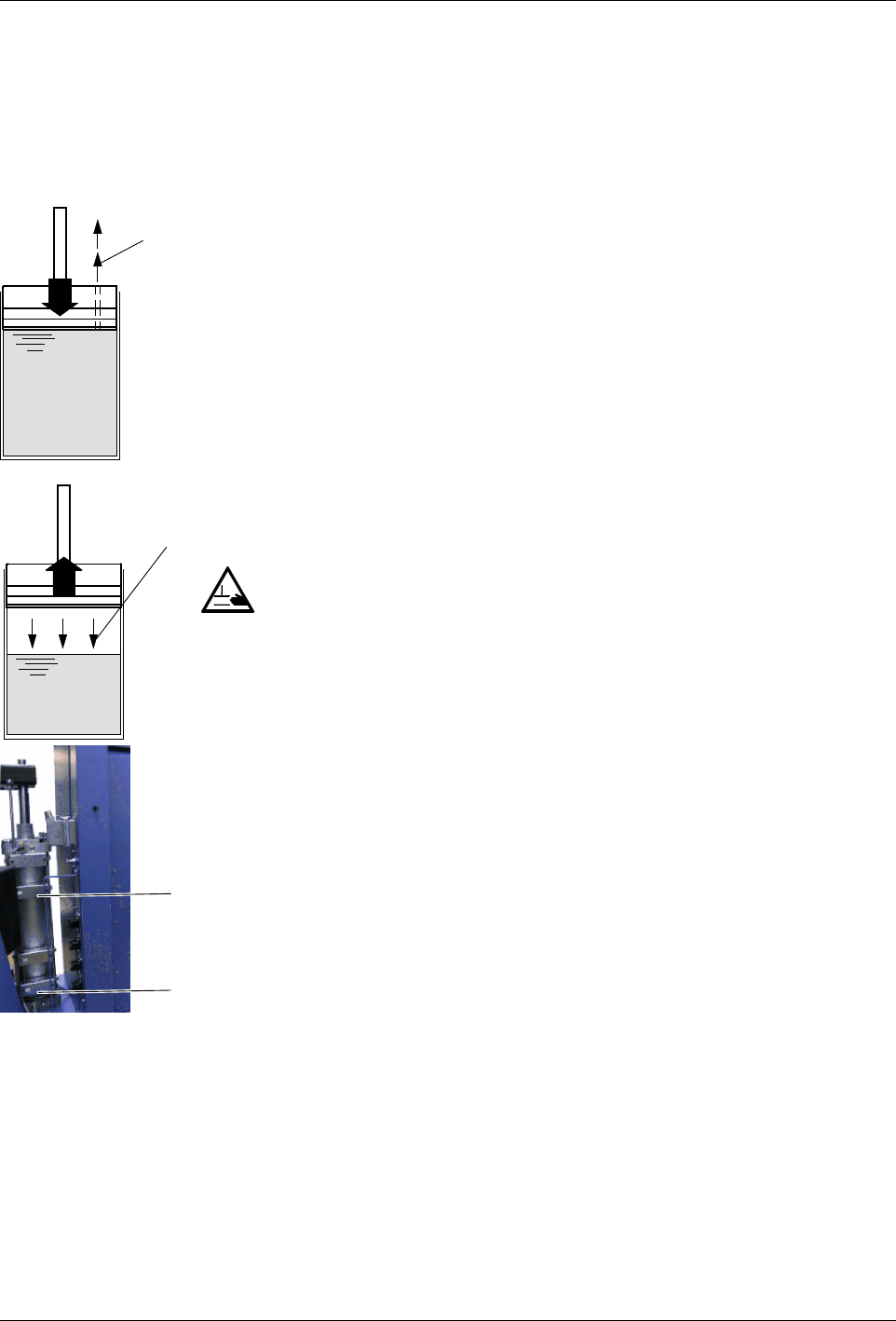
The pneumatic cylinders raise and lower the platen. When lowering the
platen, a two-hand control must be operated for safety reasons until the
platen is in the container. The selector Raise/lower platen then lights up
green.
Deaerating Container
The air relief valve must be opened manually to allow air to escape when the
platen is lowered into the container.
Aerating Container
To prevent a vacuum from forming when the platen is lifted out of the
container, the container must be aerated manually.
Platen Position
WARNING: Risk of squash! Make sure that switch 1 is not actuated until the
platen is inside the container.
A switch rod activates the switches (1 and 2) one after the other, triggering
the following switching functions:
S
Switching functions when lowering:
S
Switches from two-hand lowering mode to normal lowering mode
when the platen sealing ring is completely submerged in the container
(switch 1)
S
Activates the Container empty indication (switch 2).
S
Switching functions when raising:
S
Switches off container aeration (switch 1).