AltaPail II Bulk Melters Product Manual.pdf - 第77页
Basic Software Melter Configuration 6 -8 Part 1121836_03 E 1 1/2014 Nordson Corporation Modifying Externa l Zone Names Zone D efault Minimum Maximum Internal Zone Platen You cannot modify the name o f the Platen External…
Basic Software Melter Configuration
6-7
Part 1121836_03
E 11/2014 Nordson Corporation
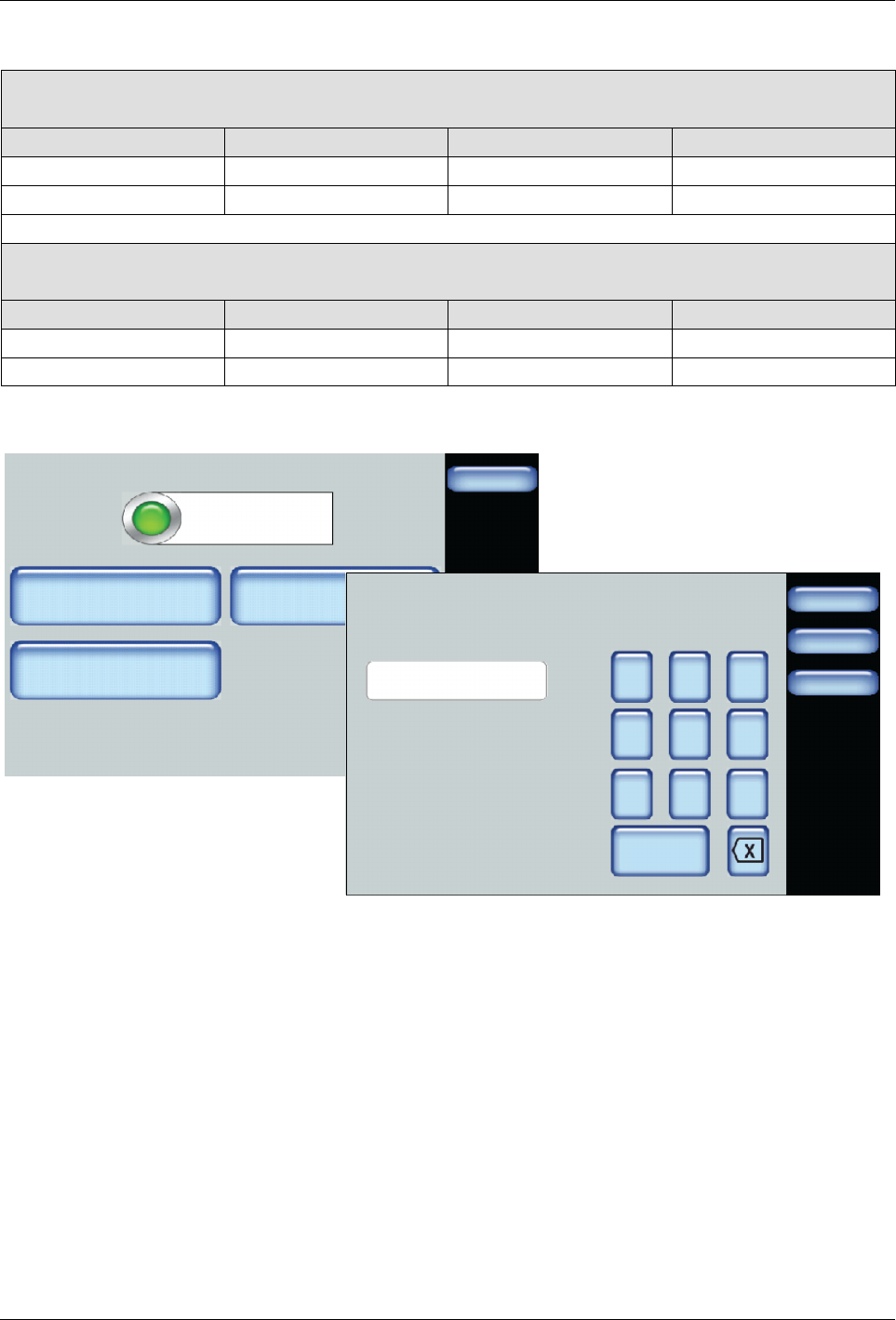
Modifying Zone Set Point Temperatures
For Melters:
7407039, 7407040, 7407041. 7407042, 7407668 and 7407669
Zone Default Minimum Maximum
Internal Zone (Platen) 176°C (350°F) 40°C (100°F) 176°C (350°F)
External Zones 176°C (350°F) 40°C (100°F) 176°C (350°F)
For Melters:
7407664, 7407665, 7407666, 7407667, 7407670 and 7407671
Zone Default Minimum Maximum
Internal Zone (Platen) 232°C (450°F) 40°C (100°F) 232°C (450°F)
External Zones 232°C (450°F) 40°C (100°F) 232°C (450°F)
Zone 1A
Done
Zone State: Enabled
Adjust Set Point
Zone 1A
Change PID Type
Create/Modify Name
Hose
176_C
Done
Cancel
7 8 9
4 5 6
1 2 3
0
Zone 1A Set Point
174
Home
1. Access the Home screen and touch a zone that you want to modify its
set point temperature.
2. Touch Adjust Set Point and enter the temperature you want for this
zone.
3. Touch Done.
Basic Software Melter Configuration
6-8
Part 1121836_03
E 11/2014 Nordson Corporation
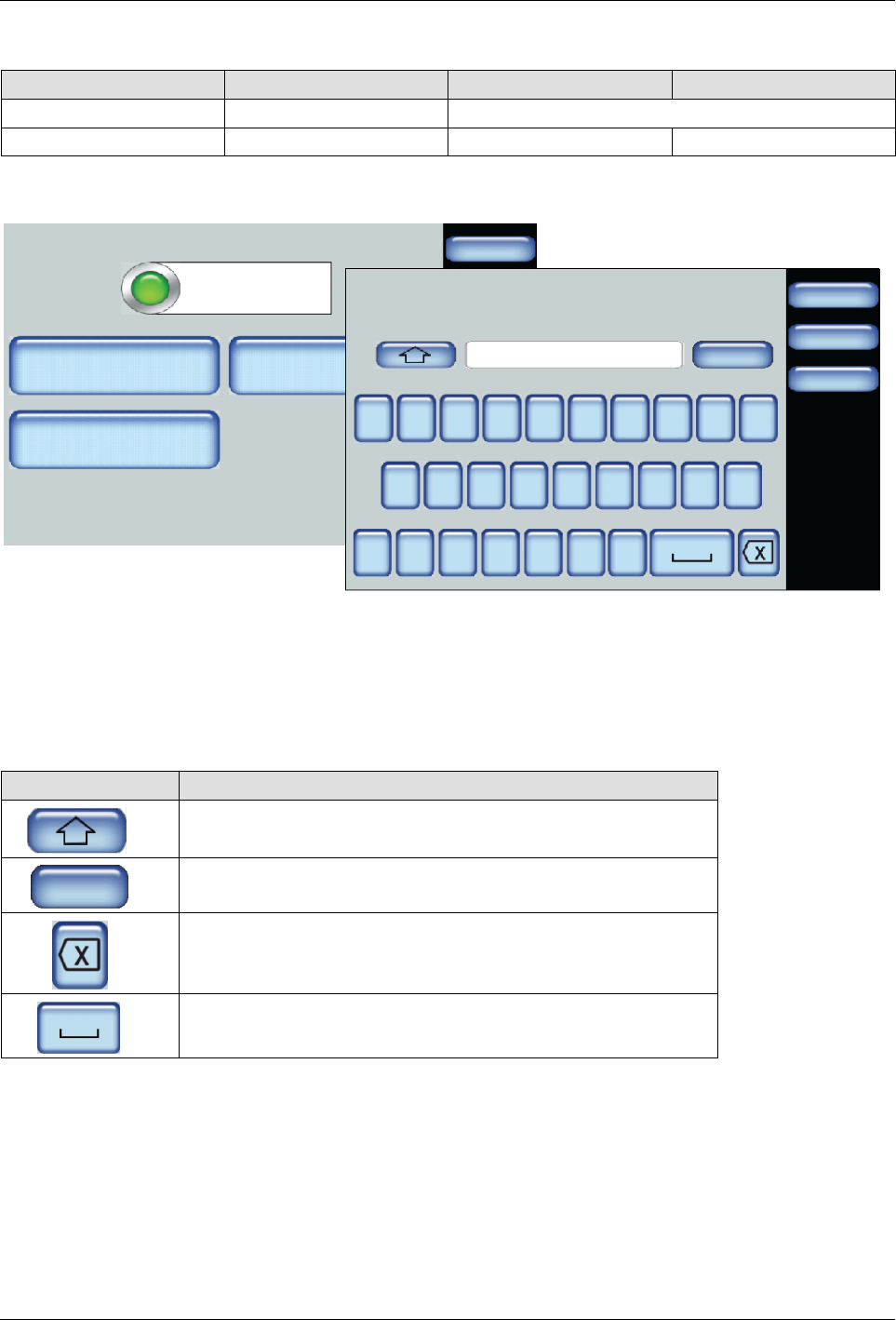
Modifying External Zone Names
Zone Default Minimum Maximum
Internal Zone Platen You cannot modify the name of the Platen
External Zones Zone [Number] [Letter] 1 character 10 characters
Zone 1A
Done
Zone State: Enabled
Adjust Set Point
Zone 1A
Change PID Type
Create/Modify Name
Hose
176_C
Zone 1A
Done
Cancel
Home
Q W E R T Y U I
A S D F G H J K
Z X C V B N
O P
L
M
123 …
1. Access the Home screen and touch an external zone that you want to
modify its name.
2. Touch Create/Modify Name and enter the name you want for this zone.
The name can be up to 10 characters long. Spaces, dashes, underscore
and numbers count as a single character.
3. Do the following to continue. When finished, touch Done.
Touch Description
Switch between upper and lower case letters.
123 …
Include numeric and extended special characters.
Delete a character.
Add space.
Basic Software Melter Configuration
6-9
Part 1121836_03
E 11/2014 Nordson Corporation
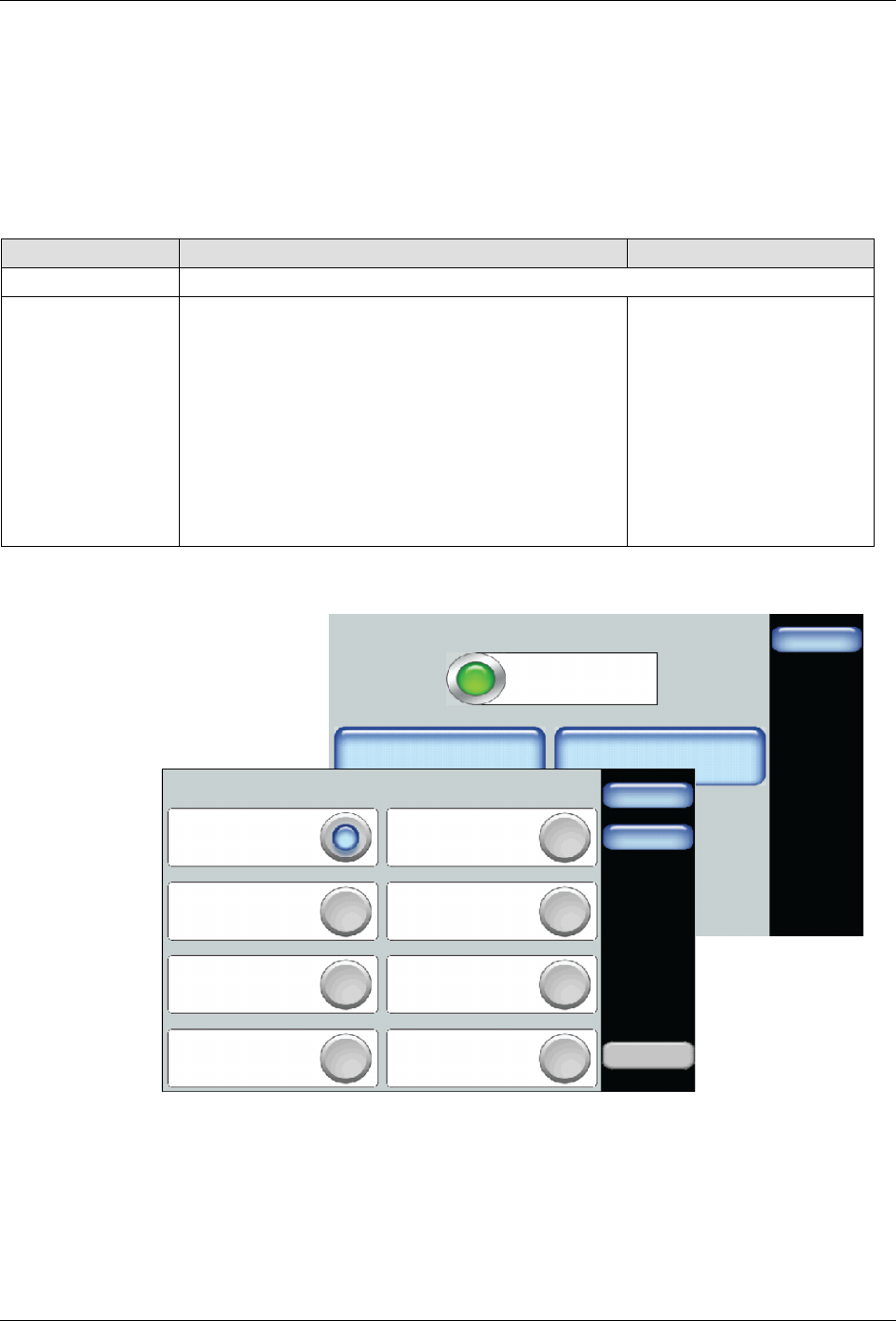
Modifying External Zone PID Types
You would only change an external zone PID Type association if you make
use of a different hardware component. Selecting the appropriate PID Type
provides optimum component performance.
NOTE: The Home screen displays the type of applicator this is currently
connected to the melter. The graphic does not change based on PID Type
selection.
Zone Default Options
Internal Zone You cannot modify the internal zone PID Type association.
External Zones
S
Zones ending with a letter A are associated with
a Hose
S
Zones ending with a letter B are associated with
a Standard Applicator
S
Hose
S
Large Hose
S
Standard applicator
S
Large applicator
S
Hand applicator
S
Air Heaters
S
Platen
S
Custom PID Values
Zone 1A
Done
Zone State: Enabled
Adjust Set Point
Zone 1A
Change PID Type
Create/Modify Name
Hose
176_C
Zone 1A
Standard Applicator Large Applicator
Hose Large Hose
Custom PID Values
Hand Applicator Air Heater
Custom
PID
Home
Done
Platen
1. Access the Home screen and touch the external zone that you want to
change its PID type.
2. Touch Change PID Type and select the appropriate button
corresponding to the installed component for the selected zone.
3. Touch Done.