AltaPail II Bulk Melters Product Manual.pdf - 第67页
About the Touch Screen D isplay and User Interface 5 -16 Part 1121836_03 E 1 1/2014 Nordson Corporation Requirements for Running the Pum p The following li sts the system requirements before running a pump: S The melter …
About the Touch Screen Display and User Interface
5-15
Part 1121836_03
E 11/2014 Nordson Corporation
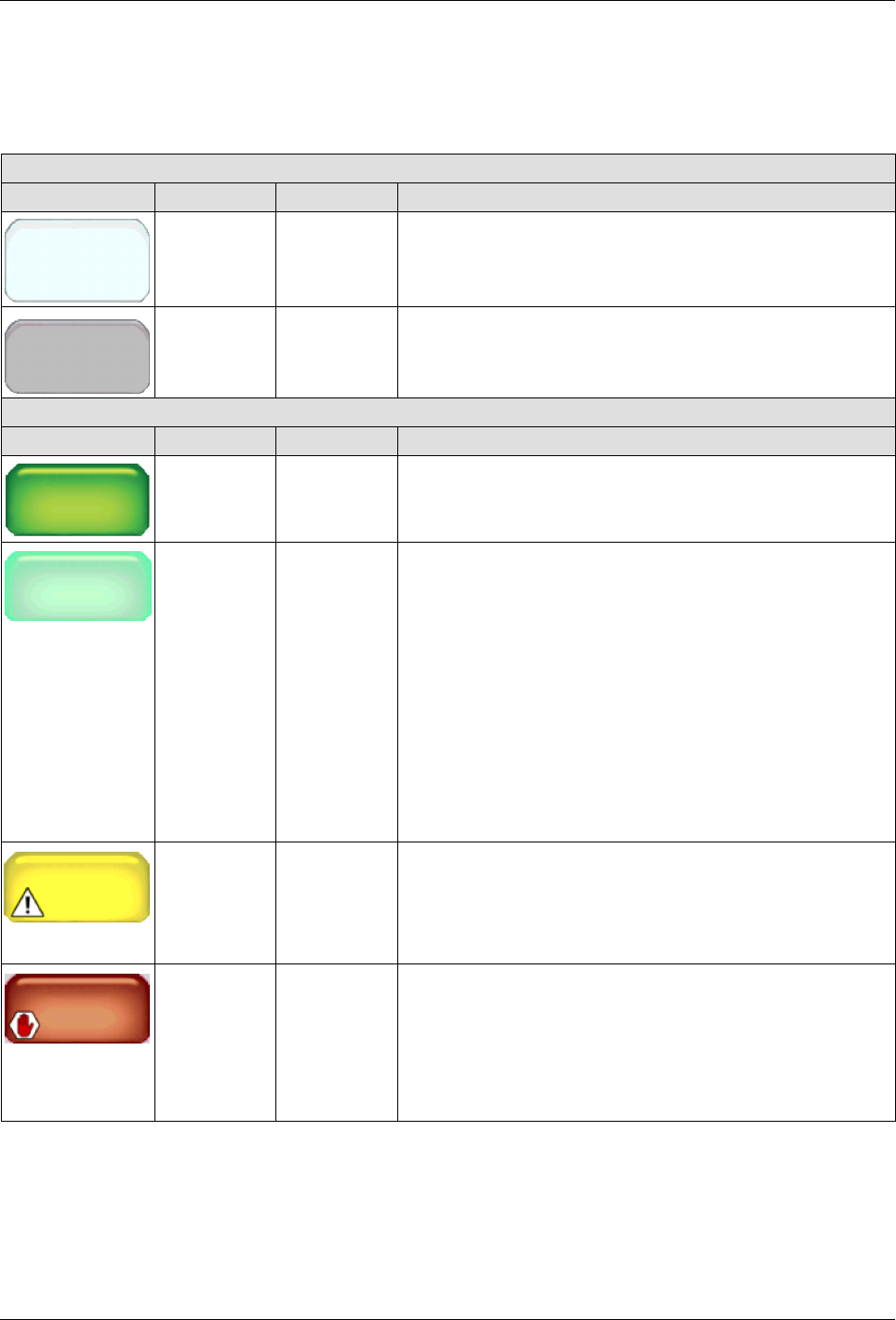
What the Pump Statuses Indicate
The following table details the pump status messages.
Table 5-3 Pump State Color Reference
Pump States
Button Color State Notes
Disabled
Pump
White Disabled The pump is available, but disabled.
Pump
Unavailable
Gray Unavailable The system cannot detect the pump.
Pump Status
Button Color State Notes
Pump
Manual
24 RPM
Dark green Ready/OK The pump is enabled and has reached its set point speed.
Pump
Manual
24 RPM
Light green Waiting for
Ready
The pump is enabled and…
S
is waiting for the melter to reach its Ready/OK status
before you can manually switch On the master Pump
Control.
S
Auto Pump is enabled and is waiting for the melter to
reach its Ready/OK status before automatically
switching On the Master Pump Control.
S
The system is in either Standby or Ready Delay mode.
S
A zone or pump is in an alert or fault condition.
S
The system itself is in an alert or fault condition.
Pump
Alert
Yellow Alert The pump is enabled, but the system has detected an
alert condition. Touch the pump with the alert to view
system message.
NOTE: In an alert condition, both the master Heater
and Pump controls remain On.
Fault
Pump
Red Fault The Pump is enabled, but the system has detected a fault
condition. Touch the pump with the alert to view system
message.
NOTE: In a fault condition, both the master Heater
and Pump controls are switched Off.
About the Touch Screen Display and User Interface
5-16
Part 1121836_03
E 11/2014 Nordson Corporation
Requirements for Running the Pump
The following lists the system requirements before running a pump:
S
The melter status must indicate Ready/OK.
S
The Pump must be enabled.
S
In addition to the Platen, at least one external zone must be enabled.
S
The Master Heater Control switch must indicate On.
S
The Master Pump Control switch must indicate On.
Basic Pump Operation Modes
There are two default pump operation modes:
Operation Mode Description
Manual (default) Delivers adhesive at a constant speed.
Gear-to-Line Delivers adhesive at a rate proportional to the line
speed.

About the Touch Screen Display and User Interface
5-17
Part 1121836_03
E 11/2014 Nordson Corporation
About the Screen Saver
Once the melter is running, the screen saver appears after 5 minutes (the
default) of no user interaction with the touchscreen. The Home screen
re-appears when you touch anywhere on the screen saver.
System Status:
Ready/OK
Figure 5-5 The Screen Saver