1.011.1_VPC使用手册.pdf - 第105页
104/144 6.1.10 The conf director y The conf directory contains the .VPD and .VPS files The VPD files hold information about the i ndividual diagrams of a configurations set, such as information about the filter settings …
103/144
22 single panel yes no
23 barcode no
24 barcode yes no
6.1.9 Mask for CLONE
bar code filter 0x001
bond filter 0x002
component filter 0x004
features filter 0x008
operator filter 0x010
inspection pattern filter 0x020
inspection plan filter 0x040
machine filter 0x080
time filter 0x100
copy all filters 0x1ff

104/144
6.1.10 The conf directory
The conf directory contains the .VPD and .VPS files
The VPD files hold information about the individual diagrams of a configurations
set, such as information about the filter settings and the selected properties.
The VPS files describe an entire configurations set, including information about
the number of individual diagrams and their names.
6.1.11 The Export directory
The Export directory contains the .data files that are generated during an
automatic export.
6.1.12 The log directory
Information from VPC-MergerVPC-Merger is co-logged in the log directory.
6.1.13 The Work directory
VPC files are stored on the VPC server, always in the directory structure
<VISNAME>\<YYYY>\
<MM>\<DD>\<VISNAME>_<YYYYMMDD>_<BARCODE>.vpc.
105/144
7. Create New Diagrams
7.1 Creating a New Configuration Set
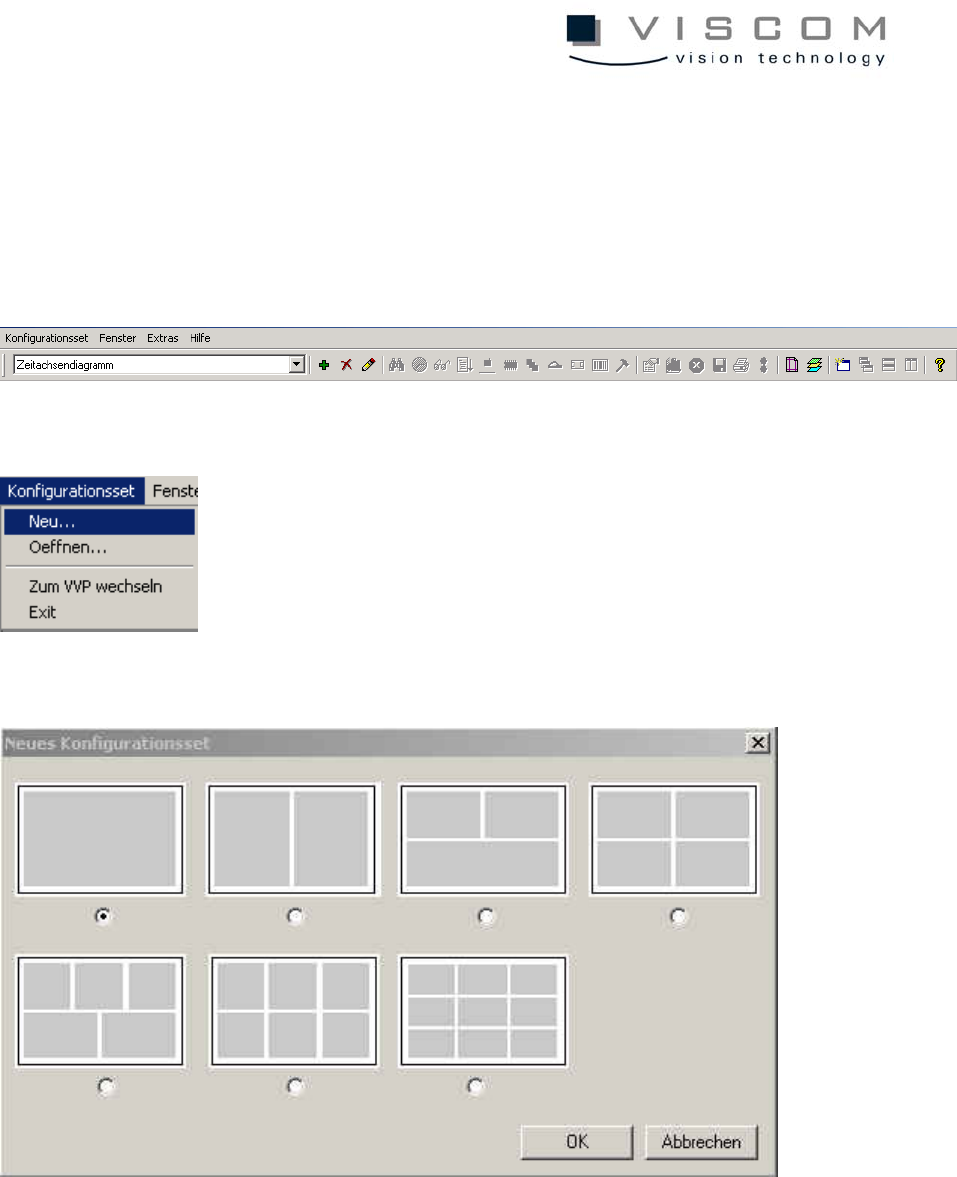
A double-click on the symbol VPC opens the menu bar. The later evaluation
area is displayed in gray. The evaluation area is gray.
A new configuration set can be opened by selecting "Configuration set - New".
The following window appears:
Here, the desired configuration set can be selected (contains 1 to 6 or 9
configurations). Then confirm with OK.
After this step, the default configurations can be seen at the top in the title list of
the default settings. The configuration set has the name NewSet_1.vps, and the
configuration has the name NewConf_1.vpc.