1.011.1_VPC使用手册.pdf - 第21页
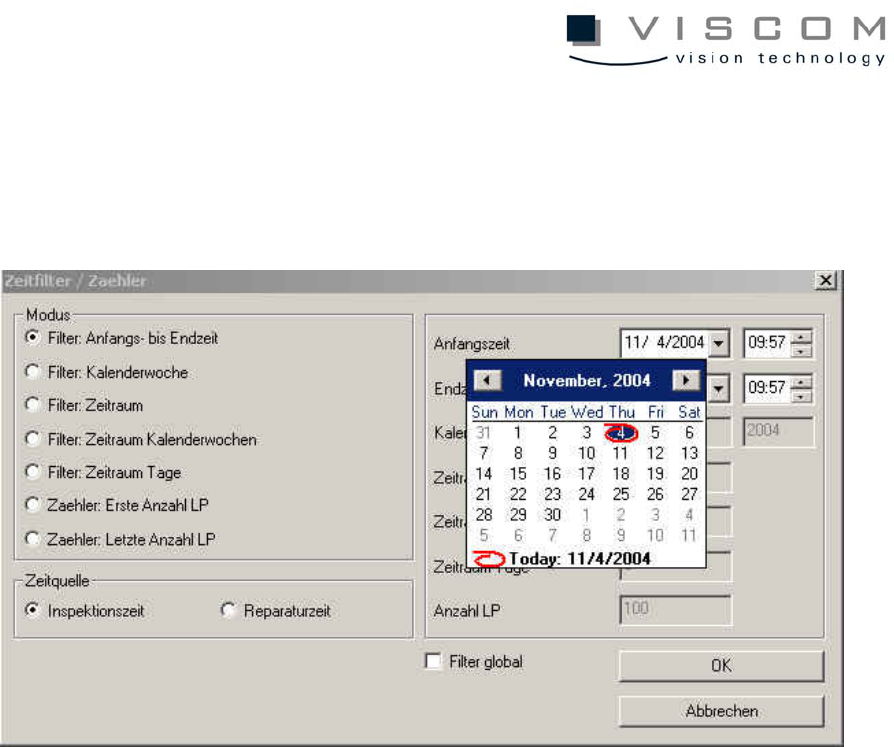
20/144 The date can be chosen directly from t he Microsoft calendar control element; spin buttons are available for the time entry.

19/144
There are 7 different modes available for the time filter:
Start to finish
time
Times are indicated in the format DD.MM.YYYY HH:MM.
The date can be selected with a calendar function.
Calendar
week
A calendar week starts Monday 0:00 and ends Sunday
23:59. Only complete weeks are evaluated, starting from the
current week and going backwards.
Time period Here, period of time during which the evaluation is to run is
entered in the format DD HH:MM. The end of the time period
is always set to the current evaluation time, so that the time
window runs concurrently.
Time period:
calendar
weeks
X calendar weeks can be entered here. Only completed
weeks are evaluated, starting with the current week and
going backwards.
Time period:
days
X days can be entered here. A day begins at 0:00 and ends
at 23:59. Only completed days are evaluated, starting from
the current day and going backwards.
First number
of PCBs
Allows the evaluation of the first X PCBs from the start time
onwards. The search is stopped either when the required
number of PCBs is reached, or the finish time is (if not
enough PCBs are found).
Last number
of PCBs
With this mode the last X PCBs, counted back from the
current time, are evaluated. The search is stopped either
when the required number of PCBs or the start time is
reached.
All machines are treated equally with respect to the counting modes, so if 10
machines are available, an evaluation of the last 100 PCBs will deliver 10 files
from each machine (provided that they work with identical cycle times).

20/144
The date can be chosen directly from the Microsoft calendar control element;
spin buttons are available for the time entry.
21/144
Important Note:
The clock time must be set identically on all AOIs and repair stations or
synchronized via a server!