1.011.1_VPC使用手册.pdf - 第119页
118/144 8.5 File Import 8.5.1 Step 1: Input directory Here, the directories containing the SPC/SPM and/or the INDEX files are defined. For pre-settings, the software uses the value of the environment variables SPC_DATA_D…
117/144
8.4 VPCImporter
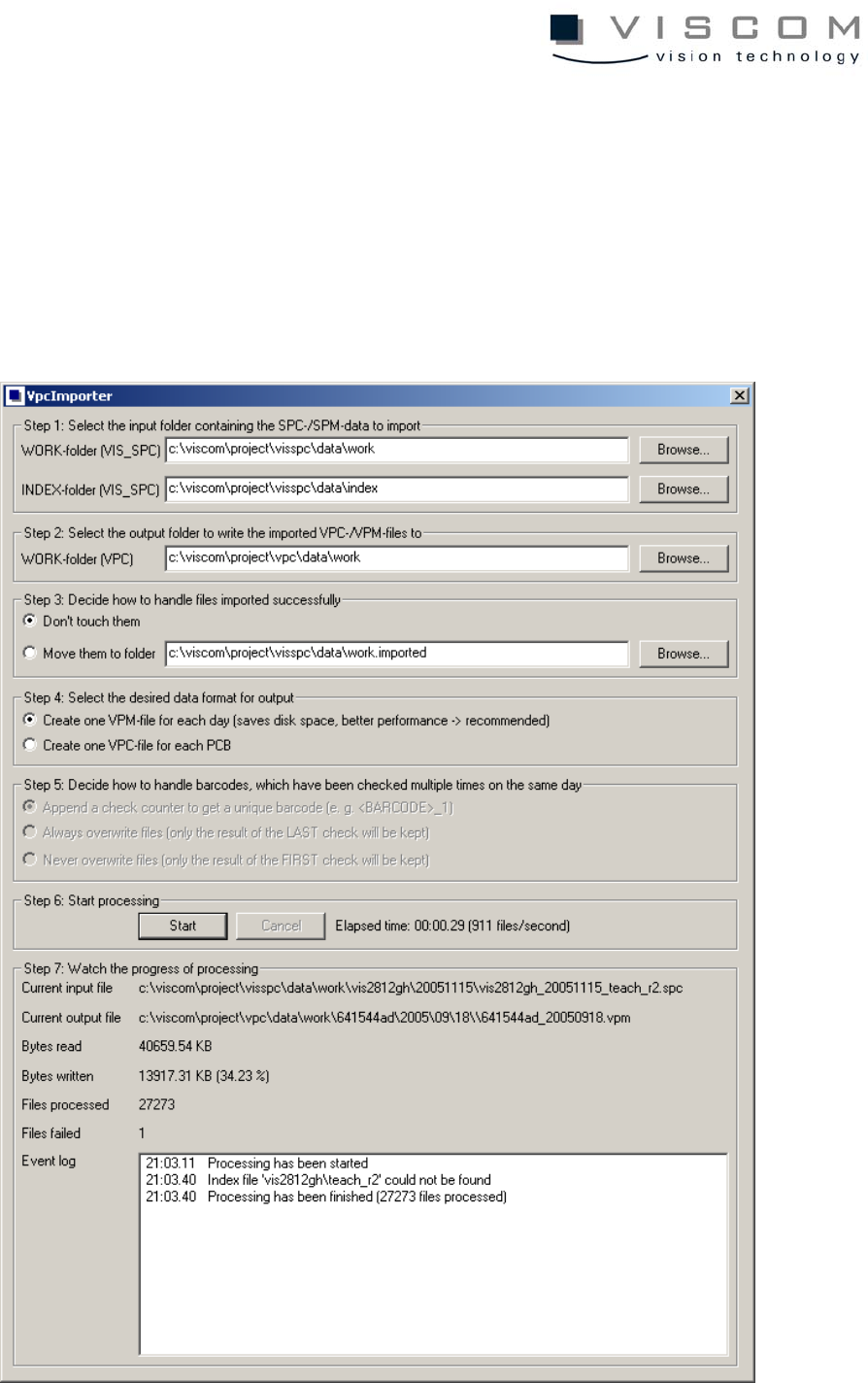
The program VpcImporter makes it possible to easily import existing SPC, SPM
and INDEX files in the new VPC and/or VPM data formats. The following
illustration shows the main dialogue, in which the import is carried out in seven
easy steps:

118/144
8.5 File Import
8.5.1 Step 1: Input directory
Here, the directories containing the SPC/SPM and/or the INDEX files are
defined. For pre-settings, the software uses the value of the environment
variables SPC_DATA_DIR or SPC_INDEX_DIR or - if these are not defined -
the directories “C:\VISCOM\PROJECT\VISSPC\DATA\WORK“ and
“C:\VISCOM\PROJECT\VISSPC\DATA\INDEX“.
Any directory can be selected under the "Browse..." button.
8.5.2 Step 2: Release directory
Here, the directory in which the generated VPC or VPM files are to be stored is
chosen.
Any directory can be selected under the "Browse..." button.
8.5.3 Step 3: Handling imported data
If desired, successful SPC or SPM files can be removed to another directory
after a successful import.
8.5.4 Step 4: File format for release
Here it can be chosen if a single VPC file for each inspection or a VPM file per
day and machine should be generated.
Basically, the VPM format is faster during evaluation and saves hard disc
space, and so is preferred to the VPC format.
8.5.5 Step 5: Multiple inspected barcodes
If "VPC" is chosen as release format, its actions when multiple barcodes in a
day are inspected by an inspection system can be defined.
• Add a counter, to get a clear, definite barcode.

119/144
• Always overwrite files (last inspection is maintained).
• Never overwrite files (first inspection is maintained).
8.5.6 Step 6: Starting the import
Clicking the button "Start" starts the data import, which can be broken off with
the button "Cancel" if necessary.
8.5.7 Step 7: Progress of the file import
Here is where the actual status of the data import is read out. This includes:
• the current processed input/output file,
• the number of the completely read or written bytes,
• the ratio and finally,
• the number of processed and aborted files.