1.011.1_VPC使用手册.pdf - 第118页
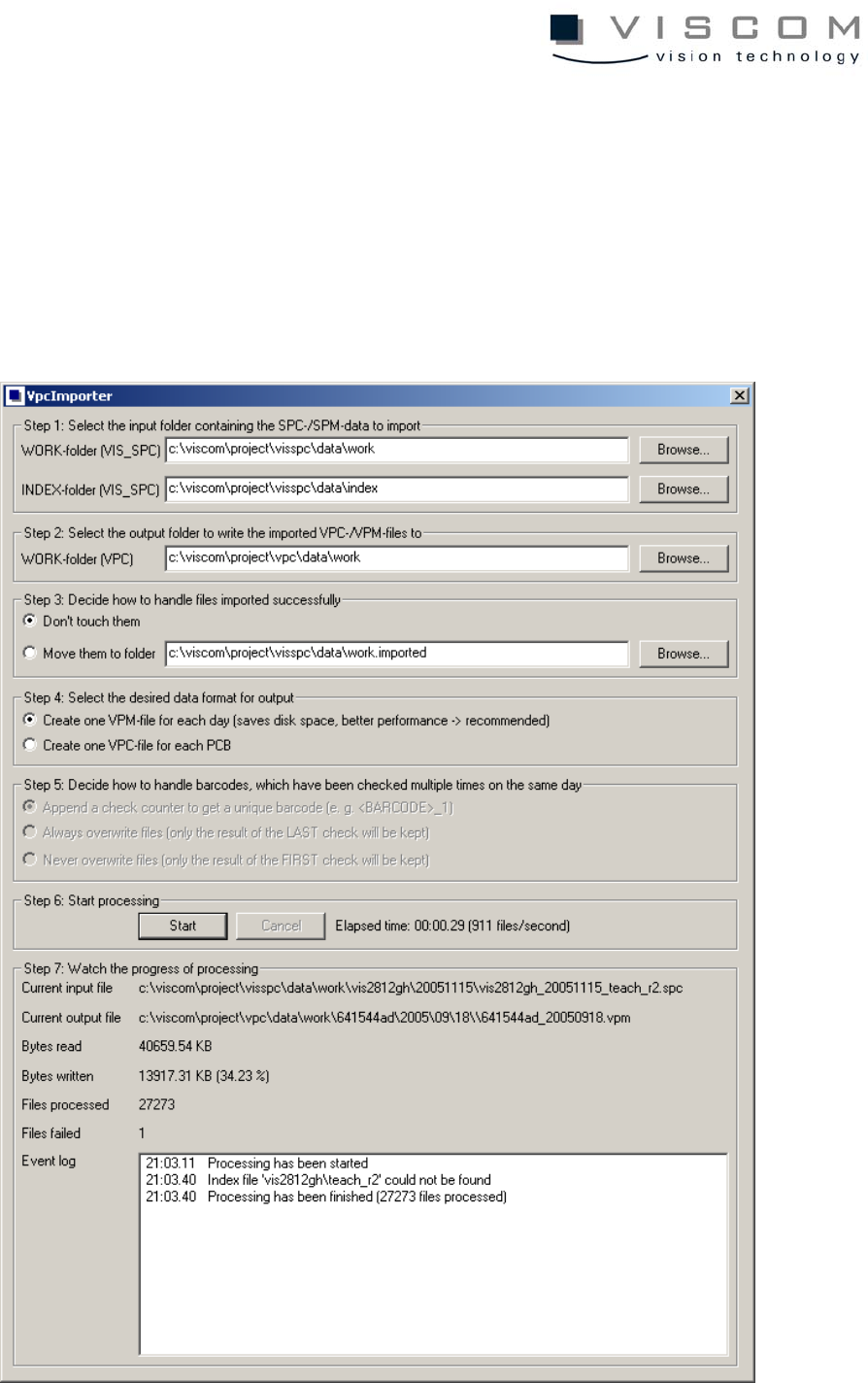
117/144 8.4 VPCImporter The program VpcImporter makes it possi ble to easily import existing SPC, SPM and INDEX files in the new VPC and/ or VPM data formats. The following illustration shows the main dialogue, in which …

116/144
• DESCRIPTION is a designation of the results code as text (empty signs
allowed; maximum 63 characters).
As an example, the following entry assigns the results code "1" to the
description "presence": 1=presence.
Example VpcDefectDefinition.ini file:
[DefectDefinition]
10000=0;0;not repaired
10002=0;2;pseudo defect
10003=0;4;borderline defect
10004=0;2;group psuedo defect
10005=0;1;group real defect
10006=0;4;group borderline defect
10010=1;1;positioning
10011=1;1;redundant component
10012=1;1;contamination
10013=1;1;wrong component
10014=1;1;reversed polarity
10015=1;1;missing component
10016=1;1;billboard
10020=2;1;solder bead >0.2mm
10021=2;1;comtamination/foreign object
10022=2;1;solder not melted
10023=2;1;slanted component
10030=3;1;print smeared/bridge
10031=3;1;displaced print !!!!!
10032=3;1;not enough paste
10040=0;1;mech. damage
10099=0;0;image defect
35;0;1;displacement X (hmm)
[ResultDefinition]
0=miscellaneous
1=presence
2=solder joint
3=geometry
4=rotation
5=displacement
117/144
8.4 VPCImporter
The program VpcImporter makes it possible to easily import existing SPC, SPM
and INDEX files in the new VPC and/or VPM data formats. The following
illustration shows the main dialogue, in which the import is carried out in seven
easy steps:

118/144
8.5 File Import
8.5.1 Step 1: Input directory
Here, the directories containing the SPC/SPM and/or the INDEX files are
defined. For pre-settings, the software uses the value of the environment
variables SPC_DATA_DIR or SPC_INDEX_DIR or - if these are not defined -
the directories “C:\VISCOM\PROJECT\VISSPC\DATA\WORK“ and
“C:\VISCOM\PROJECT\VISSPC\DATA\INDEX“.
Any directory can be selected under the "Browse..." button.
8.5.2 Step 2: Release directory
Here, the directory in which the generated VPC or VPM files are to be stored is
chosen.
Any directory can be selected under the "Browse..." button.
8.5.3 Step 3: Handling imported data
If desired, successful SPC or SPM files can be removed to another directory
after a successful import.
8.5.4 Step 4: File format for release
Here it can be chosen if a single VPC file for each inspection or a VPM file per
day and machine should be generated.
Basically, the VPM format is faster during evaluation and saves hard disc
space, and so is preferred to the VPC format.
8.5.5 Step 5: Multiple inspected barcodes
If "VPC" is chosen as release format, its actions when multiple barcodes in a
day are inspected by an inspection system can be defined.
• Add a counter, to get a clear, definite barcode.