00197042-04_SM_X-Serie-S_Customer_EN.pdf - 第106页
4 Electrics and control system 4.2 BoxPC 106 Service Manual SIPLACE X-Serie S 06/2019 Removal ► Back up the machine data. ► Switch off the machine, disconnect it from the power supply and secure it to prevent unauthorize…
4 Electrics and control system
4.2 BoxPC
Service Manual SIPLACE X-Serie S 06/2019 105
4.2.1.1 Replacing the BoxPC 627x/827x
Overview
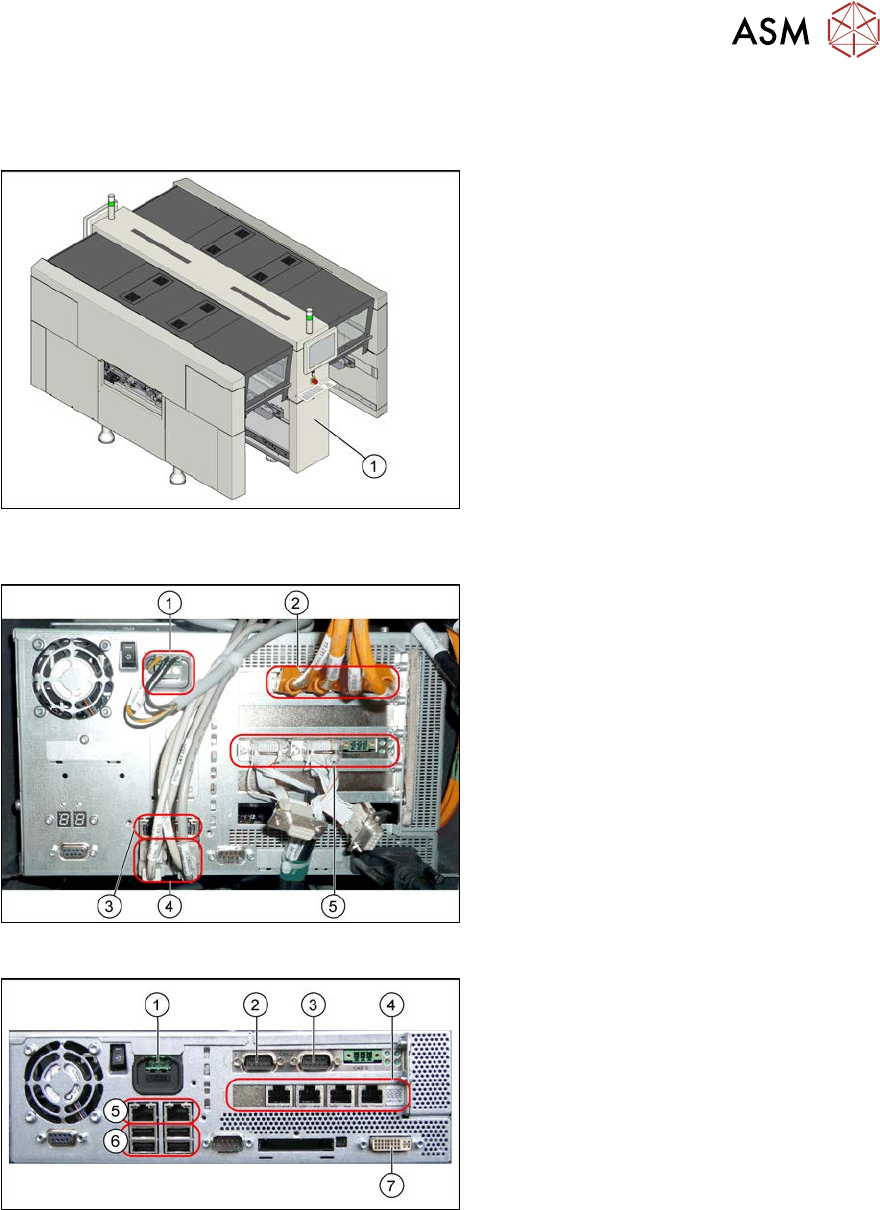
Fig.122: Installation point BoxPC (example of SIPLACE X4i
S shown)
Installation Location
The BoxPC is located behind the cover,
between locations 1 and 2(1).
Fig.123: BoxPC (example of BoxPC 827C)
BoxPC 827C (SIPLACE SX4/DX4,
X‑SeriesS up to no. Gxxxx)
1. Power supply
2. Hotlink interface
Depending on the placement heads
used, there are either one or two hot-
link interfaces fitted.
One hotlink interface: if only C&P20
heads are fitted.
Two hotlink interfaces: all other place-
ment head configurations
3. LAN connections
4. USB connectors
5. CAN card
Fig.124: BoxPC (example of BoxPC 627B)
BoxPC 627C (SIPLACE SX1/SX2/DX1/
DX2, 3D-coplanarity)
1. Power supply DC 24V
2. CAN 1
3. CAN 2
4. Hotlink card
5. LAN connections
6. USB connectors
7. DVI/VGA monitor connection
4 Electrics and control system
4.2 BoxPC
106 Service Manual SIPLACE X-Serie S 06/2019
Removal
► Back up the machine data.
► Switch off the machine, disconnect it from the power supply and secure it to prevent
unauthorized reactivation.
1.2 "Preparatory work..." [}16]
► Unplug all press-fit connections to the BoxPC. If necessary, mark their positions to make clear
assignment easier later on.
►
SIPLACE X-Series S up to no. Gxxxx:
The BoxPC is fixed in the machine with Velcro. Release the BoxPC from the Velcro and
remove it from the machine.
►
SIPLACE X-Series S from No. Hxxxx:
Loosen the screws fastening the Box PC and remove the BoxPC from the machine.
Installation
► Follow the removal instructions in reverse order for installation. Also observe the following
instructions:
●
If parts are missing in the new BoxPC (e.g. ethernet adapter, memory extension), take these
from the old BoxPC and use them in the new one.
4.2.5 "Replacing the CAN card (BoxPC 627B/827C only, up to no. Gxxxx)" [}109]
4.2.6 "Replacing the GigE Ethernet Adapter" [}109]
4.2.7 "Replacing the LAN card (from serial no. Hxxxx)" [}110]
4.2.8 "Replacing the Hotlink interface card" [}111]
4.2.9 "Replacing the RAM in the BoxPC" [}112]
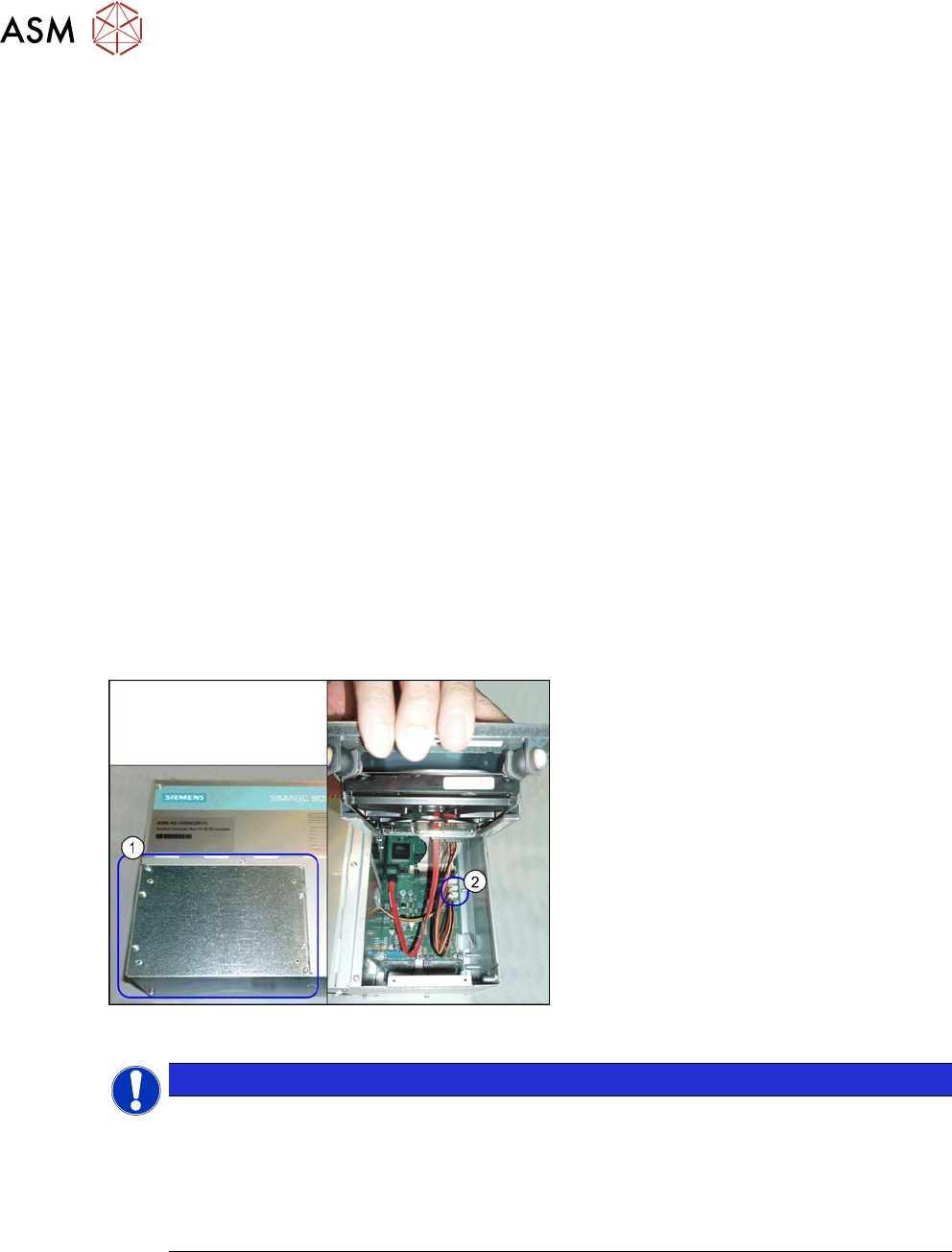
Fig.125: BoxPC (example of 827B)
Hotlink interface power cable
► The hotlink interface power cable
[03042074-xx] (2) needs to be taken
from the old BoxPC and fitted in the
new one. To gain access to this cable,
loosen and open the cover (1) on the
hard drive.
NOTICE
Installing the BoxPC
► The BoxPC needs to be installed after it has been fitted. Read the relevant installation
guide.
► BIOS update and setting images are no longer included on the station software CD.
The CDs for the BIOS settings are only available via the SIPLACE Software Download
Center (SDC).
4 Electrics and control system
4.2 BoxPC
Service Manual SIPLACE X-Serie S 06/2019 107
4.2.1.2 Replacing the BoxPC 427x
Overview
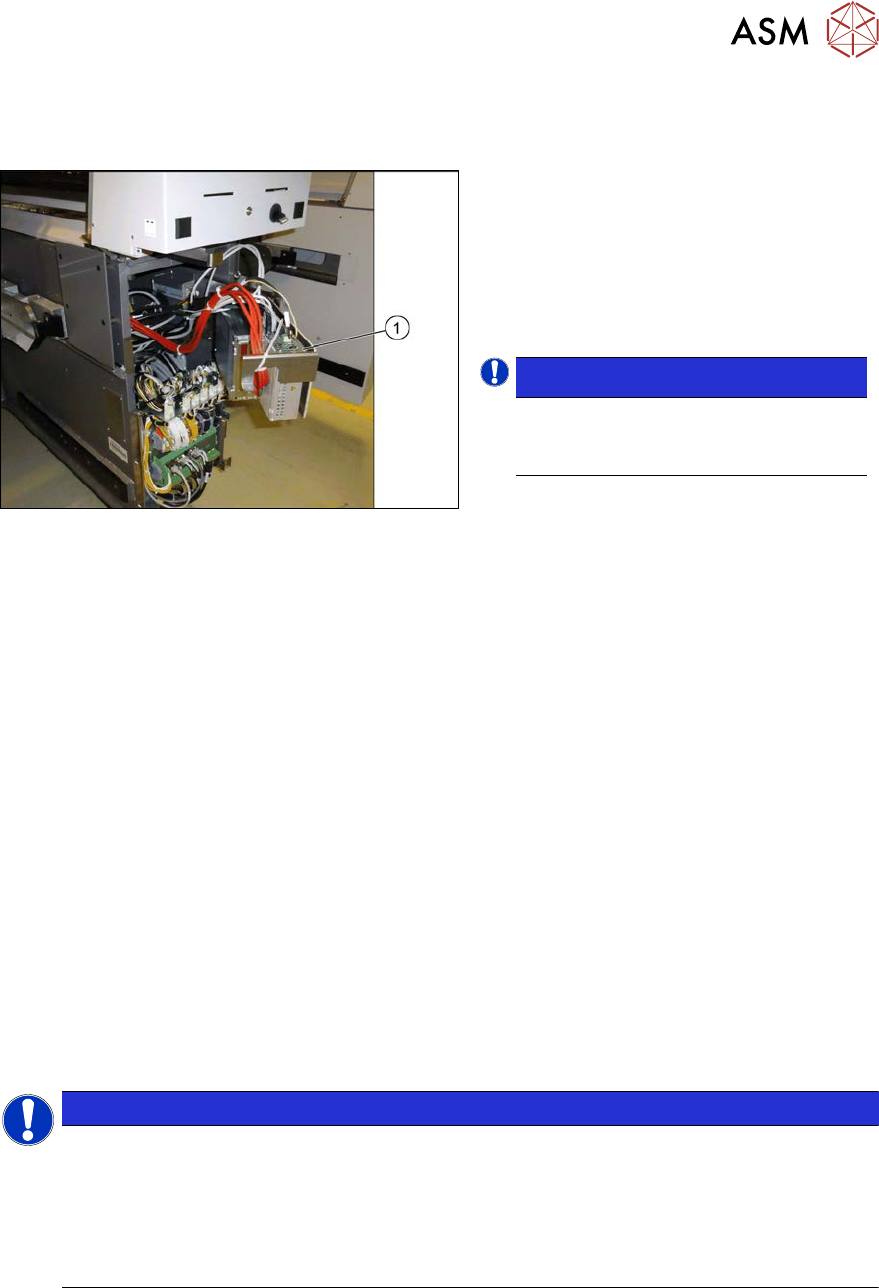
Fig.126: BoxPC in machine
1. BoxPC
The BoxPC is located behind the cover,
between locations 1 and 2.
See also: 4.2.2 "Overview of Connections for
BoxPC 427D" [}108]
NOTICE!
Conversion of a BoxPC 827C to a
BoxPC 427D is not possible.
.
Removal
► Back up the machine data.
► Switch off the machine, disconnect it from the power supply and secure it to prevent
unauthorized reactivation.
1.2 "Preparatory work..." [}16]
► Unplug all press-fit connections to the BoxPC. If necessary, mark their positions to make clear
assignment easier later on.
► Loosen the screws fastening the Box PC and remove it from the machine.
Installation
► Follow the removal instructions in reverse order for installation. Also observe the following
instructions:
●
If parts are missing in the new BoxPC (e.g. ethernet adapter, memory extension), take these
from the old BoxPC and use them in the new one.
4.2.5 "Replacing the CAN card (BoxPC 627B/827C only, up to no. Gxxxx)" [}109]
4.2.6 "Replacing the GigE Ethernet Adapter" [}109]
4.2.7 "Replacing the LAN card (from serial no. Hxxxx)" [}110]
4.2.8 "Replacing the Hotlink interface card" [}111]
4.2.9 "Replacing the RAM in the BoxPC" [}112]
NOTICE
Installing the BoxPC
► The BoxPC needs to be installed after it has been fitted. Read the relevant installation
guide.
► BIOS update and setting images are no longer included on the station software CD.
The CDs for the BIOS settings are only available via the SIPLACE Software Download
Center (SDC).