00197042-04_SM_X-Serie-S_Customer_EN.pdf - 第229页
7 Conveyor 7.5 Width Adjustment, Clamps and Cylinder Unit Service Manual SIPLACE X-Serie S 06/2019 229 7.5.3 Replacing the movable idler pulley/idler pulley (width adjustment) Parts, equipment and tools ● Movable idler p…

7 Conveyor
7.5 Width Adjustment, Clamps and Cylinder Unit
228 Service Manual SIPLACE X-Serie S 06/2019
Installation
► Follow the removal instructions in reverse order for installation. Also observe the following
instructions:
– Carefully thread in the toothed belt. To do this, carefully lift the toothed belt a little ( e.g.
with the shorter end of an Allen key).
– Make sure that the cylinder units are parallel.
Setting the Parallelism of the Conveyor Sides
– Set the correct belt tension (see below).
7.5.2.1 Setting the belt tension (width adjustment)
► Use the software to move the conveyor sides into a position which allows you best access. As
an alternative, you can loosen the clamps for the relevant sides in dual conveyors.
7.2 "Loosening the Conveyor Side Clamps" [}207]
► Switch off the machine, disconnect it from the power supply and secure it to prevent
unauthorized reactivation.
1.2 "Preparatory work..." [}16]
► Check the tension at the center between the two upper idler pulleys. The tension must be 25
to 27Hz.
► If the tension is not correct, loosen the screw fastening the movable idler pulley and correct
the tension. You may have to dismantle the cover over the conveyor control.
► Repeat the measurement 4 times.
7 Conveyor
7.5 Width Adjustment, Clamps and Cylinder Unit
Service Manual SIPLACE X-Serie S 06/2019 229
7.5.3 Replacing the movable idler pulley/idler pulley (width adjustment)
Parts, equipment and tools
●
Movable idler pulley assembly [03097090-xx]
This spare part is also used for replacing idler pulleys.
Overview
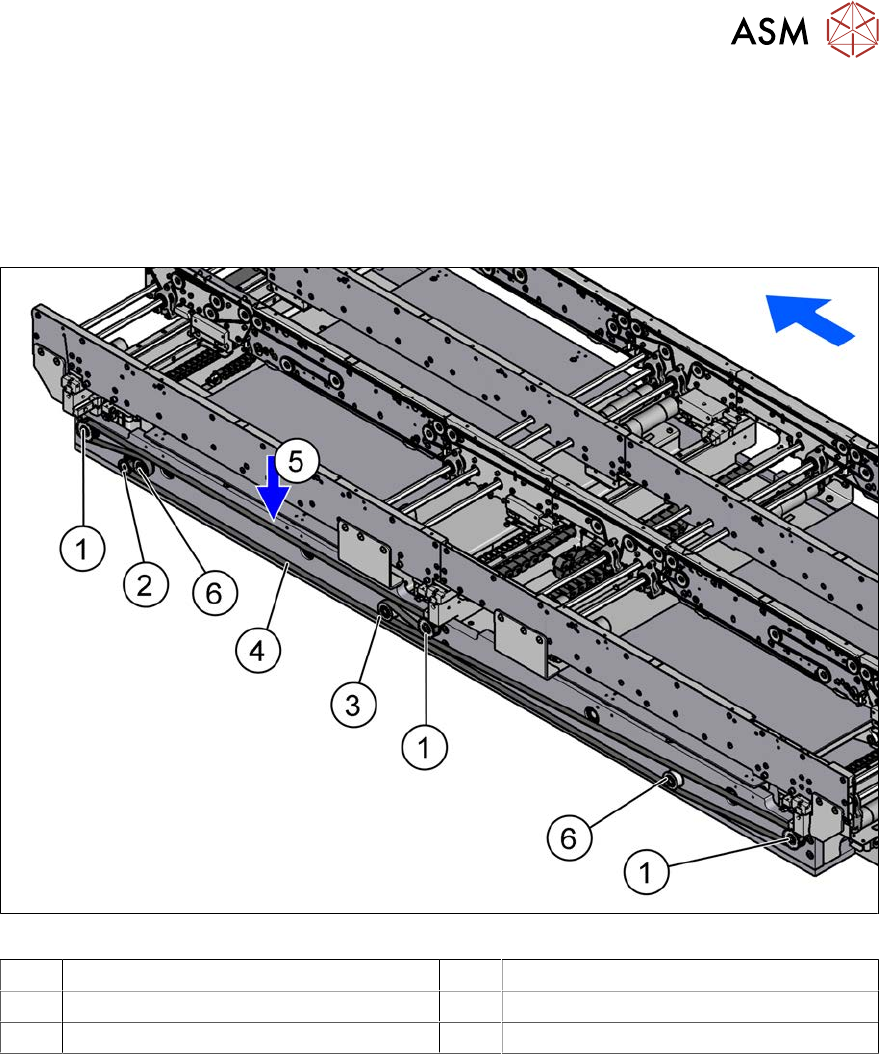
Fig.291: Overview of width adjustment
1 Cylinder units 2 Width adjustment drive
3 Movable idler pulley 4 Toothed belt of width adjustment
5 Measurement point for belt tension 6 Idler pulley
Removal
► Use the software to move the conveyor sides into a position which allows you best access. As
an alternative, you can loosen the clamps for the relevant sides in dual conveyors.
7.2 "Loosening the Conveyor Side Clamps" [}207]
► Switch off the machine, disconnect it from the power supply and secure it to prevent
unauthorized reactivation.
1.2 "Preparatory work..." [}16]
► Move the cylinder units as far as the end stop on one side of the conveyor. To do this, move
the toothed belt of the width adjustment.
► Dismantle the cover over the conveyor control.
► Loosen the movable idler pulleyfor the width adjustment toothed belt on the inside of the con-
veyor. (Open-ended wrench, size 10)
► Remove the fastening screws on the roller to be replaced and then remove the roller.
7 Conveyor
7.5 Width Adjustment, Clamps and Cylinder Unit
230 Service Manual SIPLACE X-Serie S 06/2019
Installation
► Follow the removal instructions in reverse order for installation. Also observe the following
instructions:
– Carefully thread in the toothed belt. To do this, carefully lift the toothed belt a little ( e.g.
with the shorter end of an Allen key).
– Make sure that the cylinder units are parallel.
For more information about this, read section 7.10.2 "Setting the Parallelism of the Con-
veyor Sides and Adjustment Units" [}298].
– Set the correct belt tension. (See 7.6.2 "Setting the belt tension (conveyor belt)" [}247])
7.5.4 Replacing the Cylinder Unit (Width Adjustment)
Parts, equipment and tools
●
Cylinder unit 1 SX4a [03087394-xx] (output area)
●
Cylinder unit 2 SX4a [03087398-xx] (input and intermediate conveyor area)
Overview
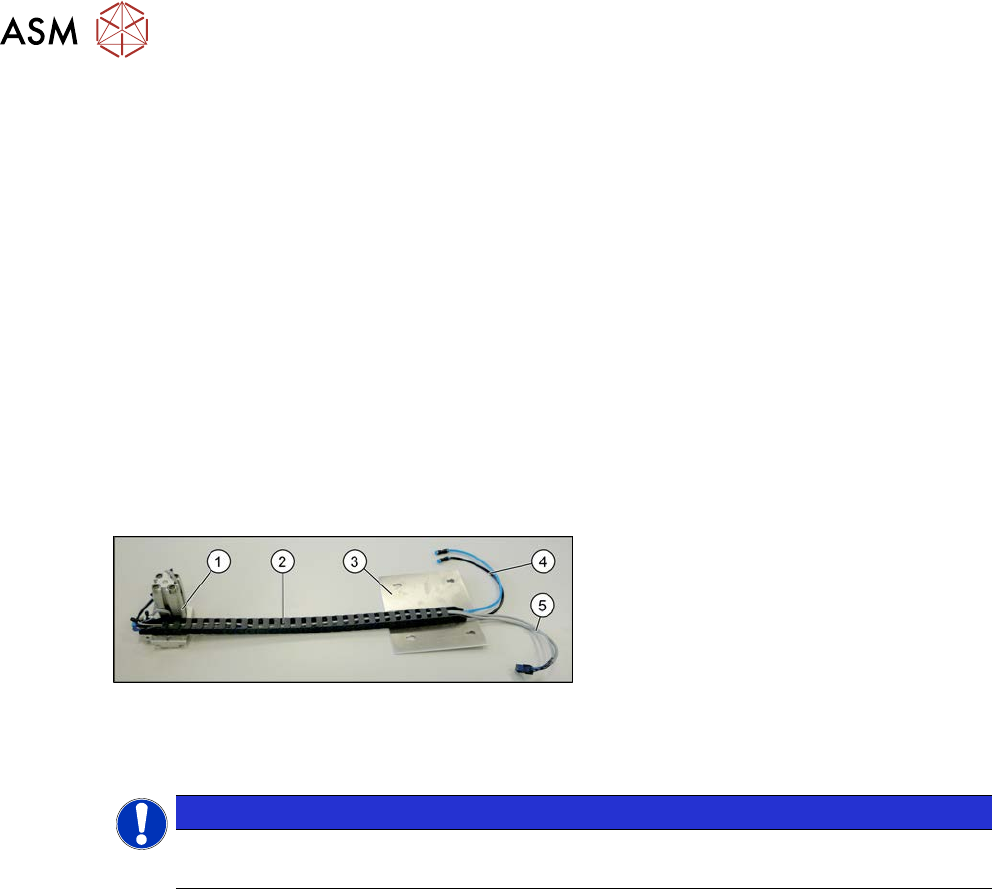
Fig.292: Overview cylinder unit
1. Cylinder unit
2. Trailing cable
3. Cover plate (the trailing cable is
fastened to it - not part of the delivery
package)
4. Pneumatic connections
5. Electrical connections
Removal
NOTICE
Location 3 or 4
We recommend that, if possible, this task is performed from location 3 or 4.
► Use the software to move the conveyor sides into a position which allows you best access. As
an alternative, you can loosen the clamps for the relevant sides in dual conveyors.
7.2 "Loosening the Conveyor Side Clamps" [}207]
► Switch off the machine, disconnect it from the power supply and secure it to prevent
unauthorized reactivation.
1.2 "Preparatory work..." [}16]
► Switch off the compressed air supply
5.2 "Disabling the compressed air supply" [}134]
► You can also dismantle the lifting table plate for better access.