00197042-04_SM_X-Serie-S_Customer_EN.pdf - 第212页
7 Conveyor 7.3 Lifting Table 212 Service Manual SIPLACE X-Serie S 06/2019 7.3 Lifting Table DANGER Press the EMERGENCY STOP! Before performing adjustment work you must ensure that the lifting table has been secured again…
7 Conveyor
7.2 Loosening the Conveyor Side Clamps
Service Manual SIPLACE X-Serie S 06/2019 211
Version 3
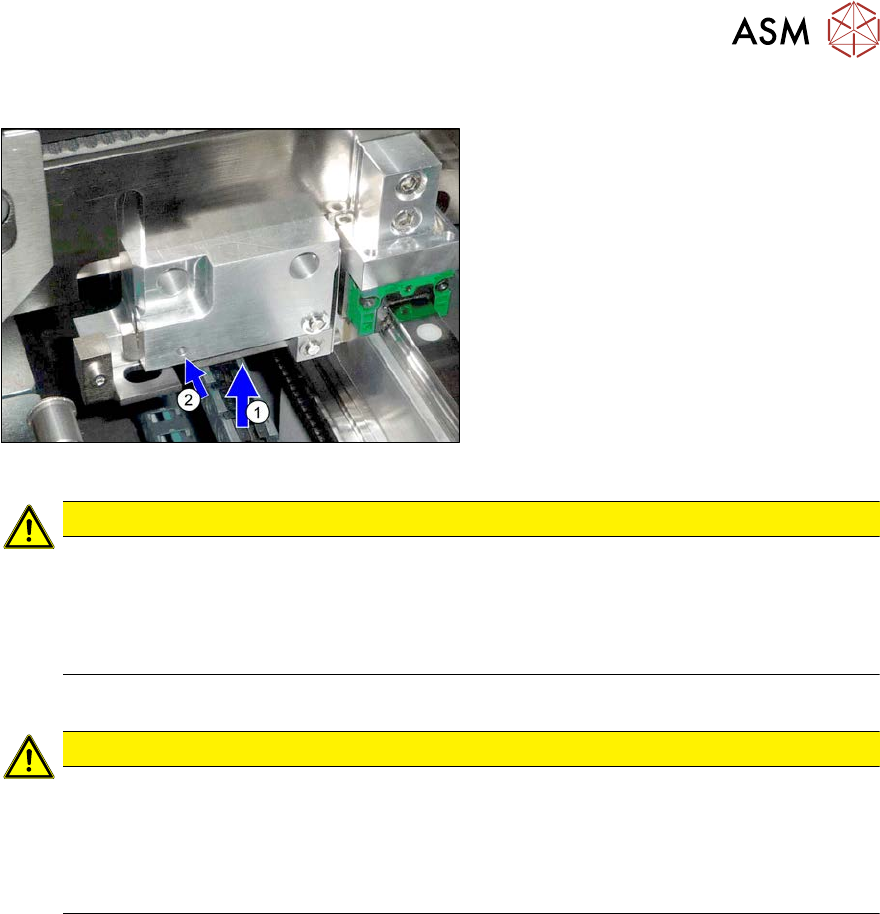
► Loosen the conveyor side clamps.
To do this, press the lever(1) upwards
and push a suitable pin or a screw into
the hole(2).
► Repeat these steps for all clamps on the sides concerned.
CAUTION
Always loosen all clamps for one conveyor side!
► Always loosen all clamps for one conveyor side.
SIPLACE SX1/SX2/DX1/DX2: 2 clamps per conveyor side
SIPLACE SX4/DX4, X-Series S: 3 clamps per conveyor side
► If you do not loosen all clamps for the conveyor side, this could be easily damaged.
You can now move the sides.
CAUTION
Moving the sides
► When the clamp is manually loosened, make sure that you only move the conveyor
sides by pushing against the clamping units.
► Make sure that you always move the conveyor sides parallel.
► Take care not to distort or trap the conveyor sides when pushing!
Restoring the clamp
► Follow the removal instructions in reverse order for installation. Also observe the following
instructions:
●
After completing the work, push the conveyor sides back into their approximate starting posi-
tion.
●
Make sure that the conveyor sides are back in their original positions after switching on.
●
Perform a reference run.
●
Perform side calibration for the fixed side on the left and right. If you do not, not all conveyor
sides will be calibrated.
This calibration is needed to ensure that the conveyor sides are positioned correctly.
●
SIPLACE SX1/SX2 V2 and X-Series S only: calibrate the board sensors.
●
Use a board to test the parallelism. This board must be transported evenly through the entire
conveyor.
7.10.2 "Setting the Parallelism of the Conveyor Sides and Adjustment Units" [}298]
●
Re-establish the original conveyor configurations:
For more information, go to Service menu - Conveyor configuration - Set options for con-
veyor fixed rail.
Select one of the positions and click on the Adjust configuration button.
Then reset the conveyor sides to the previous configuration.
7 Conveyor
7.3 Lifting Table
212 Service Manual SIPLACE X-Serie S 06/2019
7.3 Lifting Table
DANGER
Press the EMERGENCY STOP!
Before performing adjustment work you must ensure that the lifting table has been secured
against movement!
7.3.1 Replacing the lifting table plate
Parts, equipment and tools
●
Single conveyor SIPLACE X-Series S:
Lifting table assembly 701 mm [03088801-xx]
●
Dual conveyor SIPLACE X-Series S:
Lifting table plate 1 assembly 350 mm [03088811-xx]
Lifting table plate 2 assembly 350 mm [03093910-xx]
Overview
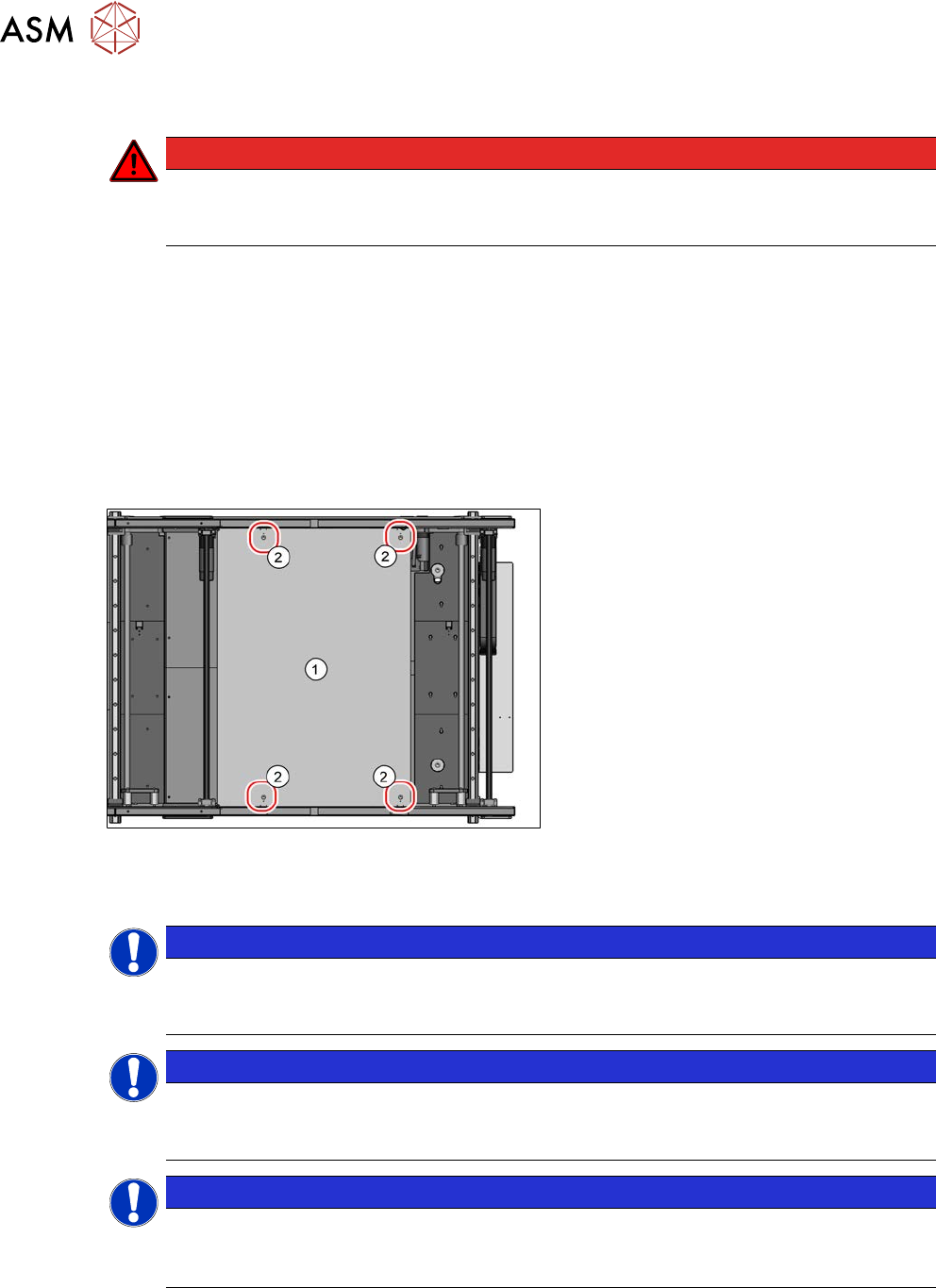
Fig.270: Lifting table plate
1. Lifting table plate
2. Fastening screws for lifting table plate
Removal
NOTICE
Single, dual conveyor
The replacement is shown in the diagram using the example of a lifting table unit for the
dual conveyor (DC). Replacement on a single conveyor (SC) follows the same procedure.
NOTICE
Does the lifting table stay in the top position?
If the lifting table remains in the top position and cannot be lowered, you will not be able to
dismantle the lifting table plate. In this case, call the SIPLACE Service team.
NOTICE
Lifting table plate guides
► Make sure that the lifting table guides are not mixed up. If you do, you will need to re-
set the parallelism of the lifting table plates.
► Use the software to move the conveyor sides into a position which allows you best access. As
an alternative, you can loosen the clamps for the relevant sides in dual conveyors.
7.2 "Loosening the Conveyor Side Clamps" [}207]
7 Conveyor
7.3 Lifting Table
Service Manual SIPLACE X-Serie S 06/2019 213
► Switch off the machine, disconnect it from the power supply and secure it to prevent
unauthorized reactivation.
1.2 "Preparatory work..." [}16]
► Remove the screws fastening the lifting table plate and remove the lifting table plate from the
machine. The lifting table plate is pinned to the table plate guides but can be easily pulled off.
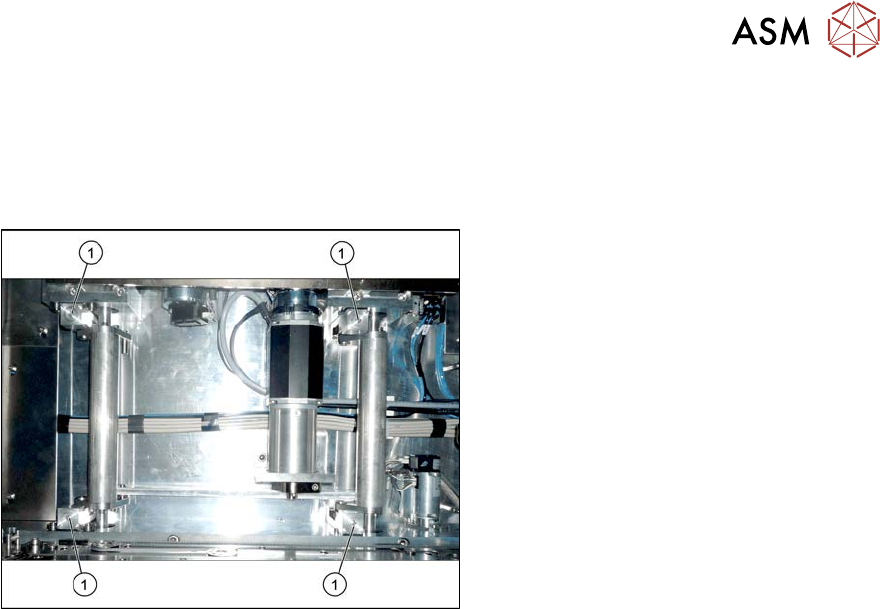
Fig.271: Lifting table plate guides
► Mark the positions of the lifting table
plate guides (1) to make it easier to refit
them later on. Make sure you do not
confuse these. If you do, you will need
to reset the parallelism of the lifting
table plates.
Installation
► Follow the removal instructions in reverse order for installation. Also observe the following
instructions:
●
The lifting table plate must slide in when inserted into the lifting table plate guidance pins.
●
Check the parallelism of the lifting table plate.
7.3.5 "Setting the Parallelism and Height of the Lifting Table Plate" [}217]