00197042-04_SM_X-Serie-S_Customer_EN.pdf - 第419页
9 Component feeding 9.6 Smart Pin Support Service Manual SIPLACE X-Serie S 06/2019 419 9.6.18 Replacing the Magazine Recognition Board NOTICE Technical Information "SPS: Malfunction of magazine identification boards…
9 Component feeding
9.6 Smart Pin Support
418 Service Manual SIPLACE X-Serie S 06/2019
9.6.17 Replacing the press roller
Parts, equipment and tools
●
Press roller SPS [03092384Sxx]
●
Circlip pliers size 0 (supplier: http://www.hoffmann-tools.com – item no.:719770 J0)
●
Assembly instructions "Smart Pin Support" for SIPLACE X‑SeriesS [DEEN:00197394‑xx]
Overview
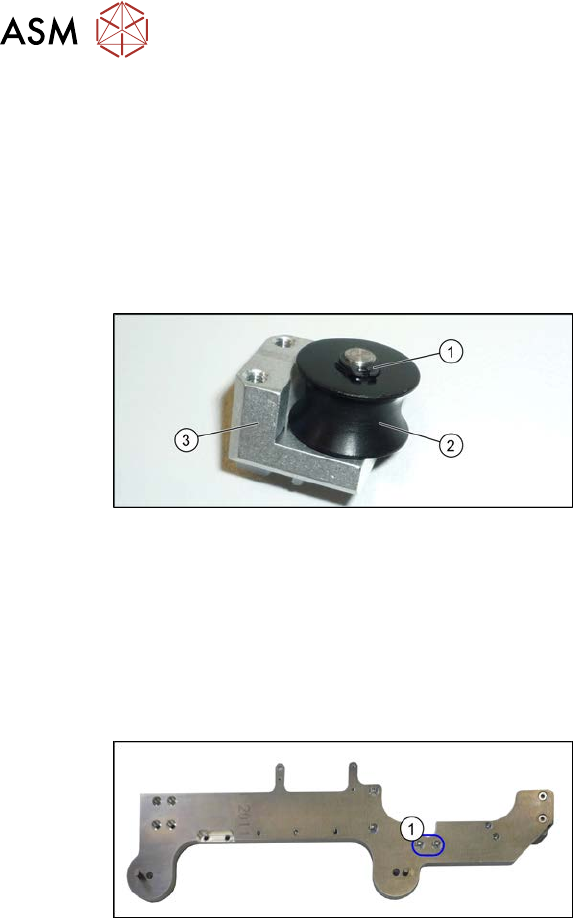
Fig.574: Press roller
1. Circlip
2. Press roller
3. Press roller mount
Removal
► Switch off the machine, disconnect it from the power supply and secure it to prevent
unauthorized reactivation.
1.2 "Preparatory work..." [}16]
► Remove the pin picker. For more information, read section 9.6.1 "Replacing the Pin Picker
Assembly" [}399].
Fig.575: Screws fastening the press roller mount
► Remove the two screws(1) fastening
the press roller mount.
► Loosen the circlip on the press roller.
► Remove the press roller.
Installation
► Follow the removal instructions in reverse order for installation.
9 Component feeding
9.6 Smart Pin Support
Service Manual SIPLACE X-Serie S 06/2019 419
9.6.18 Replacing the Magazine Recognition Board
NOTICE
Technical Information "SPS: Malfunction of magazine identification boards"
► If the magazine identification board fails, observe the Technical Information "SPS:
Malfunction of magazine identification boards" [DE: TI2014-07D06] [EN:
TI2014-07E06].
NOTICE
From SW 706.1 SP2
From SW 706.1 SP2, magazines can be fitted without the "magazine recognition" function.
In this case, the machine can only be configured manually via the software (Autoconfig).
► Read the assembly instructions "SIPLACE X Series S - Option Smart Pin Sup-
port" [00197394‑xx] (German/English).
Parts, equipment and tools
●
Magazine recognition SPS assembly [03093494-xx]
●
Assembly instructions "Smart Pin Support" for SIPLACE X‑SeriesS [DEEN:00197394‑xx]
Overview
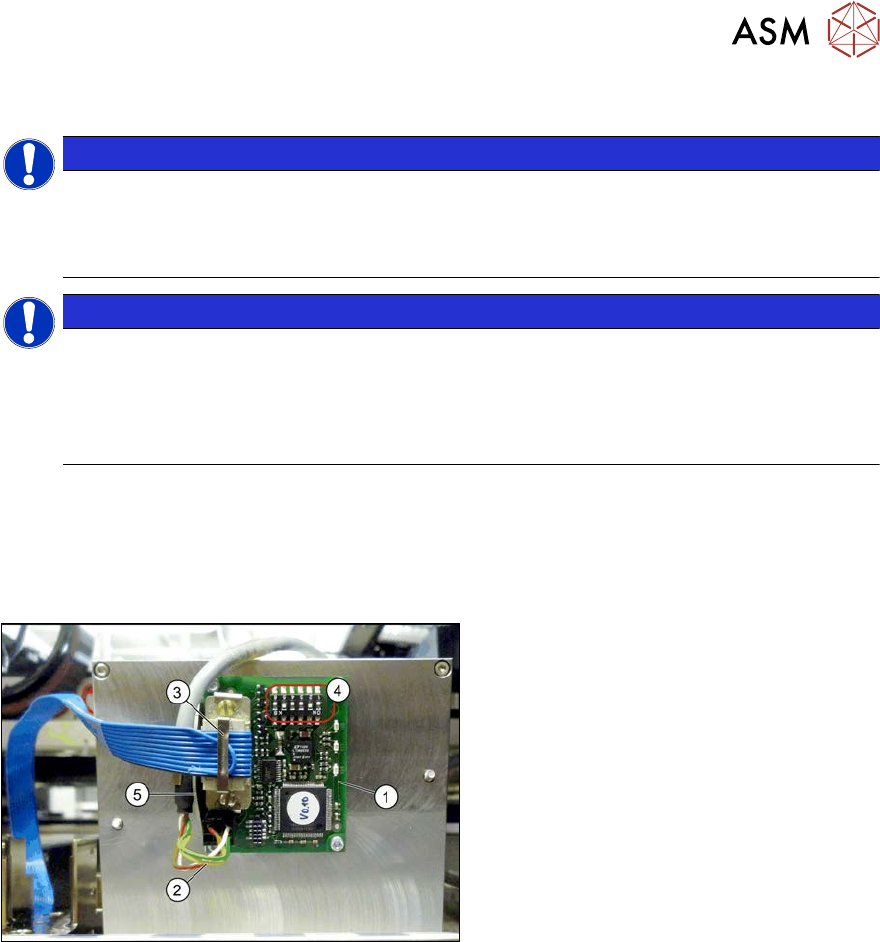
Fig.576: Magazine recognition board (using example ofQ10
here)
1. Magazine recognition board
2. Power supply cable
3. Flat ribbon cable
4. Jumper
5. Metal bracket
Removal and installation
► Refer to the appropriate assembly instructions for details of removal and installation.
9 Component feeding
9.6 Smart Pin Support
420 Service Manual SIPLACE X-Serie S 06/2019
9.6.18.1 Magazine recognition board
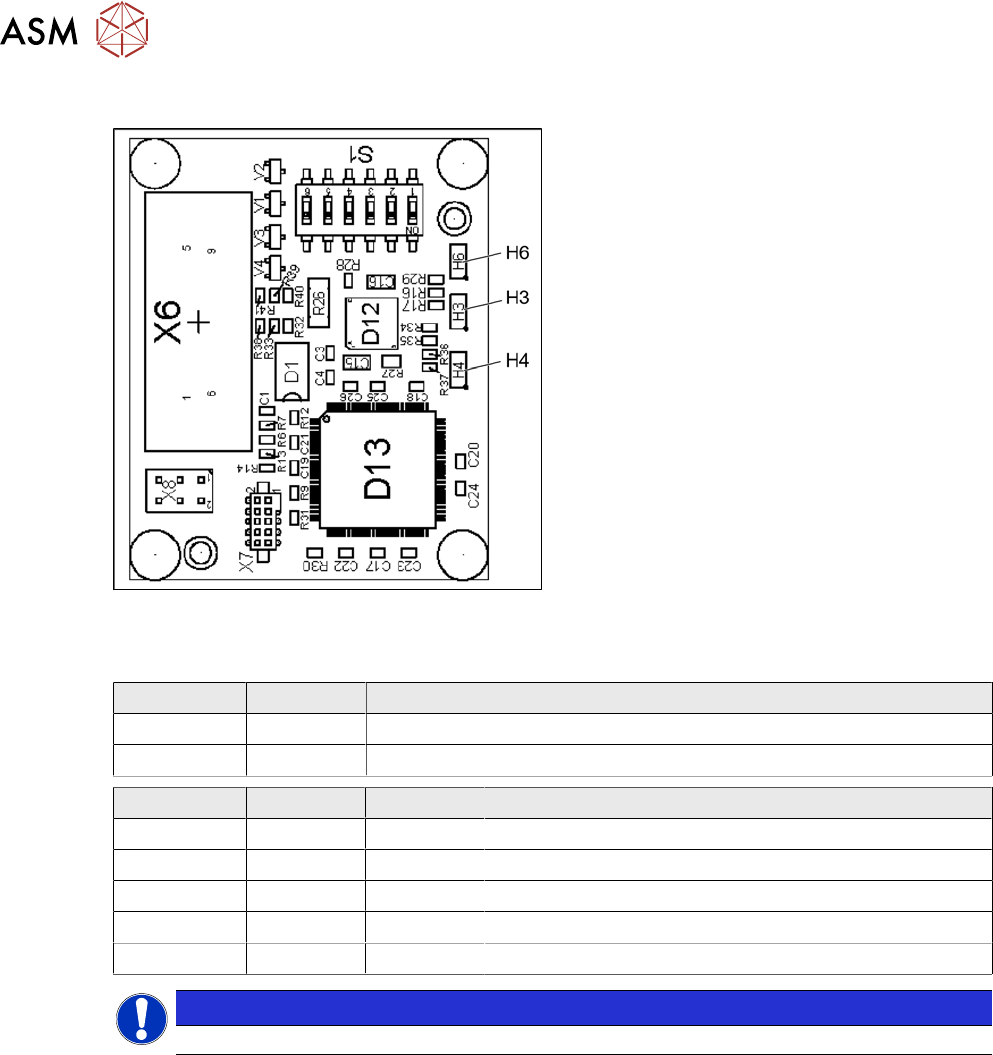
Fig.577: Magazine recognition board [03093494-xx]
The magazine recognition board is part of the
pin magazines for the "Smart Pin Support" op-
tion.
This board may be missing, depending on the
magazine version used.
LEDs:
H3: not used
H4: FPGA OK
H6: Power supply 3.3 V OK
DIP switch S1 - jumper assignment
S1.1 S1.2 Magazine connected at:
ON OFF NC connection 2
OFF ON NC connection 4
S1.4 S1.5 S1.6 Meaning
OFF OFF OFF Garage is switched off
ON OFF OFF Garage type W5
OFF ON OFF Garage type Q10
ON ON OFF Garage type L10
X X ON Reserved
NOTICE
Jumper S1.3 is not used.