00197042-04_SM_X-Serie-S_Customer_EN.pdf - 第231页
7 Conveyor 7.5 Width Adjustment, Clamps and Cylinder Unit Service Manual SIPLACE X-Serie S 06/2019 231 Fig.293: Cylinder unit (example of SIPLACE SX1/SX2 shown) NOTICE! The cover plates (1) and (2) can only be dismant…
7 Conveyor
7.5 Width Adjustment, Clamps and Cylinder Unit
230 Service Manual SIPLACE X-Serie S 06/2019
Installation
► Follow the removal instructions in reverse order for installation. Also observe the following
instructions:
– Carefully thread in the toothed belt. To do this, carefully lift the toothed belt a little ( e.g.
with the shorter end of an Allen key).
– Make sure that the cylinder units are parallel.
For more information about this, read section 7.10.2 "Setting the Parallelism of the Con-
veyor Sides and Adjustment Units" [}298].
– Set the correct belt tension. (See 7.6.2 "Setting the belt tension (conveyor belt)" [}247])
7.5.4 Replacing the Cylinder Unit (Width Adjustment)
Parts, equipment and tools
●
Cylinder unit 1 SX4a [03087394-xx] (output area)
●
Cylinder unit 2 SX4a [03087398-xx] (input and intermediate conveyor area)
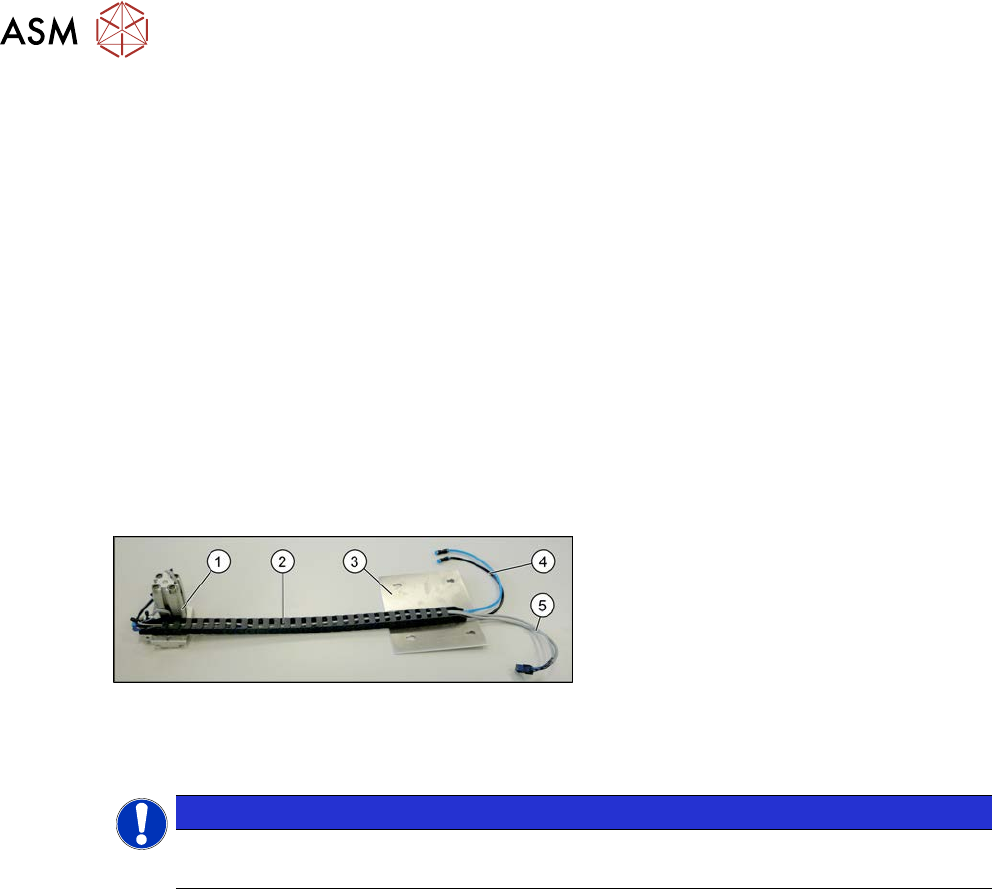
Overview
Fig.292: Overview cylinder unit
1. Cylinder unit
2. Trailing cable
3. Cover plate (the trailing cable is
fastened to it - not part of the delivery
package)
4. Pneumatic connections
5. Electrical connections
Removal
NOTICE
Location 3 or 4
We recommend that, if possible, this task is performed from location 3 or 4.
► Use the software to move the conveyor sides into a position which allows you best access. As
an alternative, you can loosen the clamps for the relevant sides in dual conveyors.
7.2 "Loosening the Conveyor Side Clamps" [}207]
► Switch off the machine, disconnect it from the power supply and secure it to prevent
unauthorized reactivation.
1.2 "Preparatory work..." [}16]
► Switch off the compressed air supply
5.2 "Disabling the compressed air supply" [}134]
► You can also dismantle the lifting table plate for better access.
7 Conveyor
7.5 Width Adjustment, Clamps and Cylinder Unit
Service Manual SIPLACE X-Serie S 06/2019 231
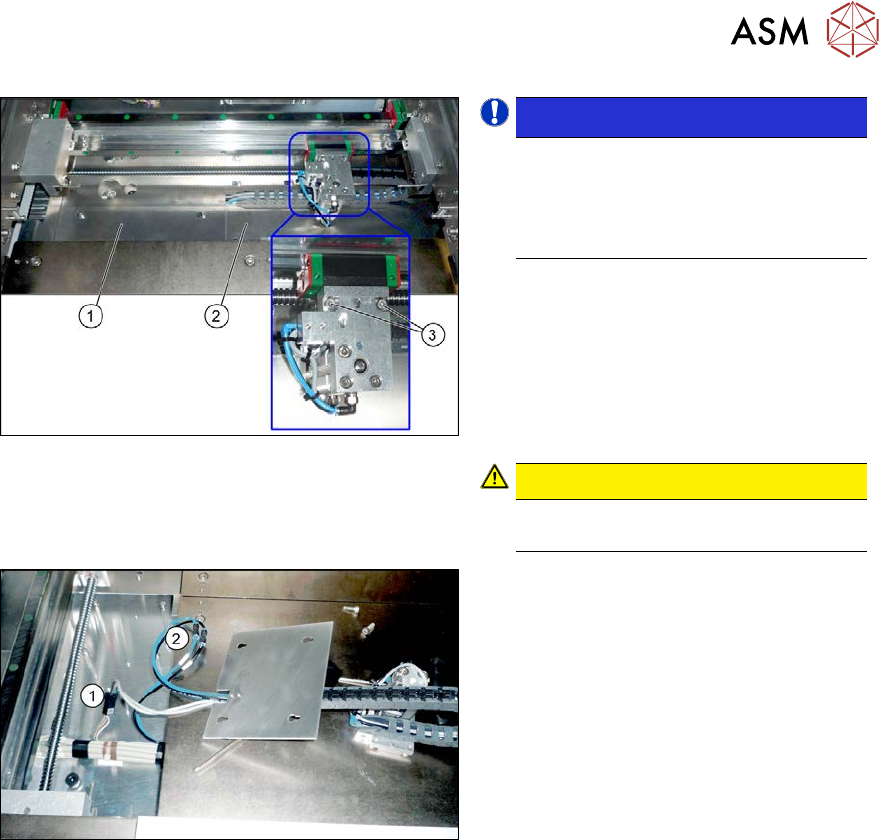
Fig.293: Cylinder unit (example of SIPLACE SX1/SX2
shown)
NOTICE!
The cover plates (1) and (2) can only
be dismantled if the cylinder unit is not
above it. You may need to gently pull
on the width adjustment belt to move
the cylinder unit.
.
► Remove the screws fastening the cover
plate (1).
► Remove the screws fastening the cover
plate (2).
► Remove the two screws fastening the
cylinder unit (3). You can now lift the
cylinder unit up and off.
CAUTION!
The cylinder unit is pinned and can be
stiff to move.
.
Fig.294: Connections (example of SIPLACE SX1/SX2
shown)
► Disconnect the cylinder unit from the
electrical(1) and pneumatic(2) sup-
plies. These are located under the
cover plates or in the intermediate con-
veyor, at the conveyor control.
You may want to mark their positions,
to make clear assignment easier later
on.
► Take the cylinder unit out of the machine, together with the cover plate.
► Remove the screws fastening the trailing cable to the cover plate.
7 Conveyor
7.5 Width Adjustment, Clamps and Cylinder Unit
232 Service Manual SIPLACE X-Serie S 06/2019
Installation
► Follow the removal instructions in reverse order for installation. Also observe the following
instructions:
– Make sure that the cable is run correctly and does not rub against any parts.
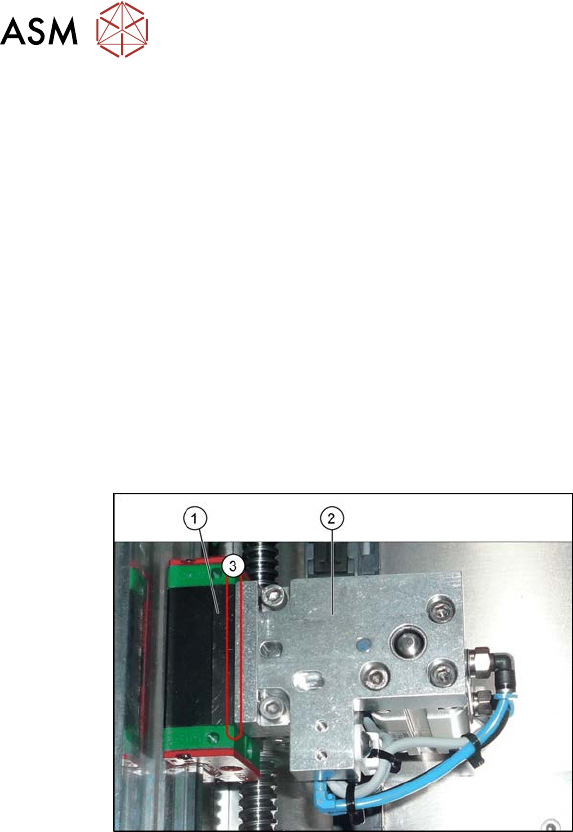
– Make sure that the cylinder unit lies flush against the trolley when you screw it into place.
(See also the following diagram)
– Replace any open cable ties.
Make sure that the cable ties and the heads of the cable ties do not rub against any parts
when you do this.
– After installation, make sure that the cylinder piston does not protrude above the other
parts. You might need to place washers between the adapter plate and the cylinder.
– After installation, check whether the cylinder unit can be moved along the entire width of
the conveyor. Make sure that there are no interfering edges etc.
– Check the distance to the clamping units. (see 7.5.9 "Information About the Clamping Unit
Versions (DC Only)" [}237]).
Fig.295: Fitting the cylinder unit
1. Trolley
2. Cylinder unit
3. The cylinder unit must lie flush against
the carriage. Make sure that there is no
gap in-between.
► Recalibrate all conveyor sides for lane1 and2 (both in Dual conveyor right mode and in
Dual conveyor left mode).