00197042-04_SM_X-Serie-S_Customer_EN.pdf - 第305页
8 Head exchange 8.1 Fast Hardware Exchange Service Manual SIPLACE X-Serie S 06/2019 305 8 Head exchange DANGER Observe User Manual ► Please observe the safety instructions in the user manual for all work! See also 2 8.2 …
7 Conveyor
7.12 Mapping
304 Service Manual SIPLACE X-Serie S 06/2019
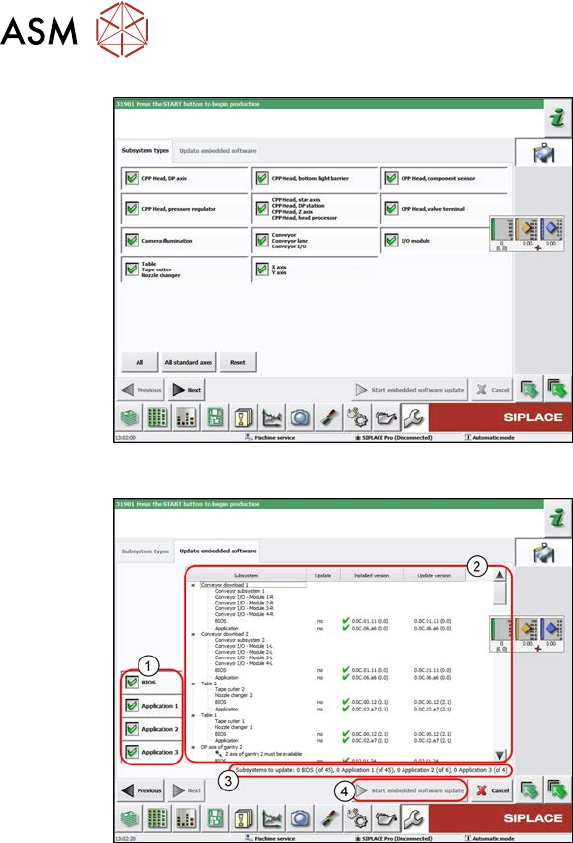
Fig.387: Select subsystem
► Select the subsystem for the eSW
download.
► Click on the Continue button.
Fig.388: Update machine menu
1. Selection buttons:
BIOS
Application 1
Application 2
Application 3
2. Shows the status of the individual sub-
systems
3. Update information
This shows you the number of subsys-
tems which still need to be down-
loaded.
4. Starts the download
7.12 Mapping
For information about mapping, refer to the technical information "Overview of all mapping plates
and allocation to the machines" [DE:TI2017‑10D04] [EN:TI2017‑10E04].
8 Head exchange
8.1 Fast Hardware Exchange
Service Manual SIPLACE X-Serie S 06/2019 305
8 Head exchange
DANGER
Observe User Manual
► Please observe the safety instructions in the user manual for all work!
See also
2 8.2 "Differentiation of the SIPLACE C&P20 head variants" [}309]
8.1 Fast Hardware Exchange
Fast Hardware Exchange (FHE) enables you to change a placement head within 15minutes.
NOTICE
SIPLACE CPP/M and SIPLACE C&P20M/M2/P/P2 only
FHE is only possible with SIPLACE CPP and SIPLACE C&P20M/M2/P/P2.
SIPLACE Twin needs to be manually processed and calibrated.
Equipment and tools
The head exchange kits contain all the tools required for replacing the relevant head:
●
Head Exchange Kit for SIPLACE CPx [03109694‑xx]
●
Head Exchange Kit for SIPLACE C&P20A [03109567‑xx]
●
Head Exchange Kit for SIPLACE CPP [03109570‑xx]
●
Head Exchange Kit for SIPLACE C&P20P [03114808‑xx]
●
Head Exchange Kit for SIPLACE C&P20P2 [03172724‑xx]
8 Head exchange
8.1 Fast Hardware Exchange
306 Service Manual SIPLACE X-Serie S 06/2019
8.1.1 Preparing the FHE in the Software
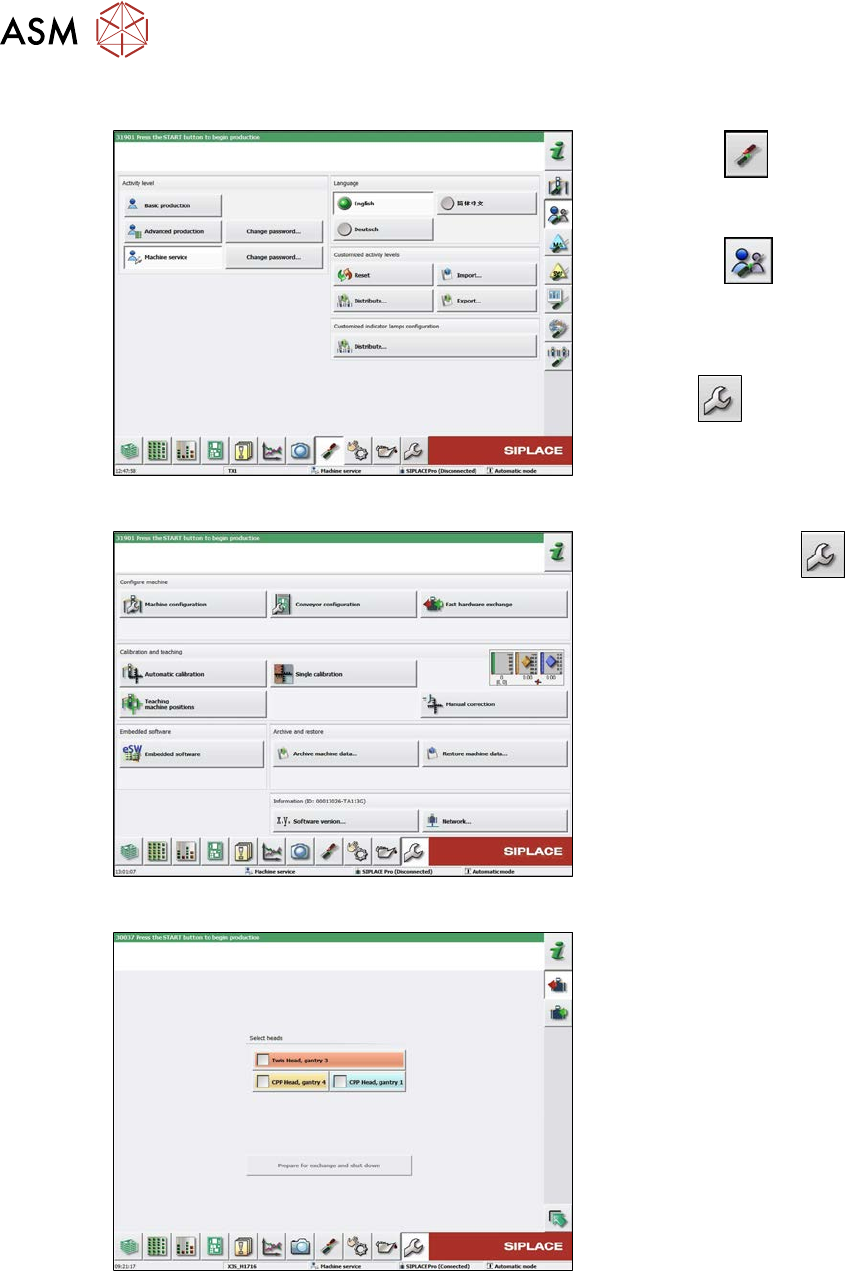
Fig.389: Select operator level
► Select the
button, to open the
Configure, update and calibrate the
machine menu.
► Select the
button to open the
Check and set user settings menu.
► Switch over to the operator level Ma-
chine service.
ð The
button will be shown.
Fig.390: Service menu
► Select the Service
button.
► Select the Fast hardware exchange
button.
Fig.391: Fast Head Exchange
► Highlight the heads to be replaced.
► Select the Prepare for exchange and
shutdown button.
The following actions will be carried out
automatically:
●
The current nozzles will be returned
and calibration nozzles will be picked
up, if present.
●
A nozzle and height reference run will
be carried out.
●
The machine will be shut down.
In a next step you can dismantle the heads.