CYCLONE-User-Manual.pdf - 第118页
User Manual For Cyclone LC Programmers 118 Figure 1 1-5: ImageKey Listing for Connected Cyclone This tab displays any ImageKeys that are present on the Cyclone to which the user is connected. Note: If there is an encrypt…
User Manual For Cyclone LC Programmers 117
configuration.
3) Stand Alone Programming (SAP) Data
This section contains all of the information a Cyclone needs to program a target as specified
in the image creation process. This includes all programming data, algorithms, scripts,
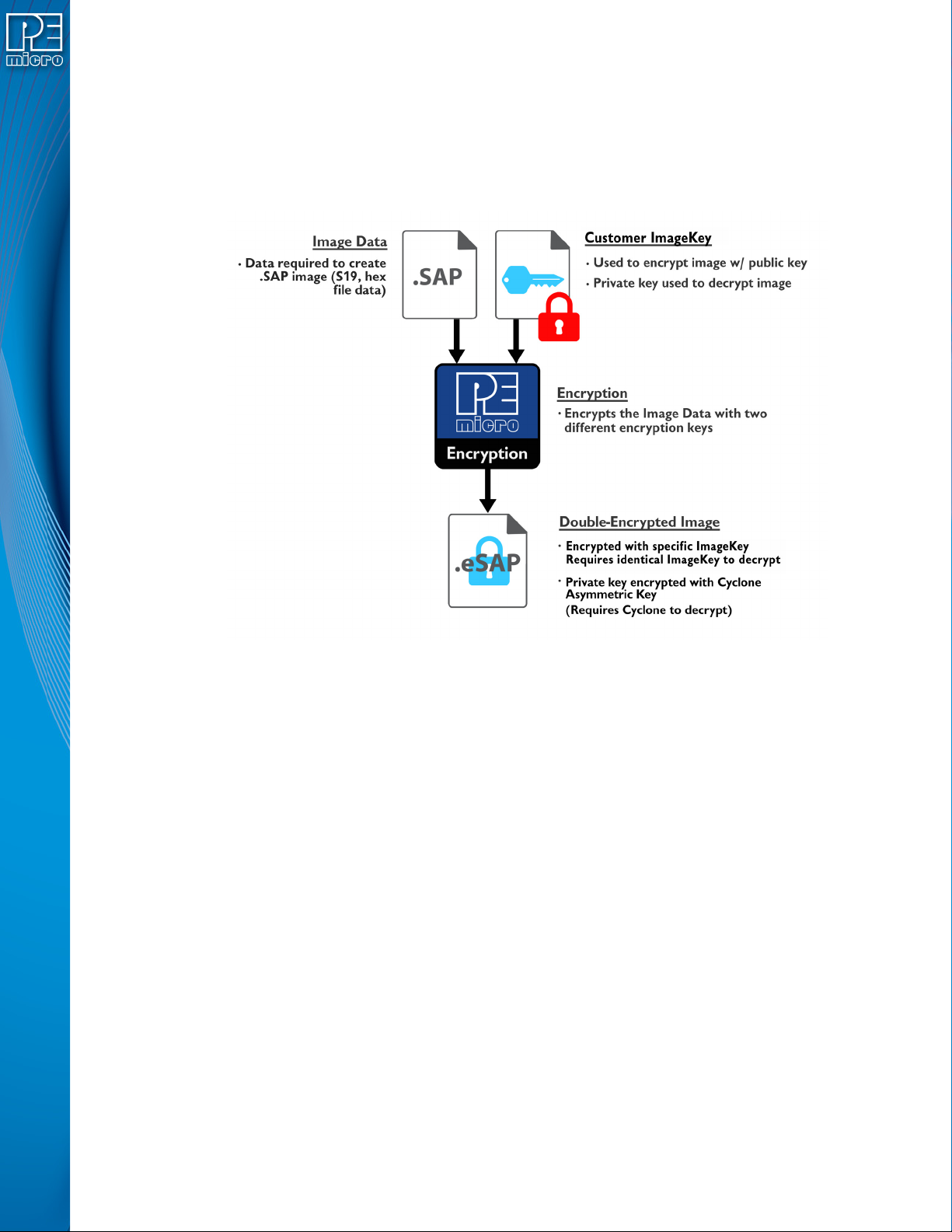
settings, etc. This section is encrypted with several keys, including the user generated
asymmetric key as well as a native asymmetric key used by the Cyclone. Once encrypted,
this section may not be decrypted except by the Cyclone during the programming process.
Figure 11-4: SAP Encryption
The end result of the encryption used to proceed the Stand Alone Programming Data is that the
section can only by decrypted and used internally on a Cyclone which has a copy of the specified
ImageKey provisioned within it. This eSAP section cannot be decrypted on a PC even with the
ImageKey
11.4 Managing Encryption For Production Programming
The steps needed to encrypt programming images using the Cyclone Image Creation Utility are
detailed in Section 6.1.8.1 - SAP Image Encryption. This section details how to successfully
implement the use of these encrypted (eSAP) images into the production programming process.
11.4.1 Provisioning a Cyclone with an ImageKey
Cyclones that have been provisioned with an ImageKey are the only Cyclones that are able to load
and program eSAP images encrypted with that ImageKey. When the user determines that one or
more Cyclone programmer(s) will have access to an encrypted image, they need to load the
ImageKey that was used to encrypt that image onto the Cyclone. This can be done with the
Cyclone Control Suite GUI, Console, or SDK. Instructions on the use of these Control Suite
options is explained in CHAPTER 8 - CYCLONE PROGRAMMER AUTOMATED CONTROL
(CYCLONE CONTROL SUITE).
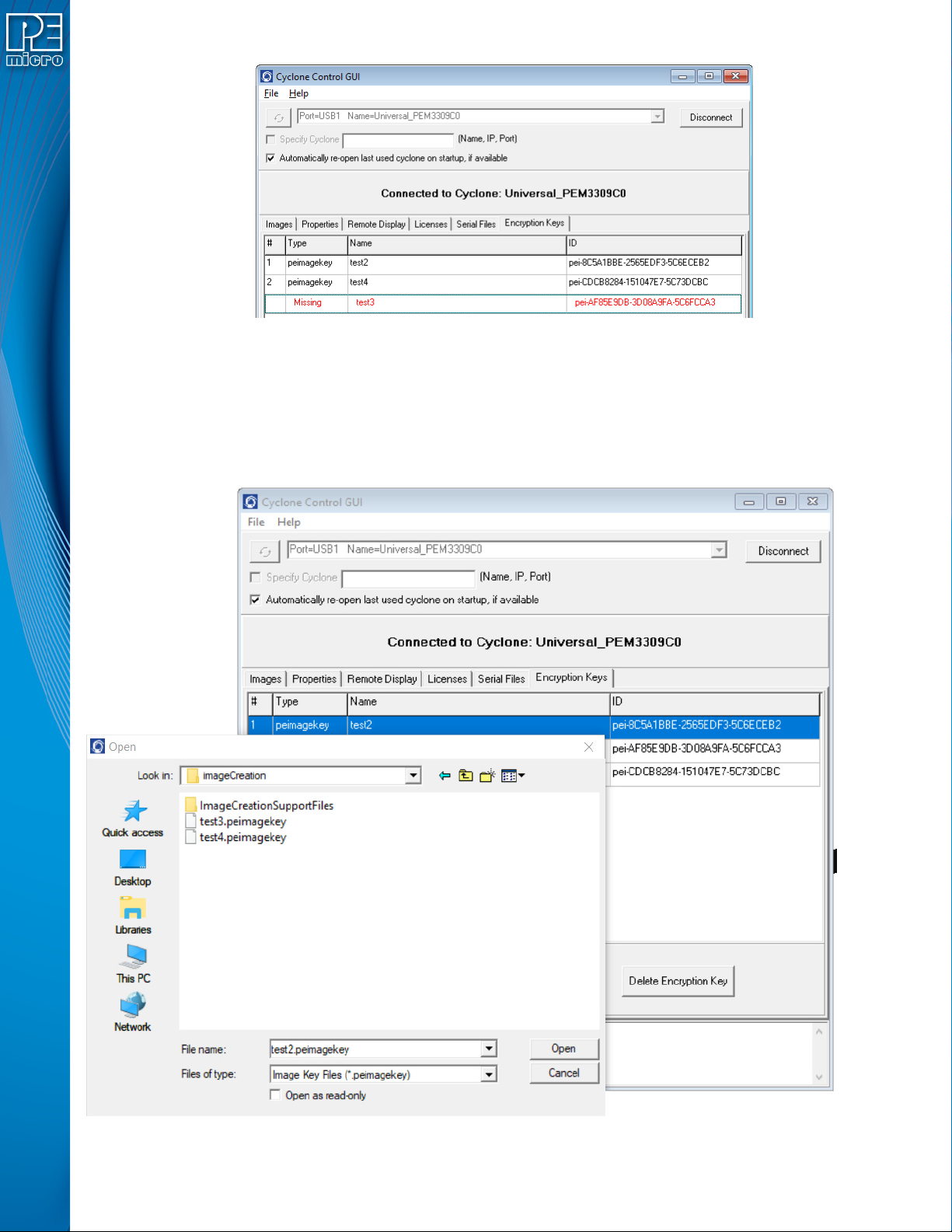
Figure 11-5 shows the Cyclone Control GUI with the Encrypted Keys tab selected.
User Manual For Cyclone LC Programmers 118
Figure 11-5: ImageKey Listing for Connected Cyclone
This tab displays any ImageKeys that are present on the Cyclone to which the user is connected.
Note: If there is an encrypted SAP image on the Cyclone whose corresponding ImageKey has been
removed, the required ImageKey will be displayed as “Missing,” along with its Name and ID.
To provision a Cyclone with an ImageKey, the user simply clicks the “Add Encryption Key” button
and browses for the ImageKey that they wish to load onto the connected Cyclone.
Figure 11-6: Browse for ImageKey
User Manual For Cyclone LC Programmers 119
11.4.2 Removing ImageKeys From A Cyclone
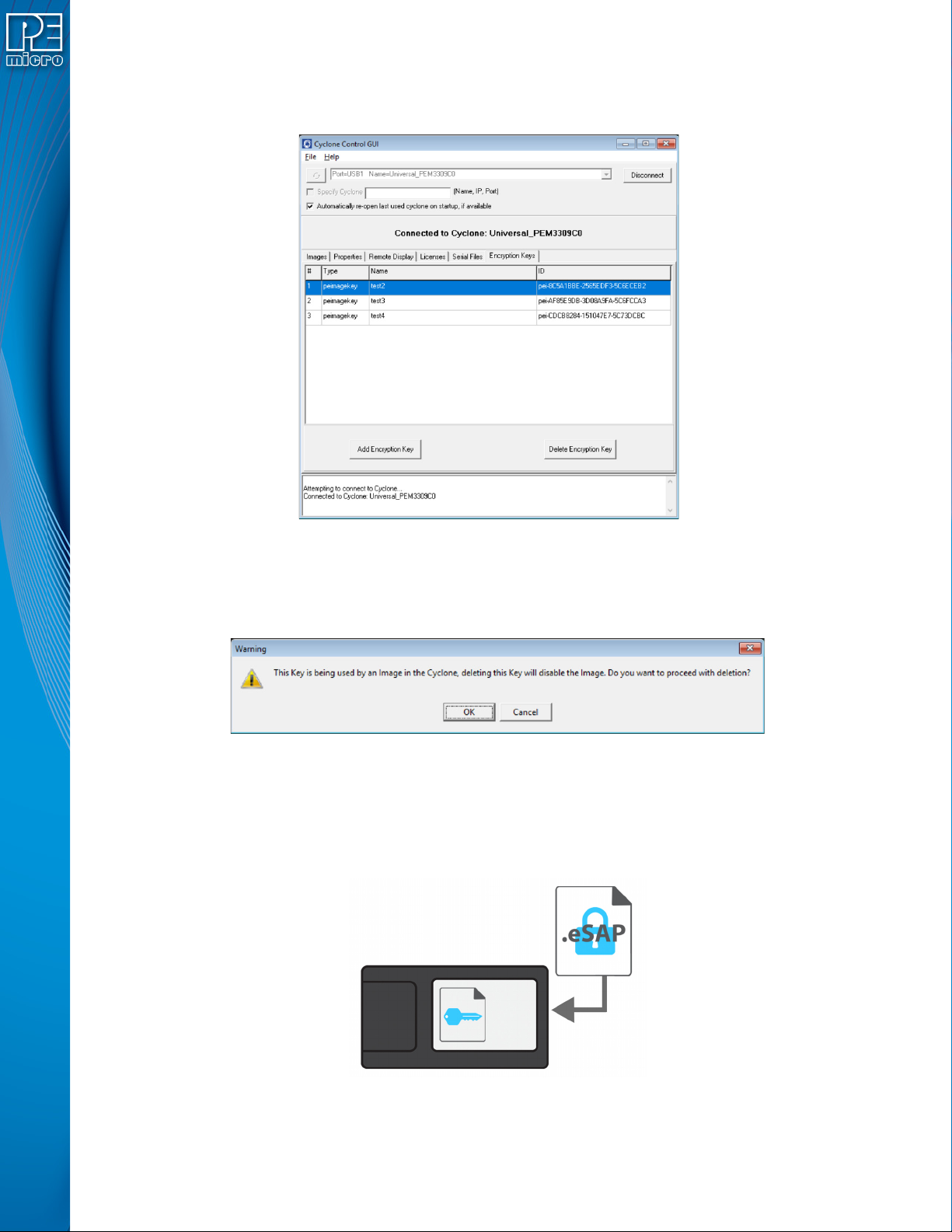
It is also easy to remove an ImageKey from the connected Cyclone. The user selects the
ImageKey that they wish to delete and hits the “Delete Encryption Key” button.
Figure 11-7: ImageKey Selected for Deletion
If the ImageKey that was selected for deletion is one that is required to decrypt one or more eSAP
images that are on the connected Cyclone, a warning message will be displayed when the Delete
button is pressed. The user may then cancel the deletion or confirm that they wish to proceed.
Figure 11-8: Warning: ImageKey Used By SAP Image on Connected Cyclone
11.4.3 Loading and Programming with Encrypted SAP Images
From the user's perspective, loading an eSAP file with the Cyclone Image Creation Utility and
programming with that eSAP file looks the same as loading/using a SAP file which is not encrypted
(as long as the appropriate ImageKey exists on the Cyclone).
Figure 11-9: Load Encrypted Image (eSAP) onto Cyclone with Corresponding ImageKey
When the user attempts to load an encrypted programming image onto a Cyclone, the Cyclone will