CYCLONE-User-Manual.pdf - 第9页
User Manual For Cyclone LC Programmers 9 1 INTRODUCTION PEmicro's Cyclone LC production programmers are powerful, fast, and feature rich in-circuit programming solutions. PEmicro offers two models which have the sam…

17.6 Debug Ports - CYCLONE-LC-UNIV ............................................................................................................149
17.7 International Shipping..................................................................................................................................149
17.8 Compliances/Standards ..............................................................................................................................149
User Manual For Cyclone LC Programmers 9
1 INTRODUCTION
PEmicro's Cyclone LC production programmers are powerful, fast, and feature rich in-circuit
programming solutions. PEmicro offers two models which have the same feature set and only vary
by the devices supported.
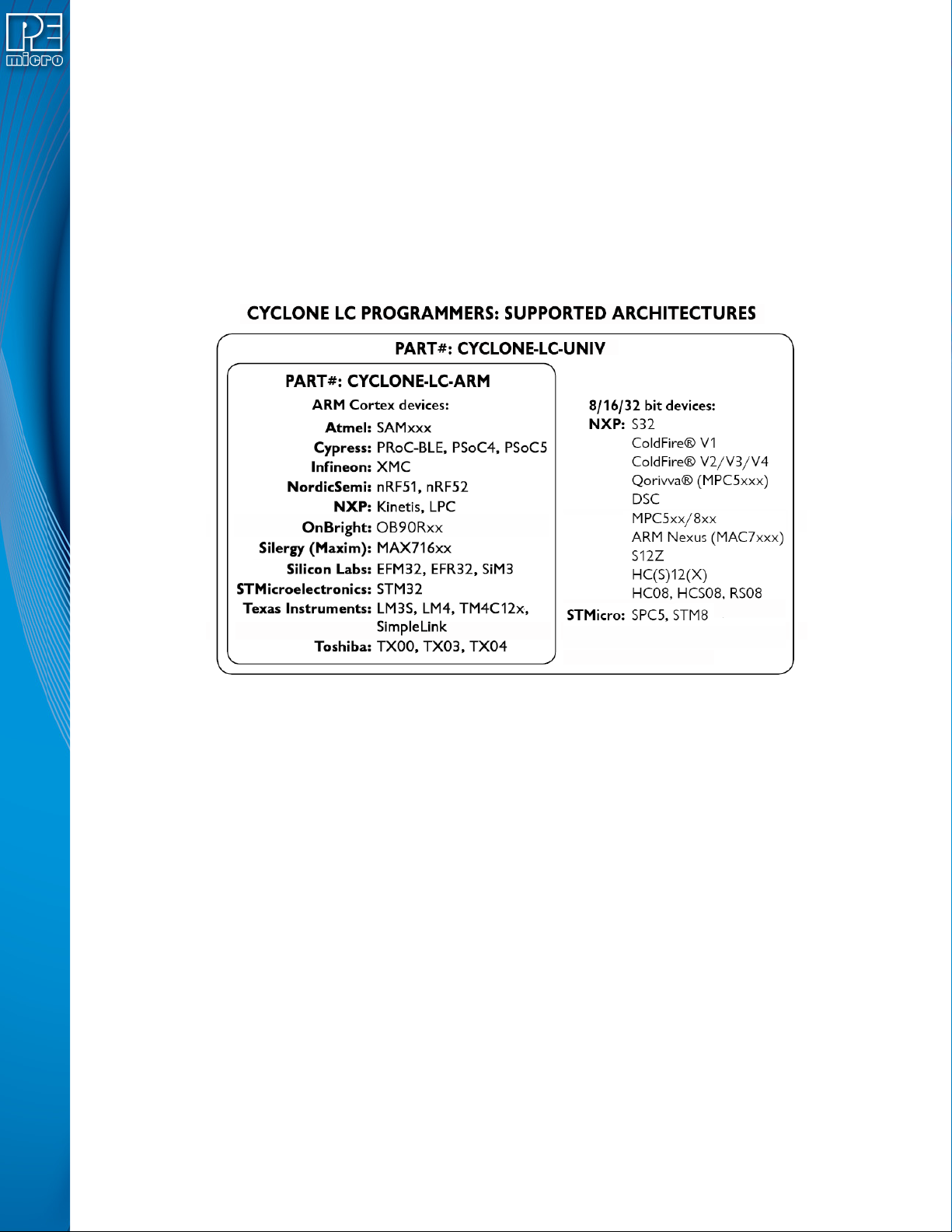
Part# CYCLONE-LC-ARM supports a wide variety of ARM Cortex devices.
Part# CYCLONE-LC-UNIV supports those ARM Cortex devices as well as the following NXP
device families: Kinetis, LPC, S32, MPC55xx-57xx), MPC5xx/8xx, DSC, S12Z, RS08, S08, HC08,
HC(S)12(X), ColdFire, and STMicroelectronics’ SPC5 & STM8.
Note: PEmicro refreshed Cyclone names and part numbers in July 2019. The part numbers listed on
earlier Cyclones will differ slightly. CYCLONE is now called Cyclone LC, however the hardware
has not changed.
Figure 1-1: Cyclone LC Supported Architectures
Cyclone LC programmers are designed to withstand the demands of a production environment.
They are Stand-Alone Programmers (SAP) that can be operated manually or used to host
automated programming. In manual SAP mode the Cyclone is operated using the touchscreen
LCD Menu and/or the Start button. Host-controlled SAP mode, for automated programming, is
accomplished using the Cyclone Control Suite.
1.1 Cyclone Feature Comparison
In addition to Cyclone LC programmers, PEmicro offers Cyclone FX programmers that include
enhanced speed, storage, and security features, plus advanced Cyclone control/automation
features which make them an incredibly powerful and versatile solution. See CHAPTER 16 -
CYCLONE FEATURE OVERVIEW / COMPARISON for a CYCLONE feature overview and
comparison with the Cyclone FX programmers.
1.2 Advanced Feature Licenses
PEmicro offers Cyclone LC users the flexibility to add many of the advanced security, automation/
control, and expandable memory features included with the Cyclone FX. These features can be
added by purchasing and installing the appropriate activation license.
1.2.1 ProCryption Security License
The ProCryption Security License offers two extremely valuable security features:

User Manual For Cyclone LC Programmers 10
1. RSA/AES encryption of programming images
Users create unique ImageKeys which are used to encrypt their programming images.
SAP images encrypted in this way can only be loaded onto a Cyclone or programmed with
a Cyclone if that Cyclone has been provisioned with the identical ImageKey.
2. The ability to restrict image programming by programming count or date range.
Programming restrictions on images are easily configured during the image creation
process.
Together these security features help keep the user’s valuable IP safe. The user should refer to
CHAPTER 11 - SAP IMAGE ENCRYPTION for more information on encrypted programming
images. Image restrictions are described in Section 6.1.8.2 - Image Restrictions.
1.2.2 Cyclone Control Suite Advanced Features License
Cyclone LC programmers include a basic version of the Cyclone Control Suite. The Advanced
Cyclone Control Suite Update license enables additional features that allow the user to:
• Add/Remove/Update many images in the Cyclone (Console, SDK, GUI)
• Gang program: Simultaneously control multiple Cyclones via the USB, Serial, or Ethernet
connections
• Program (and read) Dynamic Data in addition to fixed image data
• Access a Remote Display for the Cyclone
• Read/write Cyclone properties
• Read Image and target Properties and Status
• Compare images against a SAP file
This gives the user much more control and flexibility during the production process. The user
should refer to Section 8.1 - Overview Of Cyclone Control Suite for more information.
1.2.3 SDHC Port Activation License
The SDHC Port Activation License activates the SDHC port of the Cyclone LC. This allows the
user expand the storage capacity of the Cyclone by loading images onto SDHC cards. SDHC
cards can hold more and larger images than a Cyclone LC programmer can normally
accommodate. The Cyclone display and management tools allow the user to easily distinguish
between “internal” and “external” images. Section 6.2 - Managing Multiple SAP Images displays
an example of how external images are differentiated.