CYCLONE-User-Manual.pdf - 第119页
User Manual For Cyclone LC Programmers 119 1 1.4.2 Removing ImageKeys From A Cyclone It is also easy to remove an ImageKey from the connected Cyclone. The user selects the ImageKey that they wish to delete and hits the “…
User Manual For Cyclone LC Programmers 118
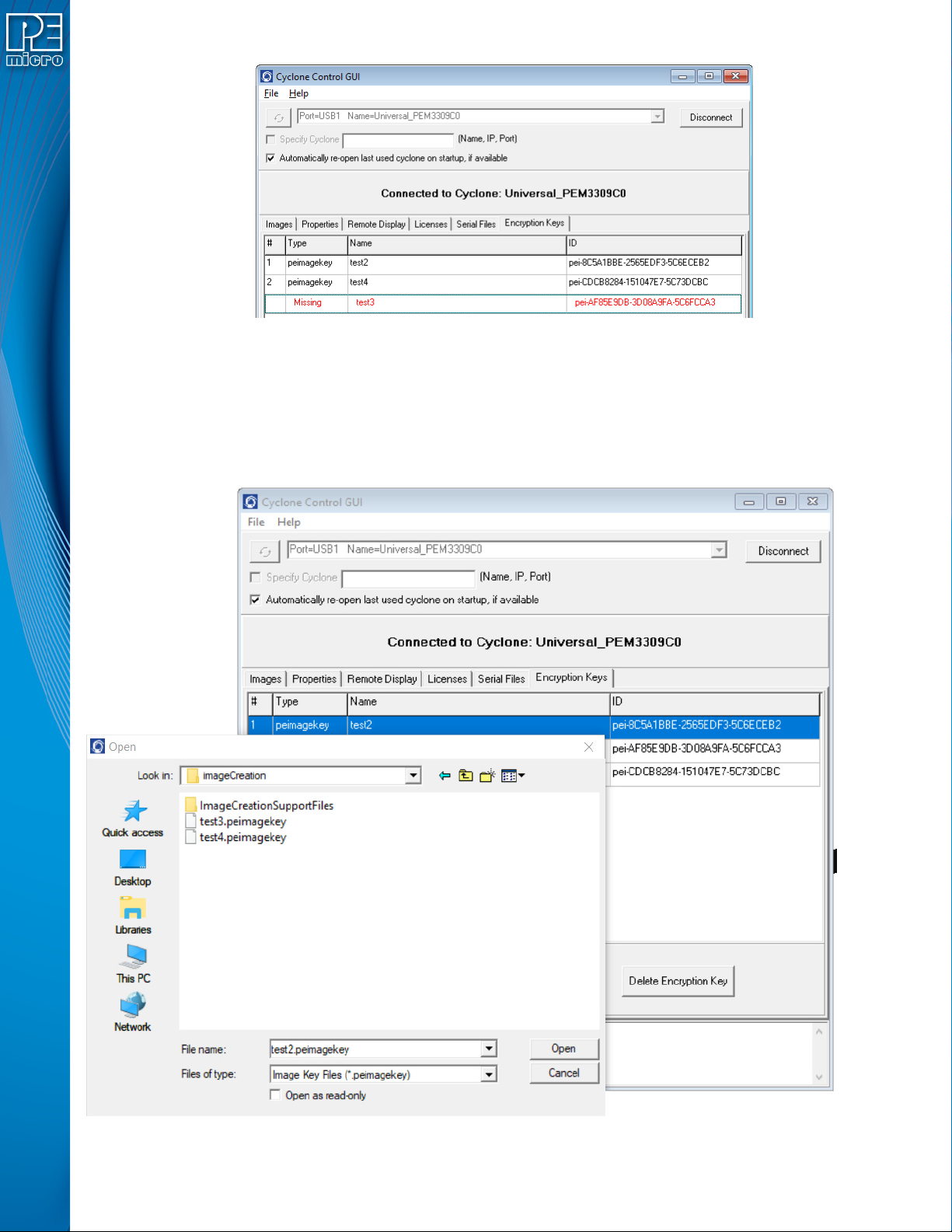
Figure 11-5: ImageKey Listing for Connected Cyclone
This tab displays any ImageKeys that are present on the Cyclone to which the user is connected.
Note: If there is an encrypted SAP image on the Cyclone whose corresponding ImageKey has been
removed, the required ImageKey will be displayed as “Missing,” along with its Name and ID.
To provision a Cyclone with an ImageKey, the user simply clicks the “Add Encryption Key” button
and browses for the ImageKey that they wish to load onto the connected Cyclone.
Figure 11-6: Browse for ImageKey
User Manual For Cyclone LC Programmers 119
11.4.2 Removing ImageKeys From A Cyclone
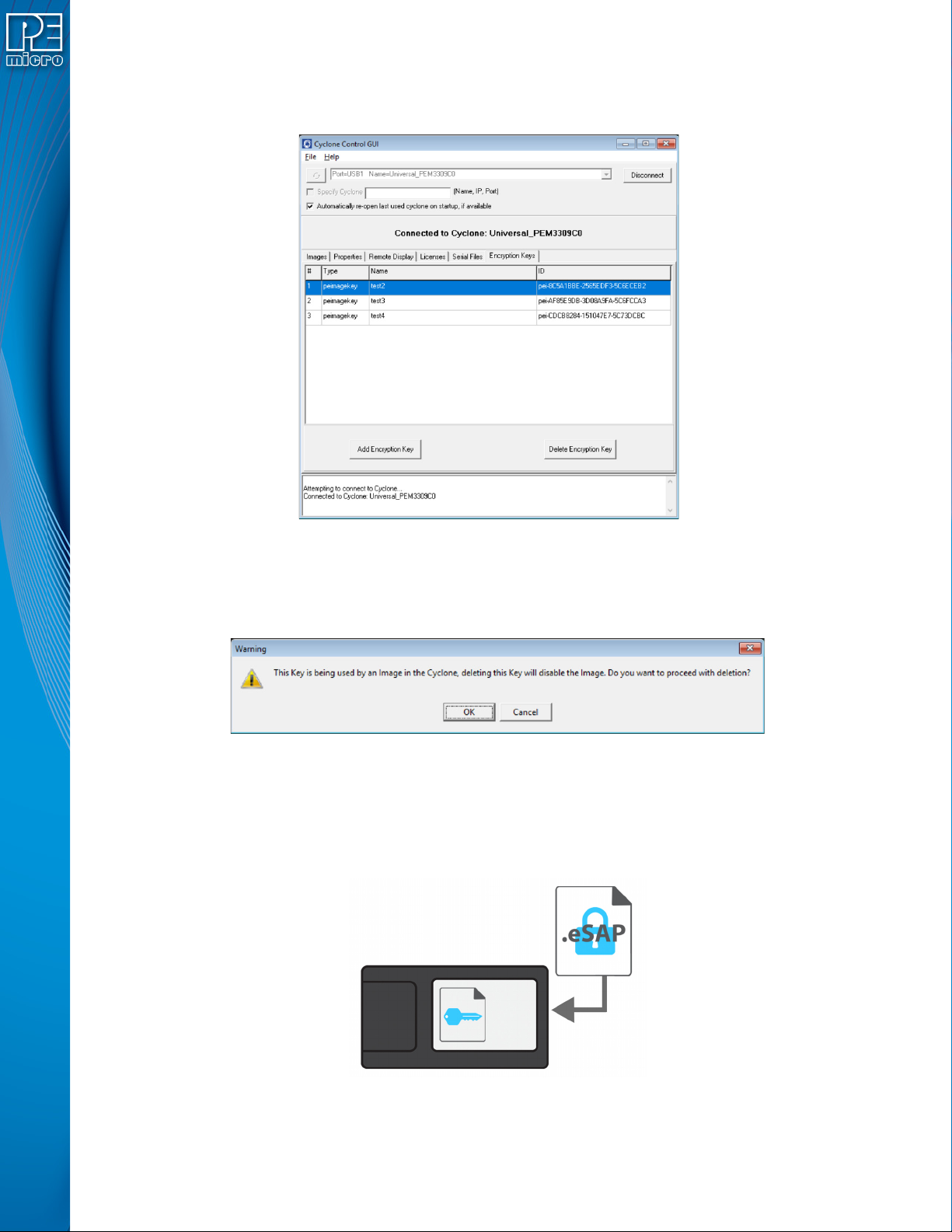
It is also easy to remove an ImageKey from the connected Cyclone. The user selects the
ImageKey that they wish to delete and hits the “Delete Encryption Key” button.
Figure 11-7: ImageKey Selected for Deletion
If the ImageKey that was selected for deletion is one that is required to decrypt one or more eSAP
images that are on the connected Cyclone, a warning message will be displayed when the Delete
button is pressed. The user may then cancel the deletion or confirm that they wish to proceed.
Figure 11-8: Warning: ImageKey Used By SAP Image on Connected Cyclone
11.4.3 Loading and Programming with Encrypted SAP Images
From the user's perspective, loading an eSAP file with the Cyclone Image Creation Utility and
programming with that eSAP file looks the same as loading/using a SAP file which is not encrypted
(as long as the appropriate ImageKey exists on the Cyclone).
Figure 11-9: Load Encrypted Image (eSAP) onto Cyclone with Corresponding ImageKey
When the user attempts to load an encrypted programming image onto a Cyclone, the Cyclone will
User Manual For Cyclone LC Programmers 120
refuse to load the image unless the appropriate ImageKey resides on the Cyclone. If the ImageKey
is present, the Cyclone will load the eSAP File and automatically decrypt it using both the matching
ImageKey and the Cyclone's internal decryption mechanism.
A user may create and use multiple ImageKeys and corresponding eSAP images on a single
Cyclone.
The decryption process is transparent to the user when the Cyclone goes to program the target.
The decrypted programming image appears as usual on the Cyclone menu screen. The user can
now program devices using the unencrypted SAP Image.
Figure 11-10: Decryption Occurs Automatically For Programming
11.4.4 Encryption Status of SAP Images
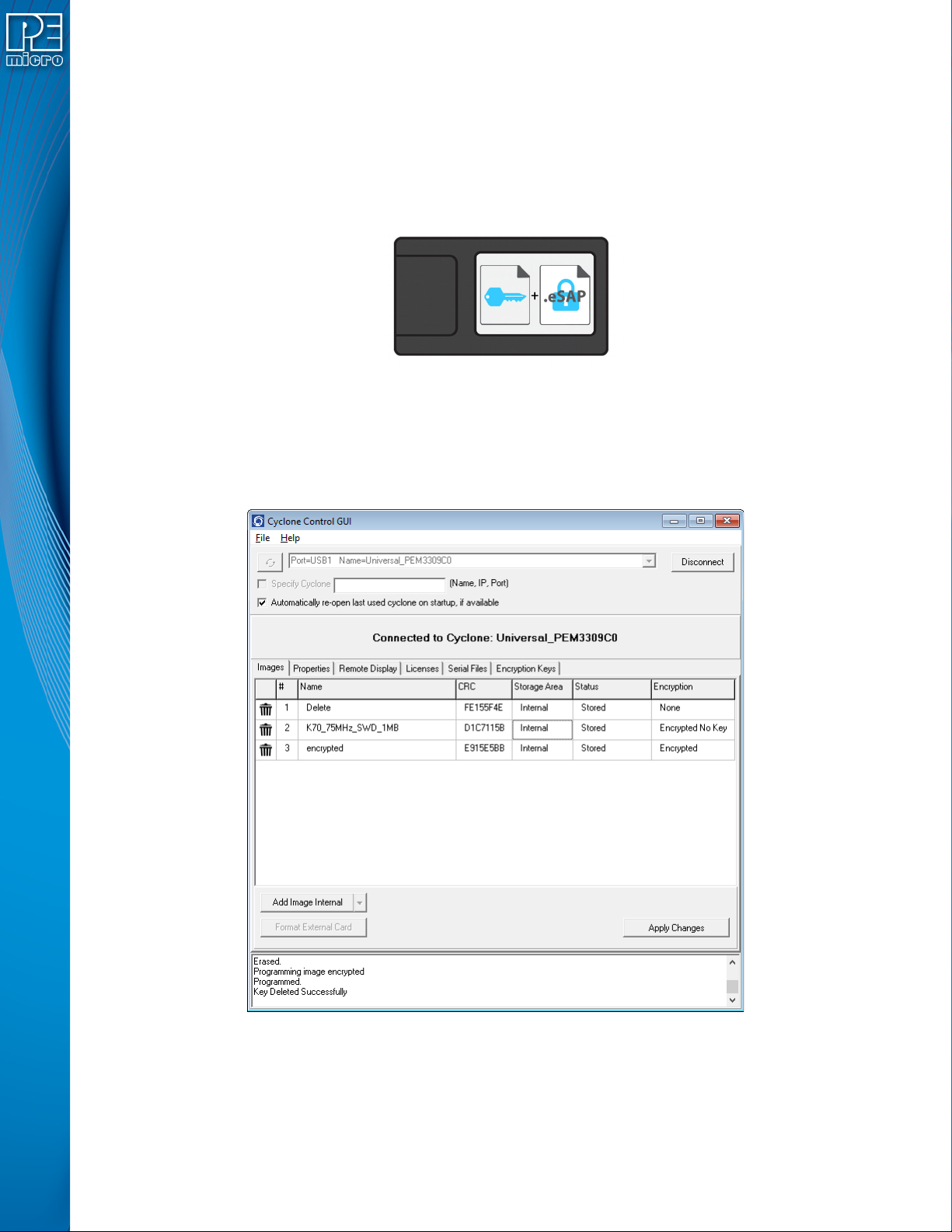
In the Images tab of the Cyclone Control Suite GUI the user can view the encryption status of SAP
images that reside on the connected Cyclone. Figure 11-11 shows the Cyclone Control GUI with
the Images tab selected.
Figure 11-11: SAP Image Listing for Connected Cyclone
The rightmost column, labeled Encryption, displays whether each SAP image is unencrypted
(“None”), encrypted with the required ImageKey present (“Encrypted”), or encrypted but missing
the ImageKey required to decrypt (“Encrypted No Key”).