CYCLONE-User-Manual.pdf - 第129页
User Manual For Cyclone LC Programmers 129 Figure 12-4: Cyclone Control GUI: Image Properties Window Deleting the image will not delete the associated serial number as other images stored on the Cyclone may be using that…

User Manual For Cyclone LC Programmers 128
12.6 Shared Serial Numbers
An important feature of the Serialize utility is that it automatically creates a Unique ID anytime a
serial file is created or modified. This allows Stand-Alone Programming (SAP) images stored on a
Cyclone to share serial numbers that reference the same unique serial number ID. There are
several cases where this is very useful. The first is when a user may want to update their firmware
for a product to a new version but needs the serial number to have persistence. The user may also
have different products that need to be programmed with different firmware, but need to have
those products draw from the same serialization sequence.
Note: Shared serial numbers require Cyclone LC firmware version 10.13 and later.
12.6.1 Example
This sections describes how a user might configure multiple SAP images on their Cyclone to share
the same Serial File.
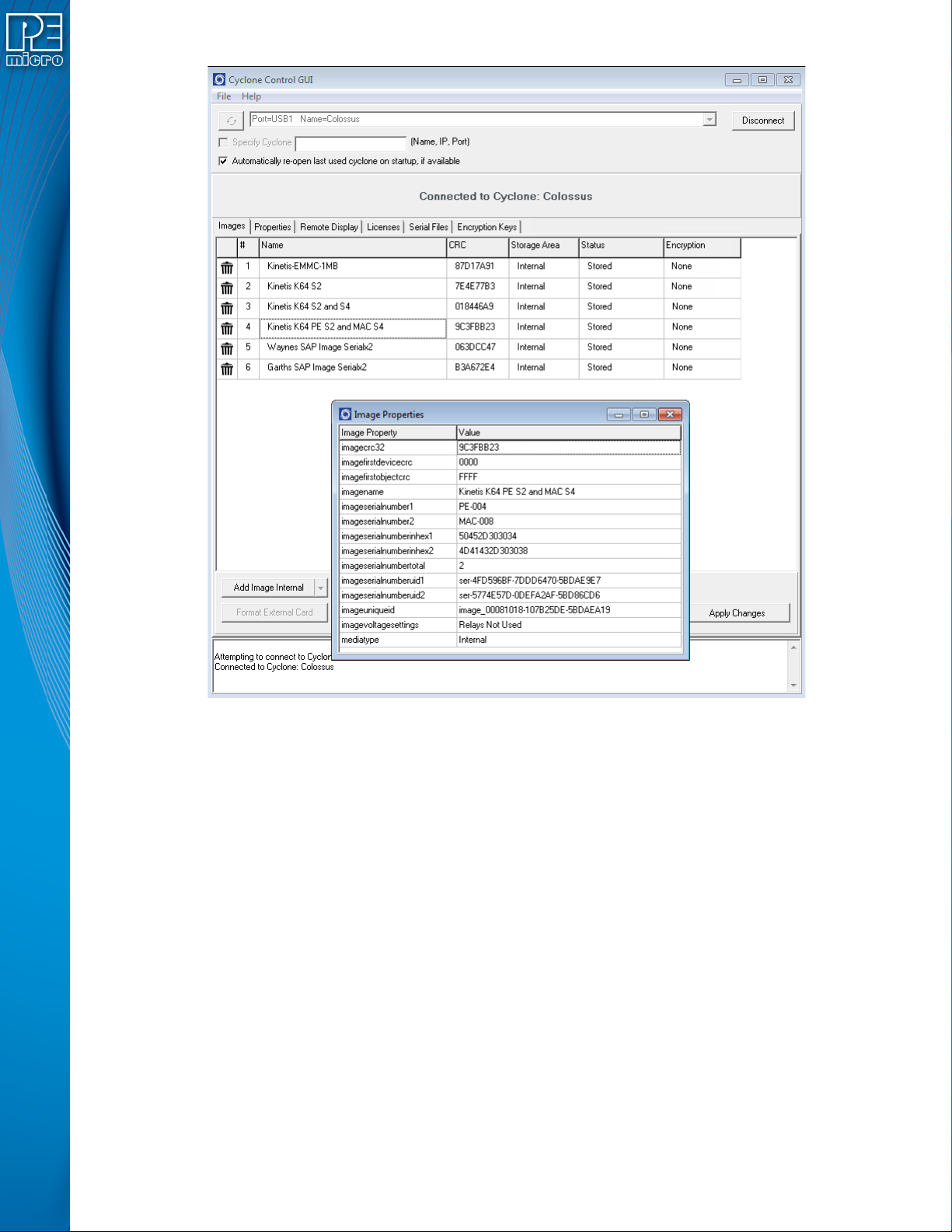
12.6.1.1 View and Edit SAP image Via Cyclone Control GUI
In Figure 13-4, the Cyclone Control GUI has been launched and is looking at the image contents
of the Cyclone. In this case it shows that the Cyclone named Colossus contains four different SAP
images.To view properties of a particular image properties, the user can simply right click on the
desired image and select “View properties” which will pop up an image properties window. In this
case it shows Image “Kinetis K64 PE S2 and Mac S4.” The Image Unique ID is visible, as well as
the two serial numbers and their respective Unique IDs. It also shows the next serial numbers (in
ASCII representation) to be programmed upon launch: PE-000 and MAC-00, respectively.
User Manual For Cyclone LC Programmers 129
Figure 12-4: Cyclone Control GUI: Image Properties Window
Deleting the image will not delete the associated serial number as other images stored on the
Cyclone may be using that same serial number. The serial number is tracked on the Cyclone by
the imageuniqueid JSON property. If any image is added back onto the Cyclone with that same
Serial Unique ID, it will continue to track with that same serial number at the latest count. So if a
user has a new version of their firmware, they can create a new SAP image that uses the same
serial number as the previous firmware (referenced by same serial unique ID) and the
programming will continue the serial number sequence from the current serial number state since
that serial file is stored on the Cyclone.
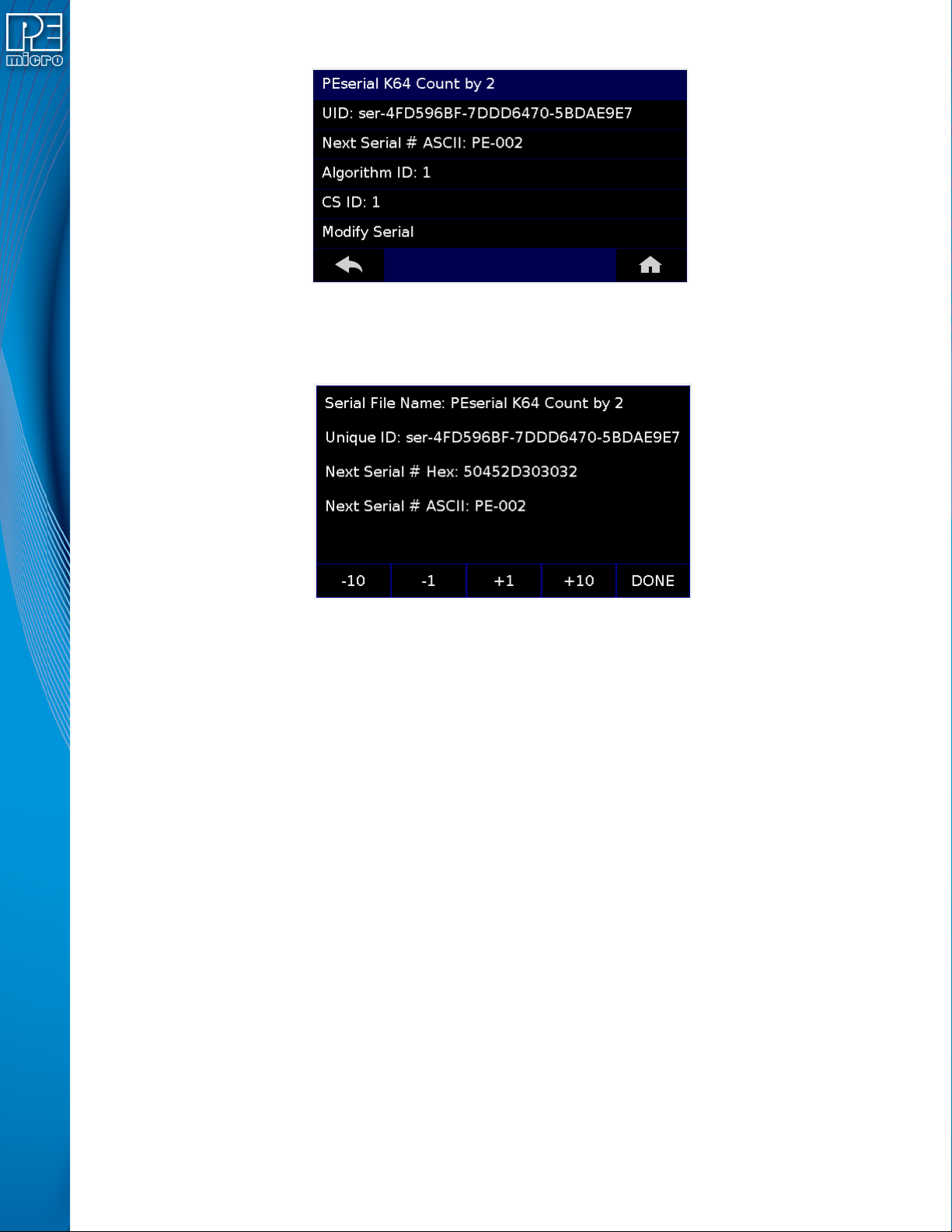
Once a SAP image is loaded with a serial file, and it is selected as the current image on the
Cyclone, it is possible to adjust the serial count. This is done by navigating through the following
screens on the Cyclone.
Menu → Current Image Options → Serial Number
If the image has more than one serial number incorporated into the SAP image, select the Serial
number which is to be modified. Otherwise just select ‘Modify Serial’.
User Manual For Cyclone LC Programmers 130
Figure 12-5: Cyclone Menu Selection
It is possible to Decrease or Increase the Next Serial by -10, -1, +1, +10. This is often done to
address issues in the production process, such as during initial setup.
Figure 12-6: Increase or Decrease Serial Number
Note that the Cyclone Control GUI has the ability to show all the Serial Files stored on the Cyclone.
This is done by opening a Cyclone, and then navigating to the Serial Files Tab, as shown in Figure
13-7. The Serial File tab has a Delete Button at the bottom which will remove the selected serial
file from view and reset the tracking of the serial number to its original state. This does not actually
delete the serial file. Once any programming is initiated using this ‘deleted’ serial file, the serial file
will reappear back in the list and program using the original serial number.