CYCLONE-User-Manual.pdf - 第127页
User Manual For Cyclone LC Programmers 127 CS serial_file_3.ser PS CM algorithm_file_2 SS object_code_2 EM PM VC CS serial_file4.ser PS CS serial_file5.ser PS 12.4.1 Invoking A Serial File V ia Command-Line The command t…
User Manual For Cyclone LC Programmers 126
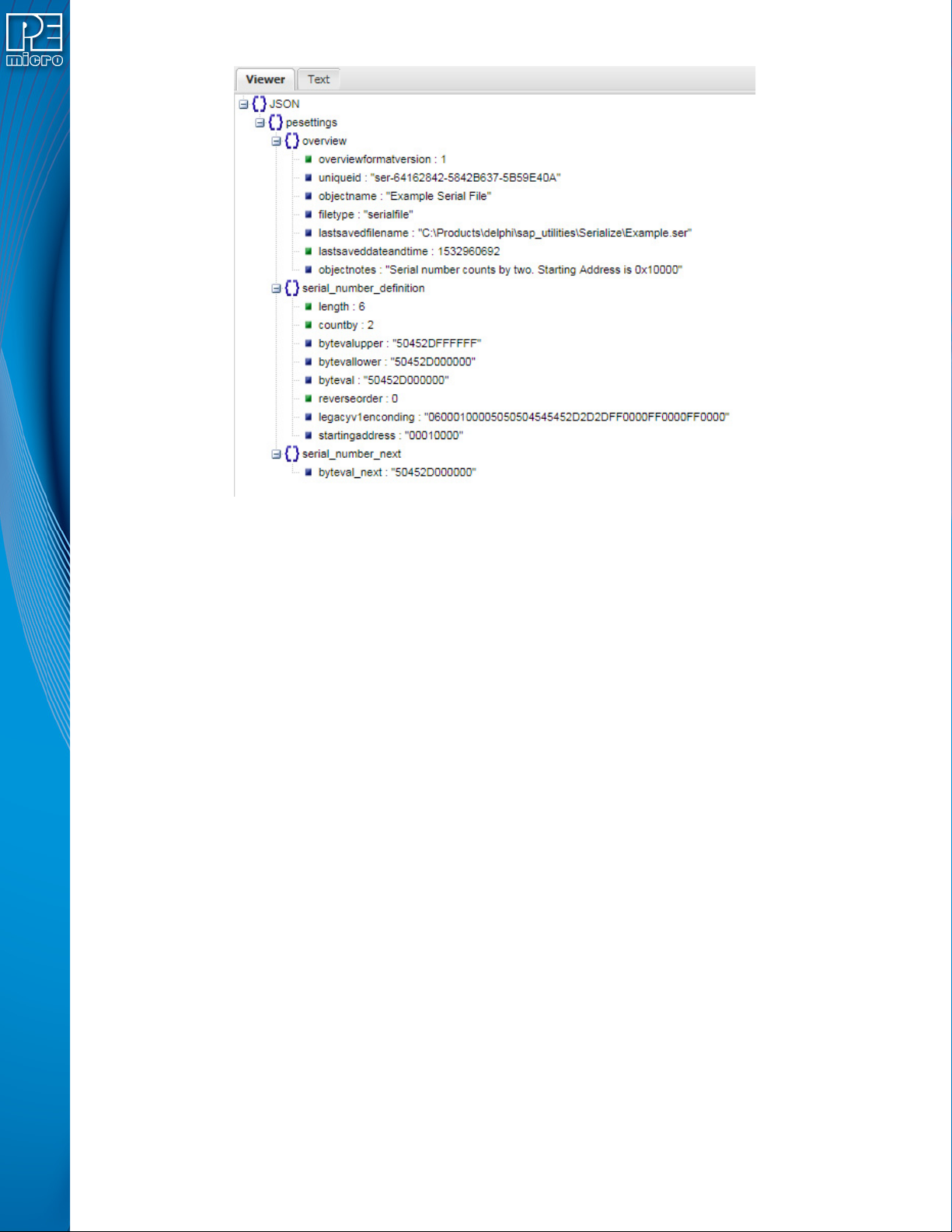
Figure 12-2: Example Serial File In JSON Viewer
12.4 Serial Number Handling
The Cyclone LC firmware implements the automatic serial number mechanism (see Section
5.2.2.3 - Serial Numbers). The same serial number files are used with the Cyclone Image
Creation Utility, and the same commands are used to specify the serial number file and initiate
serial number programming and incrementation. The serial number data structure is saved in the
SAP image. Once a “PS” command is carried out, a serial number is programmed into the target.
Only after all operations have been completed successfully does the Cyclone firmware
automatically increment the serial number and store it in the Cyclone’s flash for internal images (or
external CompactFlash for external SAP images).
The CS and PS commands are not present in the Cyclone Image Creation Utility until a valid
programming algorithm is specified.
To complement the Cyclone’s usage in production environments, the Cyclone supports multiple
serial number structures for each programming algorithm block. Each SAP image may contain
multiple programming algorithms for every memory module it needs to program, and each
programming algorithm block may contain multiple serial number structures. The SAP image
sequence below illustrates this briefly:
CM algorithm_file_1
SS object_code_1
EM
PM
VC
CS serial_file1.ser
PS
CS serial_file2.ser
PS
User Manual For Cyclone LC Programmers 127
CS serial_file_3.ser
PS
CM algorithm_file_2
SS object_code_2
EM
PM
VC
CS serial_file4.ser
PS
CS serial_file5.ser
PS
12.4.1 Invoking A Serial File Via Command-Line
The command to invoke the serial number file in PEmicro’s interactive programming software is
“CS Choose Serial File”. The command to actually program the serial number to target and
automatically increment the serial number afterward is “PS Program Serial Number”.
PEmicro’s command line software uses the same commands in a command line fashion to invoke
the serial number file, initiate its programming, and increment:
CS serial_number_file.ser
PS
12.5 Creating A SAP Image With Multiple Serial Numbers
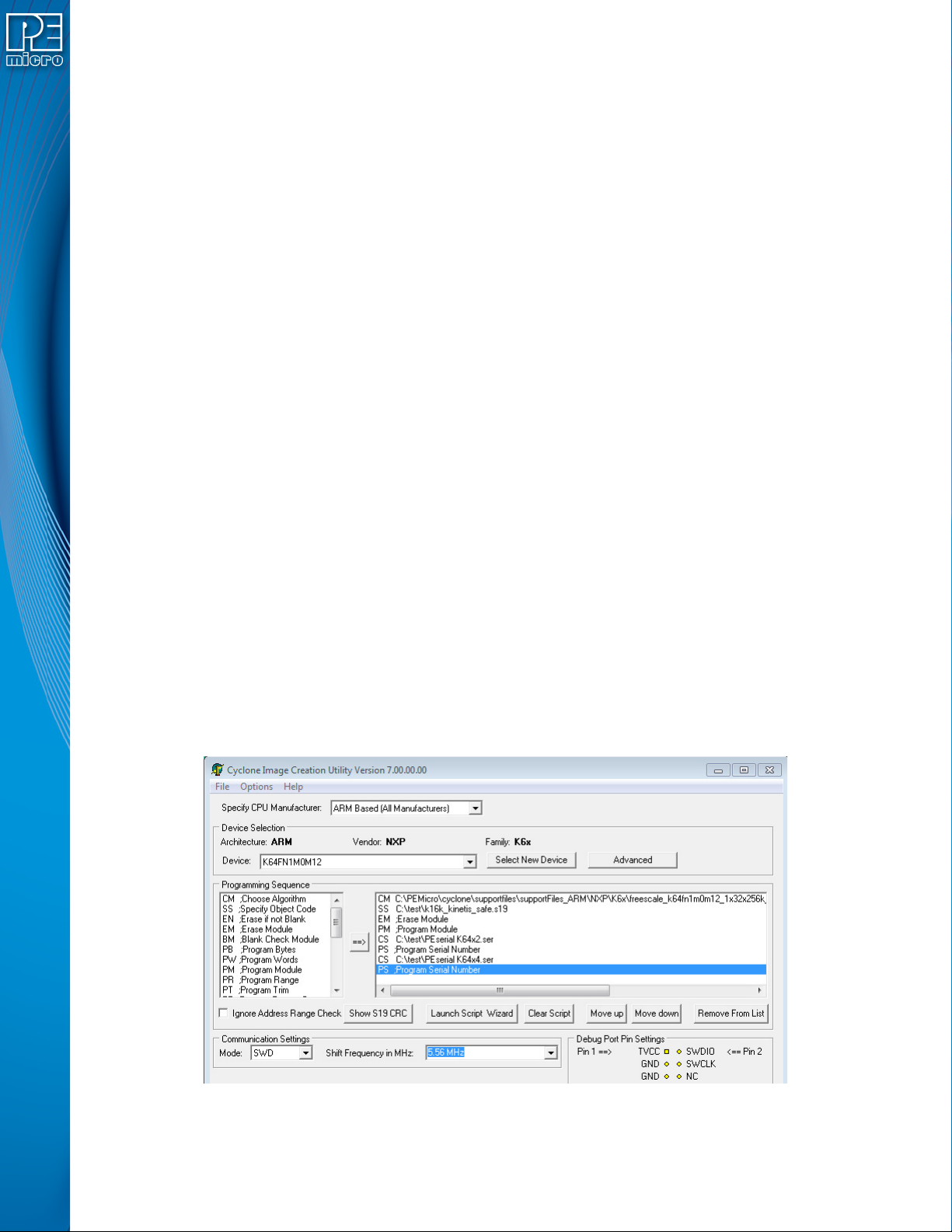
In the example shown in Figure 13-3, a SAP image was created that will select and program two
different serial numbers into different locations in memory as part of the programming sequence.
The first serial number counts by two with starting address 0x00020000 and the second serial
number counts by four with starting address 0x00021000.
As indicated by the programming sequence, first the Algorithm is selected, followed by the S19 file.
The part is erased, and then the s19 is programmed into the device. Once this is done, the first
serial file is selected and programmed, and then the second serial file. These same unique serial
numbers may be used by other SAP images, and each program will increase the serial number by
the designated count defined in the serial number file.
Figure 12-3: Cyclone Image Creation Utility: Serial Files In Programming Sequence

User Manual For Cyclone LC Programmers 128
12.6 Shared Serial Numbers
An important feature of the Serialize utility is that it automatically creates a Unique ID anytime a
serial file is created or modified. This allows Stand-Alone Programming (SAP) images stored on a
Cyclone to share serial numbers that reference the same unique serial number ID. There are
several cases where this is very useful. The first is when a user may want to update their firmware
for a product to a new version but needs the serial number to have persistence. The user may also
have different products that need to be programmed with different firmware, but need to have
those products draw from the same serialization sequence.
Note: Shared serial numbers require Cyclone LC firmware version 10.13 and later.
12.6.1 Example
This sections describes how a user might configure multiple SAP images on their Cyclone to share
the same Serial File.
12.6.1.1 View and Edit SAP image Via Cyclone Control GUI
In Figure 13-4, the Cyclone Control GUI has been launched and is looking at the image contents
of the Cyclone. In this case it shows that the Cyclone named Colossus contains four different SAP
images.To view properties of a particular image properties, the user can simply right click on the
desired image and select “View properties” which will pop up an image properties window. In this
case it shows Image “Kinetis K64 PE S2 and Mac S4.” The Image Unique ID is visible, as well as
the two serial numbers and their respective Unique IDs. It also shows the next serial numbers (in
ASCII representation) to be programmed upon launch: PE-000 and MAC-00, respectively.