CYCLONE-User-Manual.pdf - 第140页
User Manual For Cyclone LC Programmers 140 15 ERROR CODES The Cyclone LC will indicate errors using the following codes. Please contact PEmicro if instructed or if you are unsure of the specific meaning of an error code.…
User Manual For Cyclone LC Programmers 139
Where:
[old_SAP_path] The relative or full path to the SAP file. Usually has the .SAP file
extension.
[new_SAP_path] Optional parameter where the user can specify a relative or full path to
dump the output of the conversion. If path and file name matches the
input, then the output file will replace the input file. If this parameter is not
specified, the output will be dumped in the same path as the input file
renamed with postfix “_2”. For example if the input is myfile.SAP, then the
output will be myfile_2.SAP and will not replace the original input file.
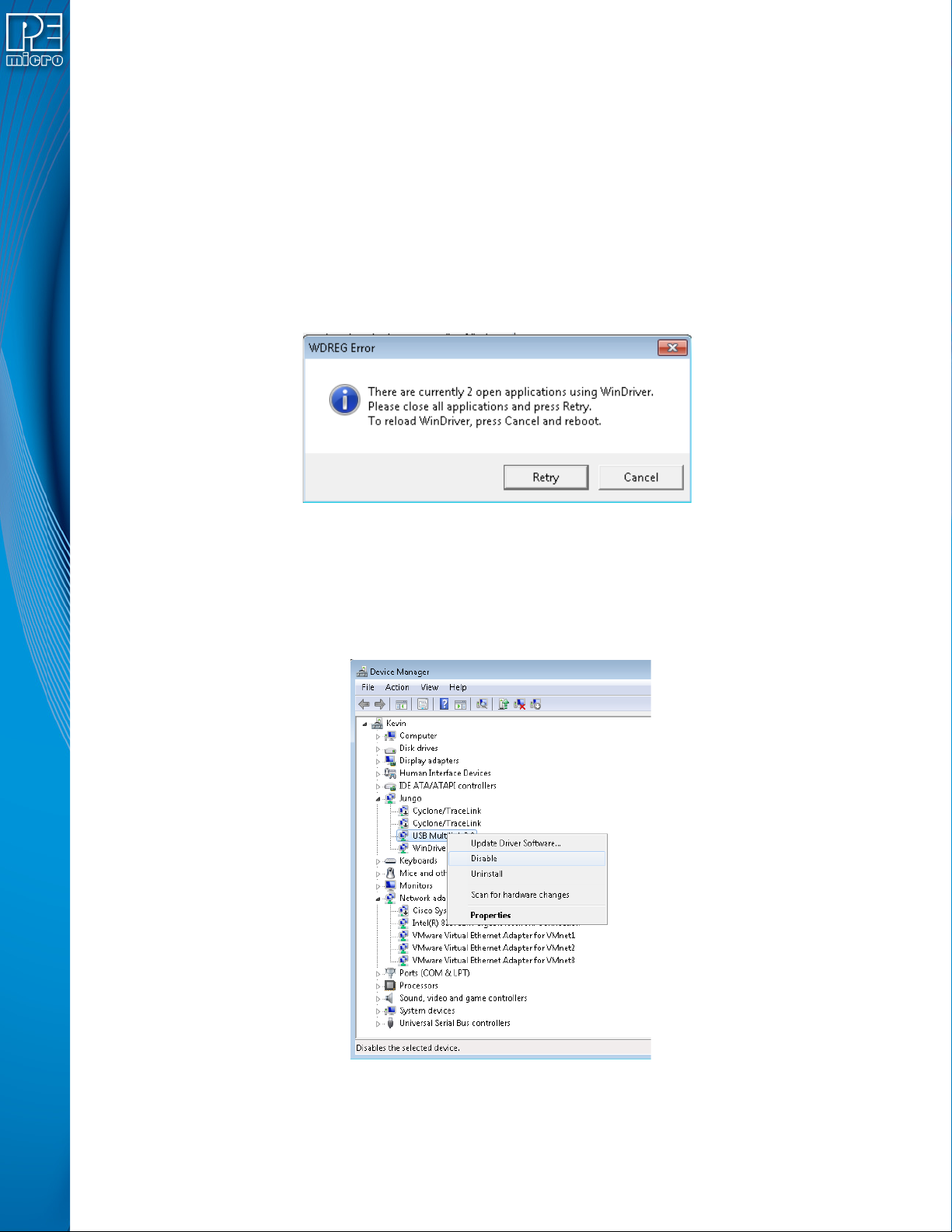
14.3 When Trying To Install The CYCLONE Software, A Popup WDREG Error Occurs Telling
Me That There Are Open Devices Using WinDriver.
Figure 14-1: WDREG Error Message
The error is that the USB Driver (WinDriver) used by PEmicro devices and software is currently in
use and can't be upgraded as such. The simple solution is to shut down any PEmicro software and
also unplug any PEmicro Cyclone, Multilink, and OpenSDA devices. If the error pops back up upon
Retry, or you are remote from the machine itself, go to the Windows Device Manager and right
click on each Multilink, Cyclone, and OpenSDA device and select “Disable”.
Figure 14-2: Disable Interfaces In Windows Device Manager
Upon clicking the Retry button in the installer, the drivers should now install and the devices will be
automatically re-enabled.

User Manual For Cyclone LC Programmers 140
15 ERROR CODES
The Cyclone LC will indicate errors using the following codes. Please contact PEmicro if
instructed or if you are unsure of the specific meaning of an error code.
Note: Some code numbers in the sequence are skipped, these are old codes that have been removed.
15.1 Debug Mode Communication Related Errors
$0001: No target device response.
$0002: Invalid target device response.
$0003: Programming operation canceled.
$0004: Error while waiting for programming operation to complete.
$0005: Error attempting to detect the communication speed.
$0006: Error: Attempt to unsecure the device was unsuccessful.
$0007: An error occurred while entering debug mode.
$0008: Error entering debug mode. The device is secured.
$0009: Error entering debug mode for verification.
$000A: Error writing data to target.
$000B: Error enabling or disabling device for programming.
$000C: Error performing timing test.
$000E: Error: Vendor hardware is not supported.
$000F: Error generating VPP high voltage.
15.2 SAP Image Handling Related Errors
$0011: No image selected
$0012: Error validating image CRC
$0014: SAP image storage was not initialized
$0015: SAP image transfer error, odd length is not allowed
$0016: SAP image transfer error, invalid start address
$0017: SAP image transfer error while writing to storage
$0018: Error writing the serial number structure storage
$0019: Error writing the menu structure storage
$001A: Error erasing internal memory
$001B: Image requires higher firmware version
$001C: Image version is not supported. Please update firmware.
$001D: Out of RAM memory. Try reset Cyclone.
$001E: SAP image storage failure
$001F: Old SAP image format, not supported.
$0020: Programming image is not accessible.
$0021: Another image is being loaded. Do not interrupt.
$0022: Image already exists.
$0023: invalid Image ID. Image ID exceeds the maximum number of images allowed.
$0024: invalid Image ID. Image ID exceeds the total number of images available in the cyclone.
$0025: The ImageKey needed for decryption is not found on the Cyclone.
$0026: Image file can not be loaded.

User Manual For Cyclone LC Programmers 141
15.3 SAP Communication Handling Related Errors
$0031: System reset occurred
$0032: System is busy with other operations.
$0033: System is busy with too many inquiries.
$0034: System has not finished initialization.
15.4 SAP Algorithm Header Operation Handling Related Errors
$0061: Undefined header operation
$0062: Operation in algorithm header has failed.
15.5 SAP Operation Related Errors
$0081: SAP operation is not supported.
$0082: Target type mismatch
$0083: SAP operation canceled
$0084: Running algorithm failure
15.6 SAP Blank Check Range and Module Related Errors
$1001: Blank Check is not supported by this algorithm.
$1002: Blank Check algorithm was not found.
$1003: Blank Check operation failed
15.7 SAP Erase Range and Module Related Errors
$2001: Erase error, algorithm not supported
$2002: Erase error, algorithm not found
$2003: Erase error, module failed or canceled
$2004: Erase error, module failed, target is still secured
$2005: Erase error, module not performed, data is preserved
15.8 SAP Program Byte, Word, and Module Related Errors
$3001: Program error, algorithm not supported
$3002: Program error, algorithm not found
$3003: Program operation failed or was canceled
$3004: Program operation failed, write protected
$3005: Program error, Data size exceeds the limit
$300A: Error during reading data range, invalid data length
$300B: Error during reading data range, invalid start address
$300C: Error during reading data range, no target power
$300D: Error during programming data range, invalid data length
$300E: Error during programming data range, invalid start address
$300F: Error during programming data range, no target power
$3010: Error reported while running the custom test application (RT) on the target.
$3011: Error displaying feature
$3012: Error programming feature
$3013: Error overlaying feature