CYCLONE-User-Manual.pdf - 第121页
User Manual For Cyclone LC Programmers 121 1 1.5 Safer Production That's Easy T o Implement SAP Image encryption with Cyclone programmers is simple to implement and helps keep valuable intellectual property safe. Pr…
User Manual For Cyclone LC Programmers 120
refuse to load the image unless the appropriate ImageKey resides on the Cyclone. If the ImageKey
is present, the Cyclone will load the eSAP File and automatically decrypt it using both the matching
ImageKey and the Cyclone's internal decryption mechanism.
A user may create and use multiple ImageKeys and corresponding eSAP images on a single
Cyclone.
The decryption process is transparent to the user when the Cyclone goes to program the target.
The decrypted programming image appears as usual on the Cyclone menu screen. The user can
now program devices using the unencrypted SAP Image.
Figure 11-10: Decryption Occurs Automatically For Programming
11.4.4 Encryption Status of SAP Images
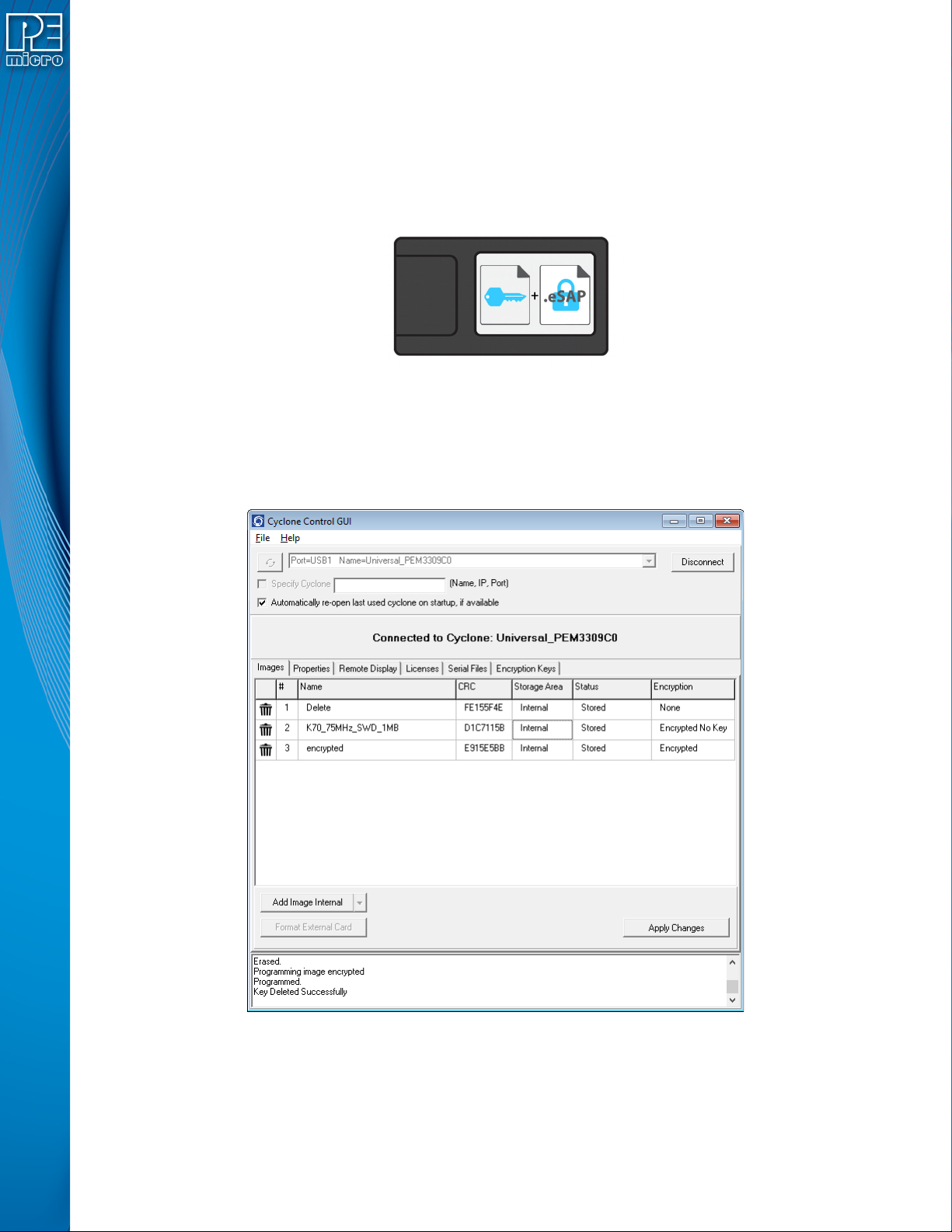
In the Images tab of the Cyclone Control Suite GUI the user can view the encryption status of SAP
images that reside on the connected Cyclone. Figure 11-11 shows the Cyclone Control GUI with
the Images tab selected.
Figure 11-11: SAP Image Listing for Connected Cyclone
The rightmost column, labeled Encryption, displays whether each SAP image is unencrypted
(“None”), encrypted with the required ImageKey present (“Encrypted”), or encrypted but missing
the ImageKey required to decrypt (“Encrypted No Key”).

User Manual For Cyclone LC Programmers 121
11.5 Safer Production That's Easy To Implement
SAP Image encryption with Cyclone programmers is simple to implement and helps keep valuable
intellectual property safe. Protected programming images can safely be sent electronically to
remote production facilities. This adds much needed convenience and peace of mind to the
production process.

User Manual For Cyclone LC Programmers 122
12 AUTOMATIC SERIAL NUMBER MECHANISM
When producing a microcontroller- or microprocessor-based product, it is often useful to program
a unique serial number into the permanent memory (FLASH) of the product.
PEmicro offers a serial number mechanism to automate this process. Each time you issue a
serialization command in the programming software, the current serial number is programmed at a
specified address. In addition, the serial number is incremented to the next available serial number
and saved for future serialized programming operations.
The Cyclone adopts this automatic serial number mechanism for its stand-alone operations. The
user can create a Serial File using PEmicro’s Serialize Utility and then include commands in the
programming sequence of the programming image to implement that Serial File. If needed,
adjustments can later be made to the serial number of a programming image.by using the Cyclone
menu screen (see Section 5.2.2.3 - Serial Numbers).
12.1 Understanding Serialization
The automatic serial number mechanism supports serial numbers from 1 to 16 bytes in length.
Each byte of a serial number ranges between a lower and an upper bound. This approach allows
the individual bytes of the serial number to have distinct properties. Some of the forms these
properties can take are:
Type Lower Bound (hex) Upper Bound (hex)
Constant Constant Constant
Binary 00 FF
ASCII Printable 20 7E
ASCII Numeric 30 39
ASCII Upper Case Letter 41 5A
ASCII Lower Case Letter 61 7A
Other XX YY
Each serial number and its properties are stored in a separate file. Any file name can be used for
the serial number file, however the extension .ser is normally appended because it makes it
simpler to locate the file.
A utility called SERIALIZE has been developed to make it easy to create, visualize, edit, and
maintain these serial number files.
12.2 Serialize Utility
The serialize utility allows the user to create a serial number file with a serial number that is
anywhere from 1 to 16 bytes long. Each byte may be bounded as a full binary or as a Number,
Constant, Alpha Uppercase, Alpha Lowercase, or ASCII printable character. The serial number file
also has a field for a starting hex address that may range from 00000000 to FFFFFFFF. Serial
numbers can be programmed in order or in reverse order.