CYCLONE-User-Manual.pdf - 第71页
User Manual For Cyclone LC Programmers 71 MSVC# 2017 Projects INST ALLDIR\cycloneControl\controlsdk\examples\msvcsharp\visual_sap_control\cyclone_control _api.cs NI LabVIEW 2018 Projects INST ALLDIR\cyclone\cycloneContro…

User Manual For Cyclone LC Programmers 70
The sample applications come with build scripts defined for ease of use. Simply run the scripts and
you should be able to build the sample application without any modifications. The callable interface
routines are defined in:
INSTALLDIR\cycloneControl\controlsdk\examples\pascal\cyclone_control_api.pas
INSTALLDIR\cycloneControl\controlsdk\examples\c\cyclone_control_api.h
8.2.2 Backwards Compatibility With Classic Cyclone Control API
The “CycloneControlSDK.dll” is backwards compatible with many of the classic Cyclone Control
API calls. In each header file, there is a constant variable or define (typically DLL_filename) which
is declared as the file name of the DLL. The value of this variable should be changed to new
filename “CycloneControlSDK.dll” instead of the old "CYCLONE_CONTROL.dll". After this
modification, rebuild the project and it should continue working with the new DLL.
8.2.3 Getting Started with the Cyclone Control DLL
This section outlines the steps you need to take to begin developing your own custom application
and offers tips and suggestions to get the Cyclone Control DLL working with your PEmicro
hardware smoothly.
BLOG TIP: Please click here to visit the PEmicro blog for a detailed example of how to set up a
programming image and use the SDK with some advanced options.
8.2.3.1 Example Programs
Located in the installation directory of the package, you will find two example programs that you
can use as a reference for your own application. The examples are located in the following
directories:
INSTALLDIR\cycloneControl\controlsdk\examples\pascal\
INSTALLDIR\cycloneControl\controlsdk\examples\c\
INSTALLDIR\cycloneControl\controlsdk\examples\labview2018
INSTALLDIR\cycloneControl\controlsdk\examples\msvc
INSTALLDIR\cycloneControl\controlsdk\examples\msvcsharp
These example programs are a valuable reference to use when starting your own custom
application.
8.2.3.2 Starting your own project
To gain access to the functions available in the DLL, the following files need to be added to the
new project workspace:
UDelphi 2.0+ Projects
INSTALLDIR\cycloneControl\controlsdk\examples\pascal\cyclone_control_api.pas
All other source files which will call functions from the DLL should include the above file using the
Delphi “uses” command.
UMSVC 5.0+ Projects
INSTALLDIR\cycloneControl\controlsdk\examples\c\cyclone_control_api.h
INSTALLDIR\cycloneControl\controlsdk\examples\c\cyclone_control_api.c
All other source files which will call functions from the DLL should include the above header file
with the C/C++ #include directive.

User Manual For Cyclone LC Programmers 71
MSVC# 2017 Projects
INSTALLDIR\cycloneControl\controlsdk\examples\msvcsharp\visual_sap_control\cyclone_control
_api.cs
NI LabVIEW 2018 Projects
INSTALLDIR\cyclone\cycloneControl\controlsdk\examples\labview2018\user.lib\CycloneControlS
DK\CycloneControlSDK.lvlib
INSTALLDIR\cyclone\cycloneControl\controlsdk\examples\labview2018\user.lib\CycloneControlS
DK\VIs\*.vi
The pre-built VIs that we provide include modifications for error handling using error clusters.
Please visit our blog post “Automated Flash Programming with LabVIEW” for more information on
how to develop your own LabVIEW project.
8.2.3.3 Initialization
ULoading the DLL (C/C++ Projects only)
Before calling any routines from the DLL, the DLL must be loaded into memory. To do this, the
following function has been provided in the included header files. Refer to Chapter 4 of this manual
for a detailed description of this function.
loadLibrary( );
For Delphi (Pascal) and C# users, this process is transparent for the user and no action is
required.
UEnumerate all ports
After loading the DLL, a call to the following function is required in order to properly initialize all
devices. This function should only be called once, typically at the beginning of the application.
enumerateAllPorts( );
UConnect to the PEmicro hardware interface
The next step is to establish communications with the PEmicro Cyclone unit. This is accomplished
with the following function call:
connectToCyclone( );
Refer to Chapter 4 of this manual for a detailed description of this function. This call returns the
handle to the Cyclone unit which is used in all other routines in the DLL to identify the Cyclone.
Note that the special case of a return value of 0 indicates an error contacting the Cyclone. This
User Manual For Cyclone LC Programmers 72
function will be called once for each Cyclone.
8.2.3.4 Finalization
Before closing the application, it is recommended that the session with the PEmicro hardware be
terminated and the DLL unloaded from memory.
These calls should always be made before the application closes:
disconnectFromAllCyclones( );
unloadLibrary();
Note that the “unloadLibrary” call is only required for C/C++ applications. For the Delphi and C#
example projects, the DLL is automatically unloaded when the application closes.
8.2.3.5 Initial Cyclone Setup
The Cyclone Image Creation Utility software, which is included with each Cyclone, is used to
create the standalone images that will be stored in the non-volatile memory of the Cyclone. These
images contain the FLASH / EEPROM programming algorithms, the actual binary data to be
programmed, the sequence of programming operations, and user specified Cyclone settings.
Prior to using the Cyclone Control Suite, these standalone images need to be created. Please
refer to the user’s manual of your Cyclone unit for more information on standalone images and
image creation.
8.2.3.6 Typical Usage
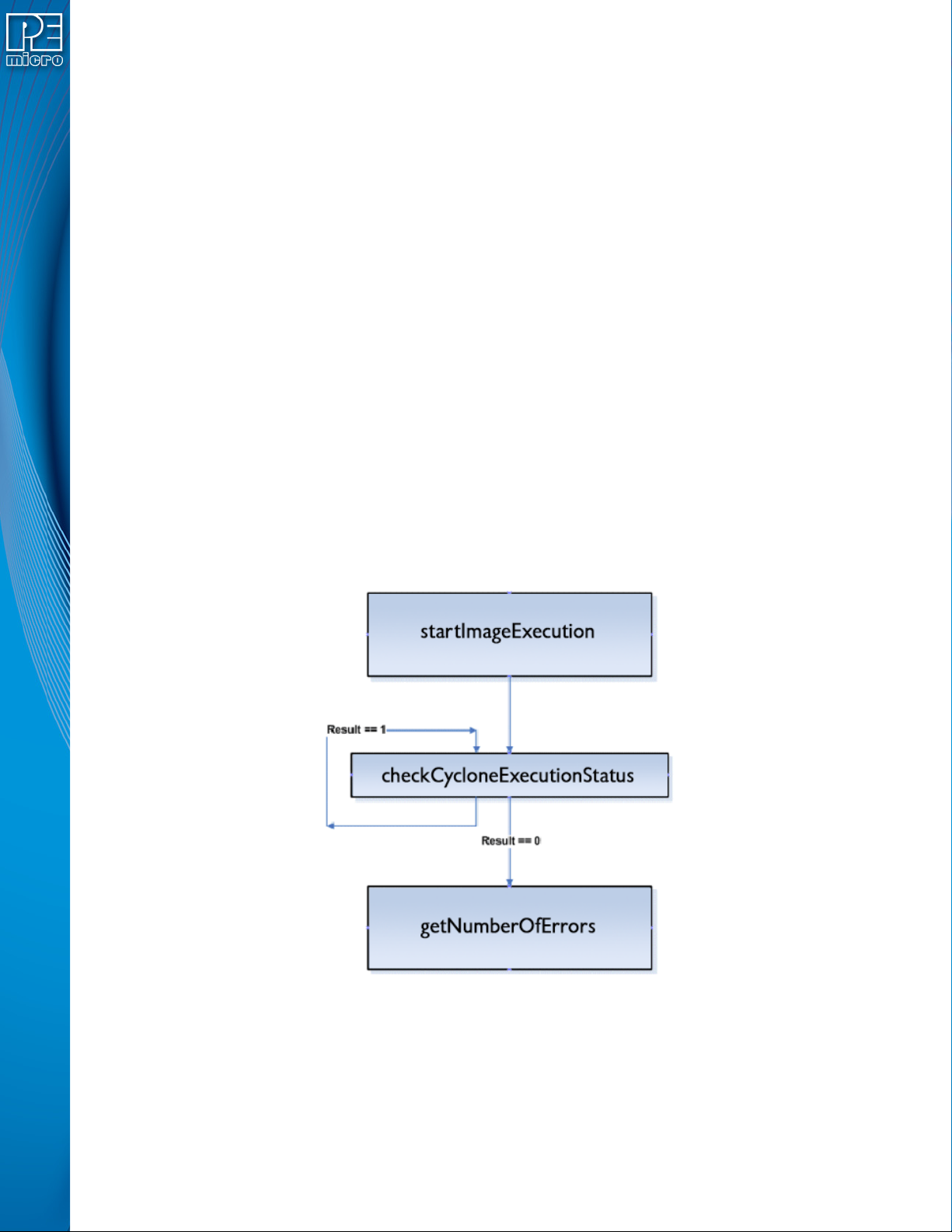
Figure 8-1: Typical programming procedure flow chart
Figure 8-1 describes the most common sequence of calls to the DLL after successfully connecting
to the Cyclone unit.
a. Initiate programming operations. “startImageExecution” carries out the programming
operations defined in the stand-alone image stored on the Cyclone unit.
b. Wait for programming completion. Note that no error checking is provided by the