CYCLONE-User-Manual.pdf - 第38页
User Manual For Cyclone LC Programmers 38 Figure 4-8: External Power Passed Through the Cyclone to the Debug Cable 4.2.5 Power provided by the Cyclone and out 2.5 mm barrel port In a slightly different scenario, the user…
User Manual For Cyclone LC Programmers 37
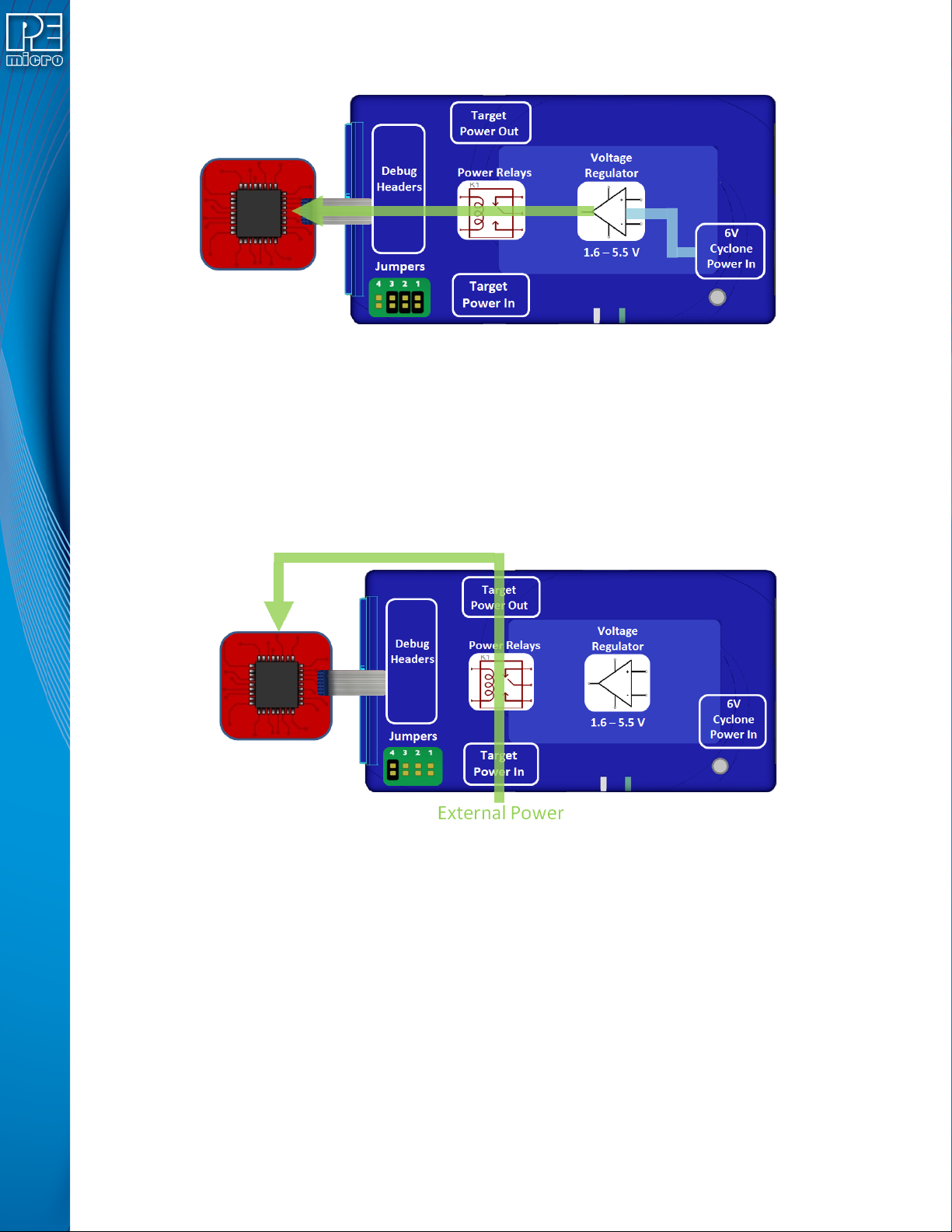
Figure 4-6: Power Provided by the Cyclone to the Debug Cable
4.2.3 External Power passed through the Cyclone and out 2.5 mm barrel port
It is also possible to provide external power, passed through the Cyclone power relays, and back
out to be available to power the target board externally. This is useful when the user wants to
control the power to the target and the target board has an external power connector. Setting a
single jumper will connect the barrel port input connector on the bottom edge of the Cyclone,
through the relays, to a matched 2.5 mm barrel port output connector on the top edge of the
Cyclone, so that the power can be routed into and back out of the Cyclone.
Figure 4-7: External Power Passed Through the Cyclone and Out 2.5 mm Barrel Port
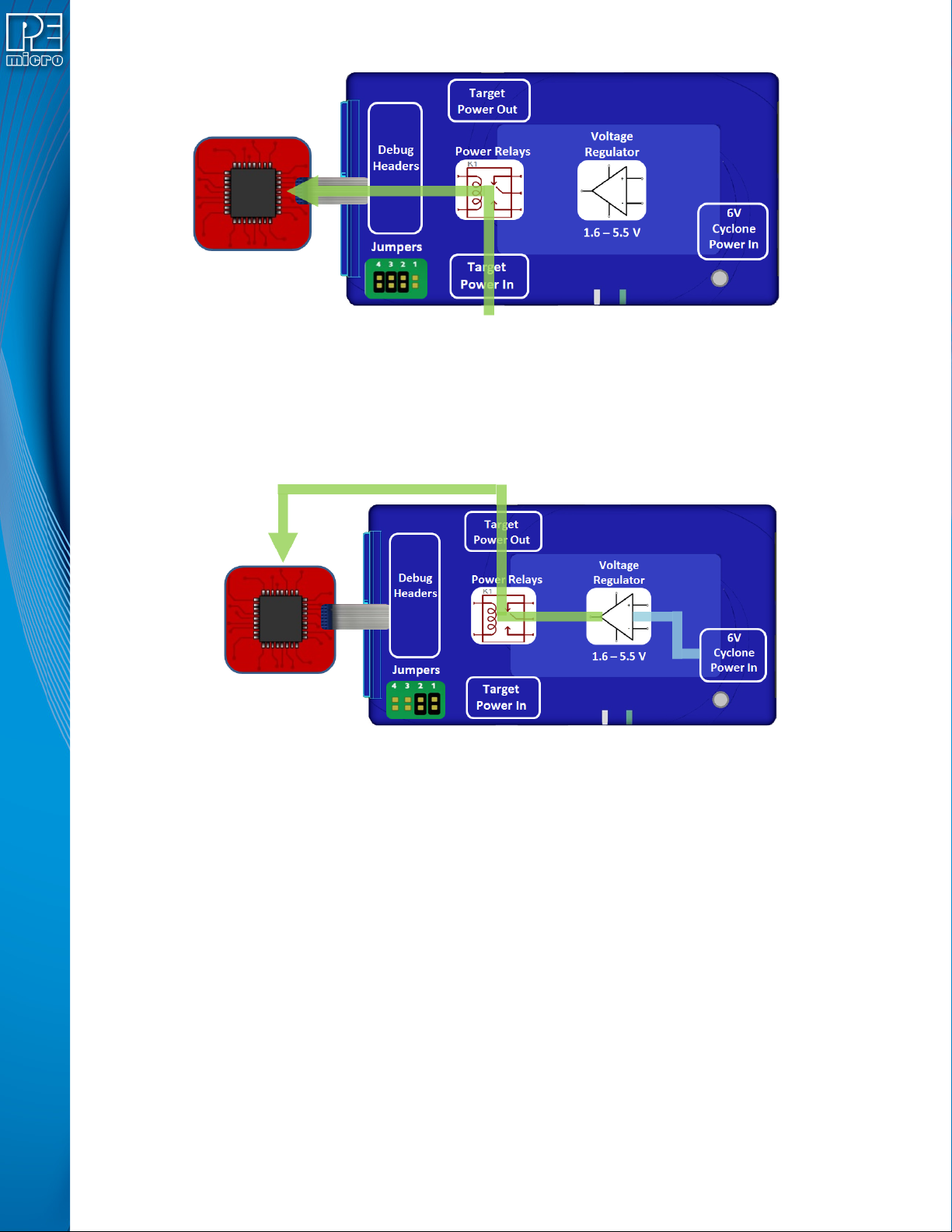
4.2.4 External Power passed through the Cyclone to the debug cable
In a slightly different scenario, the user may wish to provide power to the target through the debug
cable. On the bottom edge of the Cyclone is a 2.5 mm Power In port barrel which will pass power
through target relays which lets the Cyclone take control of the power cycling during programming.
This simple setup requires only an input to the Cyclone and a single ribbon cable connection to the
target board that handles both communication and power. The external power provided must be
between 1.6 to 5.5 volts.
User Manual For Cyclone LC Programmers 38
Figure 4-8: External Power Passed Through the Cyclone to the Debug Cable
4.2.5 Power provided by the Cyclone and out 2.5 mm barrel port
In a slightly different scenario, the user may wish to have the Cyclone provide power, but power
the target via an external connector on the target. The voltage supplied to the target is determined
by the settings in the SAP image. When generating the SAP image the Cyclone relays must be
selected as well as the correct voltage level for the target.
Figure 4-9: Power Provided by the Cyclone and Out 2.5 mm Barrel Port
4.3 Setup Reminders
The most important step when providing power out to a target is to check the Cyclone's jumper
settings to make sure they match the intended power setup. The jumpers control the power
settings which determine how power is supplied, regardless of the SAP image settings. If the
jumpers are set for power to be provided through the Cyclone, and the target is externally
powered, this is a conflict and may cause damage to the board.
In the case where power is being supplied through the Cyclone and the target is not being
powered on, the user should first check the jumper settings to make sure they match the
intended power setup. Second, the user should check to make sure the SAP image has the ‘Use
Cyclone Relays’ box checked with the appropriate voltage level selected.
User Manual For Cyclone LC Programmers 39
5 TOUCHSCREEN LCD MENU
This chapter describes the Cyclone’s touchscreen LCD menu. Figure 5-1 shows an overview of
the menu structure.
Note: This menu will change as features are added to the Cyclone LC, so if your menu does not match
what is displayed here, please check PEmicro’s website, www.pemicro.com, for a user manual
containing the latest LCD Menu operations information.
5.1 Home Screen
The home screen appears when the Cyclone LC is powered on, or when the Home
button is tapped.
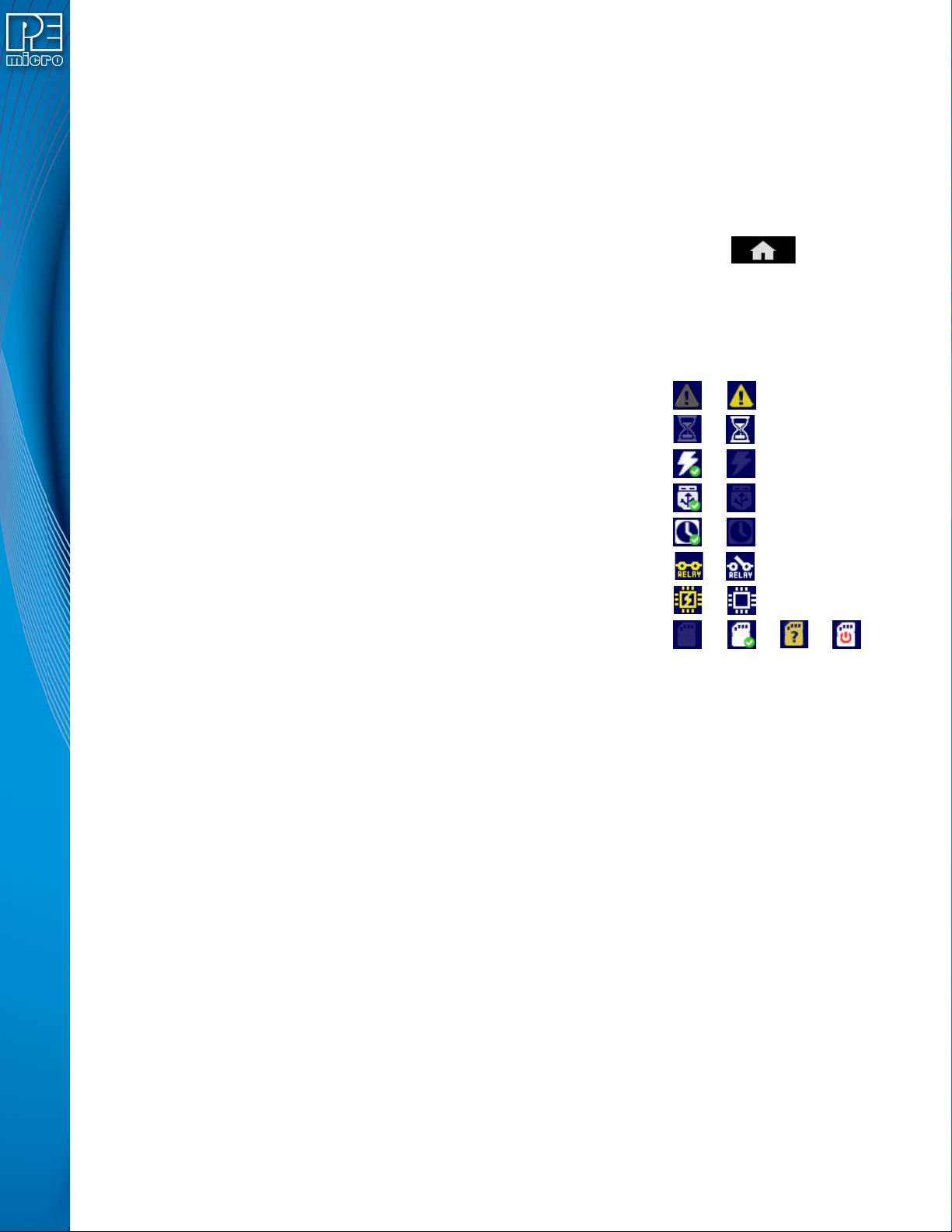
5.1.1 Icons
A row of icons in the upper right corner indicates the status of various attributes of the Cyclone.
Note: The user may tap on the row of icons to view the meaning of each of the currently displayed icons.
Cyclone Unit Status: Ok / Bad
Programming Status: Ready / Busy
Target Power Relays: On / Off
USB-To-PC Enumerated: Yes / No
Real-Time clock Enabled & Working: Yes / No
Cyclone Power Relays: Closed / Open
Target Device Is Powered*: Yes / No
SDHC Memory Card: None / Valid / Unformattted / Reset Cyclone**
* Target Device Is Powered - “Yes” indicates that the Cyclone LC detects power on the Vcc pin of
the target device programming header.
** SDHC Memory Card (Requires SDHC Activation License) - “Reset Cyclone” indicates that the
Cyclone needs to be reset before the SDHC card will register as Valid. The user can push the
Reset button which is located on the front side of the Cyclone, below the LED indicators.
5.1.2 Configurable Display Area
The main area of the home screen can be configured to optionally display the following
information, by using the Cyclone IP Configuration Utility (see Section 5.2.3.5.4 - Configure
Home Screen):
1. Firmware version of the Cyclone (always shown).
2. IP address assigned to the Cyclone.
3. Name assigned to the Cyclone.
4. Number of programming images in the Cyclone’s memory.
5. Name of the selected programming image.
6. First serial number associated with the selected image
7. Current status.
8. Results of the last operation performed.
9. Time and date.