CYCLONE-User-Manual.pdf - 第74页
User Manual For Cyclone LC Programmers 74 functions available in the library . This routine must be called before any of the other routines can be called. 8.2.4.2.2 unloadLibrary void unloadLibrary(void); This function u…
User Manual For Cyclone LC Programmers 73
“checkCycloneExecutionStatus” call. A result of 0 will be returned even if an error has
occurred or if communication with the Cyclone is lost.
c. Retrieve the error code from the Cyclone unit to determine if the programming was
successful.
8.2.3.7 External Memory Storage Support
Some Cyclones support external memory storage. The Cyclone Control SDK and Cyclone Control
Console both support images residing on external memory cards. The parameter
“selectedMediaType” is used to select between Cyclone internal Flash and external memory.
Image numbers will go in ascending order starting with image number 1. Internal images will be
counted first and external image numbers will start after the last internal image number. Image
number 1 will refer to the first image in the internal memory if there are any images in the Cyclone
internal memory, if there are no internal images, image 1 will refer to the first image in the external
memory.
Modifying images residing in external memory will only be available on Cyclones with the proper
license. Certain Cyclones may require a supplementary license to support external memory.
8.2.4 Application Programming Interface (API)
This chapter describes the API of the “CycloneControlSDK.dll” in detail. A C/C++ function
prototype is given here. Header files are provided for the following languages:
Pascal
C/C++
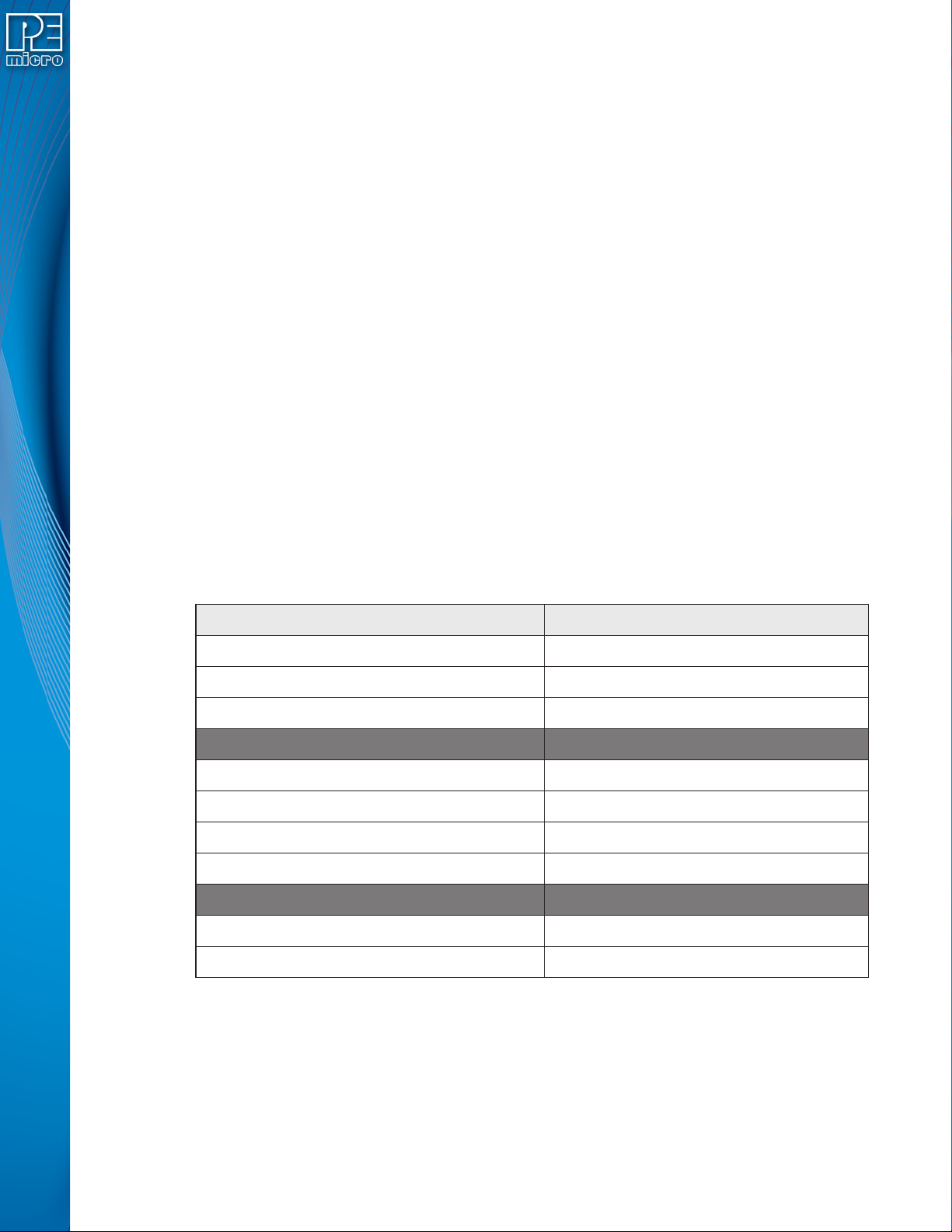
8.2.4.1 Constants
8.2.4.2 DLL Loading / Unloading Calls
8.2.4.2.1 loadLibrary
bool loadLibrary(char *filepath);
This function loads the CycloneControlSDK.dll into memory and gives the user access to all of the
Name 32-bit Value
CyclonePortType_USB 5
CyclonePortType_Ethernet 6
CyclonePortType_Serial 7
CycloneInformation_IP_Address 1
CycloneInformation_Name 2
CycloneInformation_Generic_Port_Number 3
CycloneInformation_Cyclone_Type_String 4
MEDIA_INTERNAL 1
MEDIA_EXTERNAL 2
User Manual For Cyclone LC Programmers 74
functions available in the library. This routine must be called before any of the other routines
can be called.
8.2.4.2.2 unloadLibrary
void unloadLibrary(void);
This function unloads the DLL loaded with loadLibrary( ). This call should be made before the
application starts to unload itself.
8.2.4.2.3 enumerateAllPorts
void enumerateAllPorts(void);
This function performs all necessary initialization in order to successfully communicate with a
Cyclone. The function is called once before the first call to “connectToCyclone”.
8.2.4.2.4 disconnectFromAllCyclones
void disconnectFromAllCyclones(void);
This function closes all open Cyclones (if any) and frees all dynamic memory used by the DLL. The
function is called before the user application is closed.
8.2.4.2.5 version
char *version(void);
This call returns a pointer to a null-terminated string that contains the version number of the DLL.
8.2.4.2.6 queryNumberOfAutodetectedCyclones
uint32_t *queryNumberOfAutodetectedCyclones(void);
This function returns the number of Cyclones connected locally on USB and on your local network.
8.2.4.2.7 queryInformationOfAutodetectedCyclone
char *queryInformationOfAutodetectedCyclone(int32_t autodetectIndex, int32_t
informationType);
@returnvalue True if the load was successful, false otherwise.
@returnvalue A pointer to a null-terminated string containing the version number of the DLL.
@returnvalue The number of Cyclones.
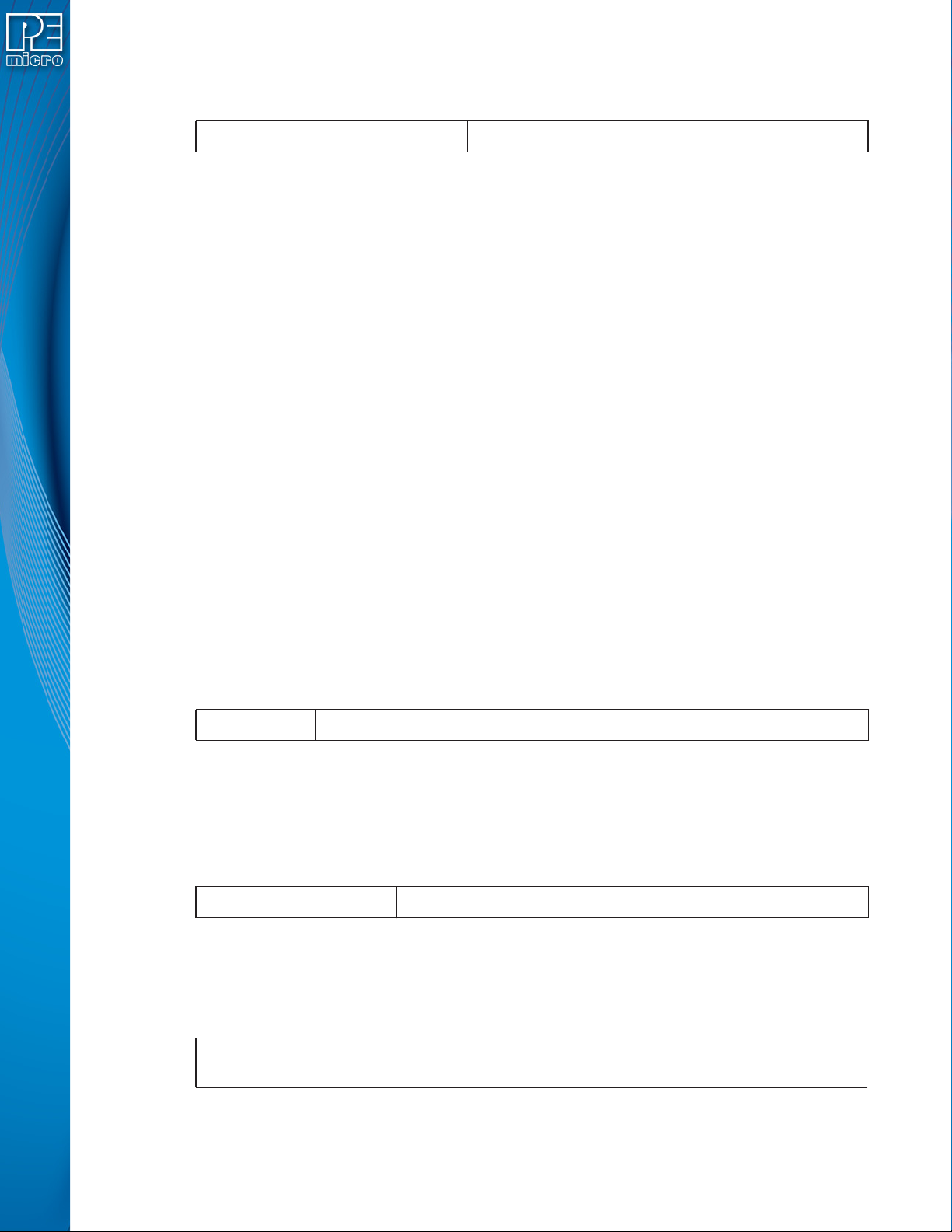
@parameter
autodetectIndex
Specifies the index of the detected Cyclone by the function
queryNumberOfAutodetectedCyclones()

User Manual For Cyclone LC Programmers 75
8.2.4.3 Cyclone Connecting / Disconnecting Calls
8.2.4.3.1 connectToCyclone
uint32_t connectToCyclone(char *nameIpOrPortIdentifier) ;
This function opens a session with a Cyclone and tests the connection. The handle returned by
this function is passed as a parameter to other functions provided by the DLL. If you connect to a
Cyclone that already has a handle, the same handle is returned. If there is a failure contacting the
Cyclone, the function returns a 0.
Note that the DLL does not support multiple Cyclones connected via the serial port. If you require
more than one Cyclone to use a serial port connection, PEmicro recommends using the RS232
communication protocols.
8.2.4.3.2 connectToMultipleCyclones
bool connectToMultipleCyclones(char *nameIpOrPortIdentifierArray,
multipleCycloneHandleArrayPtrType cycloneHandleArrayPointer, int32_t
*numberOfCycloneOpensAttempted);
This function returns a array of handles to opened Cyclones from a null-terminated String of
comma delimited identifiers.
@parameter
informationType
Specifies the property of the Cyclone to return. The possible values
are:
• CycloneInformationation_IP_Address
• CycloneInformation_Name
• CycloneInformation_Generic_port_number
@returnvalue
A pointer to a null-terminated string containing the property value of
the specified Cyclone.
@parameter
nameIPOrPortIdentifier
A pointer to a null-terminated string which uniquely identifies the
Cyclone connected to the host PC.
If identifying by IP address, the string should be in the format of
xxx.xxx.xxx.xxx, where xxx = 0…255.
If identifying by name, the string should contain the name of the
Cyclone.
If identifying by port and the Cyclone is connected by USB, the
string should be USB# where # is 1…8. If the Cyclone is
connected by Ethernet, the string should be in the format of
xxx.xxx.xxx.xxx, where xxx = 0…255.
If the Cyclone is connected by Serial, the string should be
COM1.
@returnvalue
The handle to the opened Cyclone unit. A return value of 0
indicates a failure to connect to the specified Cyclone unit.