c900773.R02_EN.pdf - 第56页
3 Mechanical Section 3-16 Camera Camera Lens When grease, dirt, or any obstacles such as dropped com ponents and deposits are on the acryl ic cover of the fixed camera, they will cause inco rrect recognition and recognit…
3 Mechanical Section
3-15
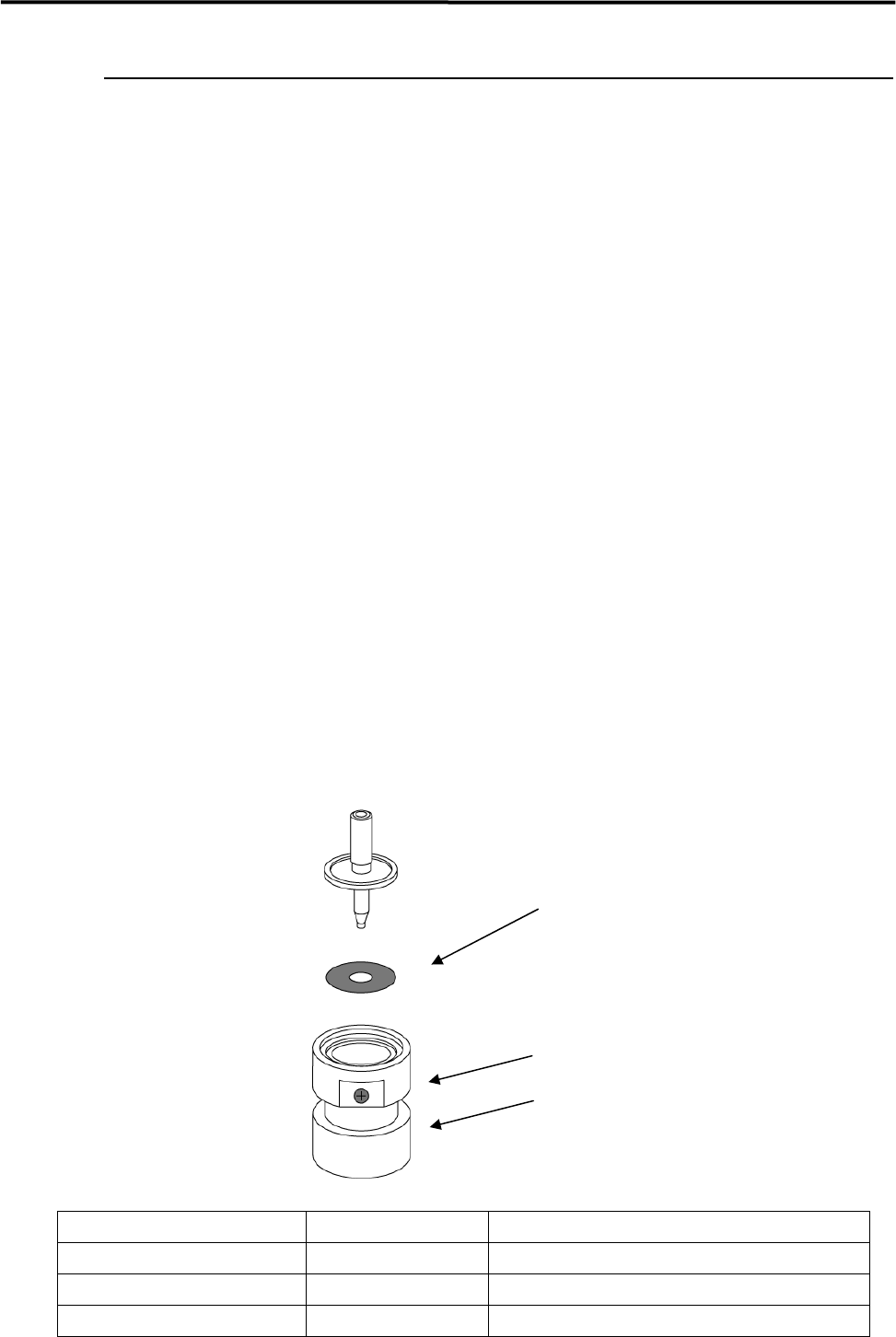
Flange Seal
Underside of the nozzle flange is covered with non-reflecting black coating, which prevents misrecognition
at vision processing, and protective seal (flange seal) which protects the coating. Long-term use of a nozzle
accompanied by ANC operation may cause scratches on the flange seal. These scratches may bring about
unwanted reflection of lights, which interfere with the image, and causes vision process errors. Follow the
procedure below and replace the flange seal when necessary.
ACTION:
① Peel off the old Flange Seal thoroughly from the underside of the nozzle flange, and clean off dust,
dirt, oil, and moisture by using industrial alcohol. Do not use a sharp-edged tool and tweezers when
peeling off the seal. Using these tools damage the non-reflecting black coating
② Slide up the ring of the Flange Seal Set Tool (Optional) and turn it clockwise.
③ Use tweezers and remove the Flange Seal from the exfoliate paper.
④ Set the Flange Seal with its adhesive side up onto the Flange Seal Set Tool. Do not touch the adhesive
side of the seal with fingers.
⑤ Check to make sure that the seal is placed evenly flat onto the inside bottom of the ring.
⑥ Insert the nozzle with its nozzle tip down into the tool.
⑦ Turn the ring counterclockwise along with pressing the nozzle onto the tool, and slide it down to
attach the nozzle flange to the flange seal.
NOTE: The flange seal comes off easily when it becomes wet. When it becomes wet, use a dry cotton-swab and
wipe off grease, oil, and water content immediately.
NOTE: There are 3 types of Flange seal. Please refer to the list below.
Flange Seal Parts Number Parts Name Supported nozzle types
LG0-M77A6-000 FLANGE SEAL 1 P005, P012, P013
LG0-M77A7-000 FLANGE SEAL 2 P031~ P034, P006, P017, P018, P019, P042
LG0-M77A8-000 FLANGE SEAL 3 P020
Flange Seal
Ring
Flange Seal Set Tool
3 Mechanical Section
3-16
Camera
Camera Lens
When grease, dirt, or any obstacles such as dropped components and deposits are on the acrylic cover of the
fixed camera, they will cause incorrect recognition and recognition errors. Check the conditions of the
acrylic cover on a daily basis. When it is dirty or obstacles are on it, clean it and remove obstacles.
NOTE:
Clean the proper part for each camera type.
(See the chart below.
○
: Should be cleaned,
×
: No need to be cleaned
)
Fixed Camera
Use of liquid cleaner
Industrial alcohol Lens cleaner (Note 1)
Lens
△
(Note 2)
Applicable Applicable
Acrylic Cover
○
Applicable Applicable
Mirror
×
Applicable Applicable
Note 1: It is contained in the Lens Cleaner Set, one of the standard accessories attached with a mounter.
Note 2: Cleaning is available only with CFB option.
■ Lens Cleaner Set
Part Name
Part No. Remark
LENS CLEANER SET LG0-M89A4-00X Lens Cleaner Set
Cleaning Fixed camera
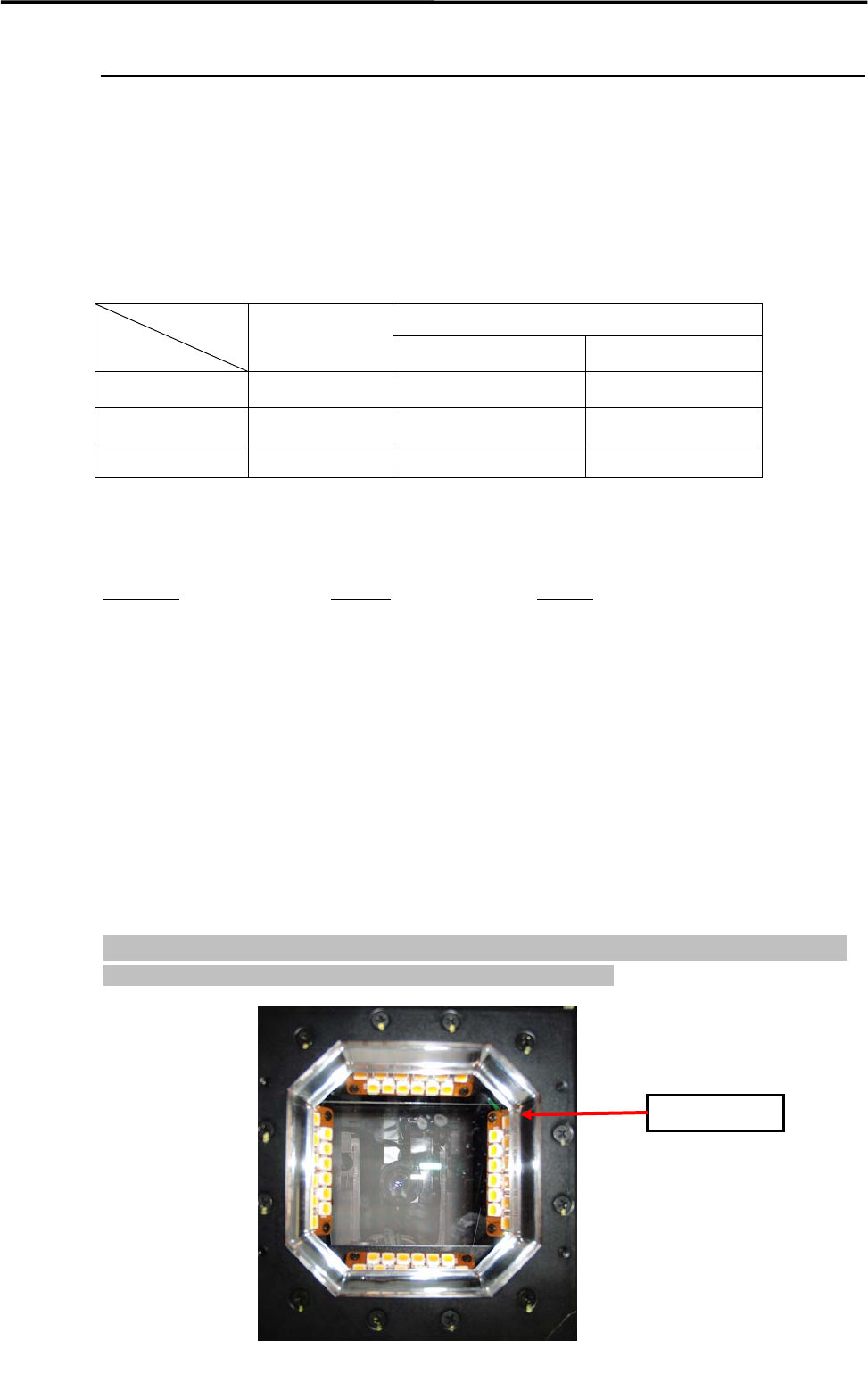
Gently remove dirt/dropped obstacles (components or deposits) from the acrylic cover of fixed camera by
blowing air with a blower brush or by wiping them with a dry and soft material like a cotton swab. Do not
apply finger pressure directly to the acrylic cover (For example, wrapping a finger with a tissue paper and
rubbing it against the cover, etc.).
When such highly adhesive material as grease, which cannot be cleaned away by air blow or wiping with a
dry soft cotton swab, is on the acrylic cover, wipe it off with a cotton swab moistened with a small amount
of liquid cleaner, and completely remove the resided liquid cleaner and dirt with a dry soft cotton swab
afterwards. Do not apply the liquid cleaner directly on the acrylic cover.
NOTE: Be careful not to touch your finger or cotton swab directly to the LED lighting. The careless touch may
change the optical axis of lighting, causing vision recognition problem.
Fixed camera
Acrylic Cover

3 Mechanical Section
3-17
Cleaning Teach Camera
The lens of teach camera faces downward, and usually dust and dirt hardly attach to it under the normal
operational condition. However, if it becomes dirty, blow the air by using an air blower brush from the
bottom of the teach camera and remove the dust and dirt.
Cleaning Lens Filter
When components or obstacles fall onto the lens filter, remove them with a blower brush or tweezers.
When grease sticks on the filter, use camera lens cleaner and lens cleaning tissue and remove it.
If condensation occurs inside the protective filter, remove the protective filter and wipe off the moisture
with lens cleaning tissue.