DECAN_S1_Administrator′s_Guide(Eng_Ver1.5)_Print.pdf - 第423页
14-41 Machine Calibration 14.3.7. ANC Pos. Scan T each the 2 fiducial marks on the top surface of the ANC. Refer to “6.3 Fiducial Mark Setup” for more information.
14-40
Next Generation, Multi-Functional Placer DECAN S1 Administrator’s Guide
When performing calibration in Station R2 by using the calibration tool.
<Axis> combo box
Select the axis to be compensated. Compensation can be made only for the X axis.
<Light> button
It is used to adjust the illumination so that the mark may be viewed clearly when
recognizing the fiducial mark of the calibration tool.
<Move /Get> button
It is used to teach fiducial mark #0 of the calibration tool.
<Start X /Start Y> edit box
Input the coordinate of fiducial mark #0 of the calibration tool. After selecting the edit
box, move the fiducial camera to the corresponding position by using the teaching box
and teach the corresponding mark correctly. Then click the <Get> button and input the
coordinate value here.
<Cur Temp> edit box
Input the current temperature at the time that the calibration is performed.
<Move Rail> button
Input the conveyor width in the <Conv. Width> edit box and click this button to adjust
the conveyor width.
<Import…> button
It is used to import the scale file for calibration.
<Start> button
It is used to start calibration after teaching fiducial mark #0 accurately.
<Finish> button
It is used to exit the work after the calibration is completed.
<Clear Result> button
Initializes the measurement result.
<Print to File…> button
It is used to output the result in text file format after completing calibration.
<Update> button
Apply the compensation value according to the calibration.
14-41
Machine Calibration
14.3.7. ANC Pos. Scan
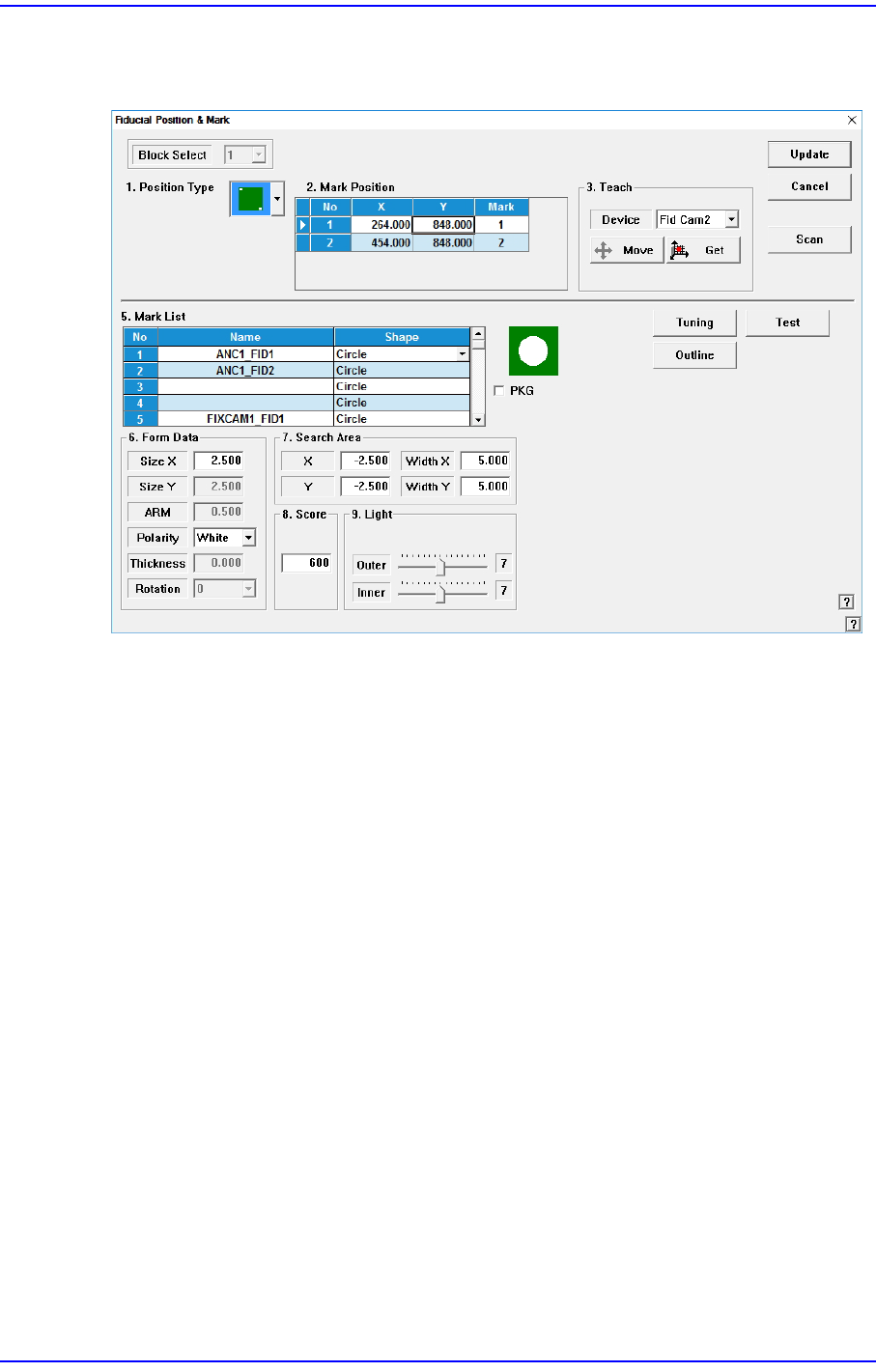
Teach the 2 fiducial marks on the top surface of the ANC.
Refer to “6.3 Fiducial Mark Setup” for more information.
14-42
Next Generation, Multi-Functional Placer DECAN S1 Administrator’s Guide
14.3.8. Head & Camera Calibration
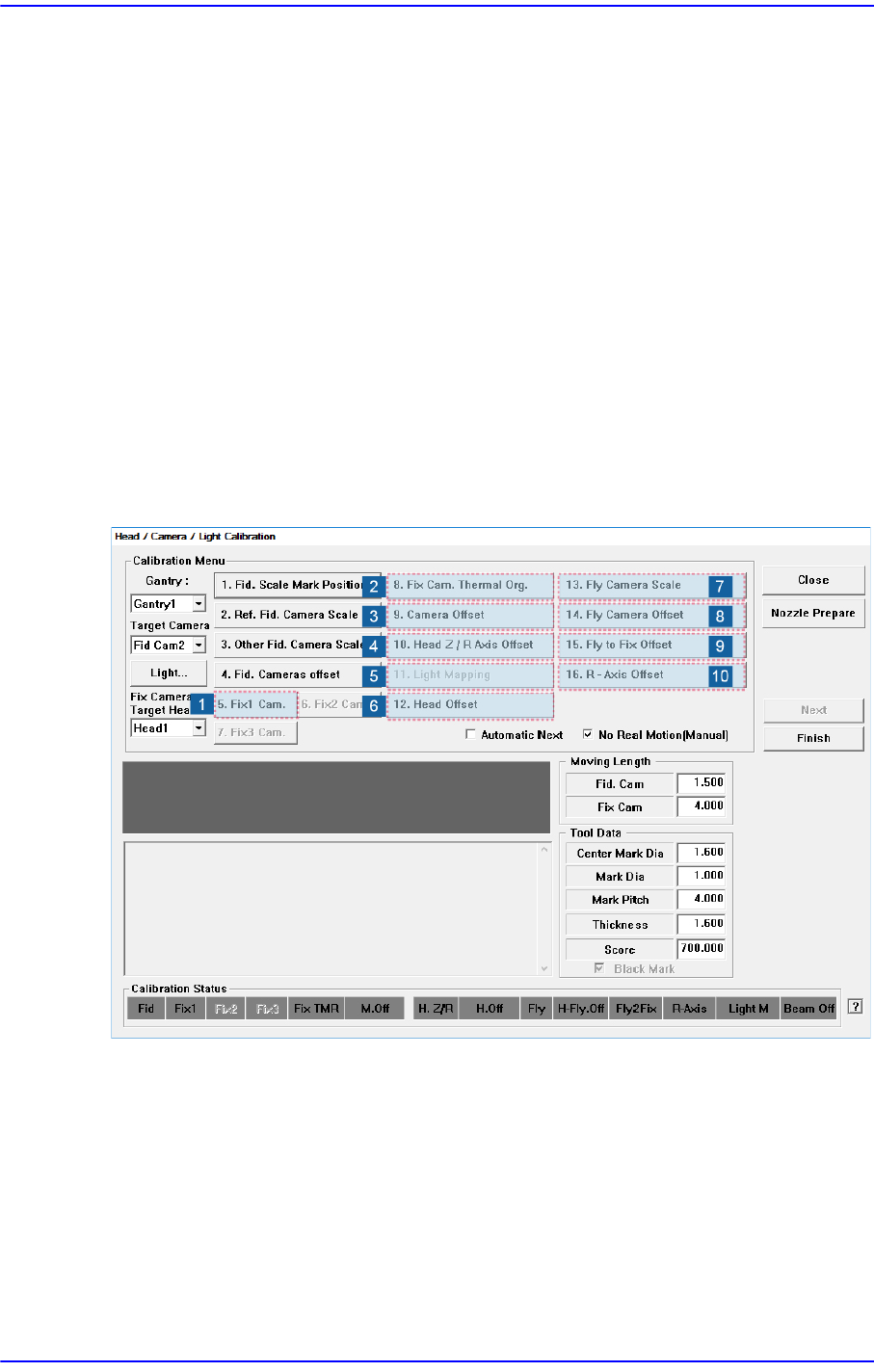
Perform the camera calibration function. The calibration sequence and tools necessary for
calibration are as follows.
1) Fix Camera Calibration (Scale & Rotation & Position) (CNT20 Nozzle)
2) Fix Cam. Thermal Org.
3) Camera Offset
4) Head Z & R Offset Calibration (CN040 Nozzle)
5) Light Mapping (LightFly Nozzle, LightFix Nozzle, Fiducial Mapping Chart)
6) Head Offset Calibration
7) Fly Camera Scale & Rotation Calibration
8) Fly Camera Offset Calibration
9) Fly To Fix Offset Calibration
10) R-Axis Offset Calibration