DECAN_S1_Administrator′s_Guide(Eng_Ver1.5)_Print.pdf - 第536页
15-70 Next Generation, Multi-Functional Plac er DECAN S1 Administrator’s Guide Sets the threshold of the vision system us ed to recognized the degree of nozzle tip contamination. <Light Level / Light Adjust> slid…
15-69
System Setup
15.5.5. <Nozzle> tab dialog
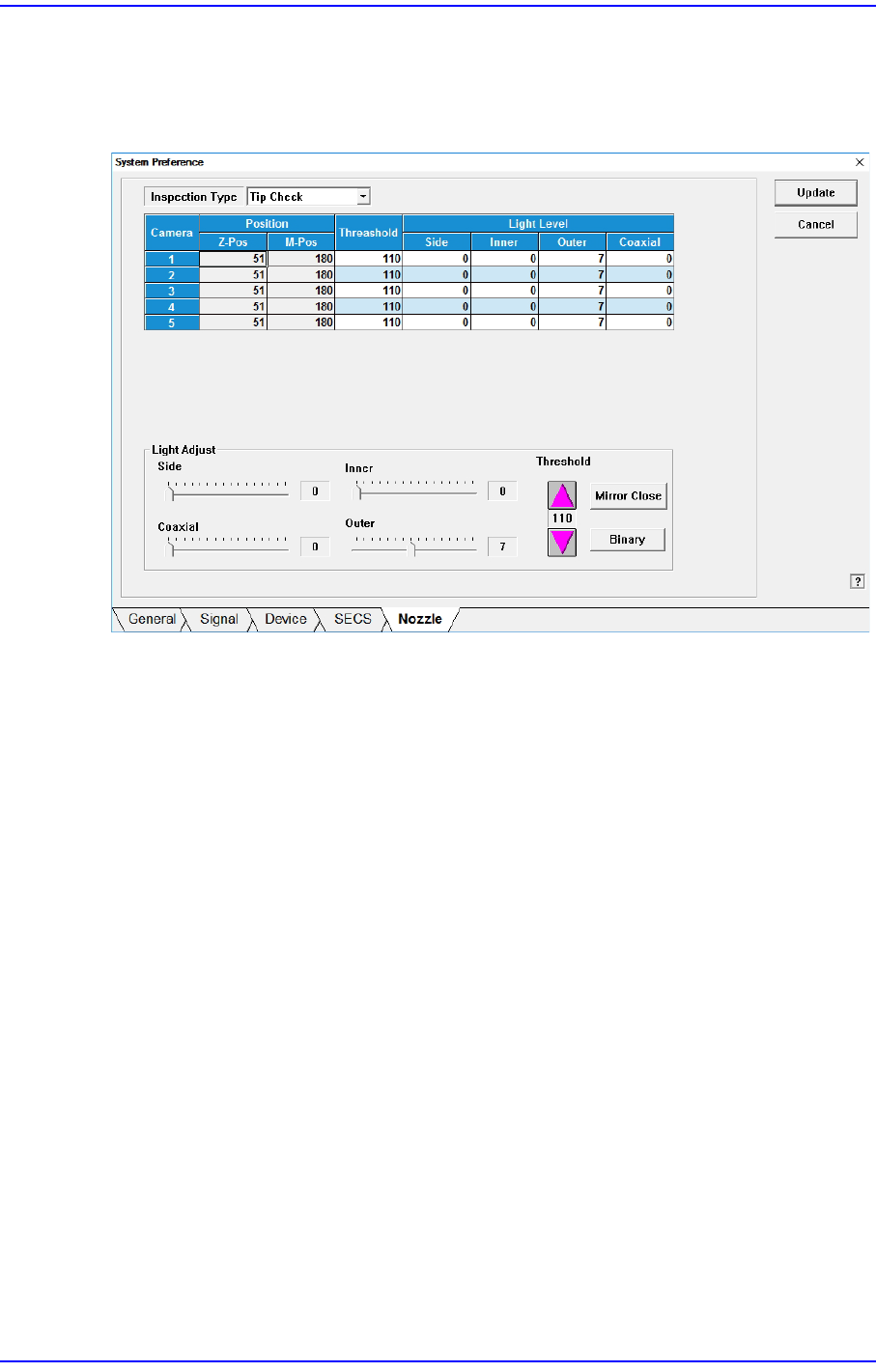
Sets the parameter of the fly camera when checking for the contamination of a nozzle tip.
Figure15.23 “Nozzle” Tap dialog
<Inspection Type> combo box
Sets the parameter of the fly camera when checking for the contamination of a nozzle
tip.
Contamination Check
The parameters of the fly camera used to test whether the nozzle tip is polluted are
displayed on the screen.
Tip Check
The parameters of the fly camera used to test whether the nozzle tip is present are
displayed on the screen.
Holder Check
The parameters of the fly camera used to test the nozzle holder are displayed on
the screen.
<Position> group
Z-Pos
Indicates the Z-axis height from the upper surface of the PCB to the nozzle tip
end.
M-Pos
Indicates the rotation angle of the mirror for the fly camera.
<Threshold> column

15-70
Next Generation, Multi-Functional Placer DECAN S1 Administrator’s Guide
Sets the threshold of the vision system used to recognized the degree of nozzle tip
contamination.
<Light Level / Light Adjust> slide bar
Sets the lighting of the fly camera.
<Mirror Open / Mirror Close> button
Opens or closes the mirror installed on the head module. Closing the mirror will allow
a user to check the nozzle tip with a vision system.
<Binary / Real> button
Shows the image seen through the Vision in real display to which threshold is not
applied, or in the image (Binary) to which threshold is applied as recognized by MMI.
15-71
System Setup
15.6. Device [F11]
Controls the data related to the tape, stick and tray and nozzle.
15.6.1. Tape Feeder
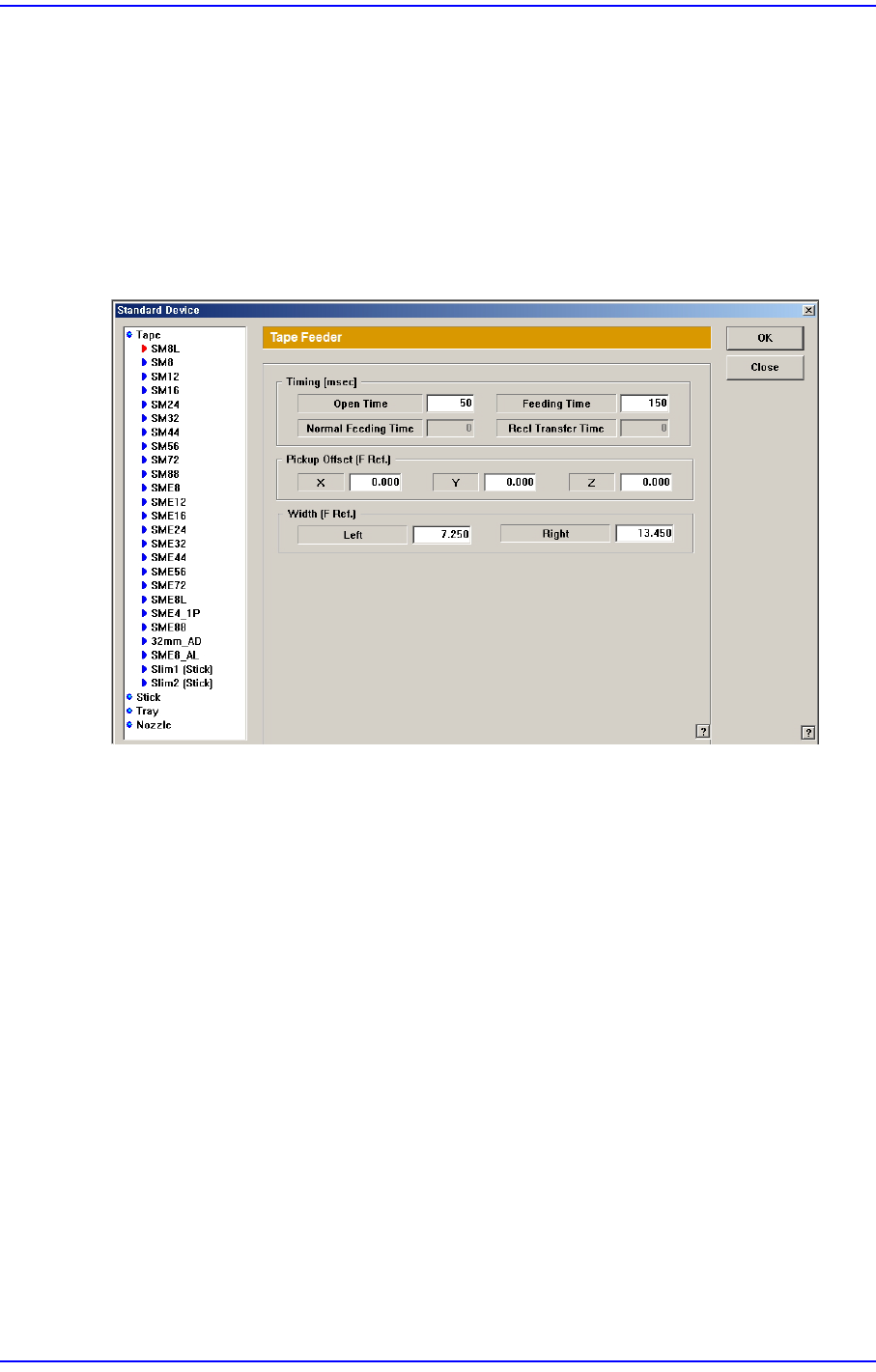
The following screen shows that the ‘Tape’ is selected from the list box. Set the parameters
for the tape feeder.
Figure15.24 “Standard Device - Tape” dialog box
List box
Select the tape feeder type to be set up.
<Timing> group
<Open Time> edit box
Time needed to feed the tape feeder.
<Feeding Time> edit box
Time needed to feed the tape feeder.
<Normal Feeding Time> edit box
Sets the time it takes generally for the tape feeder to feed the part once.
<Real Transfer Time> edit box
Sets the time required to transfer the reel in order to supply parts from the tape
feeder.
<Pickup Offset> edit box
Set the X offset value of the pick-up position of the tape feeder.Based on the setting of
the tape feeder in the front of the equipment, set the offset value of the pick-up
position of other feeders against the pick-up position of the 8mm tape feeder.