00195722-0102_UM_X-Serie_SR605_EN.pdf - 第318页
4 Setting up and commissioning User Manual SIPLACE X-Series 4.7 Commissioning the machine From software version SR.605.xx 07/2008 EN Edition 318 4.7 Commissioning the machine 4.7.1 Commissioning the machine at the custom…
User Manual SIPLACE X-Series 4 Setting up and commissioning
From software version SR.605.xx 07/2008 EN Edition 4.6 Adapting the used tape channel
317
4
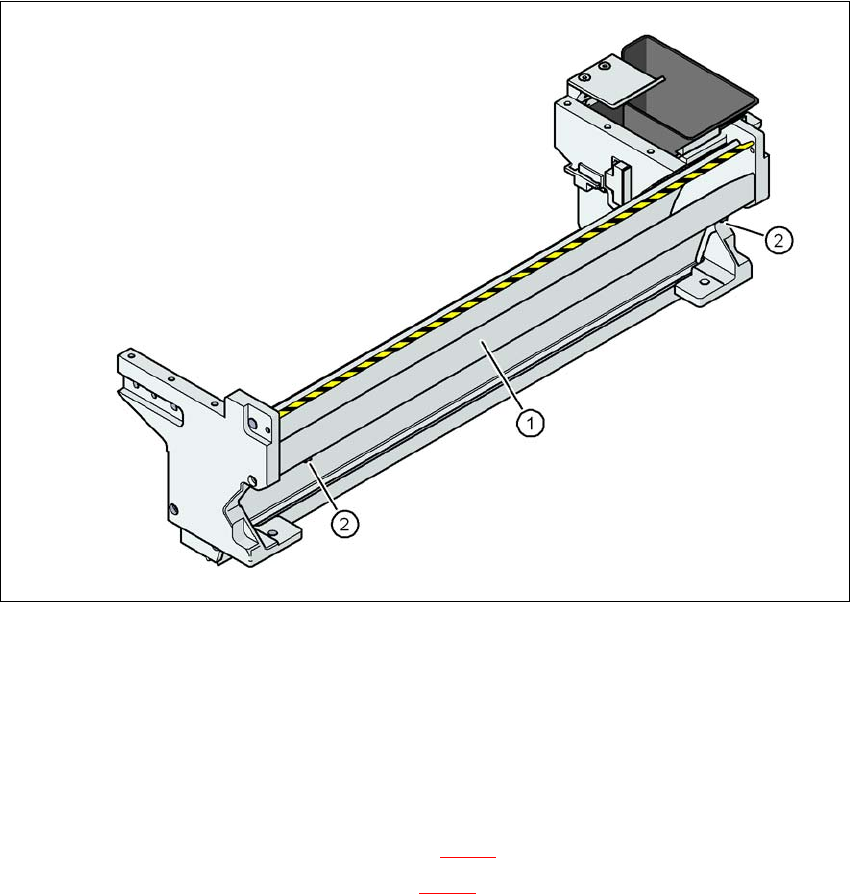
Fig. 4.6 - 2 Used tape channel with component reject bin
(1) Separating plate for tapes > 17 mm, removable
(2) DIN 84 - M3x6 screw, 2x
4
4
4.6.2.2 Removing the separating plate
→ Loosen the two slotted screws (item 2 in Fig. 4.6 - 2).
→ Pull out the separating plate (item 1 in Fig. 4.6 - 2
).

4 Setting up and commissioning User Manual SIPLACE X-Series
4.7 Commissioning the machine From software version SR.605.xx 07/2008 EN Edition
318
4.7 Commissioning the machine
4.7.1 Commissioning the machine at the customer's premises
→ Check all modules for correct seating.
→ Wipe off the linear guide rails with a lint-free cloth before removing the shipping braces for the
X/Y axis. Do not use any solvent to do this (see Section 4.3.19
, page 307.
→ Switch on the machine and perform a reference run.
→ Copy the placement program onto the computer and test it.
→ Check the machine zero point after a period of warming up of 3 - 4 h.
→ Get the customer's operating personnel to equip the feeder modules according to the cus-
tomer's placement program.
→ Instruct them in handling the feeder modules using the JobGuide.
→ Check all customer-specific installed options (in particular software) for good functioning and
order any necessary spare parts using the order form or by fax.
4.7.2 Instructing the customer's personnel
→ Explain all customer-specific installed options, in particular software / software compatibility.
→ Explain programming of the program editors on the line computer / SIPLACE Pro.
→ Instruct the operators and line engineers in using the station software.
→ Explain about password protection.
→ Instruct the customer's personnel according to the user manual and the preventive mainte-
nance.
4.7.3 A test run or starting production
→ Test the line using the test PCB or a PCB provided by the customer.
→ Record the customer product and performance data, prepare the data and document the data
in the installation report.
→ Secure the data and give the customer security copies.

User Manual SIPLACE X-Series 5 Tasks for the operating personnel
From software version SR.605.xx 07/2008 EN Edition 5.1 Personnel profile
319
5 Tasks for the operating personnel
This chapter contains a number of subjects that are intended to help you during your daily work
on a SIPLACE line. For example, you are provided with preventative measures that you can take
to minimize the down time on the machine to obtain the highest possible level of efficiency for the
SIPLACE line during production.
PLEASE NOTE: 5
The sequence for switching the machine on and off is described in the "Getting Started with Station
Software 605.xx".
→ Follow the sequences and safety instructions described in this section.
5.1 Personnel profile
PLEASE NOTE 5
Please note:
→ No one may start up, operate or otherwise work on the placement machine unless they have
the relevant qualification. Otherwise the machine is not being used as prescribed, which
could endanger life and limb, and result in material damage. You will find further information
about this in Section 1.1.9
, page 26.
→ The qualification must be proven by means of training courses or instruction for the person-
nel. The instruction is to be given by personnel trained and authorized by SIPLACE.
5.1.1 Operator level "Operator"
5.1.1.1 Training courses
A list of training courses can be found in Section 1.3, page 30.
5.1.1.2 Tasks
The operating and maintenance personnel should be given the following tasks:
– Checking the assignment of components to the feeder modules
→ To do this, a set-up check is to be carried out several times a day, preferably at the start
of a shift, to make sure that the correct components are set up.