00195722-0102_UM_X-Serie_SR605_EN.pdf - 第406页
6 Station extensions User Manual SIPLACE X-Series 6.2 Docking station for the component trolley from the SIPLACE X-series From software version SR.605.xx 07/2008 EN Edition 406 The basic tasks of the dockin g station are…
User Manual SIPLACE X-Series 6 Station extensions
From software version SR.605.xx 07/2008 EN Edition 6.2 Docking station for the component trolley from the SIPLACE X-series
405
6.2 Docking station for the component trolley from the
SIPLACE X-series
Item no. 00116933-xx Docking station for the SIPLACE X component trolley
6.2.1 Description
The docking station is an additional component for the set-up area. It forms the link between the
set-up area and the component trolley for the SIPLACE X-series. The docking station allows the
component trolleys to be set up with feeder modules and function tests and set-up checks to be
carried out externally.
6
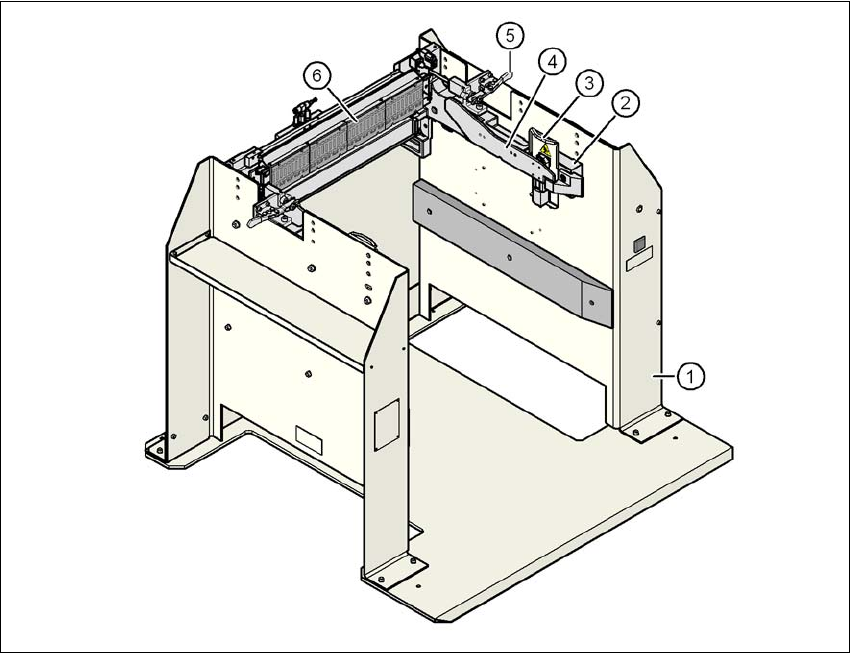
Fig. 6.2 - 1 Docking station, SIPLACE X-series
(1) Docking station
(2) Component trolley docking unit, X-series
(3) Guard plate with warning label W204
(4) Rails for guiding and docking in the component table
(5) Horizontal tensioner for locking the component trolley
(6) EDIF (energy and data interface)
6 Station extensions User Manual SIPLACE X-Series
6.2 Docking station for the component trolley from the SIPLACE X-series From software version SR.605.xx 07/2008 EN Edition
406
The basic tasks of the docking station are as follows:
– Supplying the component trolley and X feeder modules with power
– Supplying the component trolley and X feeder modules with compressed air
– Providing an infrastructure for communication between the PC at the set-up area and the
feeder modules
The operator can use the docking station to carry out function tests on the X feeder modules and
check the set-up outside the production environment. Two rows, each with four docking stations,
are connected via the CAN bus of the initial set-up PC. Each docking station has a separate power
and compressed air connection.
The component trolley docking unit (item 2 in Fig. 6.2 - 1
, page 405) of the docking station can be
adapted to the desired PCB conveyor height. For the initial set-up, the component trolley is
pushed into the docking station (item 1 in Fig. 6.2 - 1
, page 405). The component trolley slides on
the rails of the component trolley docking unit, using the roller bearings attached to the sides of
the component trolley, to the energy and data interface connection. The component table is opti-
mally positioned in the process with the EDIF of the feeder modules to the EDIF (item 5 in
Fig. 6.2 - 1
, page 405) of the component trolley docking unit and fixed in this position with both
horizontal tensioners. The guard plates (item 3 in Fig. 6.2 - 1
, page 405 prevent access to the
castors on the component trolley if this is pushed into the docking station.
6
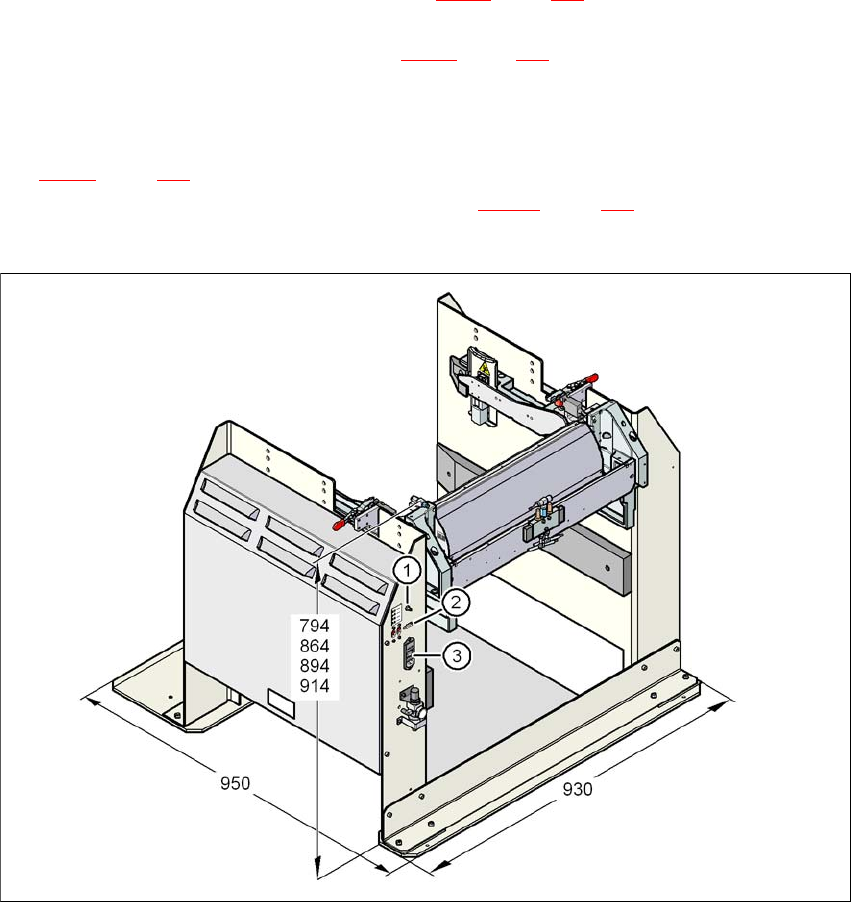
Fig. 6.2 - 2 Docking station - Dimensions in millimeters, connection points
User Manual SIPLACE X-Series 6 Station extensions
From software version SR.605.xx 07/2008 EN Edition 6.2 Docking station for the component trolley from the SIPLACE X-series
407
6.2.2 Technical data
6
6
6
6
6
6
6
6
6
6
6
6
6
6
6
6
6
6
6
Key to fig. 6.2 - 2, page 406
(1) Compressed air connection
(2) CAN bus connection
(3) Power supply connection
6
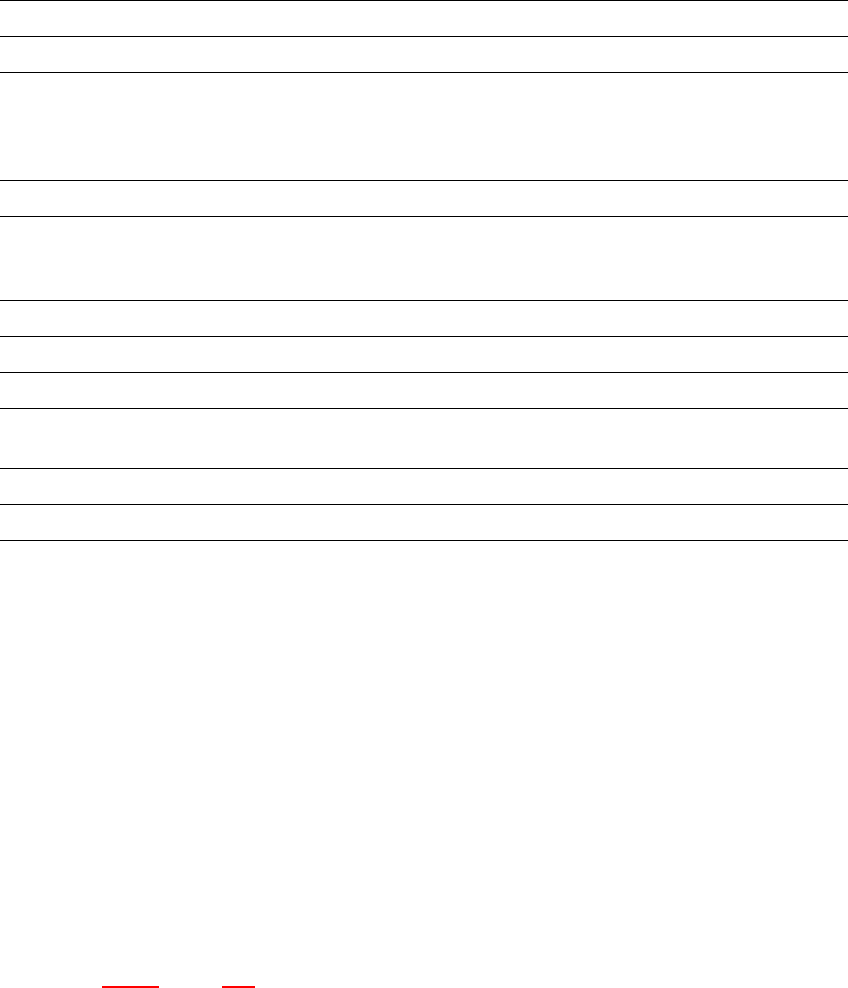
Dimensions
Length x width 950 mm x 930 mm
Height 794 mm for 830 mm PCB conveyor height
864 mm for 900 mm PCB conveyor height
894 mm for 930 mm PCB conveyor height
914 mm for 950 mm PCB conveyor height
Weight 120 kg
Compressed air pressure
p
min
p
max
0.5 MPa (5.0 bar)
1.0 MPa (10.0 bar)
Compressed air connection Coupler plug KS 2-M5-A
Compressed air consumption 50 Nl/min
a
a) Under normal atmospheric conditions at 20°C and 1013 hPa
Supply voltage 88 - 264 VAC
Rated current 3.5 A (230 VAC)
7 A (115 VAC)
Nominal apparent power 0.8 kW
Fuse 2 x 8 A