00195722-0102_UM_X-Serie_SR605_EN.pdf - 第464页
6 Station extensions User Manual SIPLACE X-Series 6.21 SIPLACE X-series Productivity Lane (XPL) From software version SR.605.xx 07/2008 EN Edition 464 6.21 SIPLACE X-series Pr oductivity Lane (XPL) Item no. 001 19970-xx …
User Manual SIPLACE X-Series 6 Station extensions
From software version SR.605.xx 07/2008 EN Edition 6.20 SIPLACE Productivity Lift
463
without interruption. This chaining increases the components to be placed per station and mini-
mizes conveyor idle times. This leads to an overall higher placement rate on the line.
This could be for
– process-related investigations or test operation
– programming PCB fiducials, package forms or test placements
– maintenance or repairs
– operating errors, such as not splicing tapes on in good time or missing components.
Another advantage is that the line can be reconfigured as required using the software, without
having to reset the machines.
6 Station extensions User Manual SIPLACE X-Series
6.21 SIPLACE X-series Productivity Lane (XPL) From software version SR.605.xx 07/2008 EN Edition
464
6.21 SIPLACE X-series Productivity Lane (XPL)
Item no. 00119970-xx SIPLACE X-series Productivity Lane
6.21.1 Safety instructions
WARNING
RISK OF CRUSHING HANDS
The PCB conveyor on the SIPLACE X-series Productivity Lane (see item 2 in Fig. 6.22 - 1
, page
466
) continues running, even if the protective covers on the SIPLACE machine are opened.
→ You should therefore never reach into the conveyor track of the SIPLACE Productivity Lane
while it is running.
→ When carrying out any maintenance or servicing work, make sure that you do not damage
any PCBs on this conveyor track.
6.21.2 Description
6
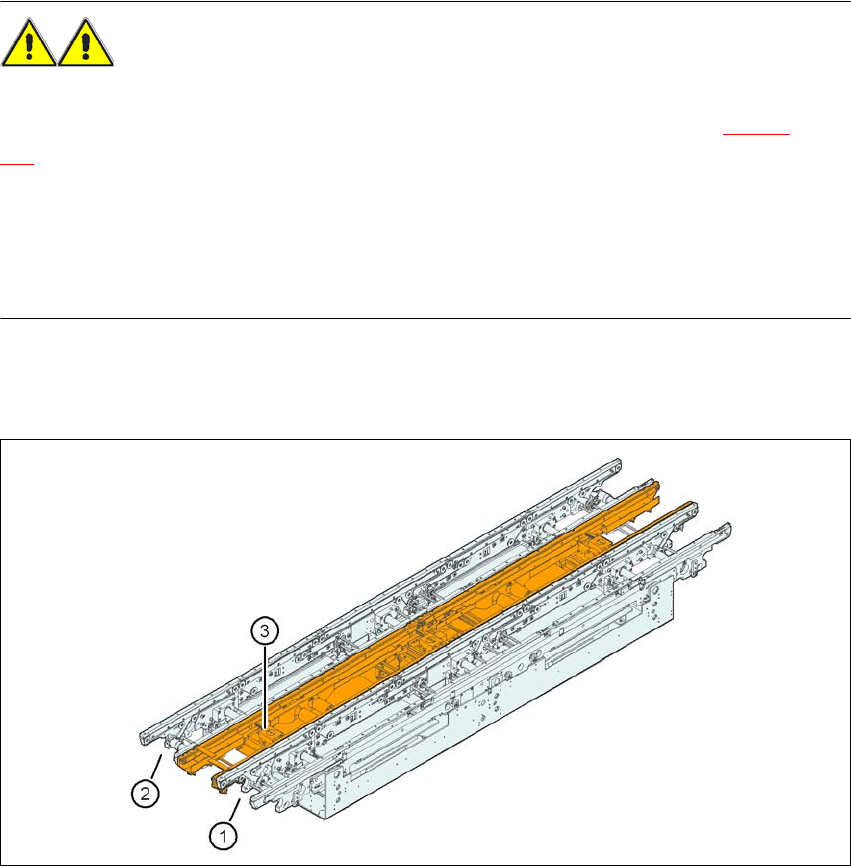
Fig. 6.21 - 1 SIPLACE X-series Productivity Lane (XPL)
(1) Conveyor track 1 of the flexible dual conveyor
(2) Conveyor track 2 of the flexible dual conveyor
(3) SIPLACE X-series Productivity Lane (XPL)
User Manual SIPLACE X-Series 6 Station extensions
From software version SR.605.xx 07/2008 EN Edition 6.21 SIPLACE X-series Productivity Lane (XPL)
465
The "SIPLACE X-series Productivity Lane" option
a
in the middle of the PCB conveyor allows
PCBs to be overtaken in the placement machine. As with the Productivity Lift, the placement ma-
chine is operated in parallel. This third conveyor track can be viewed from above, and even works
with the protective cover open. This allows the path that the PCB takes through the machine to be
followed for checking purposes. SIPLACE X-series Productivity Shuttles (see Section 6.22
, page
466
) on the input/output side of the machine or line distribute the PCBs to be processed to the
required track of the PCB conveyor or to the third conveyor track.
6.21.3 PCB widths
6
6
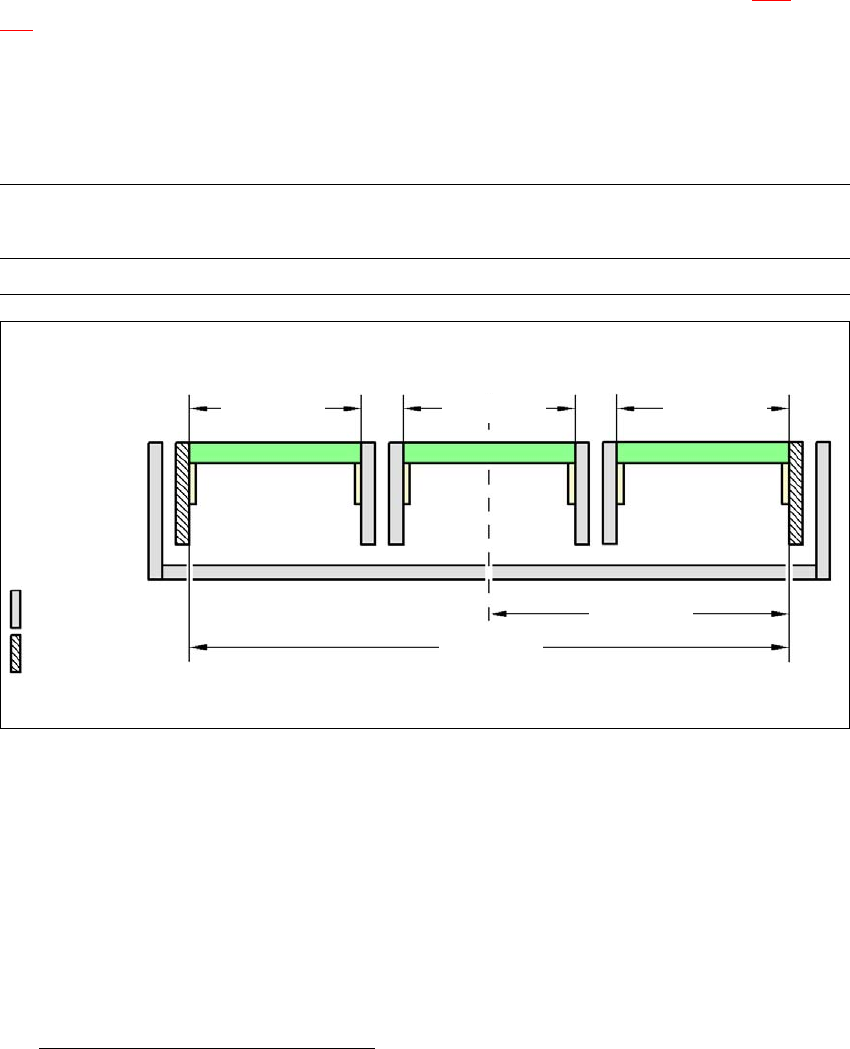
Fig. 6.21 - 2 Maximum PCB widths - conveyor edges 535 mm stationary, SIPLACE XP
a) See "SIPLACE X-series Productivity Lane" manual
Conveyor mode PCB width
track 1
PCB width
SIPLACE XPL
PCB width
track 2
XPL max. 154 mm max. 154 mm max. 154 mm
6
max. 154 mm
6
max. 154 mm
6
267.5 mm
6
535 mm
6
Movable
conveyor edge
6
Stationary
conveyor edge
6
max. 154 mm