00195722-0102_UM_X-Serie_SR605_EN.pdf - 第413页
User Manual SIPLACE X-Series 6 Station extensions From software version SR.605.xx 07/2008 EN Edition 6.2 Docking station for the component trolley fr om the SIPLACE X-series 413 PLEASE NOTE 6 Reverse the sequence to conv…
6 Station extensions User Manual SIPLACE X-Series
6.2 Docking station for the component trolley from the SIPLACE X-series From software version SR.605.xx 07/2008 EN Edition
412
PLEASE NOTE: 6
Only remove the panel (item 9 in Fig. 6.2 - 5
, page 410) in the following situations:
– You are converting the component trolley docking unit to a height of 830 mm.
– You are converting the component trolley docking unit height of 830 mm to another height.
→ Remove the 4 hexagon socket head screws M5x12 (item 7 in Fig. 6.2 - 5
, page 410). Hold the
panel tightly so that it does not drop down.
→ Remove the panel.
CAUTION 6
Be careful not to damage any cables while raising and lowering the component trolley docking
unit.
→ Release both screw connections (item 3 in Fig. 6.2 - 5
, page 410).
→ Loosen both screw connections (item 2 in Fig. 6.2 - 5
, page 410).
→ Remove both M8 hexagonal nuts and washers (item 4 in Fig. 6.2 - 5
, page 410).
→ Hold the component docking unit firmly at the side section (item 10 in Fig. 6.2 - 5
, page 410)
and remove both M8x40 hexagon socket head screws at this location.
→ Swivel the component trolley docking unit upwards until the hole in the side section is covered
with the slot (item 5 in Fig. 6.2 - 5
, page 410).
→ Fasten the side section at this location. Only hand-tighten the nuts.
→ Hold the component docking unit firmly at the FCU (item 12 in Fig. 6.2 - 5
, page 410) and re-
move the screw connections at item 2 in Fig. 6.2 - 5
, page 410.
→ Swivel the component trolley docking unit upwards until the hole in the side section is covered
with the 900 mm hole (item 1 in Fig. 6.2 - 5
, page 410).
→ Fasten the side section at this location. Only hand-tighten the nuts.
→ Swivel the component trolley docking unit from the slot (item 5 in Fig. 6.2 - 5
, page 410 to the
900 mm hole upwards and fixed in place firmly at this location.
→ Check all screw connections at items 2, 3 and 4 in the 900 mm component trolley height for
firm seating.
→ Fix the left and right guides (item 8 in Fig. 6.2 - 5
, page 410) using the hexagon socket head
screw M8x18 (item 9 in Fig. 6.2 - 5
, page 410).
→ Fix the panel (item 11 in Fig. 6.2 - 5
, page 410) using the 4 hexagon socket head screw M5x12
(item 7 in Fig. 6.2 - 5
, page 410) .
User Manual SIPLACE X-Series 6 Station extensions
From software version SR.605.xx 07/2008 EN Edition 6.2 Docking station for the component trolley from the SIPLACE X-series
413
PLEASE NOTE 6
Reverse the sequence to convert from a height of 900 mm to 830 mm (see Fig. 6.2 - 6
, page
411).
6.2.5.4 Converting the component trolley docking unit to a height of 900, 930 or 950 mm
6
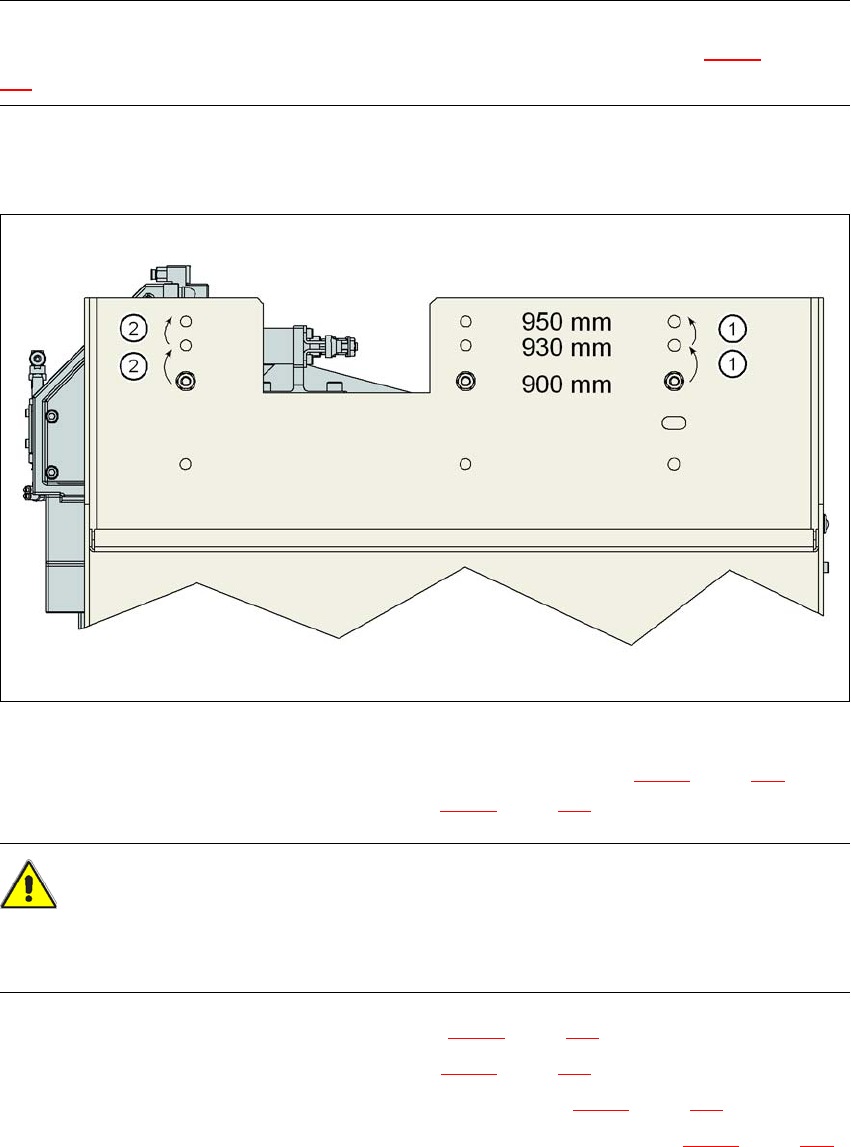
Fig. 6.2 - 7 Steps for conversion from a height of 830 mm to a height of 900 mm
→ Remove the two hexagon socket head screws M8x18 (item 9 in Fig. 6.2 - 5, page 410) and
remove the left and right guides (item 8 in Fig. 6.2 - 5
, page 410).
CAUTION 6
Be careful not to damage any cables while raising and lowering the component trolley docking
unit.
→ Release both screw connections (item 3 in Fig. 6.2 - 5
, page 410).
→ Loosen both screw connections (item 2 in Fig. 6.2 - 5
, page 410).
→ Remove both M8 hexagonal nuts and washers (item 4 in Fig. 6.2 - 5
, page 410).
→ Hold the component docking unit firmly at the side section (item 10 in Fig. 6.2 - 5
, page 410)
and remove both M8x40 hexagon socket head screws at this location.
→ Swivel the component trolley docking unit to the next highest position.
→ Fasten the side section at this location. Only hand-tighten the nuts.
6 Station extensions User Manual SIPLACE X-Series
6.2 Docking station for the component trolley from the SIPLACE X-series From software version SR.605.xx 07/2008 EN Edition
414
→ Hold the component docking unit firmly at the FCU (item 12 in Fig. 6.2 - 5, page 410) and re-
move the screw connections at item 2 in Fig. 6.2 - 5
, page 410.
→ Swivel the component trolley docking unit into the next highest position.
→ Fasten the side section at this location.
→ Check all screw connections at items 2, 3 and 4 for form seating.
→ Fix the left and right guides (item 8 in Fig. 6.2 - 5
, page 410) using the hexagon socket head
screw M8x18 (item 9 in Fig. 6.2 - 5
, page 410).
PLEASE NOTE 6
Reverse the sequence (see Fig. 6.2 - 6
, page 411) if the component trolley docking unit should
be brought down to a lower transport height.