00195722-0102_UM_X-Serie_SR605_EN.pdf - 第358页
5 Tasks for the operating personnel User Manual SIPLACE X-Series 5.11 Docking the component trolley in or out From software version SR.605.xx 07/2008 EN Edition 358 5.1 1 Docking the component trolley in or out 5.1 1.1 S…

User Manual SIPLACE X-Series 5 Tasks for the operating personnel
From software version SR.605.xx 07/2008 EN Edition 5.10 Refilling components
357
5.10 Refilling components
The online help contains information on refilling components with and without barcodes.
→ With tape feeder modules, make sure that you always splice on a new tape early enough so
that the feeder modules do not run out of components.
→ However, do not splice the tapes too early because if you wind the tape onto the new reel
after splicing the end of the old tape, the reel with the new tape may be overfilled. The tape
could then slip off the reel and become tangled. Under certain circumstances, this could
cause pick-up errors and prolonged down times.
→ Always insert spindles when using tape reels of 15" (381 mm) and larger (see Fig. 5.5 - 5
,
page 337
) and make sure that the separating plates are inserted correctly (see Fig. 5.5 - 4,
page 336
).
5 Tasks for the operating personnel User Manual SIPLACE X-Series
5.11 Docking the component trolley in or out From software version SR.605.xx 07/2008 EN Edition
358
5.11 Docking the component trolley in or out
5.11.1 Safety instructions for docking component trolleys in and out
WARNING 5
To prevent accidents (risk of crushing), the component trolley may only be docked in or out by
one person.
5
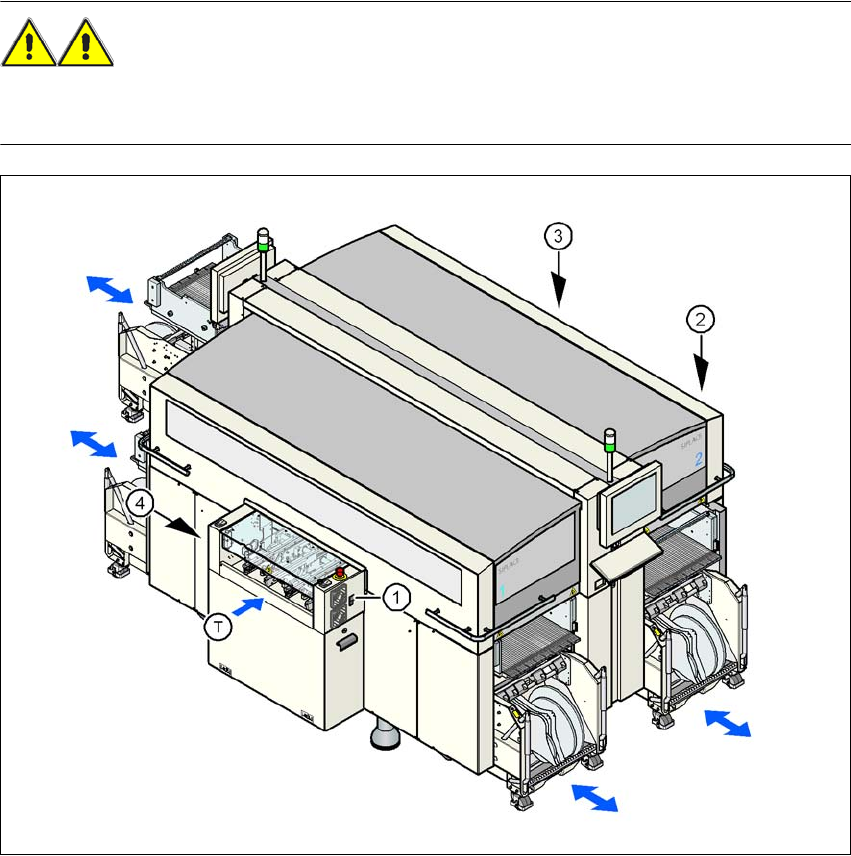
Fig. 5.11 - 1 Safety instructions for docking the component trolley in or out
(1) Button for docking the component trolley in or out, location 1
(2) Button for docking the component trolley in or out, location 2
(3) Button for docking the component trolley in or out, location 3
(4) Button for docking the component trolley in or out, location 4
(T) Direction of PCB transport
User Manual SIPLACE X-Series 5 Tasks for the operating personnel
From software version SR.605.xx 07/2008 EN Edition 5.11 Docking the component trolley in or out
359
The safety concept for the component trolley change requires the operator to press a button (item
1, 2, 3 or 4 in Fig . 5.11 - 1
, page 358) on the input or output side of the machine in order to dock
the component trolley in or out. This ensures that the operator is always standing to the side of
the placement machine. In addition, the component trolley can only be docked in if the protective
covers are closed.
5.11.2 Docking out the component trolley
→ Press one of the buttons on the input or output side of the machine (item 1, 2, 3 or 4 in Fig.
5.11 - 1
, page 358) until the CO trolley is docked out fully.
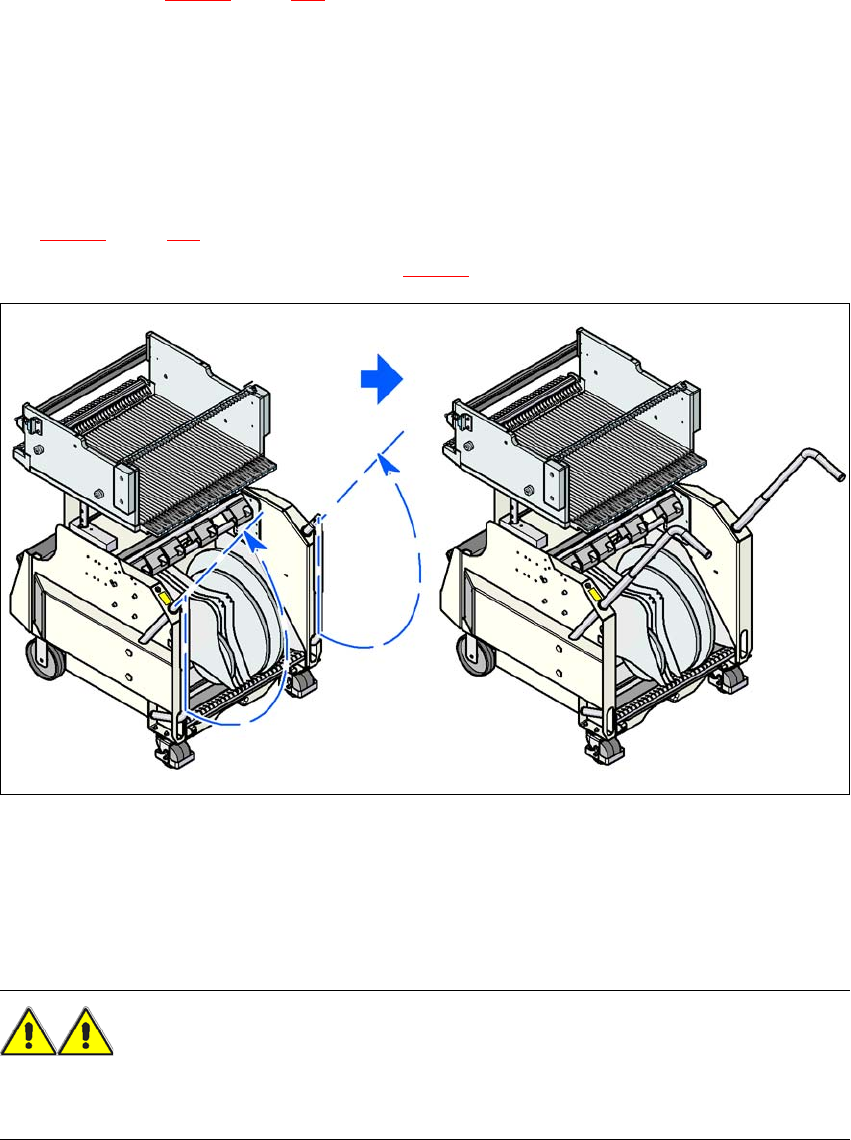
→ Swivel the two handles up (item 1 in Fig. 5.11 - 2
).
5
Fig. 5.11 - 2 Component trolley - swivel handles up to push
→ With both hands on the handles, pull the component trolley out of the placement machine.
5.11.3 Safety instructions for moving the component trolley
WARNING
To prevent accidents, ALWAYS follow the rules listed below when you move the component trol-
ley.
→ Always hold the handles with both hands when you want to move the component trolley.