Service Manual HS60.pdf - 第194页
6 Modu lar PCB conv eyor syste m Ser vic e Manu al HS- 60 6. 11 L ift ing tabl e 03/ 200 3 U S Iss ue 192 Æ A hyp ert ermi nal win d ow will o p en => P ress the Enter key =>a nd the main conveyor menu wi ll appear…

Service Manual HS-60 6 Modular PCB conveyor system
03/2003 US Issue 6.11 Lifting table
191
6.11.7.1 Removal/installation
Æ Move the PCB conveyor to the position which gives you the best access to the lifting table
Æ Move the Y-gantries into the area outside the PCB conveyor.
Æ Turn the machine off at the main switch and disconnect the machine from the mains voltage.
Æ Switch off the compressed air supply.
Æ Make sure the machine has been properly secured to prevent it being switched on again during
servicing.
Æ Undo the screws fastening the lifting table plate and remove the lifting table plate from the lifting
table unit.See also Fig. 6.11.9
Æ Undo the fastening screws for the solenoid valve (see also Fig. 6.11.11) and remove it from the
lifting table cylinder.
Æ Loosen the grub screw at the end position proximity switch and push the end position proximity
switch out of the lifting table cylinder guide rail.
Æ Loosen the locknut on the piston rod and twist the piston rod out until it releases itself from the
actuator.
Æ Undo and remove the two screws fastening the lifting table cylinder.
Æ Insert and fasten the new lifting table cylinder and install the piston rod.
Æ Move the lifting table by hand to its end position.
Æ Switch the machine on.
Æ Push the end position proximity switch into the guide rail until the LED lights up.
Æ Fix this position with the grub screw.
Æ Install the solenoid valve and the lifting table plate.
Æ Check the speed of the lifting table and correct where necessary (see also Section 6.11.7.2).
6.11.7.2 Adjusting the speed of the lifting table (service personnel only)
NOTE
The lifting table must be installed on the lifting table unit!
Æ Connect the service notebook to the conveyor control via the serial port.
Æ Open Start => Programs => Accessories and select the function Hyperterminal.
Æ Create a new connection.
Æ Select COM 1 => OK
Æ Select 57600 Bits/second => OK
Æ Select protocol => No => OK
6 Modular PCB conveyor system Service Manual HS-60
6.11 Lifting table 03/2003 US Issue
192
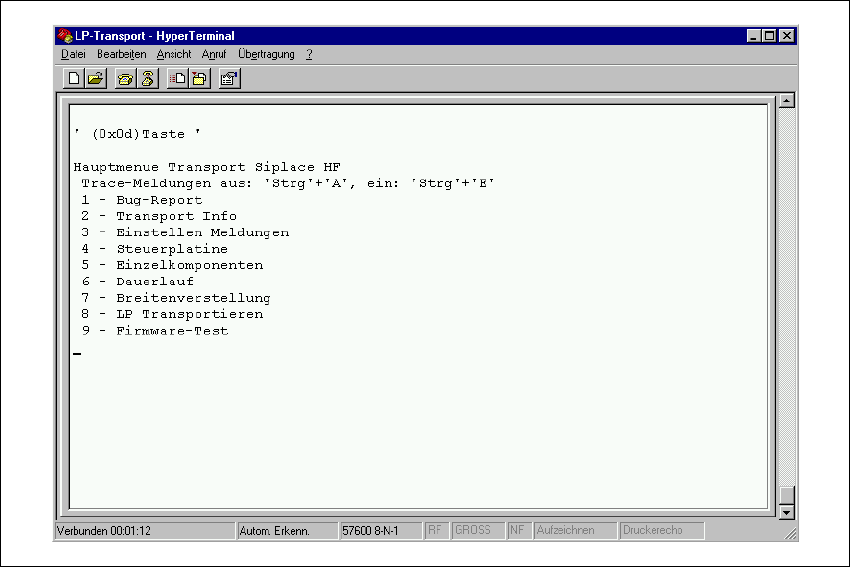
Æ A hyperterminal window will open => Press the Enter key =>and the main conveyor menu will
appear.
Fig. 6.11.15 Main menu "Test software conveyor"
Æ Select => 3 "Einstellen Meldungen" from the menu.
Æ Select "Standard Einstellungen" => Exit the menu with " 0 = Ende ".
Æ Select => 5 "Einzelkomponenten" from the menu.
Æ Select => 2 "Hubtisch" from the menu.
Æ Select => " a ", Auswahl Hubtisch (BB1,BB2 track 1 or track 2) from the menu.
Æ Press " Strg+E " to issue TSP reports.
Æ Select 2 or 3 from the menu, to move the lifting table upwards or downwards.
Service Manual HS-60 6 Modular PCB conveyor system
03/2003 US Issue 6.11 Lifting table
193
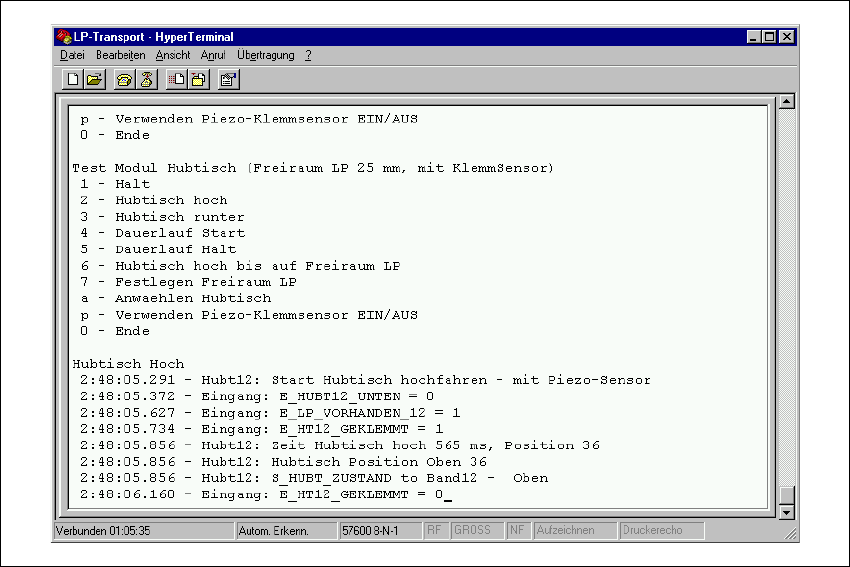
Fig. 6.11.16 Issuing times for the lifting table
Æ Adjust the valves on the lifting table cylinder to give the following values:
– Lifting table upwards: 500ms +/- 20ms
– Lifting table downwards: 480ms +/- 20ms