Service Manual HS60.pdf - 第293页
HS -60 Se rvic e Ma nual 7 DLM2 Co l lect&Plac e Head 03/ 2 003 U S I ssue 7. 11 Re pl aci ng lig ht ba r ri er ’ Z- a xi s up ’ ( 00 34 72 97 -01 ) 291 7 F ig. 7. 1 1 - 1 Rep la ci ng th e ’Z -a xi s up ’ lig ht bar…

7 DLM2 Collect&Place Head HS-60 Service Manual
7.11 Replacing light barrier ’Z-axis up’ (00347297-01) 03/2003 US Issue
290
7.10.4 Fitting the intermediate distribution board
Æ Restore connections X1 ... X12 as described in Table 7.10 - 1.
Æ Push the hose onto the pressure sensor tube (see item 4 in Fig. 7.10 - 1).
Æ Fix the intermediate distribution board in place (see item 2 and 3 in Fig. 7.10 - 1).
Æ Fix the protective cover to the head.
Æ Switch the placement system on and start it up.
7.10.5 Settings
No settings are required. 7
7
7.11 Replacing light barrier ’Z-axis up’ (00347297-01)
7.11.1 Tools and equipment
– Set of DIN 911 Allen keys
– Set of Phillips screwdrivers
– SITEST program
7.11.2 Parts
Light barrier ’Z-axis up’, item no. 00347297-01 7
7.11.3 Dismantling the ’Z-axis up’ light barrier
Æ Switch the placement system off and secure it to prevent switching on again as described in
Section 7.4
, page 261.
Æ Remove the plug from socket X10 on the intermediate distribution board (see item 10 in Fig.
7.2 - 5
, page 254).
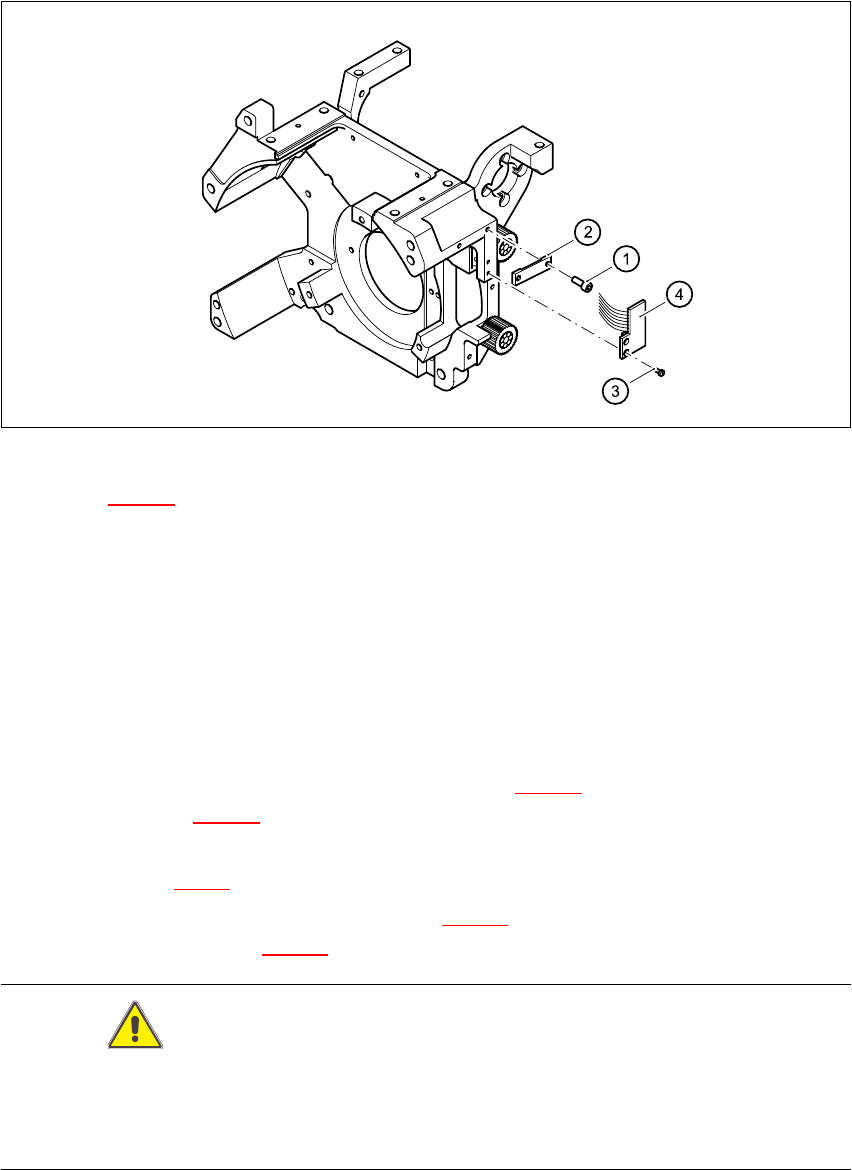
Æ Undo the two M2.0x4 hexagon socket-head screws (see item 1 in Fig. 7.11 - 1) and remove
the ribbon cable clamp (see item 2 in Fig. 7.11 - 1
).
Æ Undo the two M1.6x3 Phillips screws (see item 3 in Fig. 7.11 - 1).
Æ Remove the light barrier board (see item 4 in Fig. 7.11 - 1) together with its cable.
HS-60 Service Manual 7 DLM2 Collect&Place Head
03/2003 US Issue 7.11 Replacing light barrier ’Z-axis up’ (00347297-01)
291
7
Fig. 7.11 - 1 Replacing the ’Z-axis up’ light barrier board
Key to Fig. 7.11 - 1
(1) 2 x M2.0x4 hexagon socket-head screw
(2) Cable clamp assembly, flat
(3) 2 Phillips screws (1.6x3)
(4) Light barrier board ’Z-axis up’
7.11.4 Fitting the ’Z-axis up’ light barrier
Æ Use the two M1.6x3 Phillips screws (see item 3 in Fig. 7.11 - 1) to fix the light barrier board
(see item 4 in Fig. 7.11 - 1
) in place.
Æ Connect the ribbon cable plug to socket X10 on the intermediate distribution board (see
item X10 in Fig. 7.2 - 5
).
Æ Use the ribbon cable clamp (see item 2 in Fig. 7.11 - 1) and the two hexagon socket-head
screws (see item 1 in Fig. 7.11 - 1
) to fix the ribbon cables.
CAUTION 7
Make sure that the ribbon cable is not squashed in the guide channel.
Make sure to push the folded part of the flat ribbon cable for the ’Z-axis up’ light barrier back under
the illumination board. 7
7 DLM2 Collect&Place Head HS-60 Service Manual
7.11 Replacing light barrier ’Z-axis up’ (00347297-01) 03/2003 US Issue
292
7.11.5 Settings
Æ No settings are required.