Service Manual HS60.pdf - 第209页
Se rv ic e Ma nu al HS- 6 0 6 Mo du la r P C B c onve y or s y st em 03/ 2 003 U S Iss ue 6. 13 Wi dth ad justme nt 207 Fig. 6.1 3.26 Re placi ng th e lim it s witc h for the wi dth adj ustm ent sy stem (e xa mple shows …

6 Modular PCB conveyor system Service Manual HS-60
6.13 Width adjustment 03/2003 US Issue
206
6.13.4 Replacing the limit switches for the end position of the width adjustment sys-
tem (00365108-02)
DANGER
Please observe the safety instructions in Chapter 2.
Limit switch in the input conveyor:
In the vicinity of the input conveyor, there are 4 limit switches under the conveyor sides. The limit
switch is designed to prevent the conveyor sides hitting one another or the conveyor base.
Limit switch in the output conveyor:
In the vicinity of the output conveyors, there are 2 limit switches for the adjustment unit. They serve
to secure the transport area and to initialize the adjustment unit during width adjustment.
6.13.4.1 Parts
– 00365002-03 Limit switch on the mounting tray
– 00365108-02 Limit switch for width adjustment 1
– 00365109-02 Limit switch for width adjustment 2
– 00362345-01 Limit switch for width adjustment - on the conveyor side
Service Manual HS-60 6 Modular PCB conveyor system
03/2003 US Issue 6.13 Width adjustment
207
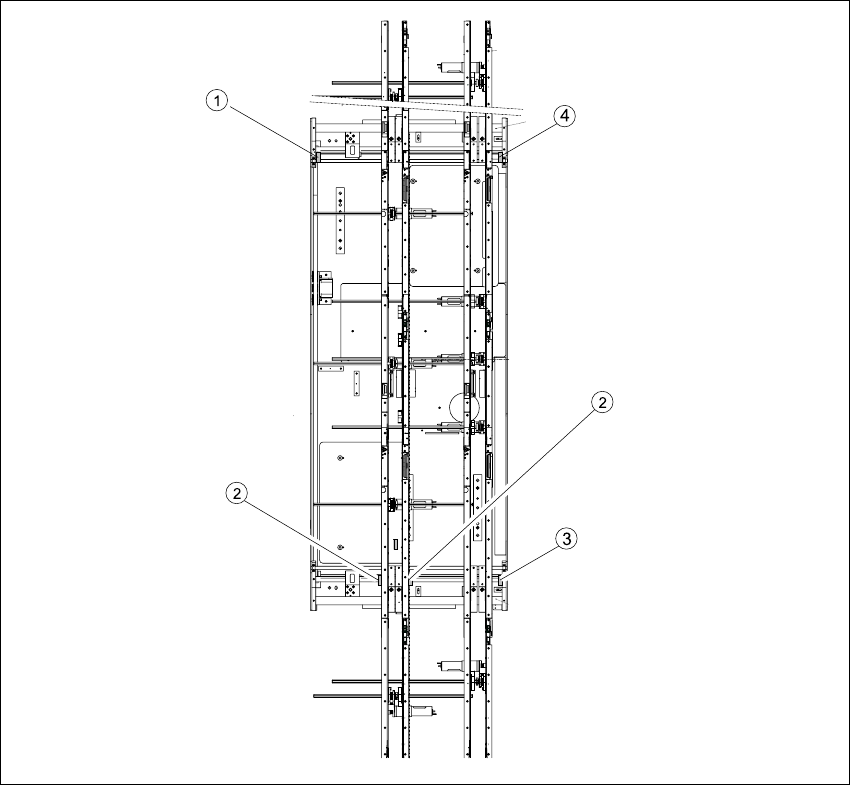
Fig. 6.13.26 Replacing the limit switch for the width adjustment system (example shows HS-60)
Key
(1) Limit switch on the mounting tray (3) Limit switch for width adjustment 1
(2) Limit switch for width adjustment 1 or 2 for
dual conveyors
(4) Limit switch for width adjustment 2

6 Modular PCB conveyor system Service Manual HS-60
6.13 Width adjustment 03/2003 US Issue
208
6.13.4.2 Removal/installation
NOTE:
The limit switches are pre-assembled and include cables.
However, if the limit switch itself is faulty, the wiring can also be unsoldered/soldered right at the
switch in question.
Æ Unsolder the connection wires on the faulty limit switch (see also Section 6.16 and Section
6.17).
Æ Undo and remove the two screws on the faulty limit switch.
NOTE:
If you have discovered a break in the limit switch cable during a continuity check, the cable must
be woven out as far as the conversion board of the mounting tray (see circuit diagrams of the
same name) and unplugged at the corresponding point. (see also Section 6.16
and Section 6.17).
This may be somewhat complicated depending on the routing of cables inside the machine base.
You may wish to contact Siemens Dematic AG SMD Service regarding this work.
Æ Install the new limit switch and re-solder the connection wires with the correct allocation.
6.13.4.3 Checking the position of the limit switch
Æ Check the minimum and maximum width for the relevant machine type and the parallelism of
the conveyor sides.