FCM_User Reference Manual.pdf.pdf - 第107页
4022 591 96082 User Re ference Manual 02.02 FCM Multiflex 5-15 MIS 5.3.2.4 [ R eports] > [P roc ess r eport...] T ABL E 5-5 Q ui ck Ref er en ce fcm05 18a.tif SCREE N 5-1 1 [Proc ess r eport... ] screen example , part…
MIS
User Reference Manual 4022 591 96082
5-14 FCM Multiflex 02.02
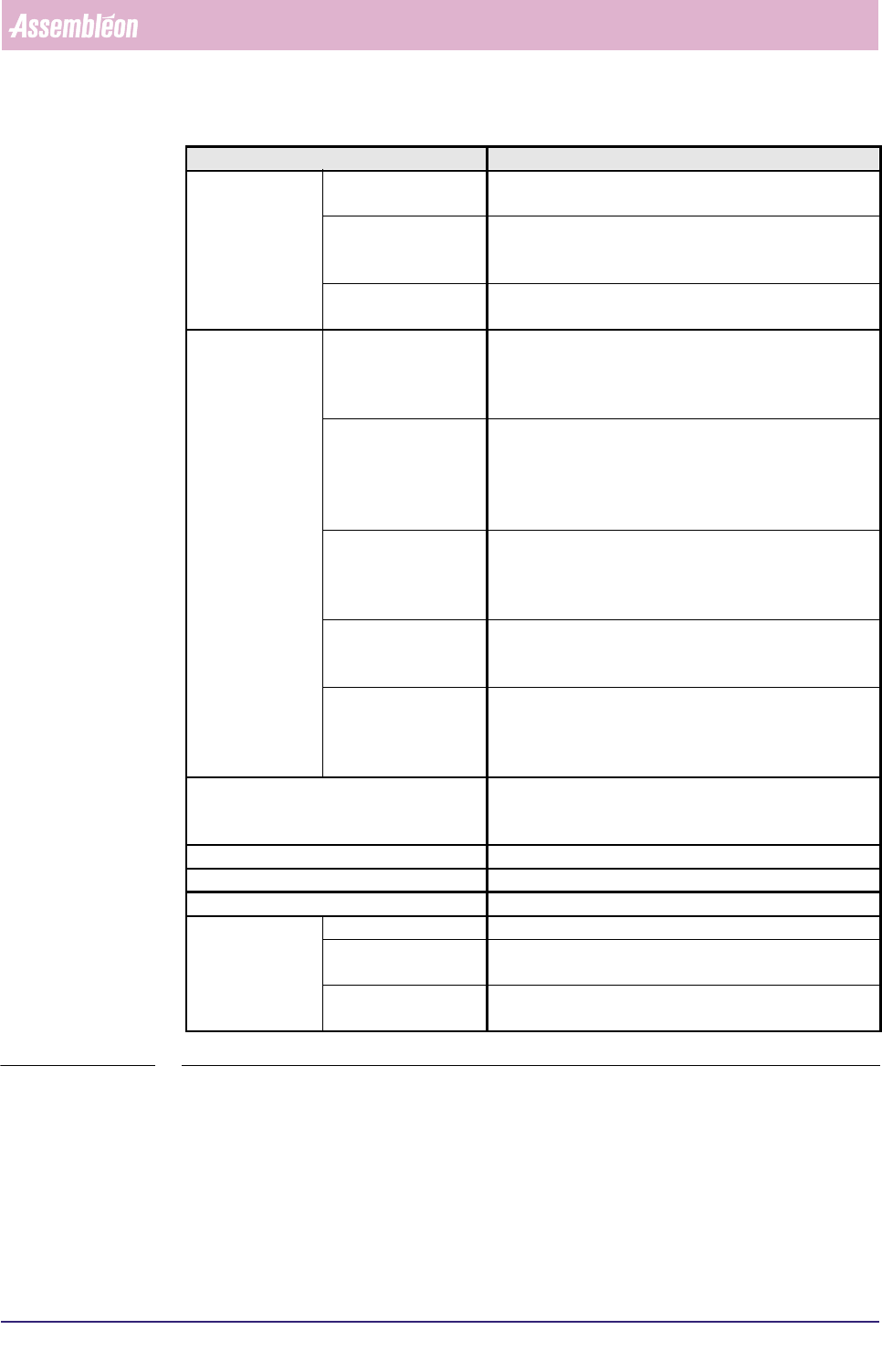
■ Report text explanation (see SCREEN 5-6 and SCREEN 5-7)
TABLE 5-4
▼ Controls
The controls on the right of the screen (see SCREEN 5-6) have the functions:
■
[Print (F7)] = print the report; pressing <F7> will also print the report
■ [Quit] = leave the dialogue
Report text Explanation
auto retries missing after pick total number of automatic pick retries that occurred after
SMD was missing immediately after pick action
align total number of automatic pick retries that occurred after
SMD was missing upon starting the align action (WVM
only)
after align (misalign) total number of automatic pick retries that occurred after
SMD could not properly be aligned
manual retries pick error
■ FCM Multiflex stopped after having reached the auto
retry limit
■ total number of manual pick retries after
SMD was missing immediately after pick action
missing before align
■ FCM Multiflex stopped after having reached the auto
retry limit
■ total number of manual pick retries after
SMD was missing upon starting the align action
(WVM only)
misalign
■ FCM Multiflex stopped after having reached the auto
retry limit
■ total number of manual pick retries after
SMD could not properly be aligned
missing after align
■ FCM Multiflex stopped immediately after the SMD
was lost after performing the alignment action
■ total number of manual pick retries
retained after place
■ FCM Multiflex stopped immediately after the SMD
was still present on the nozzle after trying to place it on
the board
■ total number of manual pick retries
remaining SMDs not placed (skipped) total number of picked SMDs that are not placed
(dumped) as a result of selecting [Skip action] or [Skip
board] in the [Error Recovery] dia-logue
Machine errors total number of FCM Multiflex hardware errors
placed components total number of placed SMDs
picked components total number of picked SMDs
boards pro-duced good total number of well produced boards
suspect total number of produced boards of which it is not certain
that all SMDs are placed
skipped total number of boards of which it is certain that not all
SMDs are placed
4022 591 96082 User Reference Manual
02.02 FCM Multiflex 5-15
MIS
5.3.2.4 [Reports] > [Process report...]
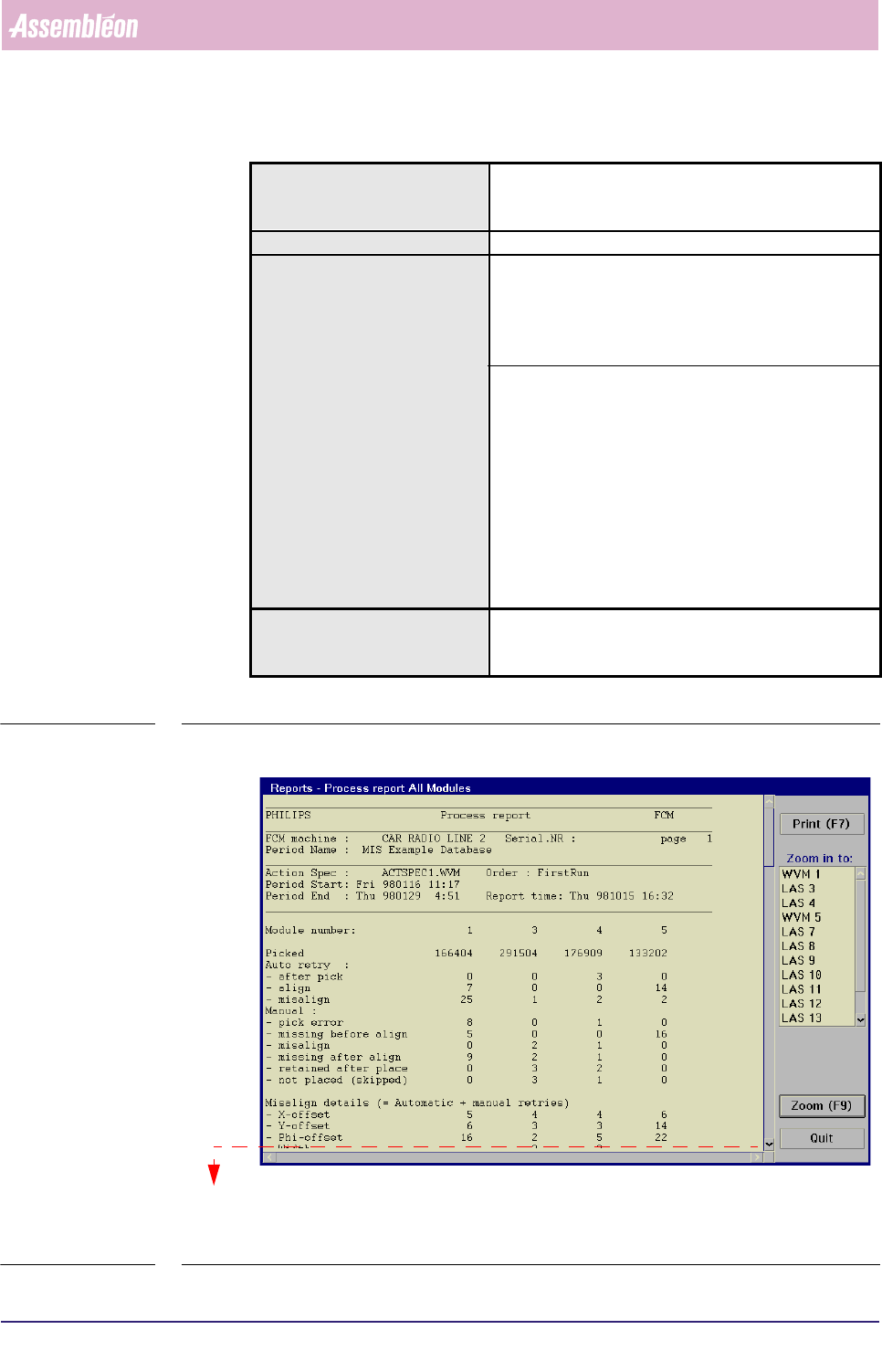
TABLE 5-5 Quick Reference
fcm0518a.tif
SCREEN 5-11 [Process report...] screen example, part 1
Actions ■ select [Functions...] in the MIS pull-down menu
■ select [Reports]
■ select [Process report...]
Conditions ■ order active
Information ■ FCM Multiflex machine identification and serial no.
■ MIS period name + start/stop date/time
■ action spec name
■ order name
■ report date/time
■ number of auto retries per placement module + per
feeder
■ number of manual retries per placement module +
per feeder
■ number of picked SMDs per placement module + per
feeder
■ number of not placed SMDs (skipped) per placement
module + per feeder
■ misalign details per placement module + per feeder
■ retry limit
■ time lost due to process errors
Display Options ■ process report for all modules
■ process report per placement module
(zoom-in function)
see next screen
MIS
User Reference Manual 4022 591 96082
5-16 FCM Multiflex 02.02
fcm0519a.tif
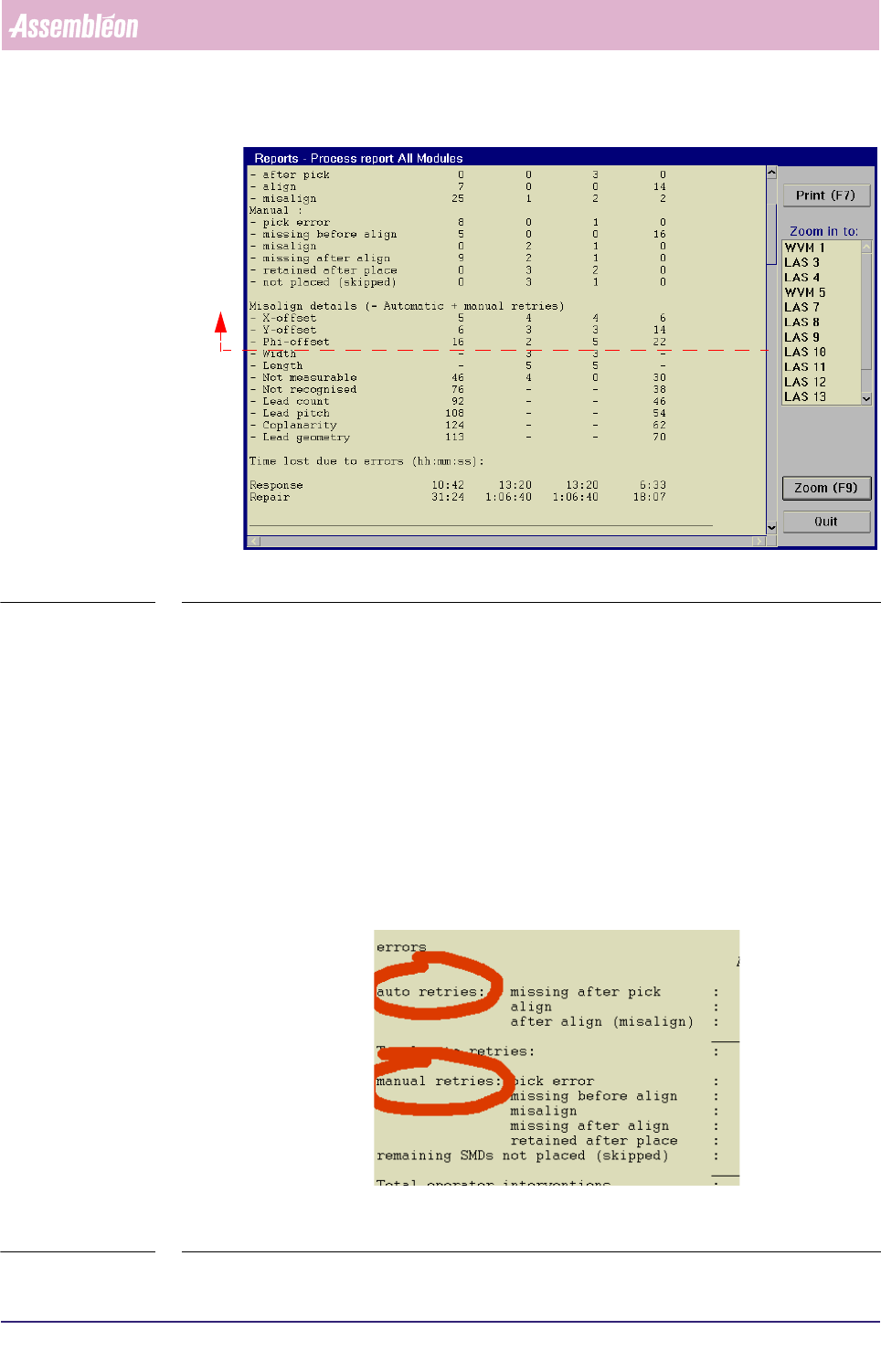
SCREEN 5-12 [Process report...] screen example, part 2
✱✱ Detailed Information
▼ Displayed Information
The [Process report...] report gives a textual overview of the process errors.
They can either be displayed for all placement modules or for a specific
placement module.
On first entry, the report displays an overview on all (used) placement modules
(see 5.3.2.5 and SCREEN 5-12).
The process errors are divided into auto retries and manual retries
(see SCREEN 5-13).
fcm0516a.tif
SCREEN 5-13
see previous screen