FCM_User Reference Manual.pdf.pdf - 第186页
MIS User Re ference Manual 4022 5 91 96082 5-94 F CM Mult ifl ex 02.02 M I S periods created t his way get th e name Da te + Or der name + “ shif t x ” , where x is th e actual shift number (sh i ft number 1 is th e f ir…
4022 591 96082 User Reference Manual
02.02 FCM Multiflex 5-93
MIS
5.3.9.4 [Parameters] > [Auto start period...]
TABLE 5-54 Quick Reference
fcm0578a.tif
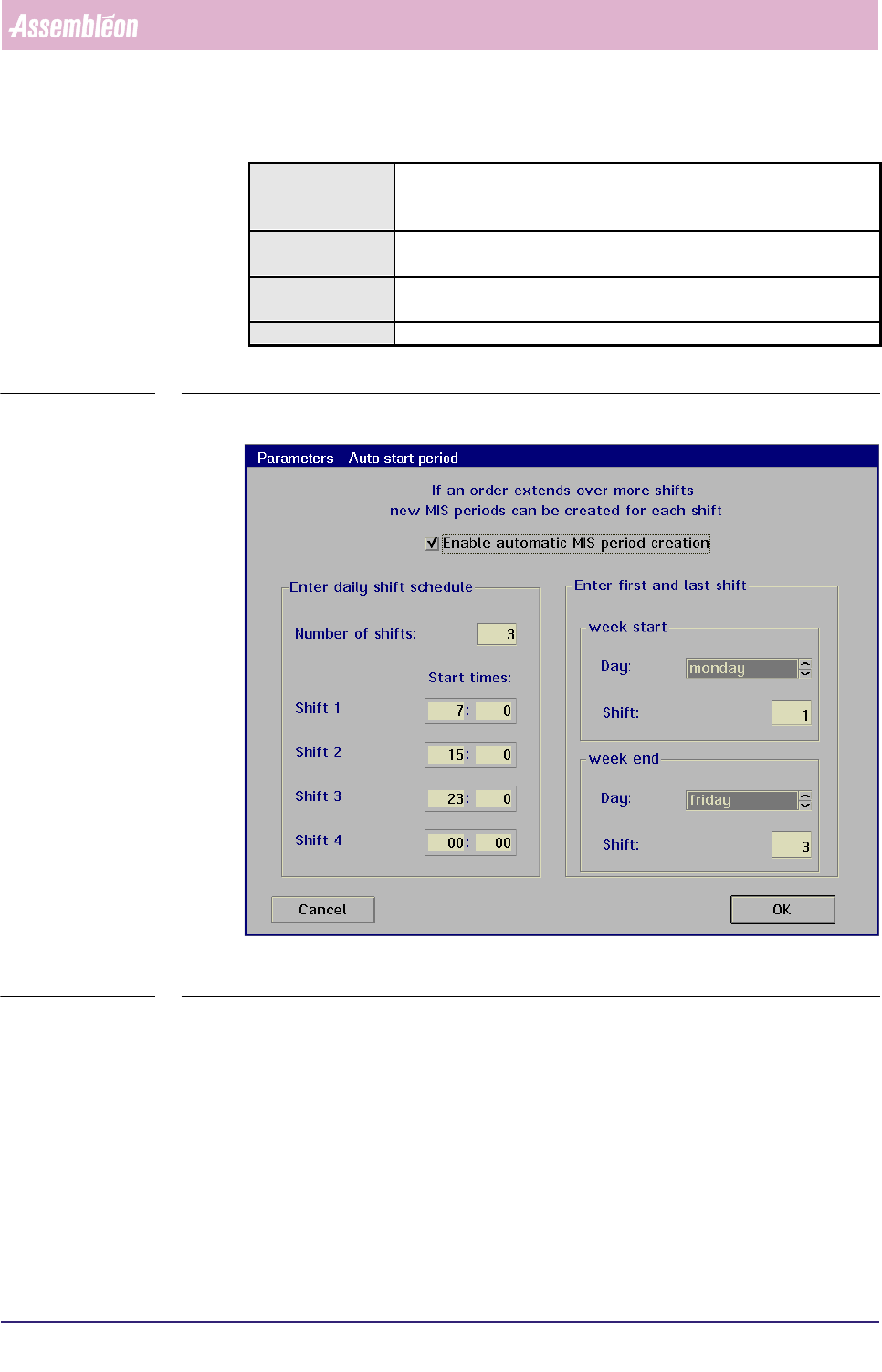
SCREEN 5-69 [Auto start period...] screen example
✱✱Detailed Information
When you plan to run the same order over a long period, you can let the system
create MIS periods automatically. In that case, the MIS period creation is based on
a shift schedule to be filled in via the
[Auto start period...] menu (see SCREEN 5-
69). Each time a new shift starts, a new MIS period is created (as long as the
concerned order is active).
Actions ■ select [Functions...] in the MIS pull-down menu
■ select [Parameters]
■ select [Auto start period...]
Conditions ■ supervisor access level
■ order active
Information ■ in this menu, the supervisor can initiate and define automatic MIS
periods creation for shift scheduled production
Display Options -
MIS
User Reference Manual 4022 591 96082
5-94 FCM Multiflex 02.02
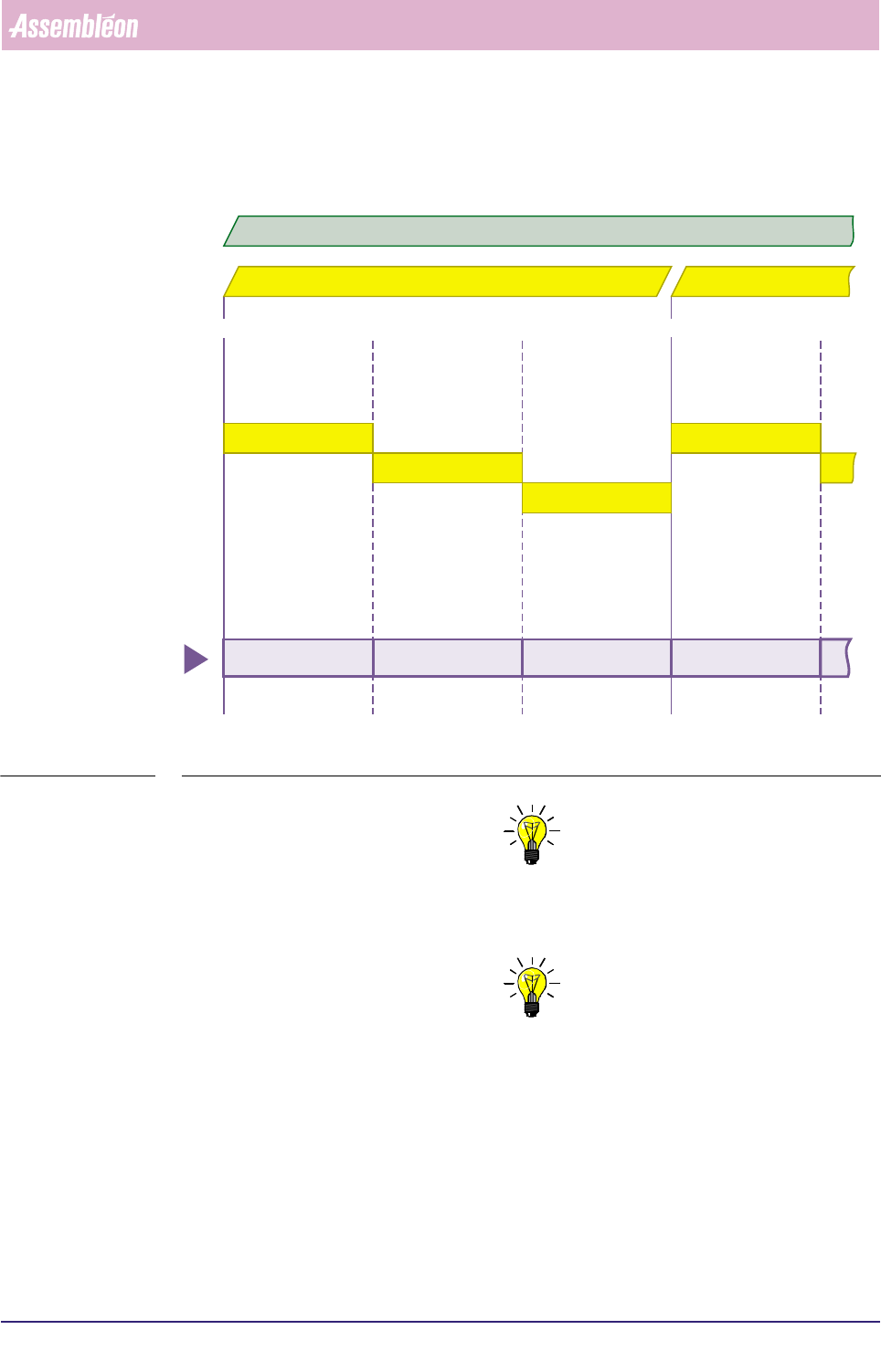
MIS periods created this way get the name Date + Order name + “shift x”, where
x is the actual shift number (shift number 1 is the first on the day). FIGURE 5-10.
fcm0579a.eps
FIGURE 5-10 Automatic MIS periods creation, controlled by the MIS shift schedule
NOTE: 1) Deleting the current order will end the MIS period of that order
respectively the automatic generation of new MIS periods for that
order.
NOTE: 2) Entering a new order will still create a new MIS period.
shift 1
shift 2
shift 3
shift 1
07:00 u 15:00 u 07:00 u 15:00 u23:00 u
date = 98 10 02 date = 98 10 03
98 10 02 order A shift 1 98 10 02 order A shift 2 98 10 02 order A shift 3 98 10 03 order A shift 1
automatically created
MIS periods
active order = A
4022 591 96082 User Reference Manual
02.02 FCM Multiflex 5-95
MIS
5.4 Glossary and Conventions
5.4.1 Glossary
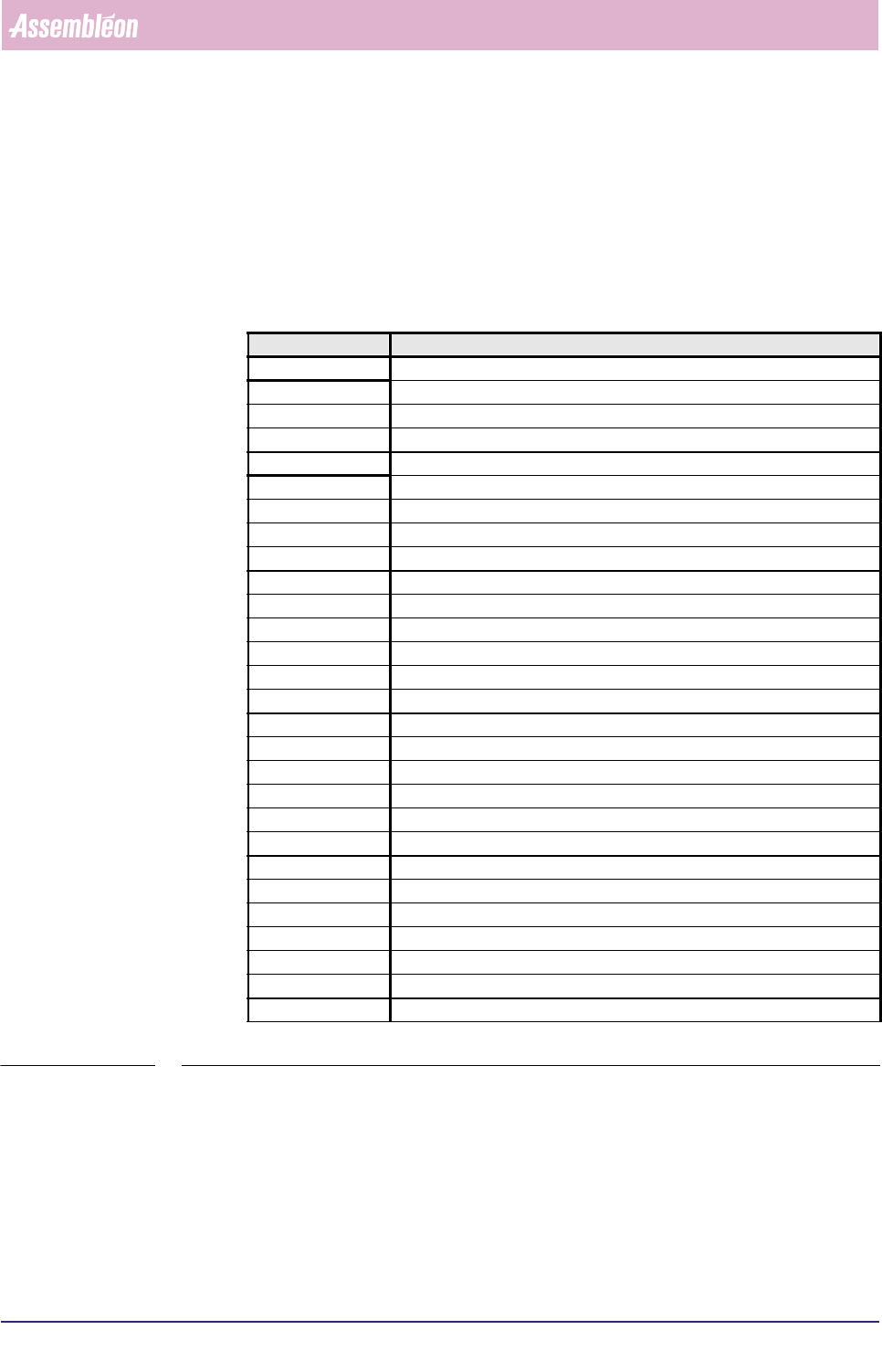
Most abbreviations are explained within the text of this manual. Though, for your
convenience, a survey of the most important used abbreviations are listed below in
alphabetic order.
TABLE 5-55
Abbreviation Meaning
action spec action specification
AM Automation Module
BBRAM Battery Backup Random Access Memory
BI Barcode Identification
BMS Bad Mark Sensing
BVM Board Vision Module
DC DFA/BMS Controller
DFA Dynamic Fiducial Alignment
EPD Electrical Proximity Detector
EPROM Erasable Programmable Read Only Memory
FCM Multiflex Fast Component Mounter
GPM General Purpose Module
LA Laser Align
LAS placement module with Laser Align System
MIS Manufacturing Information System
MUP Multi User Pipette
board Printed Circuit Board
PIP PIck and Placement module
PPM Parts Per Million
PPS Production Preparation System
PPU Placement Phi Unit
PROM Programmable Read Only Memory
SBIP Single Board Image Processor
SECS-II SEMI Equipment Communications Standard - Part II
SMD Surface Mounted Device
SMEMA Surface Mount Equipment Manufacturers Association
TC Transport Controller
WVM Wide Vision Module