FCM_User Reference Manual.pdf.pdf - 第220页
Pr oduc t Ch ang e Ov er User Re f eren ce Manu al 4022 591 960 82 6-28 FCM M ult ifle x 02.02 6.4.1. 6 Cop y to Archi ve ... T ABLE 6-9 The archive disk can be a f l oppy disk drive or an y other in- or externa l disk d…
4022 591 96082 User Reference Manual
02.02 FCM Multiflex 6-27
Product Change Over
6.4.1.3 Save Fiducial Teach Data...
TABLE 6-6
This is relevant when teach data of a certain fiducial type has to be modified, but
the current data is expected to have future use.
NOTE: For back-up purposes it is better to archive on floppy disk.
■ Select a file name or type a new name for the file to be saved.
6.4.1.4 Load Fiducial Teach Data...
TABLE 6-7
NOTE: The old teach data of all fiducial types in the current (active) database will
be overwritten!
6.4.1.5 Copy From Archive...
TABLE 6-8
The archive disk can be a floppy disk drive or any other in- or external disk drive.
From there it can be moved to the current (active) database by the
[Load Fiducial
Teach Data...]
command.
)XQFWLRQ $XWKRUL]DWLRQ
Save teach data - that was stored in the teach mode in the current
(active) database - to a selected file on disk.
- Supervisor
- Maintenance/ Service Engineer
)XQFWLRQ $XWKRUL]DWLRQ
Copy teach data from a selected file on disk to the current (active)
database.
- Supervisor
- Maintenance/ Service Engineer
)XQFWLRQ $XWKRUL]DWLRQ
Copy teach data from the archive disk drive to a file on the
(system) disk.
- Supervisor
- Maintenance/ Service Engineer
Product Change Over
User Reference Manual 4022 591 96082
6-28 FCM Multiflex 02.02
6.4.1.6 Copy to Archive...
TABLE 6-9
The archive disk can be a floppy disk drive or any other in- or external disk drive.
6.4.1.7 Delete...
TABLE 6-10
)XQFWLRQ $XWKRUL]DWLRQ
Copy teach data from a file on the (system) disk to the archive disk
drive.
- Supervisor
- Maintenance/ Service Engineer
)XQFWLRQ $XWKRUL]DWLRQ
Delete fiducial teach data files. - Supervisor
- Maintenance/ Service Engineer
4022 591 96082 User Reference Manual
02.02 FCM Multiflex 6-29
Product Change Over
6.5 Teach Badmarks
6.5.1 The Badmarks Menu
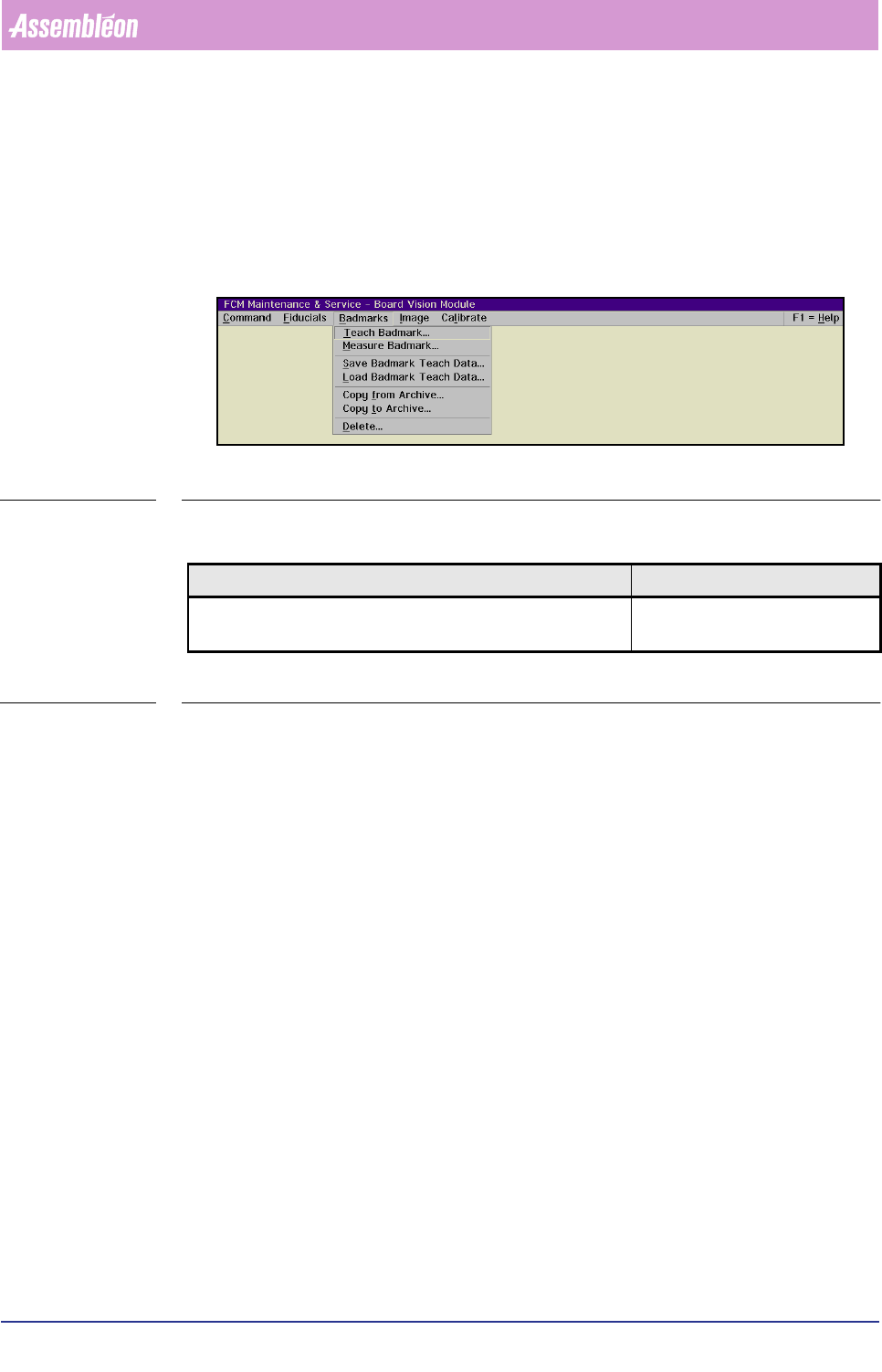
The options in this menu are related to the badmark sensing function of the BVM.
For a list of menu items, please refer to the figure below.
SCREEN 6-21
6.5.1.1 Teach Badmark...
TABLE 6-11
Before the system can perform successful badmark sensing, every badmark type
which has been specified in the action spec must have been taught to the system.
Once a badmark type has been taught to the system, this information can be filed
for future use.
Please notice that there are basically two ways to indicate a bad circuit:
■ By using a spot-type badmark (dedicated badmark).
The bad circuit is indicated by a sticker, a painted spot etc.
Typically this badmark exceeds the BVM camera’s field of view.
■ By using a fiducial-type badmark. In this case a fiducial was assigned for
badmark purposes; this fiducial has the function of a badmark.
The bad circuit is indicated by the presence or absence (being covered) of a
fiducial assigned as such.
Typically the fiducial-type badmark is smaller than the BVM camera’s field of
view.
Teaching the fiducial-type badmark is similar to the teaching of fiducials.
Before the badmark teaching can start, meet following conditions:
■ The board is present in the BVM section.
■ The action spec with the relevant badmark types specifications has been loaded.
)XQFWLRQ $XWKRUL]DWLRQ
Teach the system the (new) badmark types which are specified
in the action spec.
- Supervisor
- Maintenance/ Service Engineer