FCM_User Reference Manual.pdf.pdf - 第203页
4022 591 960 82 Us er Reference Man ual 02.02 FC M Multif lex 6-11 Pr oduc t Ch ang e Ov er SCREEN 6-4 T o set th e d ef ault or fix e d alter nativ es th e f oll o win g fi l e has t o be ed ited : File: ..\SETUP\M CSTR…
Product Change Over
User Reference Manual 4022 591 96082
6-10 FCM Multiflex 02.02
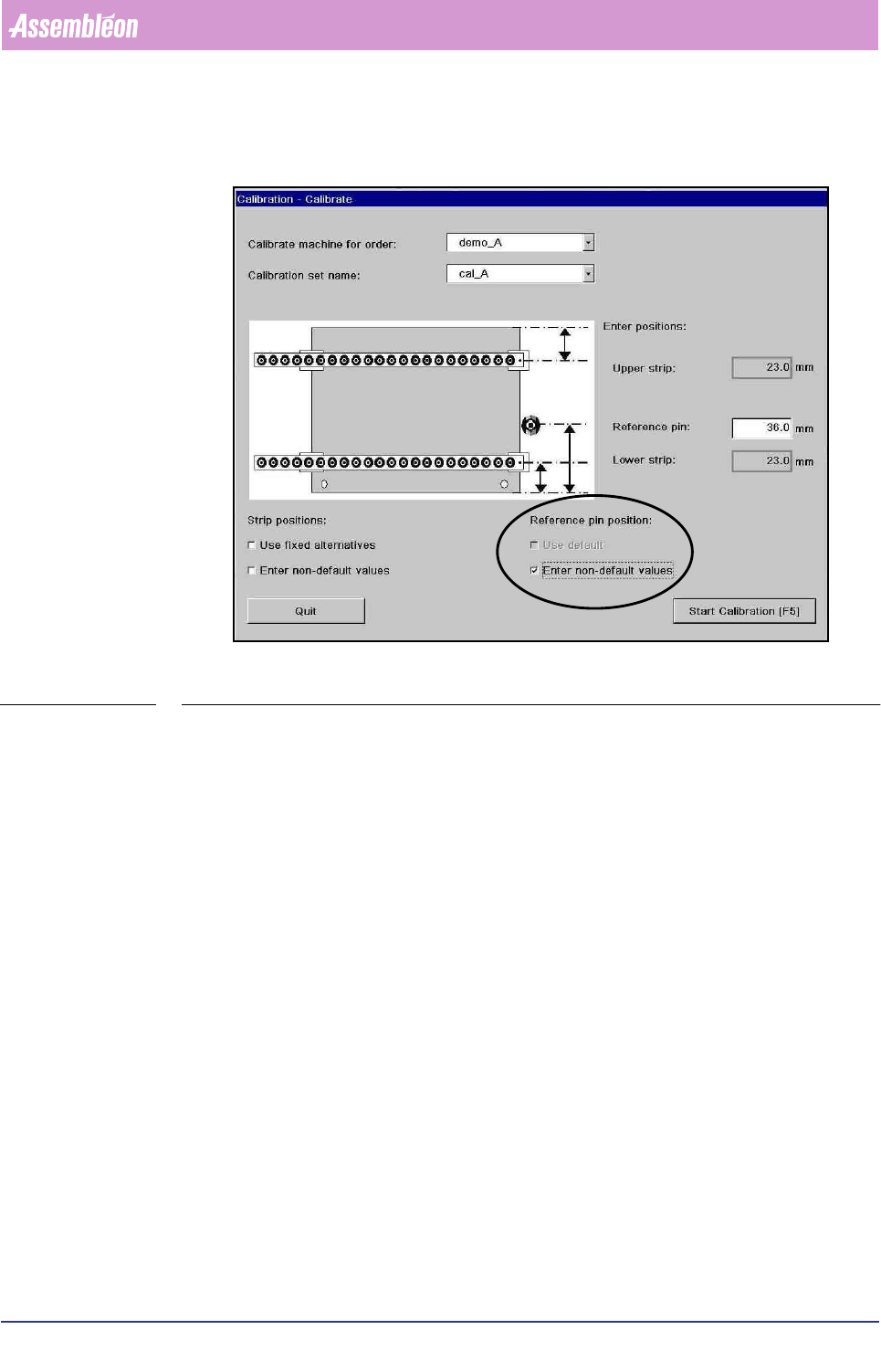
Reference pin position checkboxes:
SCREEN 6-3
■ Use default. To use other defaults for the position of the reference pin. These
values can be edited, refer to 6.2.7 for more details. If there is no general
default specified in the file the default value of 36 mm is used.
■ Enter non-default values. To enter reference pin position. Entry fields with
initial value 36 mm are displayed. In the entry fields new values can be entered.
The reference pin position must be measured from the front edge of the board to
the middle of the reference pin in millimeters.
6.2.7 Making Customized Defaults for Calibration Strip Positions
and Reference Pin Positions
It is possible to create a default values for the calibration strip positions as well as
for the reference pin positions. This might be useful if frequently a carrier is used
that requires alternative strip positions or has a different reference pin position. In
the case of a different reference pin position it is recommended that the values in
the action spec are filled in correctly. If the values in the action spec are correct no
reference pin position has to be filled in during calibration because the action spec
value is used.
4022 591 96082 User Reference Manual
02.02 FCM Multiflex 6-11
Product Change Over
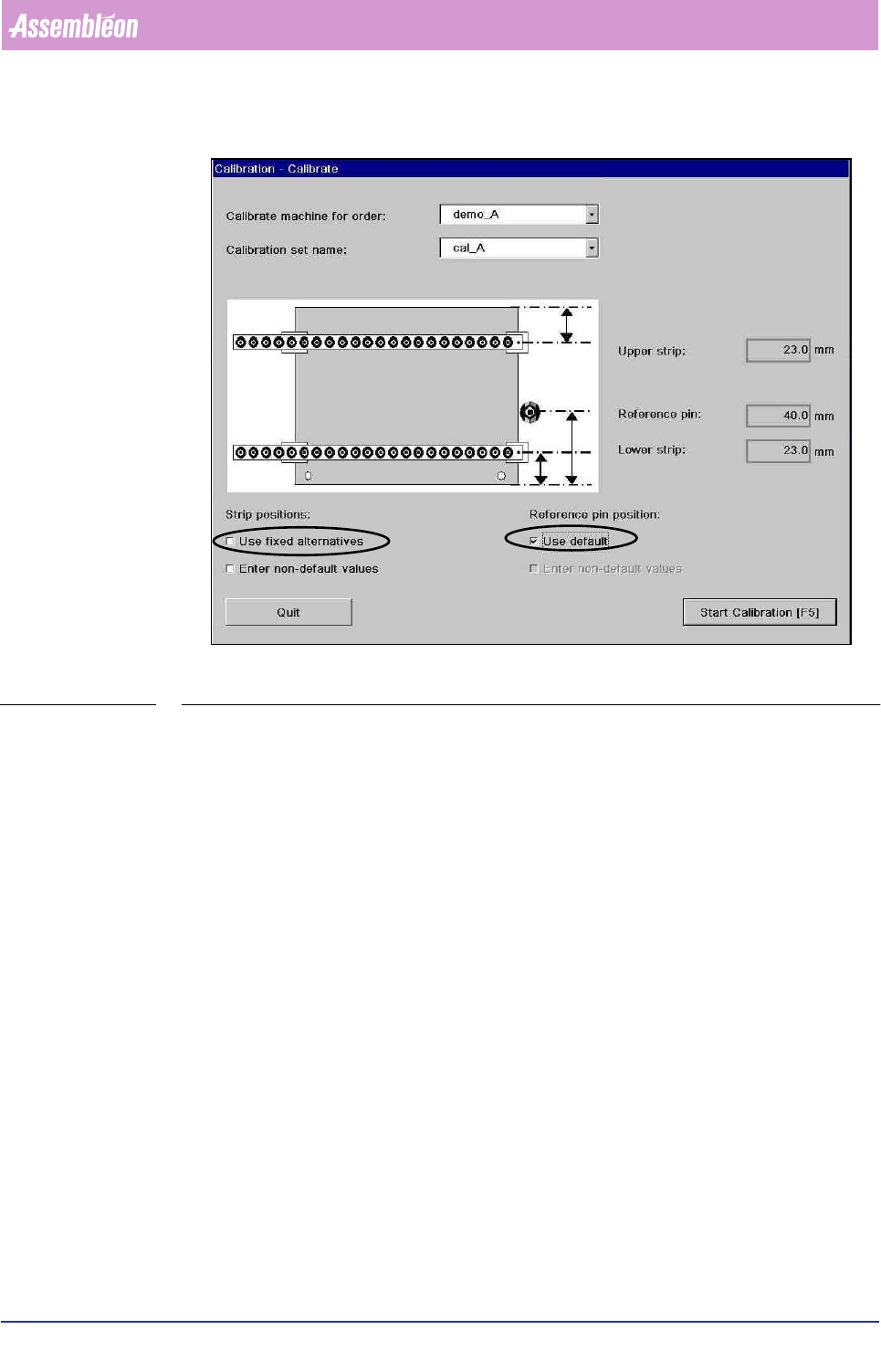
SCREEN 6-4
To set the default or fixed alternatives the following file has to be edited:
File: ..\SETUP\MCSTRIP.DAT
This file stores the parameters for strip and reference pin Y-positions during
Multiflex calibration is the checkbox “use default” or “use fixed alternatives” in the
dialog “Calibrate” are checked.
The file contents:
0 to5 lines “DEFAULT” <range><direction><offset_1><offset_2>
0 to 5 lines “REFPIN” <range><Y>
0 to 5 lines “STRIP” <range><direction><offset_1><offset_2>
<direction>::= “SS”|”NS”
■ “SS”: <delta_1> and <delta_2> are both offsets from the south (front) edge of
the board
■ “NS”: <delta_1> is from the north (rear) edge and <delta_2> is from the south
(front) edge
Product Change Over
User Reference Manual 4022 591 96082
6-12 FCM Multiflex 02.02
<range> ::= <lower><upper>
<lower><upper> ::= range 77..590
<offset_1><offset_2> ::= range 0..300
Initial file
DEFAULT 81.0 390.0 NS 23.0 23.0
DEFAULT 0.0 81.0 SS 33.0 23.0
REFPIN 0.0 390.0 36.0
STRIP 87.0 101.5 NS 52.5 23.0
STRIP 50.0 87.0 SS 33.0 23.0
Explanation of the file:
DEFAULT
There are 2 default lines. The first is the default for the range of production boards
from 81.0 mm to 390.0 mm in Y. For these boards the default strip positions are
23.0 mm from the rear edge (N=north edge) and 23.0 mm from the front edge
(S=south edge).
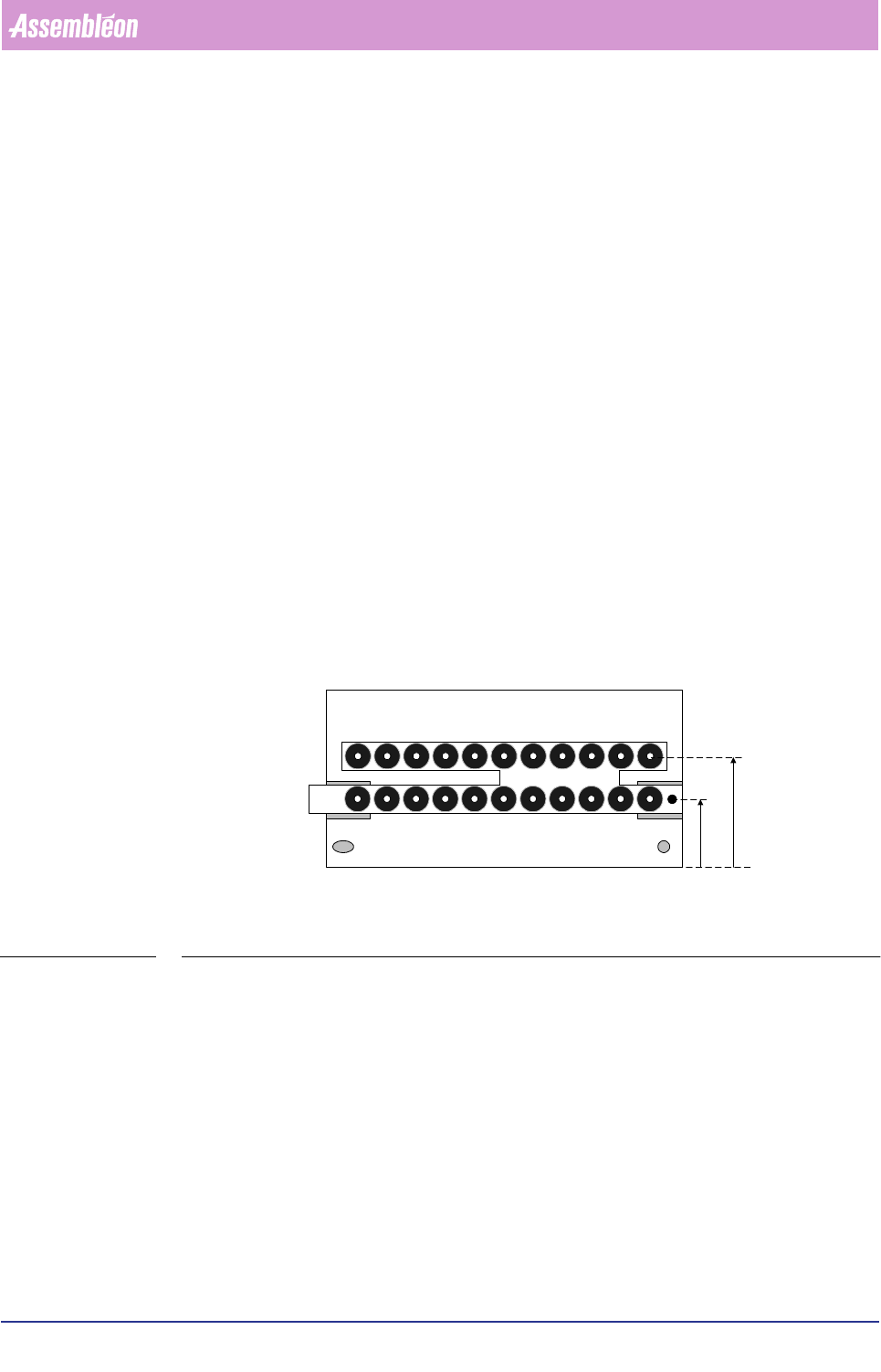
FIGURE 6-6
The second default line is for the range of production boards from 0.0 mm to 81.0
mm in Y. For these boards the default strip positions are 33 mm from the front edge
(S=south edge, in figure S
F
2) and 23 mm from the front edge (S=south edge, in
figure S
F
1). These are the values for de dual calibration strip.
Do not edit these values because these defaults are the values (from the offline
preparation tool) that are used when none of the checkboxes are checked.
South east
corner
S
F
1
S
F
2