FCM_User Reference Manual.pdf.pdf - 第145页
4022 591 96082 User Re ference Manual 02.02 FCM Multiflex 5-53 MIS 5. 3. 5 Mac hi ne P erf orm a nc e 5.3.5.1 [ R eports] > [Machin e perf ormance ... ] T ABL E 5-24 Qui ck Refer ence fcm05 52a.tif SCREE N 5-4 3 [Ma c…

MIS
User Reference Manual 4022 591 96082
5-52 FCM Multiflex 02.02
■ If the board consists of a number of circuits, enter the specific circuit number
on which the bad placements were found. If the board is not divided in separate
circuits, the number to be filled in is always 1.
■ Select [OK]
Once the item code and circuit number have been entered, the MIS system will start
searching for the SMD in the action spec.
If the entered SMD parameters are found, the process graph of the placement
module where this SMD is used will be displayed (see SCREEN 5-41).
The controls on the right of the screen have the functions:
■ select
[Print (F7)] or press <F7> to print the graph
■ select [PPMs] if you wish to display the errors in Parts Per Million
■ select
[Absolute] if you wish to display the absolute number of errors
■ select [Quit] to leave the [Production times...] menu
4022 591 96082 User Reference Manual
02.02 FCM Multiflex 5-53
MIS
5.3.5 Machine Performance
5.3.5.1 [Reports] > [Machine performance...]
TABLE 5-24 Quick Reference
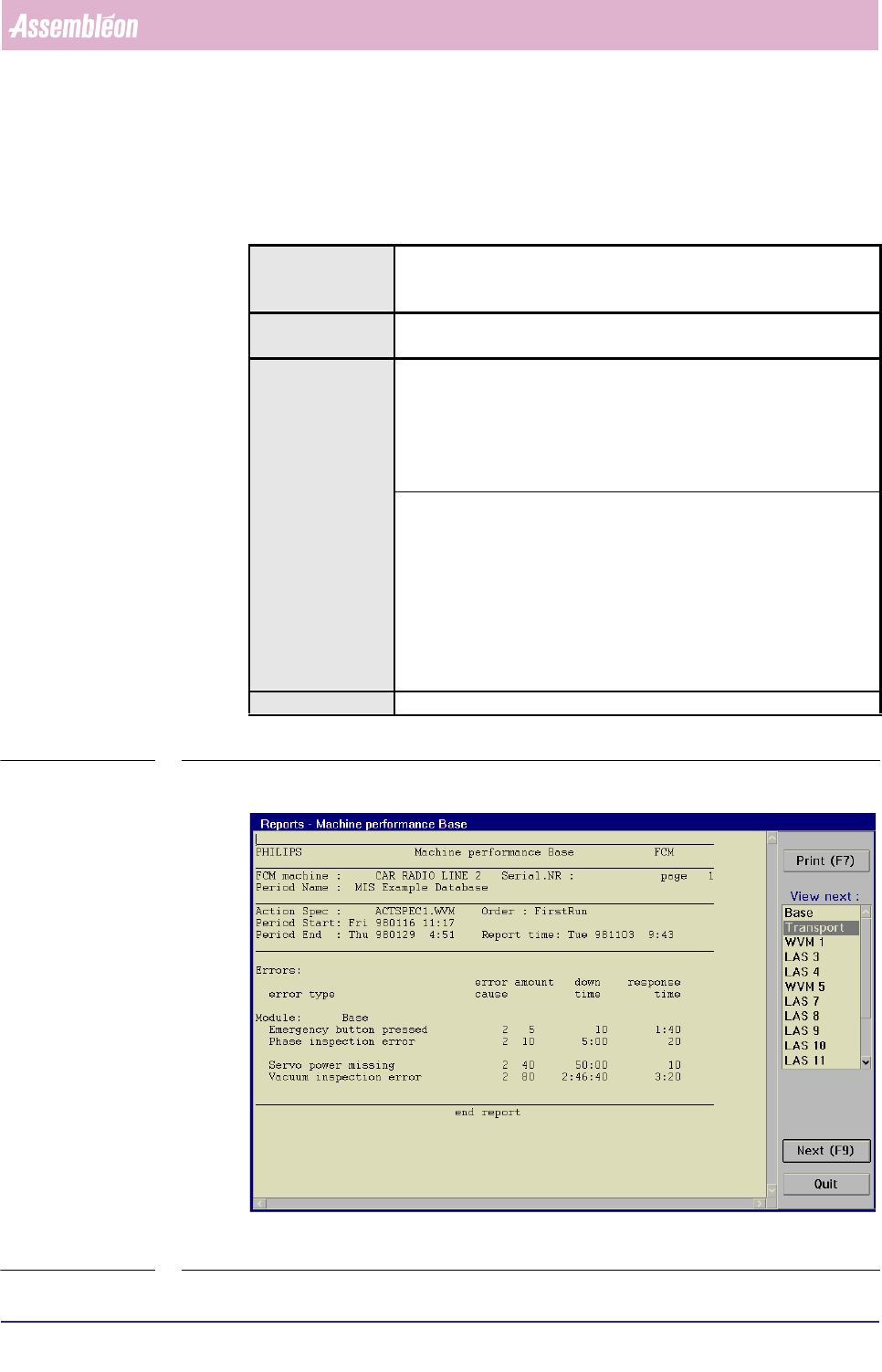
fcm0552a.tif
SCREEN 5-43 [Machine performance...] screen example
Actions ■ select [Functions...] in the MIS pull-down menu
■ select [Reports]
■ select [Machine performance...]
Conditions ■ supervisor access level
■ order active
Information ■ FCM Multiflex module involved (e.g. Base, Transport etc.)
■ FCM Multiflex machine identification and serial no.
■ MIS period name + start/stop date/time
■ action spec name
■ order name
■ report date/time
■ display of all machine errors by
• error type
• number of errors
• error cause
• operator response time
• down time (excluding operator response time)
■ display of all servo warnings by
• number of tracking warnings
• drift specification
Display Options -
MIS
User Reference Manual 4022 591 96082
5-54 FCM Multiflex 02.02
✱✱Detailed Information
▼Displayed Information
The [Machine performance...] report gives a list of all machine errors that
occurred. Besides, it lists all servo warnings occurrences (tracking warnings, drift).
The information is given per FCM Multiflex module.
On entry, a report on the module
[Base] is showed. Next, the module [Transport],
[BVM], or one of the various placement modules can be selected to have their
reports successively shown on the screen.
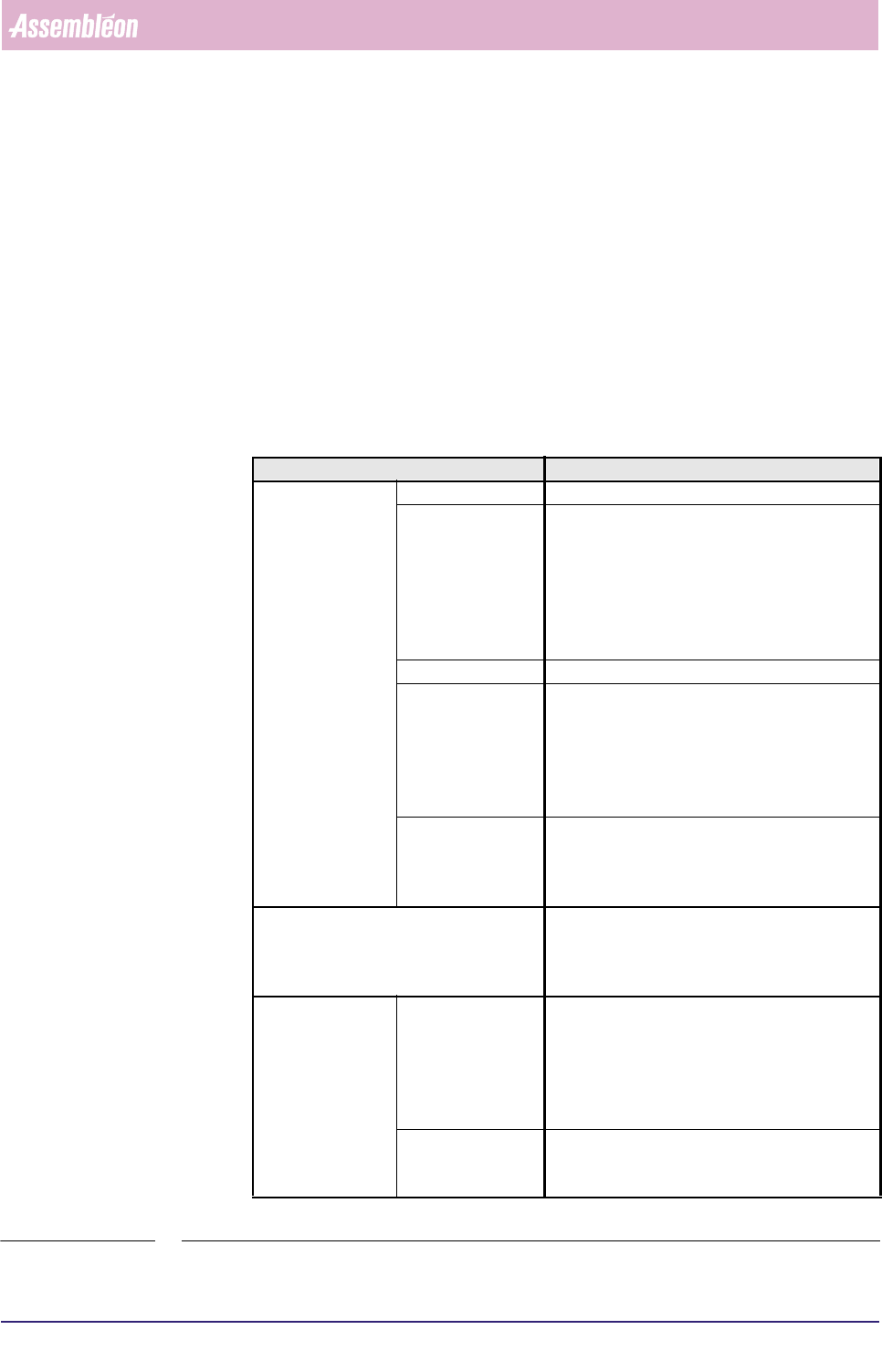
Report text explanation
See screen examples SCREEN 5-20 and SCREEN 5-43
TABLE 5-25
Report text Explanation
Errors: error type description of the error
error cause a clue is given here on the (possible) cause of
the error by a numeric code
the meaning of the used numeric codes is
appointed in the [Parameters] > [Error
causes] list as filled
in by the supervisor, see section 3.9.3
amount the number of error occurences
down time the FCM Multiflex down time per error -
excluding operator response time - expressed in
hh:mm:ss, where hh = hours, mm = minutes,
and ss = seconds
note that “10 seconds” is denoted as only “10”
response time the time between occurrence of the error and
the moment the operator started with recovery
(the Waiting-for-operator time, see also FIGURE
5-8)
Module: the part of the FCM Multiflex for which the report
has been generated; this can be Base, Trans-
port, BVM, or one of the used placement
modules (e.g. WVM1, LAS9 etc.)
Servo diagnos-
tics:
Servo ..... tracking
warnings:
the number of times the difference between
aimed and achieved motion (“slip”) of the servo
system exceeded a fixed limit;
for “.....” the concerned servo system is
specified
Drift:
the total number of servo increment pulses - as
generated by the servo motor encoder - that did
not match the nominal value