FCM_User Reference Manual.pdf.pdf - 第97页
4022 591 96082 User Re ference Manual 02.02 FCM Multiflex 5-5 MIS 5.2.3.3 Backup MIS Dat a Up t o 100 MIS per iods a r e st ored on the sy stem dis k. Wh en period 101 is cr ea ted, the ol dest MI S p eriod w ill be d el…
MIS
User Reference Manual 4022 591 96082
5-4 FCM Multiflex 02.02
data collection command should be given first. During production, an automatic
MIS data collection commands are given by the FCM Multiflex system periodically.
This is noticeable as the FCM Multiflex will pause for approximately 10 seconds 1 at
that time.
For FCM Multiflex systems without SECS-II option installed, automatic MIS data
collection commands are given every hour (on the hour).
For FCM Multiflex systems with SECS-II option installed, automatic MIS data
collection commands are given after a set period has been expired. Default
period setting is 1 hour; a value can be set between 1 hour and 10 seconds.
5.2.3.2 Writing Actions
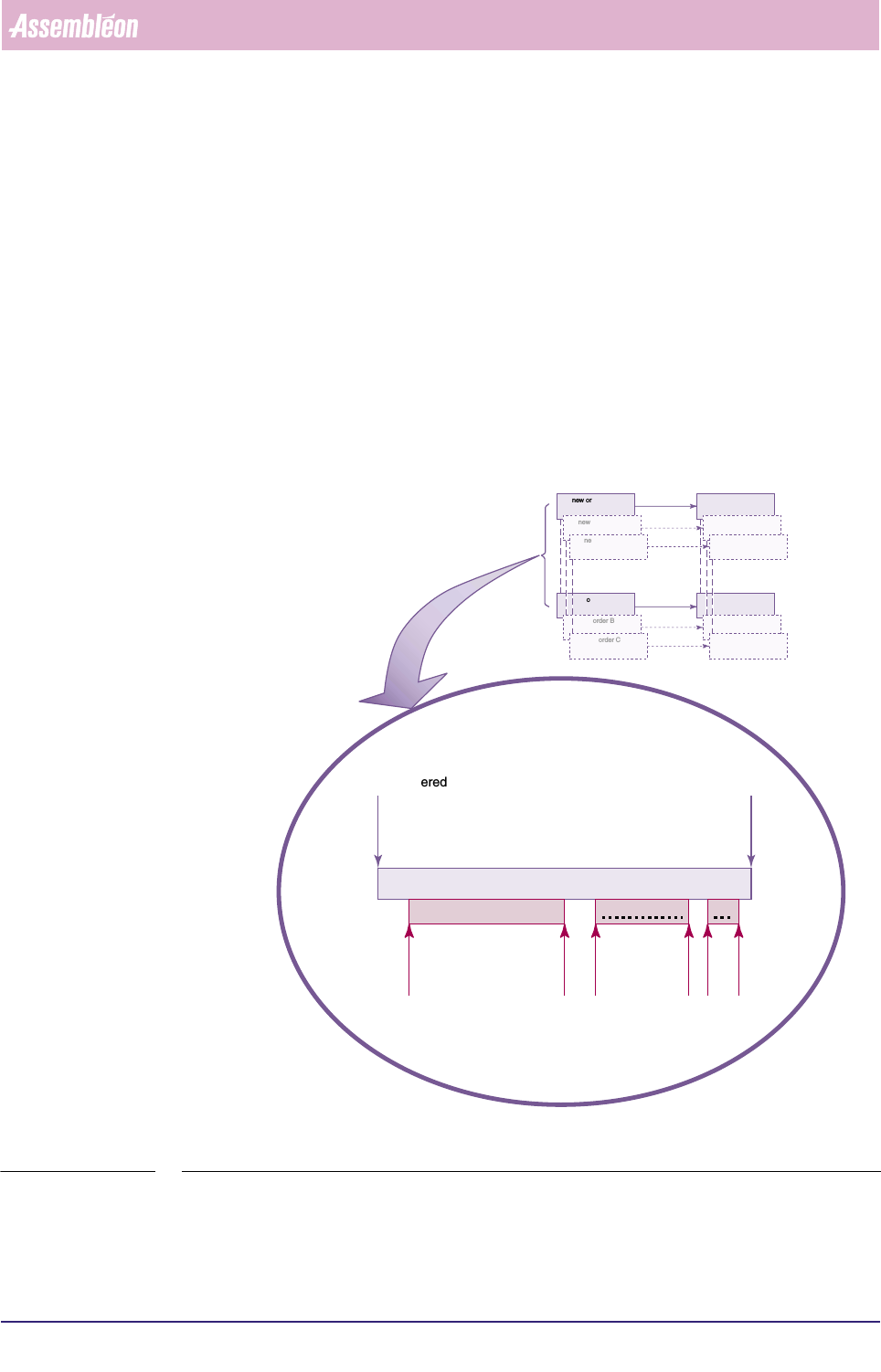
As long as an order has not been deleted, the MIS period of that order will be
updated any time this order is started. See FIGURE 5-3
fcm0503a.eps
FIGURE 5-3 MIS data being written in the same MIS period during different production runs
1. Depends on the number of installed placement
modules.
new order A entered order A deleted
MIS period A
started
started
started
stopped
stopped
stopped
MIS data being written MIS data being written
MIS d..
running order A running order A running
order A
new order A entered new MIS period A starts
order A deleted MIS period A ends
new order B entered new MIS period B starts
order B deleted MIS period B ends
new order C entered new MIS period C starts
order C deleted MIS period C ends
4022 591 96082 User Reference Manual
02.02 FCM Multiflex 5-5
MIS
5.2.3.3 Backup MIS Data
Up to 100 MIS periods are stored on the system disk. When period 101 is created,
the oldest MIS period will be deleted from the system disk automatically. However,
a backup mechanism is available (copy to archive, see index) within MIS.
5.2.4 Automatic MIS Period Creation
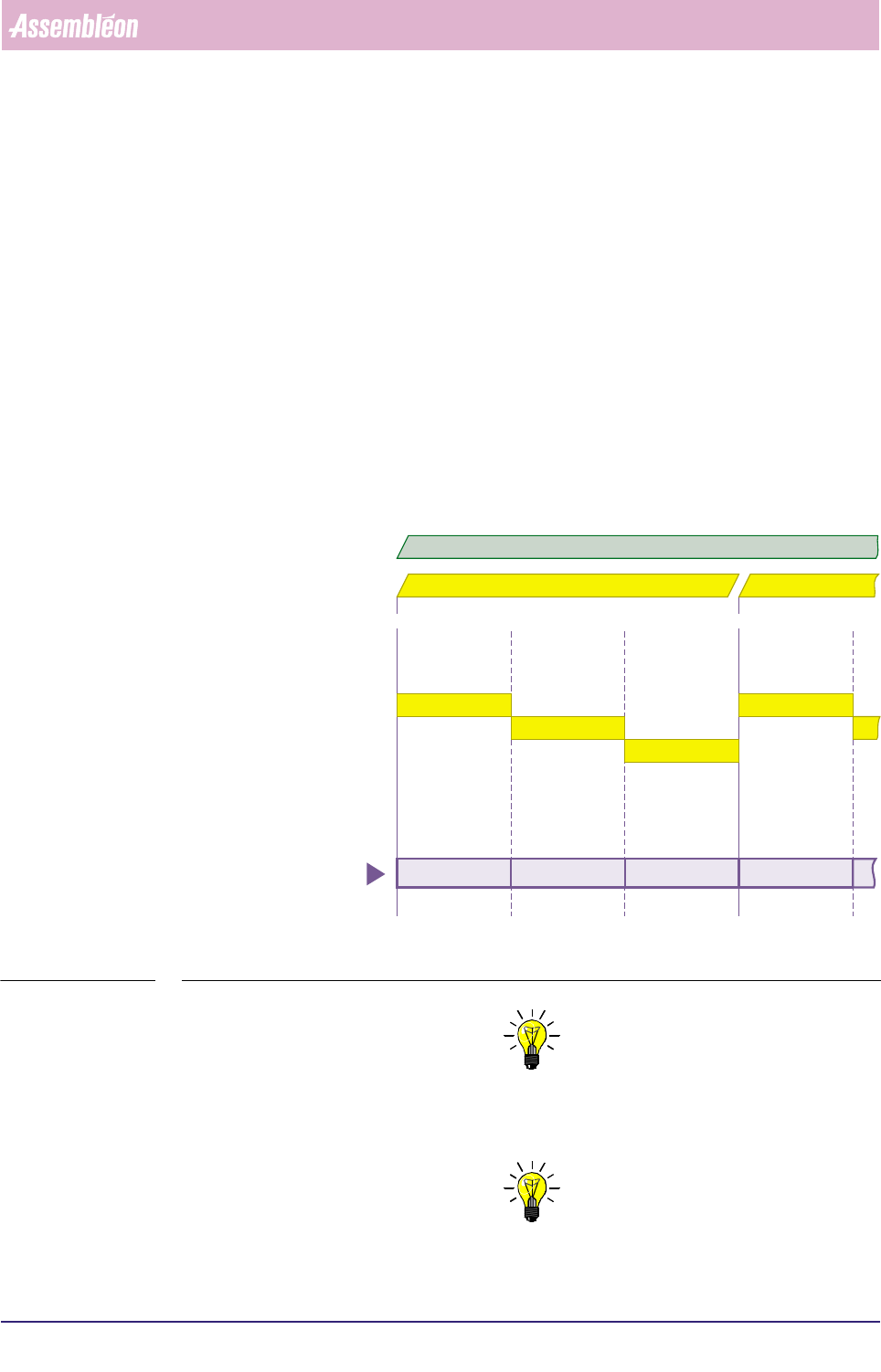
When you plan to run the same order over a long period, you can let the system
create MIS periods automatically. In that case, the MIS period creation is based on
a shift schedule to be filled in via the MIS menu
[Parameters] > [Auto start
period...]
, see section 5.5.9.4 Each time a new shift starts, a new MIS period is
created (as long as the concerned order is active).
MIS periods created this way get the name Date + Order name + “shift x”, where
x is the actual shift number (shift number 1 is the first on the day).
See FIGURE 5-4 .
fcm0505a.eps
FIGURE 5-4 Automatic MIS periods creation, controlled by the MIS shift schedule
NOTE: 1) Deleting the current order will end the MIS period of
that order respectively the automatic generation of new MIS periods for
that order.
NOTE: 2) Entering a new order will still create a new MIS period.
shift 1
shift 2
shift 3
shift 1
07:00 u 15:00 u 07:00 u 15:00 u23:00 u
date = 98 10 02 date = 98 10 03
98 10 02 order A shift 1 98 10 02 order A shift 2 98 10 02 order A shift 3 98 10 03 order A shift 1
automatically created
MIS periods
active order = A
MIS
User Reference Manual 4022 591 96082
5-6 FCM Multiflex 02.02
5.2.5 Start of a Temporary MIS Period
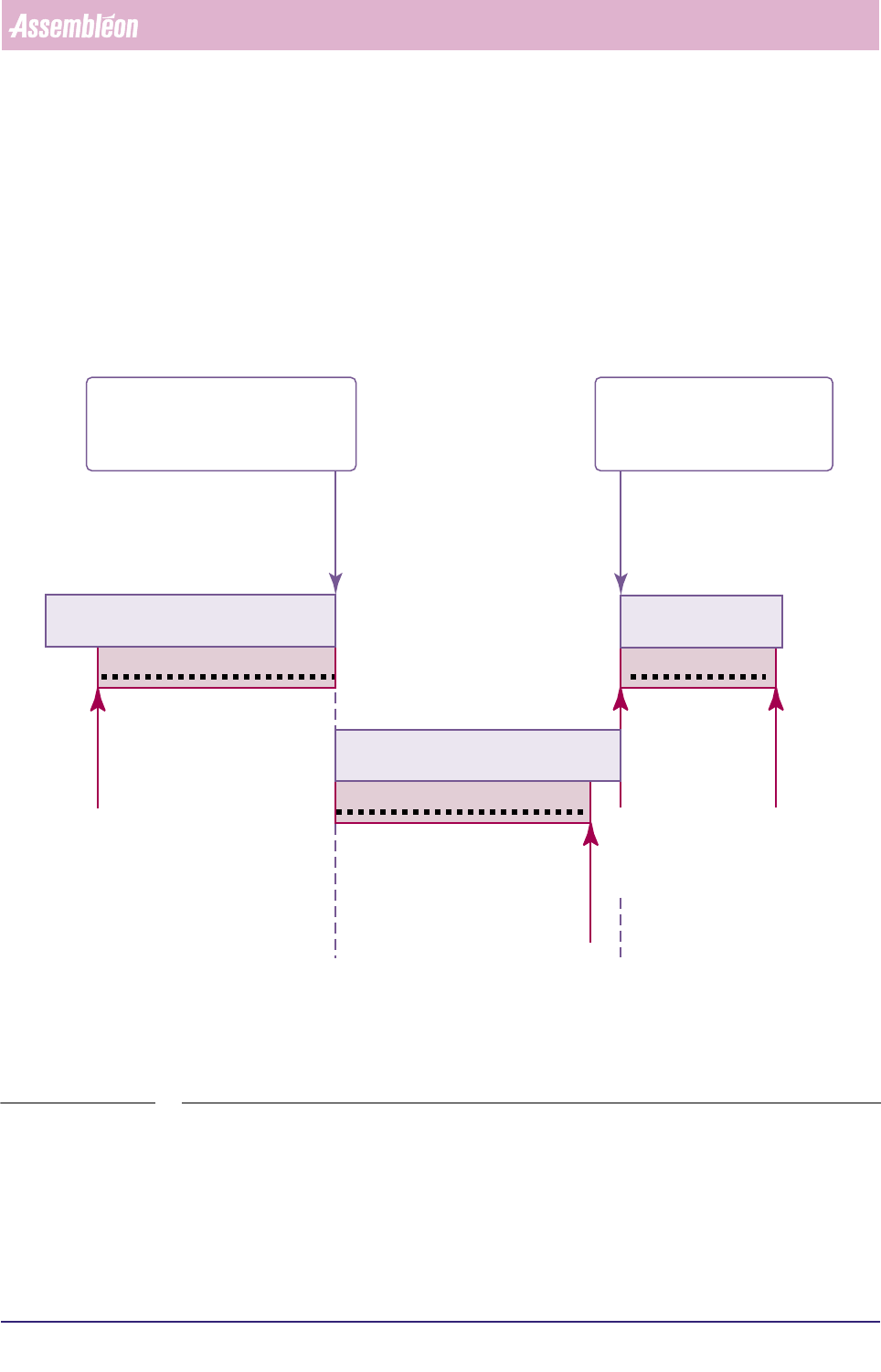
In some cases, it may be useful to insert a temporary MIS period. For instance, after
having replaced some suspicious machine parts, such a temporary MIS period can
tell you how the system behaves now without being charged with all “old data”, as
you start with a “clean sheet”. Start of a temporary MIS period is only possible
when an order is running. The current MIS period will be ended. On start of another
order, the temporary MIS period on its turn will be ended.
See FIGURE 5-5.
fcm0504a.eps
FIGURE 5-5 Starting a temporary MIS period
5.3 MIS Functions Description
5.3.1 Introduction
By means of a MIS Functions Selection Tree chart (see FIGURE 5-6), this chapter
gives you a schematic survey of all possible types of information you can extract
stopped
MIS data being written
running order A
order B started
= temporary MIS period
automatically closed
temporary MIS period started
= current MIS period
automatically closed
started
MIS data being written
running order A
MIS period A
started
stopped
MIS data being written
running order B
MIS period B
temporary MIS period