FCM_User Reference Manual.pdf.pdf - 第290页
SVS P r o Config ur ation User Re ference Manual 4022 5 91 96082 8-4 FCM Multiflex 02.02 ; This is an example SVS Pro configuration file ; with identifiers enabled ; All COMMENT Lines start with “ ; ” ; Identifiers (0 = …
4022 591 96082 User Reference Manual
02.02 FCM Multiflex 8-3
SVS Pro Configuration
8.1.1 Identifiers
Possible values: 0 = disabled
1 = enabled
8.1.1.1 Barcode Identifiers Enabled
When barcode identifiers are enabled, the checks that are done are limited to:
■ check on maximum barcode length
■ correct identifier.
8.1.1.2 Barcode Identifiers Disabled
When barcode identifiers are disabled the following functions can be applied to
barcodes scanned:
■ Length check
Checks that the length of the scanned barcode is within the range specified for
the barcode type (partnumber, lotcode etc.). Both minimum and maximum
length is checked.
■ Format check
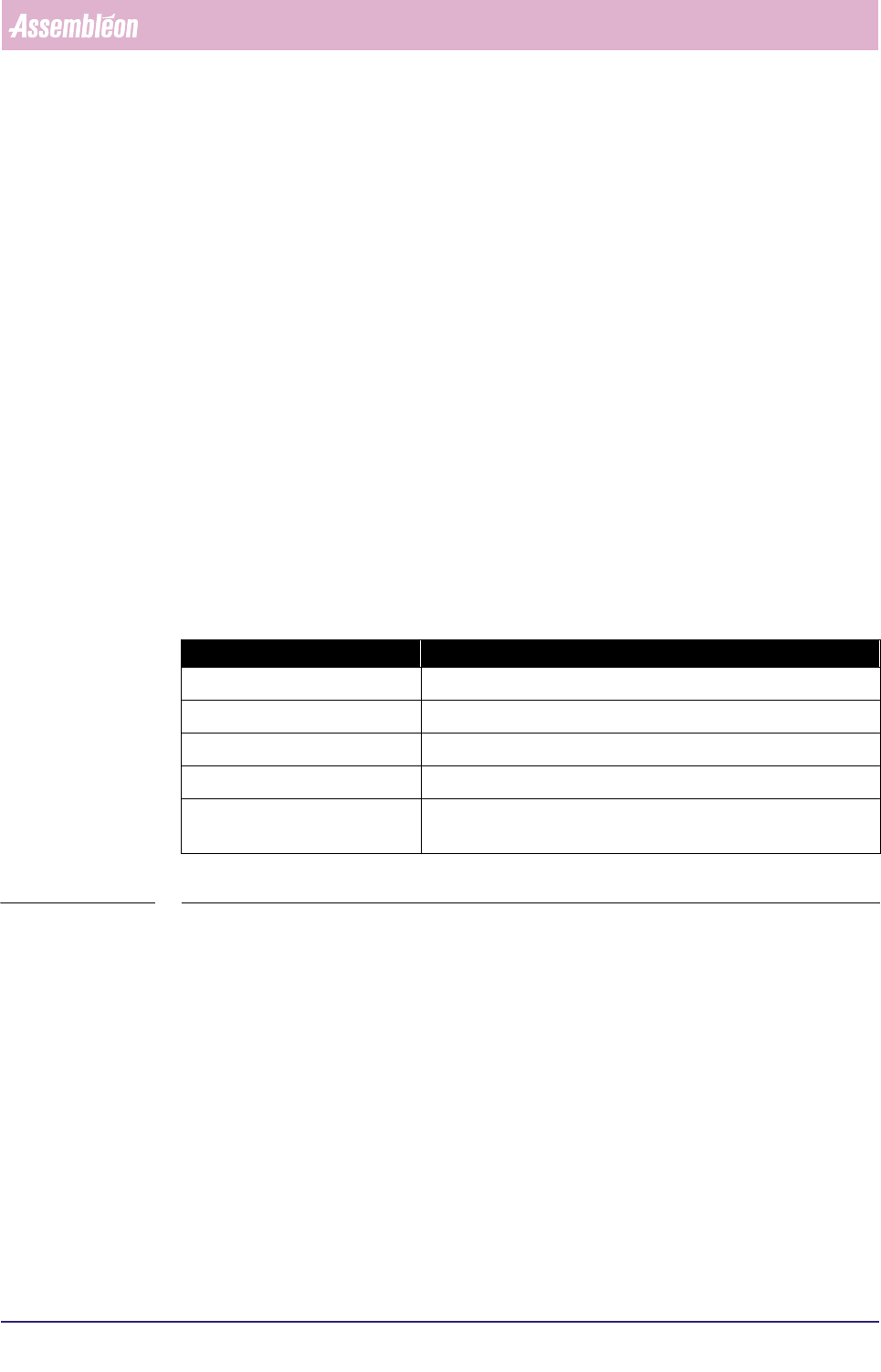
Specifies for each position in the barcode what character is expected:
TABLE 8-1
■ Autofind
Allows a variable amount of leading characters to be skipped. If the barcode
string does not match after previous checks the first character is skipped and
the checks be re-applied on the resulting string. This may be repeated for a
configurable amount of characters.
Evaluation takes place in the order as listed above.
Character: Means:
# numeric
% alphabetic
any character ‘a..z’, ‘A..Z’ or ‘0..9’ a specified fixed character
? any character (position not to be checked)
* wildcard (only to be used at the end of the string to specify any
number of other characters that need no checking may follow)

SVS Pro Configuration
User Reference Manual 4022 591 96082
8-4 FCM Multiflex 02.02
; This is an example SVS Pro configuration file
; with identifiers enabled
; All COMMENT Lines start with “;”
; Identifiers (0 = disabled, 1 = enabled)
;
IDENTIFIERS 1
; Barcode configuration with identifiers
; this section must be present but is only used if IDENTIFIER field is 1
;
; /type /req /identifiers
IDBARCODE 1 0 ; Operator id
IDBARCODE 2 1 P 1P ; Part number
IDBARCODE 3 1 Q ; Initial Quantity
IDBARCODE 4 1 T 1T S ; Lot Code
IDBARCODE 5 1 V ; Vendor code
IDBARCODE 6 0 T 1T S V ; Combined vendor-lot code
; Barcode configuration without identifiers
; this section must be present but is only used if IDENTIFIER field is 0
;
; /type /req /format /min /max /autofind /compress /verify
BARCODE 1 1 * 4 12
BARCODE 2 1 * 4 20 0 1 YYYYYYYYYYYYYYYYYYYY
BARCODE 3 1
BARCODE 4 1 * 3 14
BARCODE 5 1 * 3 10
BARCODE 6 0 * 3 14
; Random scanning (0 = disabled, 1 = enabled)
; this section is ignored if IDENTIFIER field is 0
;
RANDOMSCAN 1
; Operator rescan id (enabled)
; Time after which the validity of the operator ID scan expires
; and the operator ID has to be rescanned
; ( 0 = disabled, “30…999” = time in seconds)
OPERRESCAN 300
; Amount of components added on “Continue” (“snooze”),
; Intelligent feeder: feeder low length,
; Non-intelligent feeder: amount of boards that can be produced with remaning
; components (recommended: 2x the maximum number of boards in the machine)
; /snooze /length (m) /amount
AMOUNTS 10 2 18
; Feeder support
; /feeder /svs-support
FEEDER T 2 ; Handle as intelligent feeder
FEEDER B 1 ; Handle as non-intelligent feeder
FEEDER FLPCHP 1 ; Handle as non-intelligent feeder
FEEDER TRAY 0 ; No check on tray feeder
FEEDER HOOVERDAVIS 2 ; Handle as intelligent feeder
4022 591 96082 User Reference Manual
02.02 FCM Multiflex 8-5
SVS Pro Configuration
8.1.2 IDBarcode
Barcodes with identifiers.
8.1.2.1 Type
Possible values: 1 = operator id
2 = part number
3 = quantity
4 = lot code
5 = vendor code
6 = combined vendor-lot code
8.1.2.2 Req
Barcode scan required.
Possible values: 0 = no
1 = yes
8.1.2.3 Identifiers
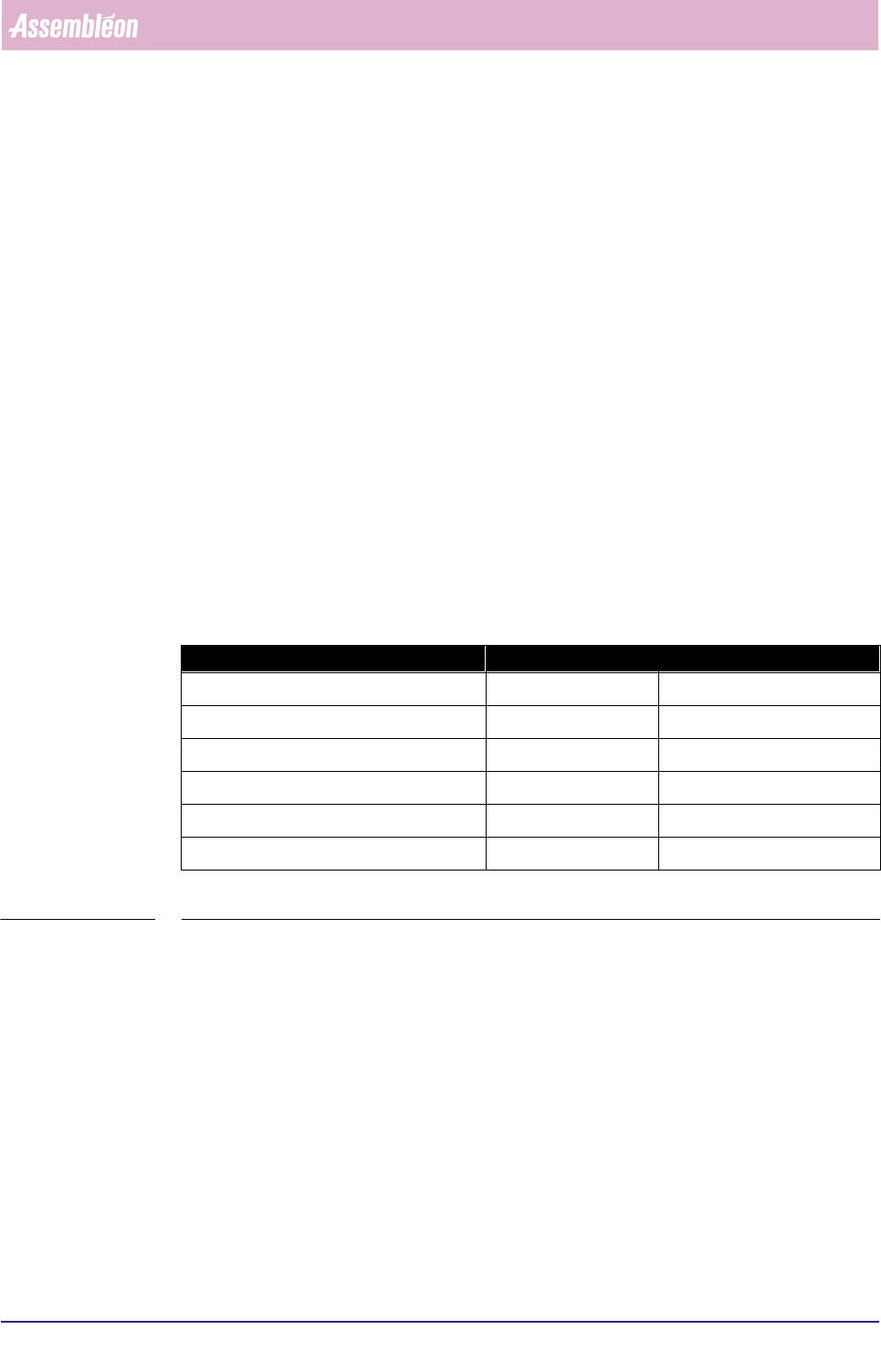
Defines the type of barcode.
TABLE 8-2
Possible values: identifiers may consist of 0..3 numeric digits followed by a single
alphabetic character.
Barcode Maximum length Default identifiers
Operator ID 12 ‘None’
Part number 20 P, 1P
Initial quantity 5 Q
Lot code 14 T, 1T, S
Vendor code 10 V
Combined vendor-lot code 14 T, 1T, S, V