FCM_User Reference Manual.pdf.pdf - 第218页
Pr oduc t Ch ang e Ov er User Re f eren ce Manu al 4022 591 960 82 6-26 FCM M ult ifle x 02.02 NOTE: This setting is not relevant for an interpola tion algorithm . 6.4.1. 2 Measur e Fi ducial... T ABLE 6-5 ■ Sel ect [Mea…
4022 591 96082 User Reference Manual
02.02 FCM Multiflex 6-25
Product Change Over
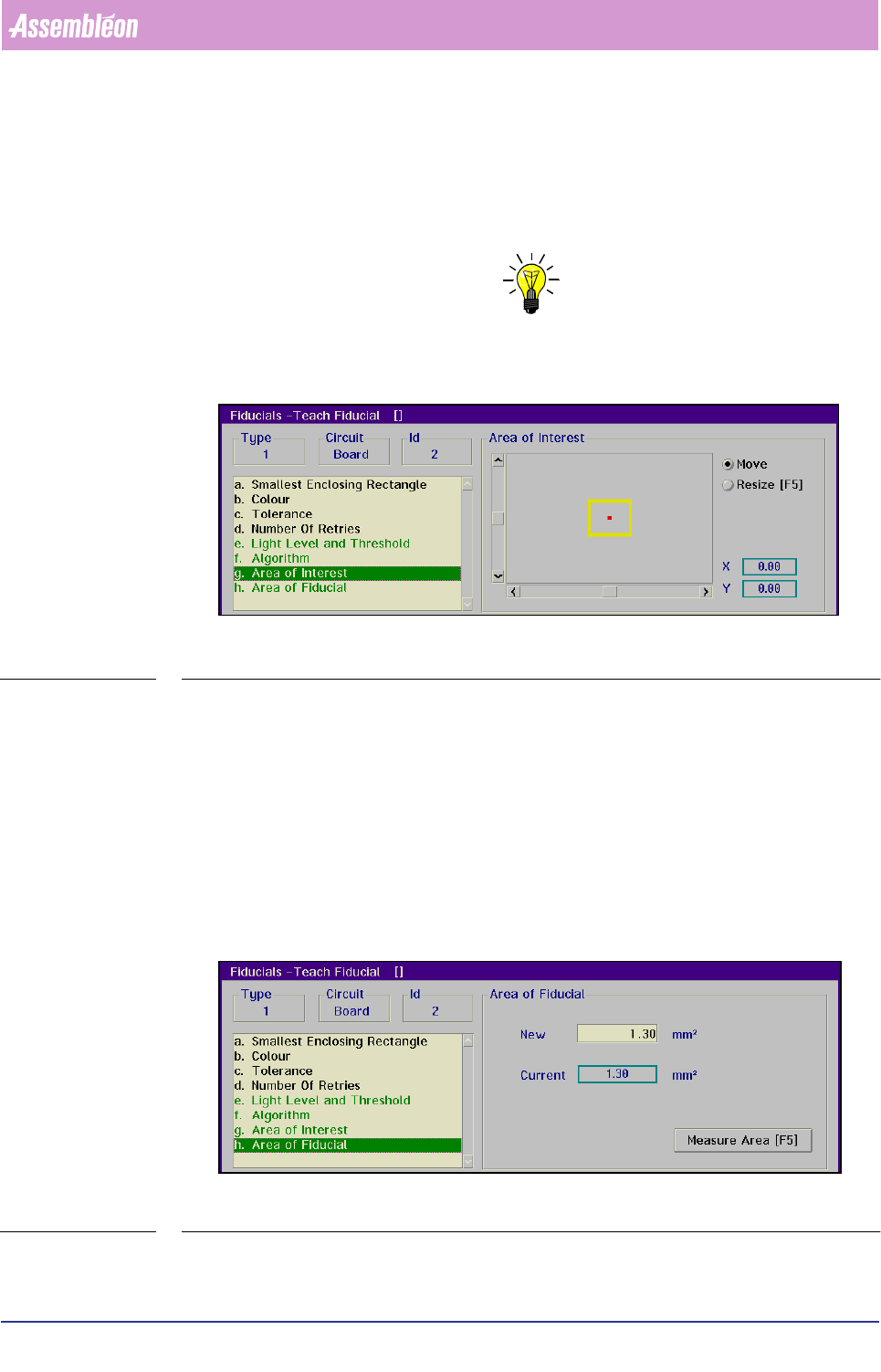
Area of Interest
■ Select [Area of Interest]
The [Area of Interest] determines where the system will search for the fiducial.
In this way fiducial-like elements - like certain print patterns - can be avoided.
NOTE: It is recommended to make the area of interest not larger then necessary.
A large area of interest will increase the time required for measurement.
SCREEN 6-18
■ Toggle with <F5> between [Move] and [Resize] as necessary, and
■ Position and resize the area of interest with the arrow keys or by means of the
tracker ball and the sliders
The X and Y value indicate the centre of the search area with respect to the centre
of the field of view of the BVM camera.
Area of Fiducial
■ Select [Area of Fiducial]
This menu box gives the surface area of the fiducial in mm
2
.
SCREEN 6-19
Product Change Over
User Reference Manual 4022 591 96082
6-26 FCM Multiflex 02.02
NOTE: This setting is not relevant for an interpolation algorithm.
6.4.1.2 Measure Fiducial...
TABLE 6-5
■ Select
[Measure Fiducial...]
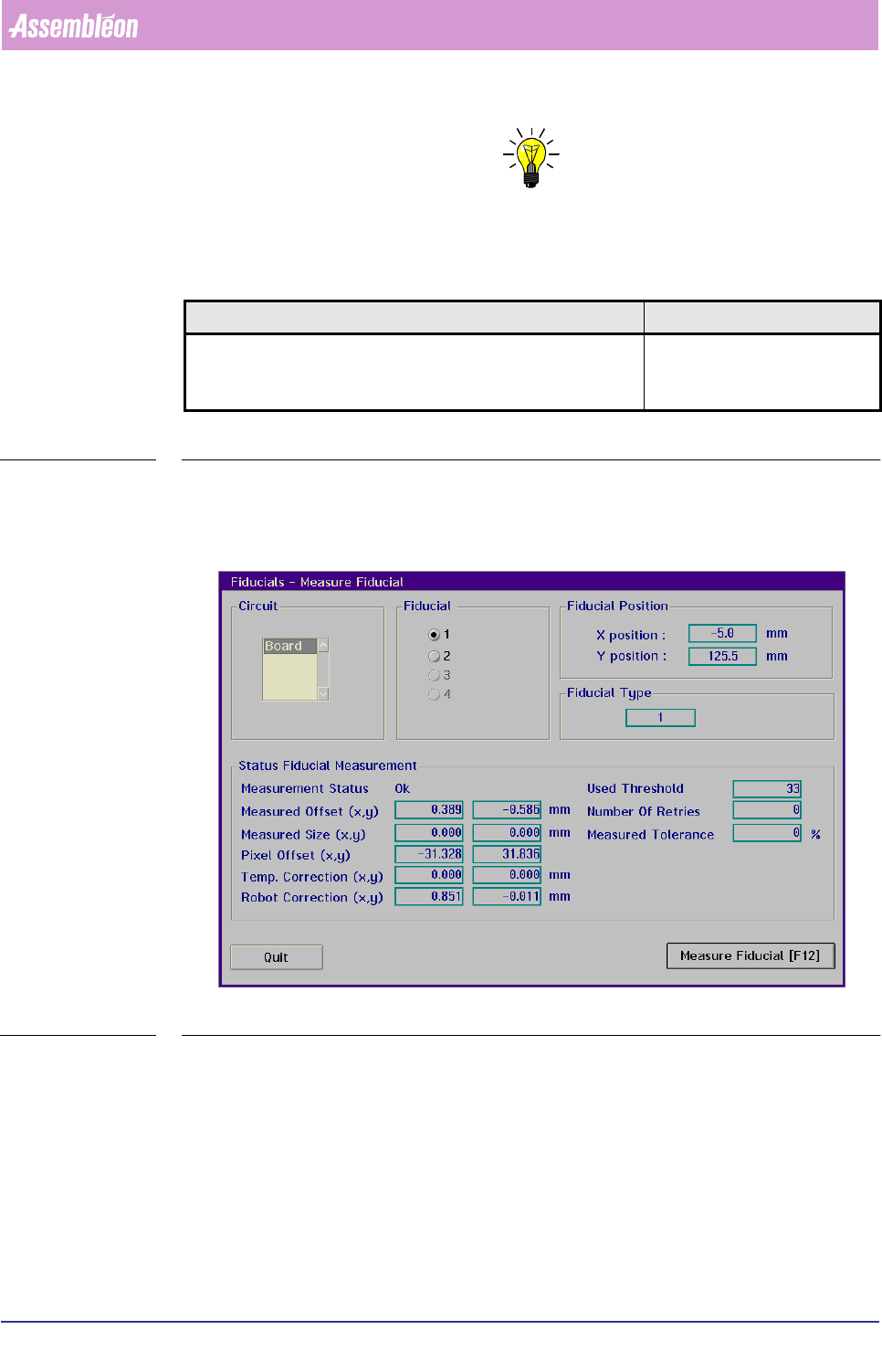
■ The fiducial to be measured must be selected from the action spec, which lists all
used circuits and fiducials
SCREEN 6-20
■ Select the circuit concerned in the [Circuit] box
■ Select the fiducial concerned via the
[Fiducial] box
■ Select
[Measure Fiducial]
The system will try to measure the selected fiducial; the result will be displayed in
the
[Status Fiducial Measurement] box.
)XQFWLRQ $XWKRUL]DWLRQ
Check the results of a fiducial measurement with the current teach
data.
- Operator
- Supervisor
- Maintenance/ Service Engineer
4022 591 96082 User Reference Manual
02.02 FCM Multiflex 6-27
Product Change Over
6.4.1.3 Save Fiducial Teach Data...
TABLE 6-6
This is relevant when teach data of a certain fiducial type has to be modified, but
the current data is expected to have future use.
NOTE: For back-up purposes it is better to archive on floppy disk.
■ Select a file name or type a new name for the file to be saved.
6.4.1.4 Load Fiducial Teach Data...
TABLE 6-7
NOTE: The old teach data of all fiducial types in the current (active) database will
be overwritten!
6.4.1.5 Copy From Archive...
TABLE 6-8
The archive disk can be a floppy disk drive or any other in- or external disk drive.
From there it can be moved to the current (active) database by the
[Load Fiducial
Teach Data...]
command.
)XQFWLRQ $XWKRUL]DWLRQ
Save teach data - that was stored in the teach mode in the current
(active) database - to a selected file on disk.
- Supervisor
- Maintenance/ Service Engineer
)XQFWLRQ $XWKRUL]DWLRQ
Copy teach data from a selected file on disk to the current (active)
database.
- Supervisor
- Maintenance/ Service Engineer
)XQFWLRQ $XWKRUL]DWLRQ
Copy teach data from the archive disk drive to a file on the
(system) disk.
- Supervisor
- Maintenance/ Service Engineer