FCM_User Reference Manual.pdf.pdf - 第26页
Hu man Inte rfac e User Re ference Manual 4022 5 91 96082 3-10 F CM Mult ifl ex 02.02 An e m pty bl ock mean s the b oar d is pr ogr essin g no rmally The boa r d has been s kipped (e .g. “ Skip Bo ar d ” has been select…

4022 591 96082 User Reference Manual
02.02 FCM Multiflex 3-9
Human Interface
3.3.5 Spool
This window displays the current spool status of the FCM Multiflex with regards to
buffering SECS-II (GEM) Host Link messages. It may display the following statuses:
■ Active:
The FCM Multiflex Controller is storing all (relevant) SECS-II messages in a
special buffer (spool area) since the FCM Multiflex is currently unable to send
data to the host.
■ Full:
The FCM Multiflex Controller is unable to store more SECS-II messages since the
buffer is full.
■ Purging:
The FCM Multiflex Controller is discarding SECS-II messages which were stored in
the buffer (on host’s request).
■ Transmitting:
The FCM Multiflex is sending the SECS-II messages which were stored in the
buffer to the host (on host’s request).
■ Inactive:
The FCM Multiflex is currently not storing messages in the buffer, and trans-
ferring data directly to the host computer.
If the optional SECS-II (GEM) Host Link FC 6 is not installed on your system, this
status window is empty.
Detailed information is available in the relevant FCM Multiflex Option Manual.
3.3.6 Slots
This area shows module positions with module name and slot numbers. Pick &
Placement Modules (CLM (LAS) or WVM) can be fitted in positions 1 through 16. The
Transport Controller (TC) occupies slot 0 while optional modules (e.g. BVM, BI) are
displayed to the left of the TC slot.
Possible statuses that can exist for a module are:
■ E : Error (red background)
■ W : Warning (green background)
■ Ok : Normal (green background)
■ : An empty field means the module is not available (either not physically
present, or no PPU mounted)
■ D : Disabled (black background).
3.3.7 Board Status
This is a visual display of the boards running through the machine. In case of a
Rolling Changeover, boards from a current Order and from the next Order are
displayed in different colours. Additionally, the state of each board is indicated by
means of a character inside the board. Following statuses can exist for a board:
Human Interface
User Reference Manual 4022 591 96082
3-10 FCM Multiflex 02.02
An empty block means the board is progressing normally
The board has been skipped (e.g. “Skip Board” has been selected).
The board is suspected (e.g. “Skip Action” has been selected ).
3.4 Status Bar
The status bar is located at the bottom of the Human Interface screen and is split
up into 6 sections (of which section 4 is currently not used). It gives the operator a
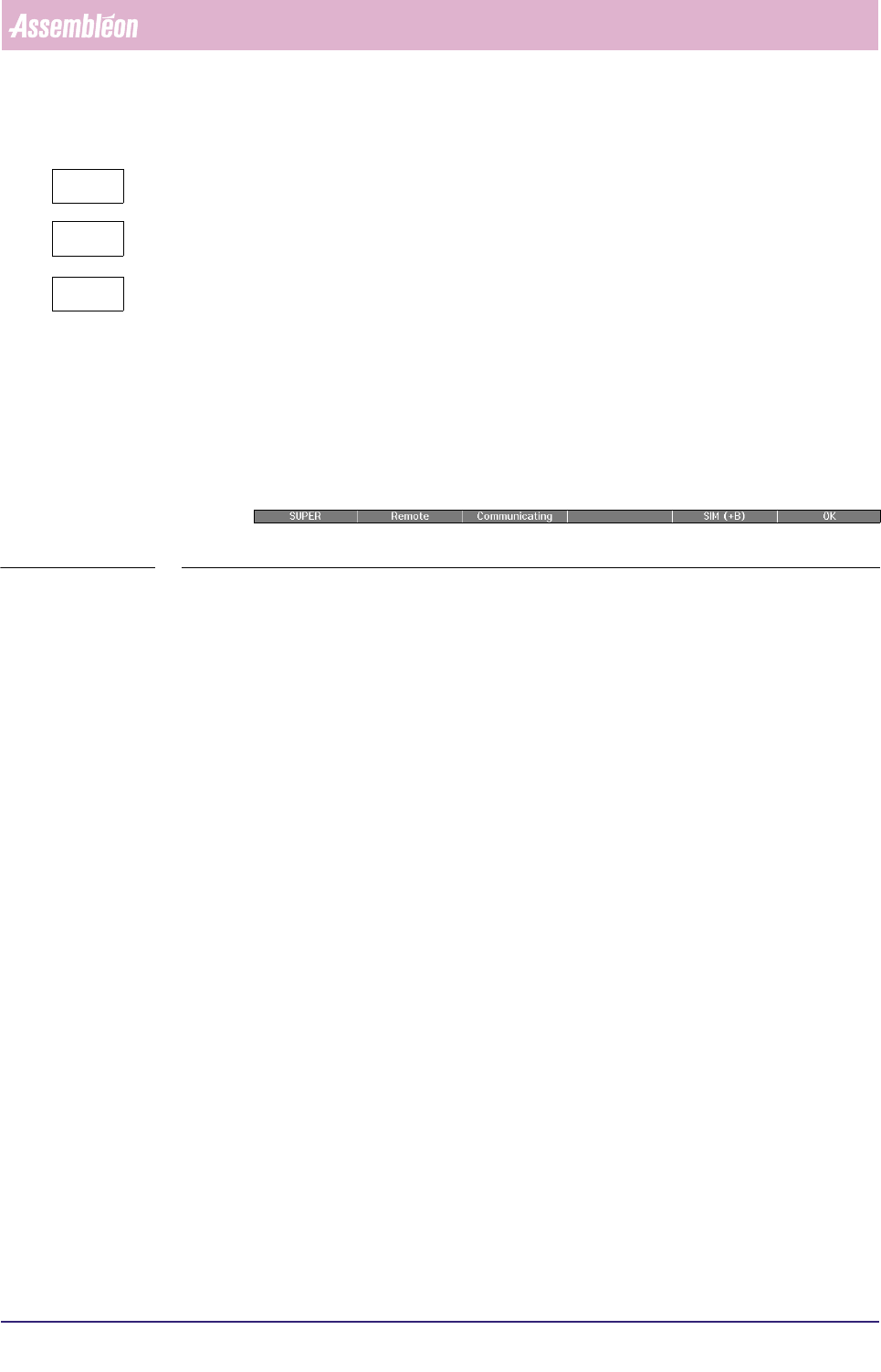
brief overview of the operation statuses of the FCM Multiflex (see SCREEN 3-6).
SCREEN 3-6 Example of Status bar
The following information can be displayed:
■ User level:
• OPER(ator),
• SUPER(visor),
• MAINT(enance/Service Engineer).
■ Control State (only with optional SECS-II (GEM) Host Link):
• Offline:
The FCM Multiflex is operated locally using the Human Interface of the FC
controller, but is not sending data (e.g. MIS) to the host computer. The FCM
Multiflex will only respond to host messages requesting to go on-line.
• Attempt:
The FCM Multiflex has requested the host to go on-line (either local or
remote).
• Local:
An on-line state in which the FCM Multiflex is operated locally using the
Human Interface of the FC controller. Data may be exchanged with the host.
• Remote:
An on-line state in which the FCM Multiflex is operated via the host
computer, and data may be exchanged.
-
?

4022 591 96082 User Reference Manual
02.02 FCM Multiflex 3-11
Human Interface
■ Communication State (only with optional SECS-II (GEM) Host Link)
• Disabled:
Communication between FCM-II and host computer has been switched off by
the FCM Multiflex User.
• Enabled:
Communication between FCM Multiflex and host computer has been switched
on by the FCM Multiflex User, but the host is currently not responding.
• Communicating:
The host communication is enabled, and the connection between host and
FCM Multiflex has been established.
■ Simulation:
• SIM(+B): Only displayed if simulation with boards is active.
• SIM(-B): Only displayed if simulation without boards is active.
■ Overall FCM Multiflex State:
• OK (green colour)
• ERROR (red colour)
• WARNING (yellow colour)
• WAITING (blue colour)